
















OpenCart
1 290 UAH839 UAH≈ €17
Black November: −35% on all modules until 30 November Black November: −35% until 30 November Choose a module
 Website auditA PDF report by email in 3 minutesCheck a website
Everyday tasks
Image compressorSize, quality and WebP in bulkQR generatorLink, Wi-Fi, payment to IBANVAT calculator20, 14, 7% and amount in wordsTransliterationOfficial Ukrainian standardWebsite checks
PHP and pluginsPHP version, WordPress, pluginsGoogle Merchant feedFields, prices, GTIN, imagesDomain emailSPF, DKIM, DMARC, blacklistsAI search readinessllms.txt, bots, markupAll 9 toolsEnter at least 2 characters


QR Platba for OpenCart 4.x, 3.x, 2.3 (Czechia): the QR code and details for free, in Pro — automatic confirmation from your bank’s e-mail notifications and a CSV import. Lifetime licence.
The free version works with no time limit. Pro adds the rest of the features in the table.


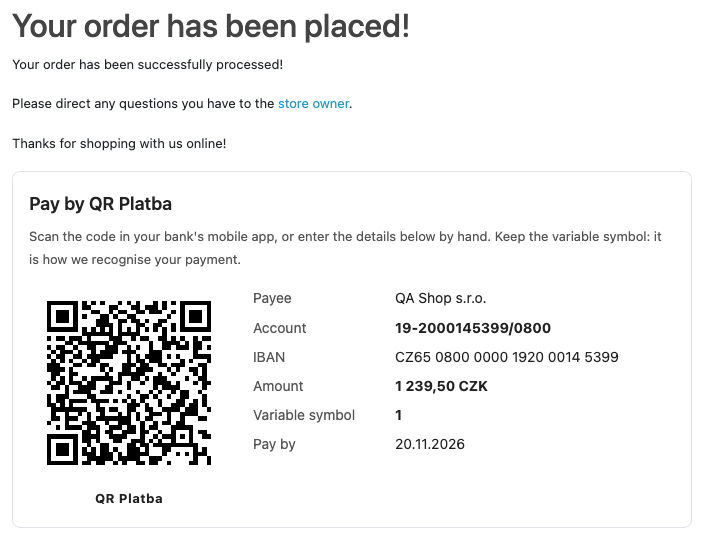
After the order is confirmed the buyer sees a “Pay by QR Platba” box: the QR code and next to it the payee, account, IBAN, amount, variable symbol (the order number) and the date to pay by.

Extensions → Extensions → Payments → QR Platba (bank transfer) by CatCode: six tabs: “General”, “Account”, “Bank e-mails”, “E-mail recognition”, “Payments” and “Licence”.

A fresh install is the free version, nothing switches on by itself. The “Try Pro for 7 days” button → e-mail → the key right in the window and by e-mail.

Moving the site? Unlink the licence on the old domain and activate it on the new one yourself. A staging copy (staging., dev.) works with the same key and does not take a site slot. For studios — keys for 5 or 25 sites, or unlimited.
 OpenCart 4.0.2.x–4.1.x, 3.0.x or 2.3.0.2; the cURL extension (for the Pro licence).Shop currency CZK and a Czech account: the method is shown only to buyers who pay in CZK.For automatic confirmation: a mailbox with IMAP access that your bank sends e-mail notifications about incoming payments to, and a cron call to the module every 5–10 minutes. OpenCart 4 also runs the job hourly from System → Maintenance → Cron Jobs.Only orders in the “waiting for payment” status and not older than the set number of days are confirmed; the amount in the e-mail must be at least the order total, otherwise the payment is recorded as partial.E-mail fields are found by patterns: if your bank words them differently, change the patterns on the “E-mail recognition” tab and check them on a pasted e-mail.
For OpenCart 4.x, 3.x and 2.3: QR Platba (ČBA 1.2, SPAYD) and bank details on the confirmation page, in the order e-mail and in the customer account; the account as an IBAN or a Czech…


QR Platba by CatCode for OpenCart 4.x, 3.x and 2.3 adds a “bank transfer with QR Platba” payment method: after the order the buyer sees a QR code in the Czech standard (ČBA, SPAYD), scans it in the app of any Czech bank, and the account, the amount and the order number as the variable symbol fill in by themselves.
What you need. A Czech bank account (an IBAN or a number like “prefix-number/bank code”) and the shop currency CZK. The code is generated in the shop itself; the module adds no outside service and no payment fee.
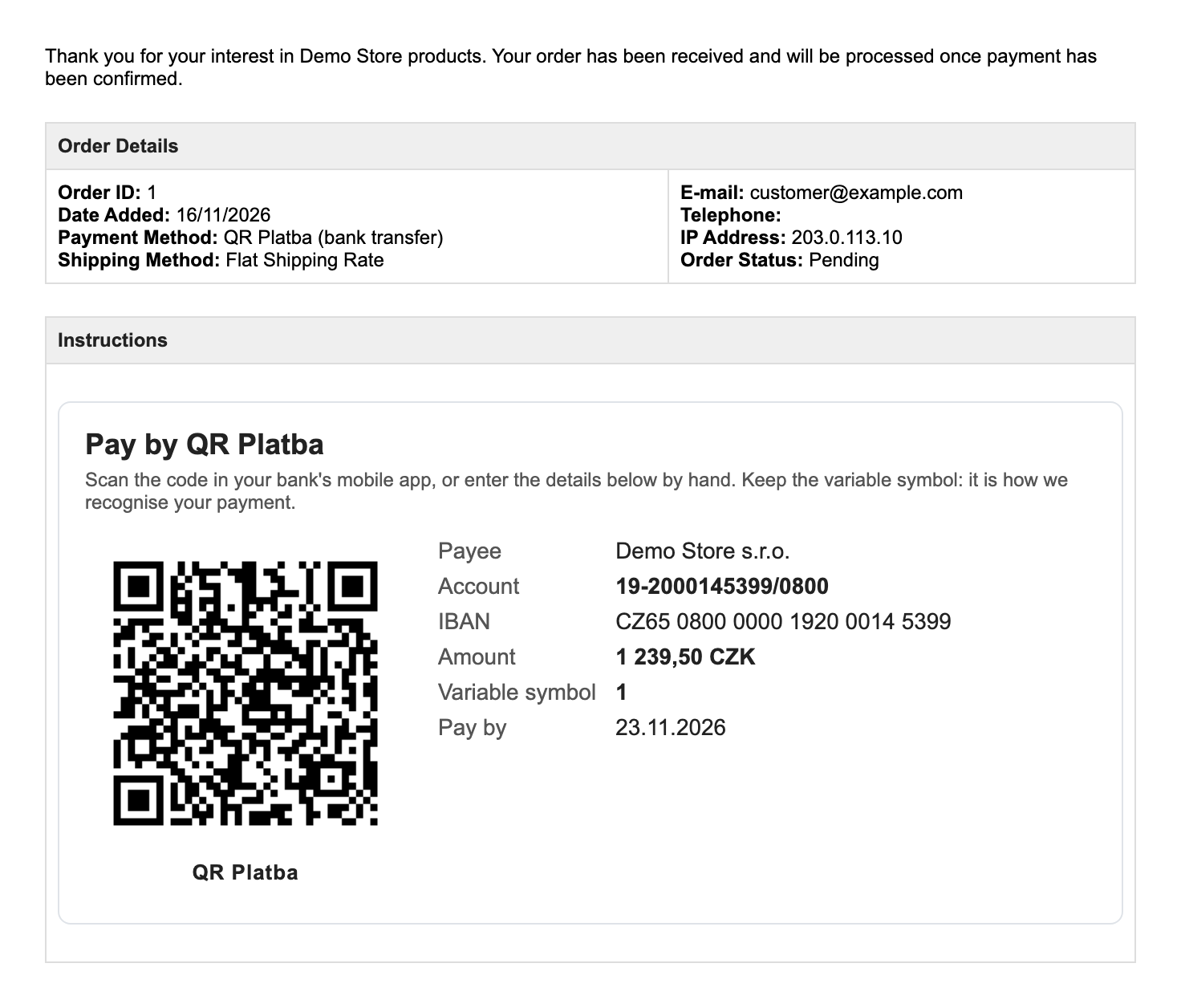
After the order is confirmed the buyer sees a “Pay by QR Platba” box: the QR code and next to it the payee, account, IBAN, amount, variable symbol (the order number) and the date to pay by. The same details with the code sit in the order e-mail and on the order page of the customer account, so the buyer can pay later without looking for them.
The method is shown only to buyers who pay in Czech crowns (CZK); you can limit it to a range of order totals and a geo zone. In the code the message for the payee and the payee name are written without accents, so that every banking app accepts them. The interface is in English, Czech and Ukrainian.
Extensions → Extensions → Payments → QR Platba (bank transfer) by CatCode: six tabs: “General”, “Account”, “Bank e-mails”, “E-mail recognition”, “Payments” and “Licence”. On “General” you switch the method on, set the name and the text at the checkout, the status of a new order and the status when paid, the range of totals, the geo zone and the sort order; the buyer can get an e-mail when the payment is received.
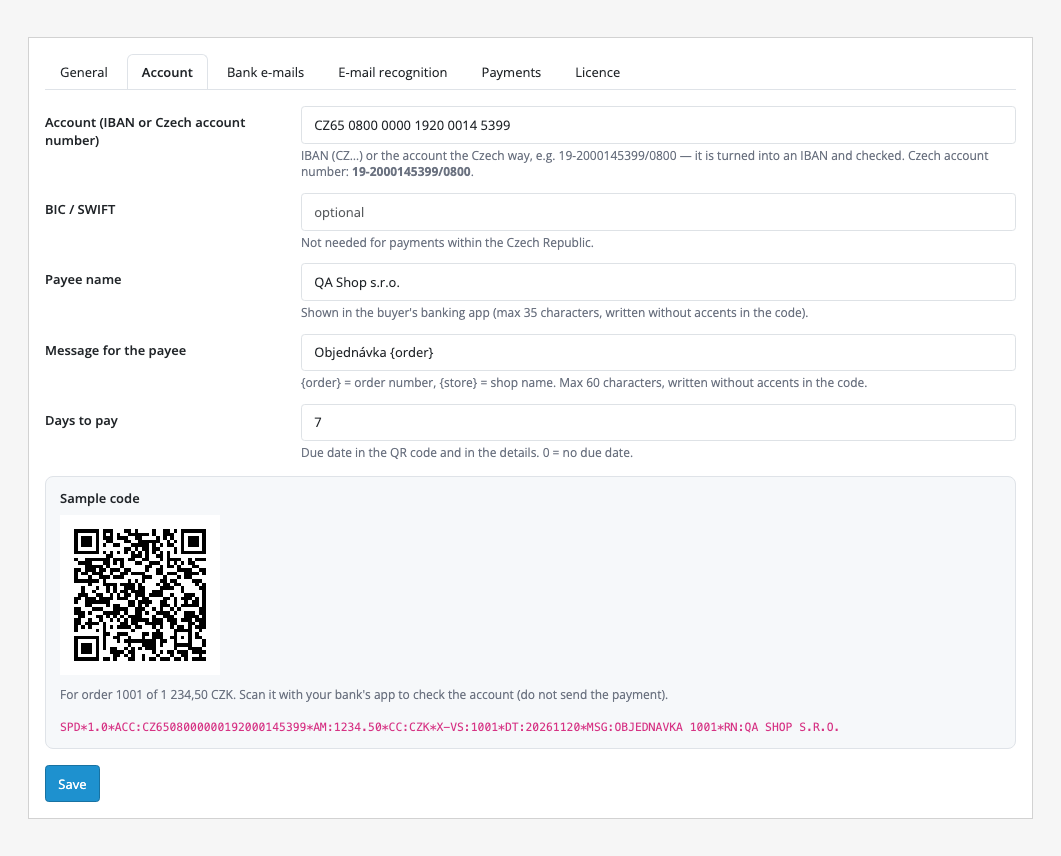
On “Account” you enter the account: an IBAN (CZ…) or a Czech number like 19-2000145399/0800; it is turned into an IBAN and checked by its check digits. Then the payee name (up to 35 characters), the message for the payee with {order} and {store} placeholders (up to 60 characters) and the days to pay for the due date. Below is a sample code for order 1001 and the SPD string encoded in it: scan it with your bank’s app to check the account (there is no need to send the payment).
Banks give business customers no payment API, but they e-mail every incoming payment. In Pro you forward these e-mails to a mailbox the module reads: the “Bank e-mails” tab holds the IMAP server, port, encryption, login, password (stored encrypted), folder, how many days back to read on the first run and how many days after the order it can still be confirmed automatically. The PHP imap extension is not needed. “Save and test the mailbox” checks the connection, “Read new e-mails now” reads new e-mails at once.
A payment with the order’s variable symbol and an amount at least the order total moves the order to the paid status. A lower amount is added to earlier ones: the order keeps waiting, and its history shows how much has arrived and how much is still missing. A second payment for an order that is already paid, a payment in another currency, a payment dated before the order and an order whose status was already changed by hand leave the status alone and land in a note to check.
The “E-mail recognition” tab sets how the module finds the amount, the variable symbol, the date, the payer’s account and the message in an e-mail: each field has a pattern (a regular expression), and a sender filter (for example your bank’s domain) drops foreign e-mails. In the “Test with an e-mail” box you can paste a real e-mail and see what is recognised and which order would be paid, with nothing changed. The “Payments” tab is the journal of the last 50 payments with the result: paid, partly paid, order already paid, no such order, not a payment, read before. Below it is the import of a bank statement from internet banking as CSV: columns are found by their names, only incoming payments are used, rows imported before are skipped.
Didn't find the answer? Message us on Telegram and we'll reply within a business day.
 @catcode_support
Setup, compatibility, activation
No, it is an independent CatCode module that builds the code by the open QR Platba standard.
The code is read by the apps of Czech banks that support QR Platba. Automatic confirmation suits any bank that e-mails about incoming payments: the e-mail fields are set by patterns.
No. Automatic confirmation reads the e-mail notifications from your bank over IMAP, and a CSV statement can be imported instead of e-mails.
The amount is added to earlier ones, the order keeps waiting, and its history shows how much has arrived and how much is missing.
The status does not change and the order gets a note to check whether the buyer paid twice.
No: the method is shown only when paying in CZK, because the QR Platba standard works in Czech crowns.
OpenCart 4.0.2.x–4.1.x, 3.0.x and 2.3.0.2: three separate archives in one product.
Yes, for OpenCart it is one payment and a lifetime licence, for two sites.
Pro switches off and the free part (the code and the details) keeps working.
No reviews yet. Be the first.
No questions yet. Ask one — we answer within 24 hours.
We build custom modules for WordPress, WooCommerce, OpenCart and Shopify. Tell us about the task and we'll prepare an estimate.
Order a custom module
—
Charged in UAH; your bank converts it to your currency. EUR price is approximate.

CatCode assistant
Just now


CatCode assistant
Online

I’ll help with your website task
Describe your website task — I’ll find a ready-made module or pass it to a developer for an estimate. Modules, custom features, layout, integrations, speed, migration, technical SEO.