OpenCart
Przelewy24 & BLIK Payments for OpenCart — bank transfer, card and BLIK payments in Poland
Free + Pro
990 UAH
v1.0.0
Enter at least 2 characters

Przelewy24 module for OpenCart 4.x, 3.x and 2.3: bank transfers, cards, BLIK. An order is marked paid only after a signed notification and transaction/verify. Pro adds the BLIK code right at checkout, refunds from the admin and a payment journal. Lifetime licence.
The free version works with no time limit. Pro adds the rest of the features in the table.



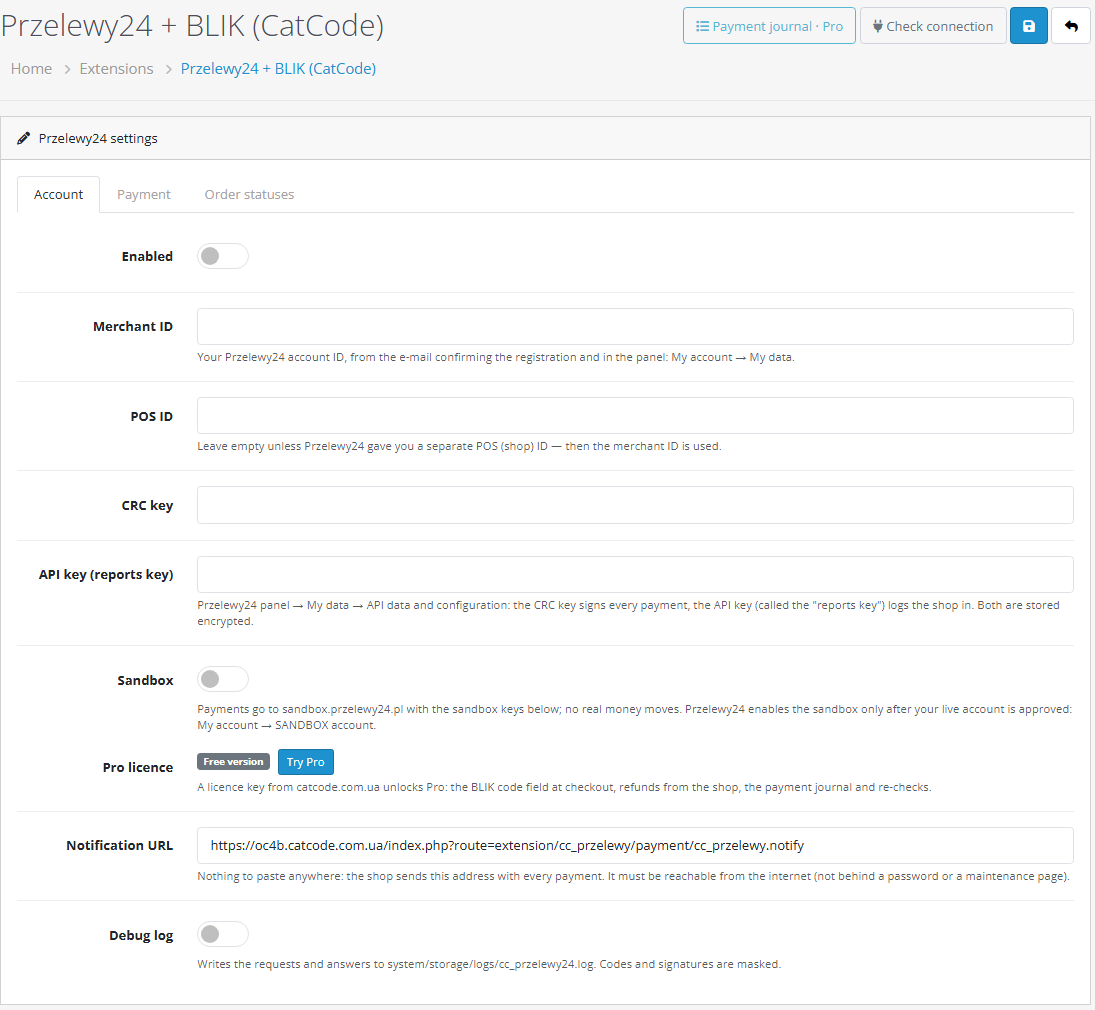
A fresh install is the free version, nothing switches on by itself. The “Try Pro for 7 days” button → e-mail → the key right in the window and by e-mail.

Moving the store? Unbind the licence on the old domain and activate it on the new one yourself. If our server is unreachable, Pro keeps working for 14 more days. For studios — keys for 5 or 25 sites, or unlimited.
 OpenCart 4.0.2 – 4.1.x (tested on 4.1.0.3 and 4.0.2.3), 3.0.x (tested on 3.0.5.0) or 2.3.0.2PHP — whatever your OpenCart version needs; the 2.3 build is tested on PHP 7.0. We recommend 64-bit PHP, as Przelewy24 does.Order currency: PLN, or EUR and other currencies your Przelewy24 account accepts. For any other currency the method is not shown at checkout.A Przelewy24 merchant account: merchant ID, CRC key and API key. Przelewy24 enables the sandbox for an already approved account.BLIK code at checkout (Pro) — only after Przelewy24 enables the BLIK code payment service on the account.Checkout: standard and One Page Checkout (CatCode). Third-party checkouts with their own templates were not tested.The shop must be reachable from the internet — otherwise Przelewy24 notifications cannot arrive (no password protection, no maintenance mode).Module languages: English and Polish.
For OpenCart 4.x, 3.x and 2.3: Przelewy24 REST API v1, notification signature checks and transaction/verify, amount check, payment waiting page, a separate session for every attempt,…
4 modules in one order — 40% cheaper than separately



Przelewy24 & BLIK Payments for OpenCart is a payment module for the Polish market. The buyer pays by bank transfer, card or BLIK through Przelewy24, and the order in your shop is confirmed by itself. The module runs on the Przelewy24 REST API v1 and takes neither the buyer’s return nor a notification at face value: a payment counts only after the signature check and a transaction/verify call, exactly as Przelewy24 requires. Three builds — for OpenCart 4.x, 3.x and 2.3.
What you need. A Przelewy24 merchant account — Przelewy24 issues the merchant ID, CRC key and API key after you register the shop. The order currency is PLN, or EUR and other currencies if your account accepts them. The BLIK code right at checkout (Pro) works only if Przelewy24 has enabled this service on your account; otherwise BLIK goes through the Przelewy24 page. The module follows the official Przelewy24 REST API specification and was tested on test shops against a simulation of the Przelewy24 responses — we recommend making your first payment in the sandbox of your account.
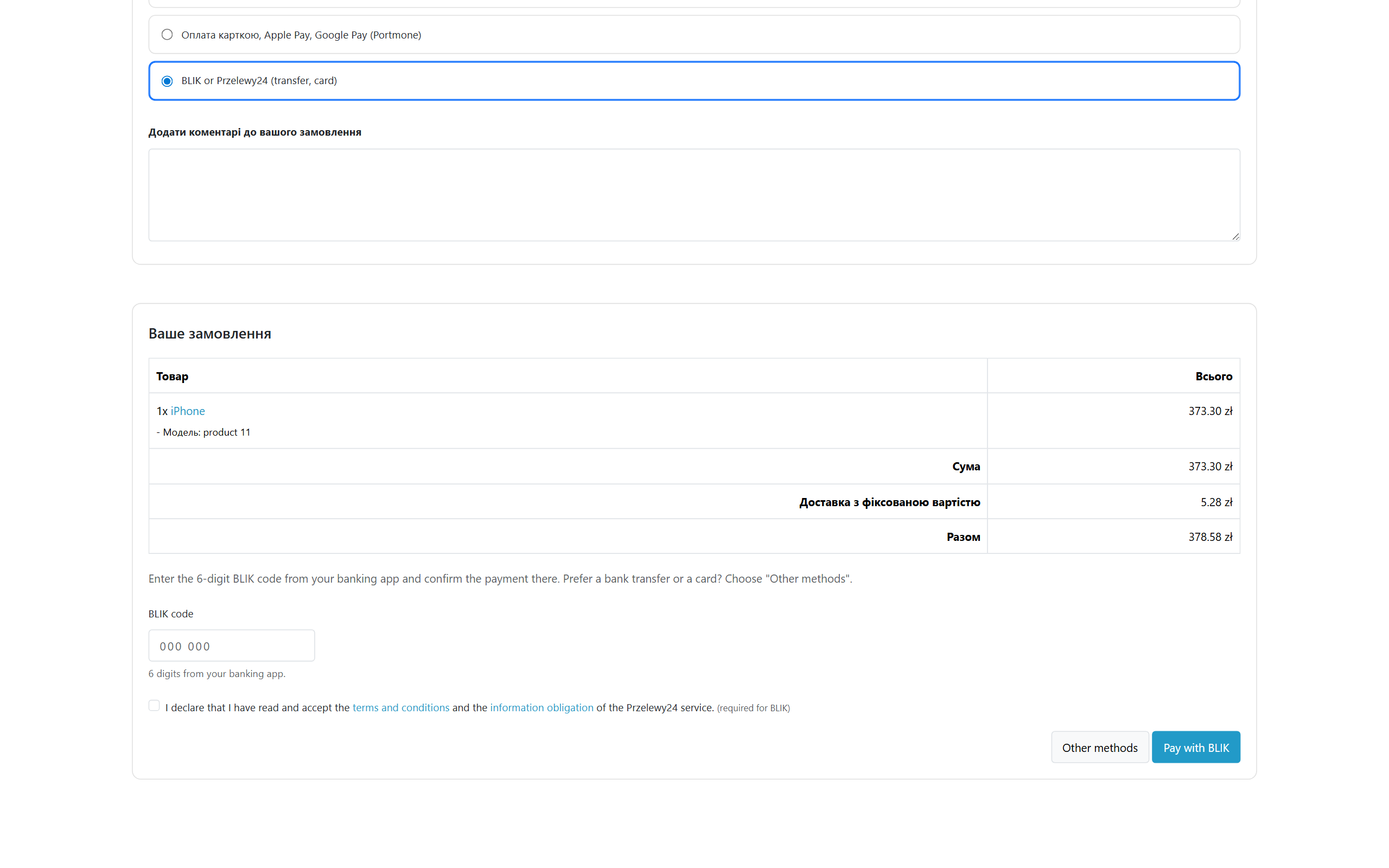
Without Pro, after confirming the order the buyer goes to the Przelewy24 page, picks a bank, a card or BLIK and comes back to the shop. Card and bank details never pass through your site. If the buyer closes the tab and never comes back, the order still becomes paid — from the Przelewy24 notification.
The return page from Przelewy24 does not start OpenCart, so the buyer keeps the session even with strict cookie settings (SameSite=Strict on OpenCart 4). As soon as Przelewy24 confirms the payment, the buyer sees the usual “Your order has been placed” page with an empty cart.
transaction/register) with a unique session number, the order amount and currency, and a SHA-384 signature on the CRC key. The amount is the “Total” row — with coupons, shipping and product options.paymentMethod/blik/chargeByCode), and the buyer confirms the payment in the banking app.transaction/verify — without it Przelewy24 does not settle the money to the merchant. Only after a successful verify does the order become paid.transaction/refund) — in full or in parts; the result from Przelewy24 is written to the order history.UAH 990 — a one-time payment, lifetime licence. No yearly fees: the module and its Pro features stay yours. One licence covers all three builds — OpenCart 4.x, 3.x and 2.3.
One key — one domain. Moving the shop? Release the licence on the old domain with the button in the module settings and activate it on the new one.
Trial first, then payment. The free 7-day Pro trial starts from the “Try Pro” button in the module settings with just an e-mail, no card needed. A fresh install is the plain Free version, nothing switches on by itself. After the trial only the Pro features stop; taking payments keeps working.
cc_przelewy.ocmod.zip (do not rename the archive) and click “Install”. OpenCart 3: Extensions → Installer → cc_przelewy24-oc3.ocmod.zip. OpenCart 2.3: copy the contents of the upload/ folder from cc_przelewy24-oc23.ocmod.zip to the shop root (FTP or the hosting file manager).Didn't find the answer? Message us on Telegram and we'll reply within a business day.
 @catcode_support
Setup, compatibility, activation
@catcode_support
Setup, compatibility, activation
Yes. Przelewy24 issues the merchant ID, CRC key and API key after you register the shop as a merchant. Przelewy24 enables the sandbox only for an already approved main account.
Only if Przelewy24 has enabled BLIK code payments (the paymentMethod/blik/chargeByCode service) on your account — it is off by default and your Przelewy24 account manager turns it on. Switch on "BLIK code at checkout" after Przelewy24 confirms it. Regular BLIK on the Przelewy24 page works without Pro and without this service.
PLN by default. EUR and others — if your Przelewy24 account accepts them: add them to the "Currencies" field. For a currency outside the list the method is not shown at checkout.
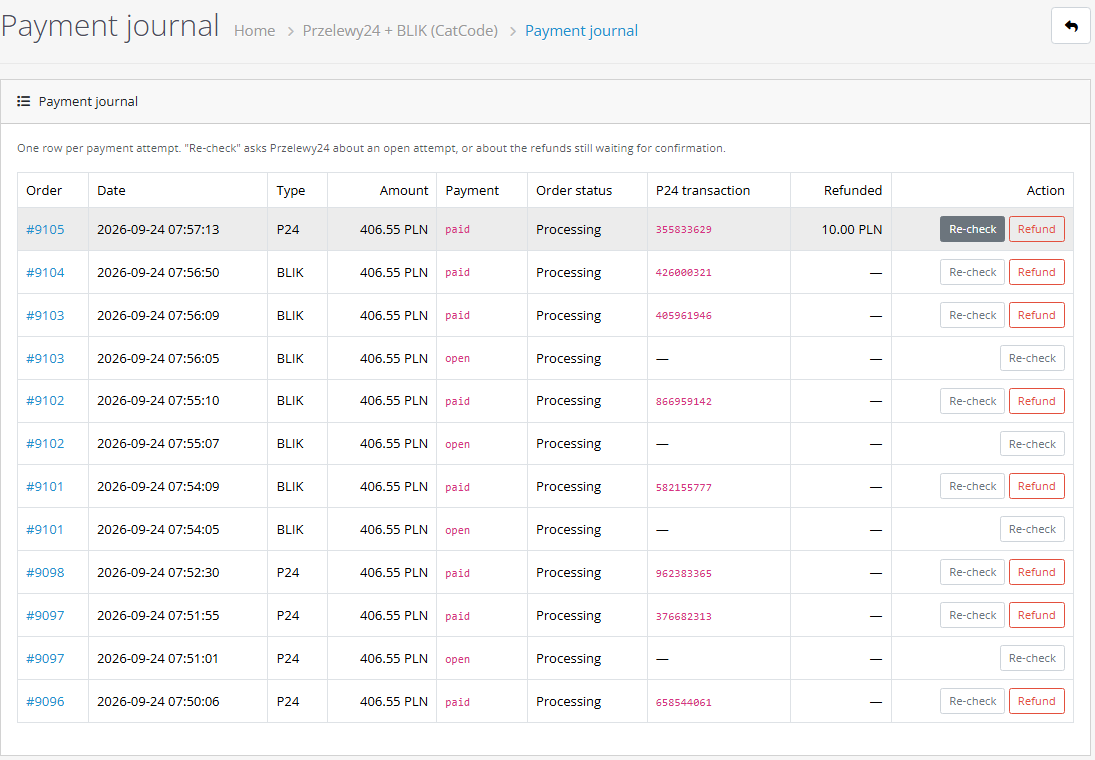
Przelewy24 repeats the notification until the shop accepts it, and the waiting page asks for the status by itself. A bank transfer can take a few minutes. In the Pro journal the "Re-check" button asks for the status at once.
Yes. For OpenCart the licence is a one-time purchase and stays yours with no yearly fees. One licence covers the OpenCart 4.x, 3.x and 2.3 builds.
Taking payments on the Przelewy24 page (transfers, cards, BLIK), the signature check and the payment confirmation stay free with no time limit.
No reviews yet. Be the first.
No questions yet. Ask one — we answer within 24 hours.
We build custom modules for WordPress, WooCommerce, OpenCart and Shopify. Tell us about the task and we'll prepare an estimate.
Order a custom module
—

CatCode assistant
Just now


CatCode assistant
Online

I’ll help with your website task
Describe your website task — I’ll find a ready-made module or pass it to a developer for an estimate. Modules, custom features, layout, integrations, speed, migration, technical SEO.
