OpenCart
KSeF E-Invoicing for OpenCart — FA(3) e-invoices to Poland’s KSeF straight from orders
Free + Pro
990 UAH
v1.0.0
Enter at least 2 characters
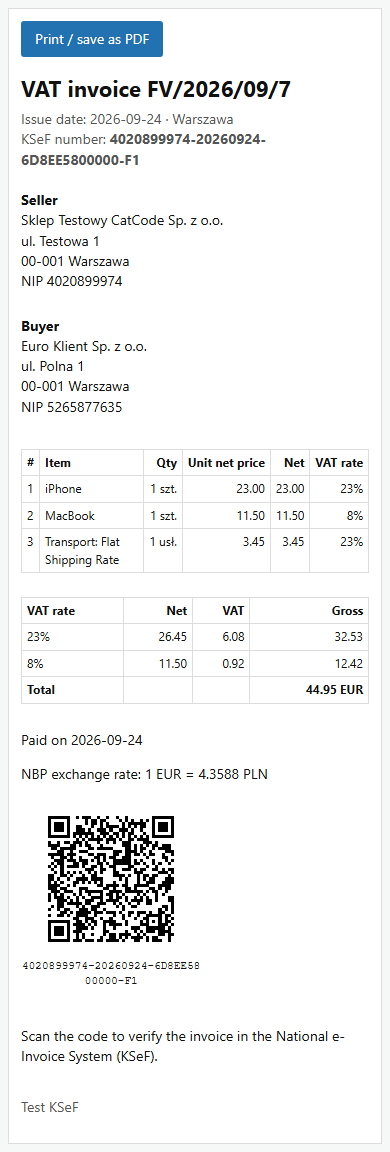
Structured FA(3) e-invoices for Poland's KSeF from OpenCart 4, 3 and 2.3 orders: sent directly to the KSeF API 2.0 with your own token, no SaaS subscription. KSeF number, UPO and QR code on the order, NIP field at checkout, queue with retries, TEST/DEMO/PROD. Pro adds correction invoices, EU and non-EU buyers, B2C, currencies at the NBP rate and a customer e-mail with the QR code. Lifetime licence.
The free version works with no time limit. Pro adds the rest of the features in the table.



A fresh install is the free version, nothing switches on by itself. The “Try Pro for 7 days” button → e-mail → the key right in the window and by e-mail.

Moving the store? Unbind the licence on the old domain and activate it on the new one yourself. If our server is unreachable, Pro keeps working for 14 more days. For studios — keys for 5 or 25 sites, or unlimited.
 OpenCart 4.0.2 – 4.1.x (tested on 4.1.0.3 and 4.0.2.3), 3.0.x (tested on 3.0.5.0) or 2.3.0.2 (tested on PHP 7.0)PHP as required by your OpenCart version, with OpenSSL; no third-party libraries. MySQL / MariaDB, mysqli and pdo drivers.A KSeF token for the seller’s NIP from the KSeF taxpayer application of the environment you work in (TEST, DEMO or PRODUCTION). When moving from TEST to PRODUCTION the token has to be replaced.OpenCart taxes with Polish rates (23%, 8%, 5% …) in the tax classes of products and shipping, or the “rate included in prices” mode, or zw. Rates outside the Polish list and fixed taxes (type F, eco tax) produce no invoice — the module explains why.Currency — PLN for Free; other currencies at the NBP rate with Pro.Checkout: default and One Page Checkout (CatCode). Third-party checkouts with their own field templates have not been tested.For fast statuses — PHP-FPM or the cron address from the “Tools” tab every 5 minutes. Without them statuses and UPO update hourly (OpenCart 4) or when the admin is opened.Module languages: English and Polish.
For OpenCart 4.x, 3.x and 2.3: FA(3) 1-0E, KSeF API 2.0 with a KSeF token, queue with retries, UPO, KOD I QR code, duplicate protection, validated NIP field on the default checkout and One…
4 modules in one order — 40% cheaper than separately



KSeF E-Invoicing for OpenCart is a module for shops in Poland that invoice businesses. From 2026 Polish VAT payers send B2B invoices through the National e-Invoice System (Krajowy System e-Faktur, KSeF). The module turns an OpenCart order into a structured invoice in the official FA(3) format and sends it straight to the KSeF API 2.0 — no accounting SaaS in between and no monthly subscription. The KSeF number, the official receipt (UPO) and the verification QR code are stored on the order. Builds for OpenCart 4.x, 3.x and 2.3.
What you need. A KSeF token for your company’s NIP, generated in the KSeF taxpayer application (Aplikacja Podatnika KSeF) of the chosen environment (“Tokeny” section, invoice write and read permissions). Honestly about testing: the module has been tested on the official KSeF TEST environment of the Ministry of Finance on OpenCart 4.1, 4.0.2, 3.0.5 and 2.3 — invoices were accepted with real KSeF numbers and UPO, and every XML is valid against the official FA(3) XSD. We have not run it on DEMO or PRODUCTION yet: same API there, but it needs a real company. Try it on your own NIP with the 7-day Pro trial — if KSeF answers differently than on TEST, we fix it promptly.
The shop remains responsible for the invoice content: the module builds FA(3) from the OpenCart order data (products, order total lines, taxes, addresses, NIP). Tax decisions — how a coupon is spread over rates, when 0% WDT or EX applies, when an order counts as paid, the correction type — follow OpenCart’s logic and the Ministry of Finance documentation; show the settings to your accountant before switching to PRODUCTION.
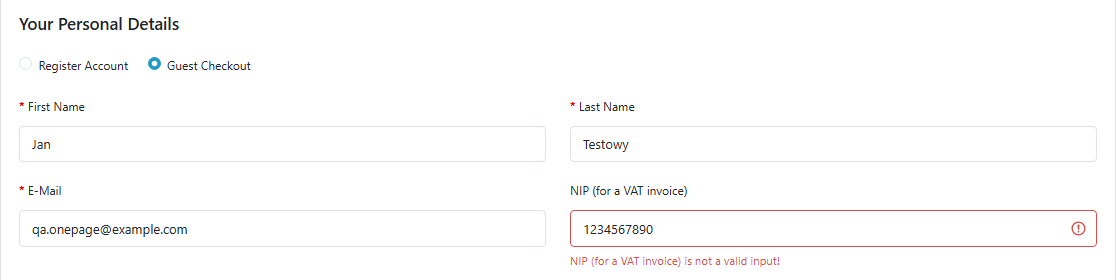
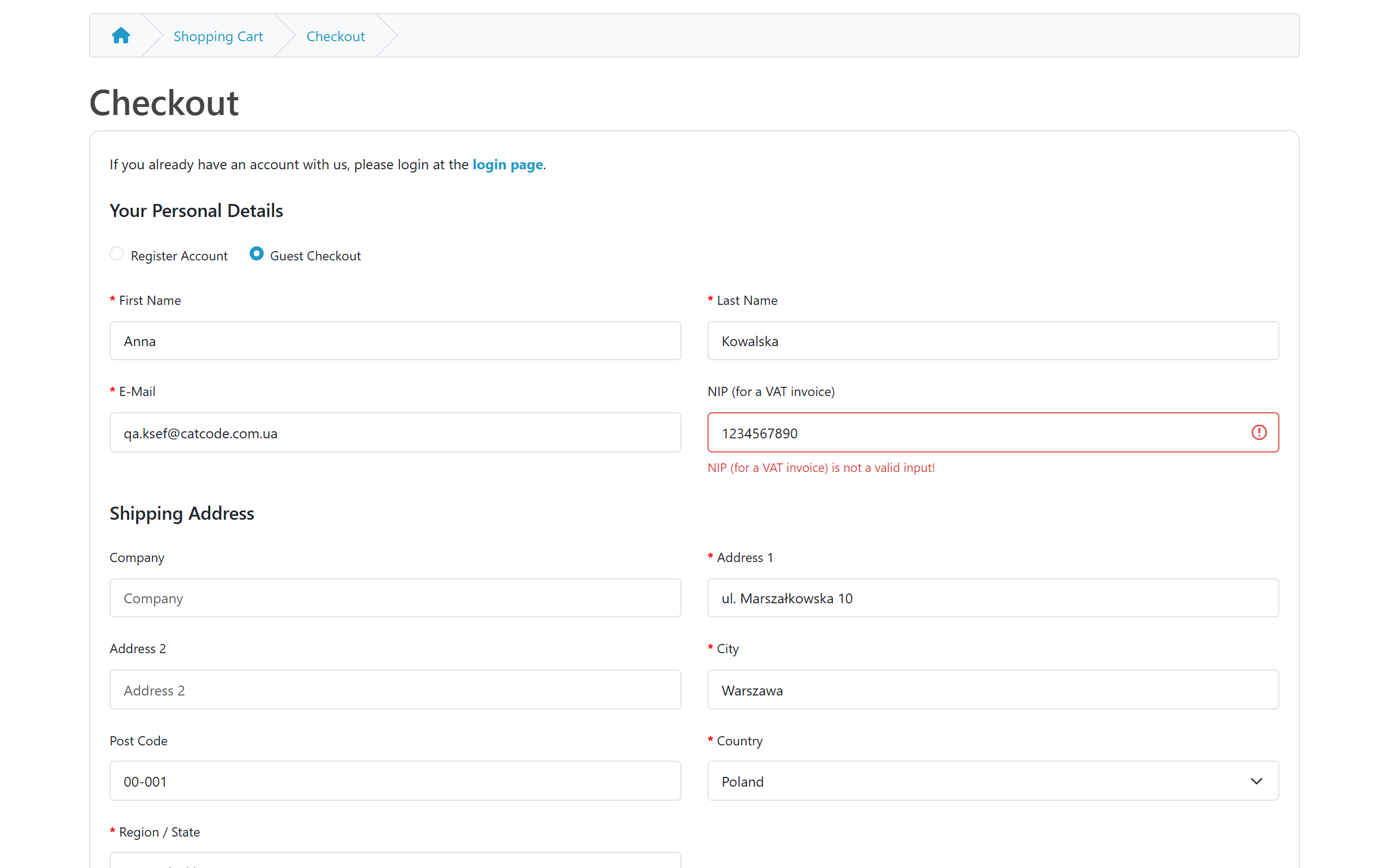
The module adds a native OpenCart custom field “NIP (for a VAT invoice)” — the “Create the NIP field” button in the settings creates it. The default checkout, registration, account pages and One Page Checkout (CatCode) show it. It is optional: without a NIP the order goes through as usual and no KSeF invoice is created. When a NIP is entered, the module checks its checksum — a wrong number stops the checkout with an error next to the field. “5265877635”, “526-587-76-35” and “PL5265877635” are all accepted, as are VAT numbers of other EU countries (invoicing such buyers needs Pro).
On a phone it works the same way: the error shows under the field, the rest of the checkout is unchanged. A customer who already has an account in OpenCart 4 sees the NIP field in their account, not at checkout — that is how OpenCart shows account fields. For such orders you can enter the NIP on the order page in the admin (see below).
With Pro the customer gets the e-mail “Your invoice is in KSeF” with the KSeF number and QR code, an invoice block on the order page of their account and a printable invoice behind a keyed link. The printable invoice is an information copy; the legally binding invoice is the XML in KSeF.
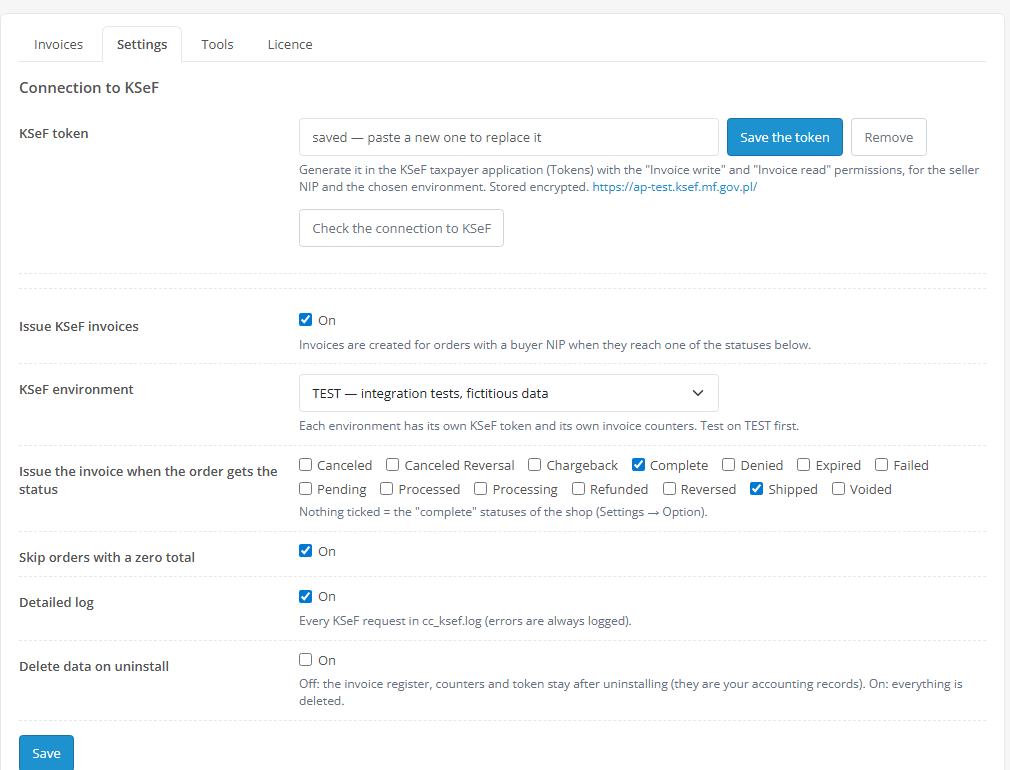
storage/cc_ksef.key.php, not in the database; the form only shows “saved”. You can also set the token with the CC_KSEF_API_TOKEN constant in config.php.The KSeF panel on the order page: the buyer’s NIP with its validation mark, a field to enter or correct the NIP just for the invoice (the customer’s own field is not changed), status, KSeF number, KOD I QR code and a link to the details. An order without an invoice gets an “Issue KSeF invoice” button, and when there is no invoice for a reason (e.g. a consumer order), the panel says why.
The invoice page: date, status, KSeF number, session, SHA-256 of the file, “Download XML”, “Download UPO”, the printable invoice, the QR code and the full FA(3) XML that KSeF saw. A rejected invoice shows the KSeF text in Polish and the “Regenerate and send” (after fixing the data) and “Discard” buttons. With Pro the same page has the correction invoice form: returned quantities per line and / or a price reduction spread over the VAT rates; the module will not correct more than is left.
Number already used by another program. If you also issue invoices on the same NIP in another program or another shop with the same number pattern, KSeF refuses the second invoice with that number (code 440). The module compares the file with the UPO of the original: its own file (e.g. when the KSeF response was lost) is taken over with its KSeF number, a foreign one never. Such an invoice becomes “Rejected by KSeF” with an explanation and the other document’s KSeF number; change the number format (e.g. a SKLEP/ prefix) and click “Regenerate and send” — the invoice gets a new number. While the original cannot be compared yet, the invoice stays in processing for up to 24 hours and is checked every 2 minutes.
cc_ksef_invoice, cc_ksef_order, cc_ksef_kv) and OpenCart events — no core file edits: install.xml in the 3.x and 2.3 builds contains no modification.cc_ksef.ocmod.zip (do not rename the archive) and click “Install”. OpenCart 3: Extensions → Installer → cc_ksef-oc3.ocmod.zip. OpenCart 2.3: copy the contents of the upload/ folder from cc_ksef-oc2.ocmod.zip to the shop root (FTP or the hosting file manager) — the 2.3 installer needs FTP access, uploading by hand is simpler.Didn't find the answer? Message us on Telegram and we'll reply within a business day.
 @catcode_support
Setup, compatibility, activation
@catcode_support
Setup, compatibility, activation
A KSeF token for your company's NIP. You generate it in the KSeF taxpayer application (Aplikacja Podatnika KSeF, "Tokeny" section) with the invoice write and read permissions and paste it into Extensions → Modules → KSeF E-Invoicing → Settings. No separate contract or SaaS account is needed.
On the official KSeF TEST environment of the Ministry of Finance, on OpenCart 4.1.0.3, 4.0.2.3, 3.0.5.0 and 2.3.0.2: B2B, B2C, EU in EUR, corrections, a rejection with its reason, UPO, duplicates — with real KSeF numbers. It has not been run on DEMO or PRODUCTION yet: same API there, but it needs a real company.
The token. A KSeF token only works in the environment it was generated in, so after switching paste a token from the PRODUCTION taxpayer application. Each environment keeps its own number counters.
Give the shop its own number format, e.g. SKLEP/{YYYY}/{MM}/{N}. If the other program already used the same number, KSeF refuses the invoice; the module marks it as rejected with an explanation and never attaches the other document's KSeF number to the order. After changing the format use "Regenerate and send".
Yes. For OpenCart the licence is a one-time payment with no yearly fees. The Pro features stay in your shop for good.
Invoices stay in the queue and are sent automatically as soon as KSeF answers. Nothing is lost, nothing is sent twice.
No reviews yet. Be the first.
No questions yet. Ask one — we answer within 24 hours.
We build custom modules for WordPress, WooCommerce, OpenCart and Shopify. Tell us about the task and we'll prepare an estimate.
Order a custom module
—

CatCode assistant
Just now


CatCode assistant
Online

I’ll help with your website task
Describe your website task — I’ll find a ready-made module or pass it to a developer for an estimate. Modules, custom features, layout, integrations, speed, migration, technical SEO.
