Get in touch
  • OpenCart
  • Sales and conversion
  • v1.0.1

Profit & Cost Reports for OpenCart — profit report and cost of goods

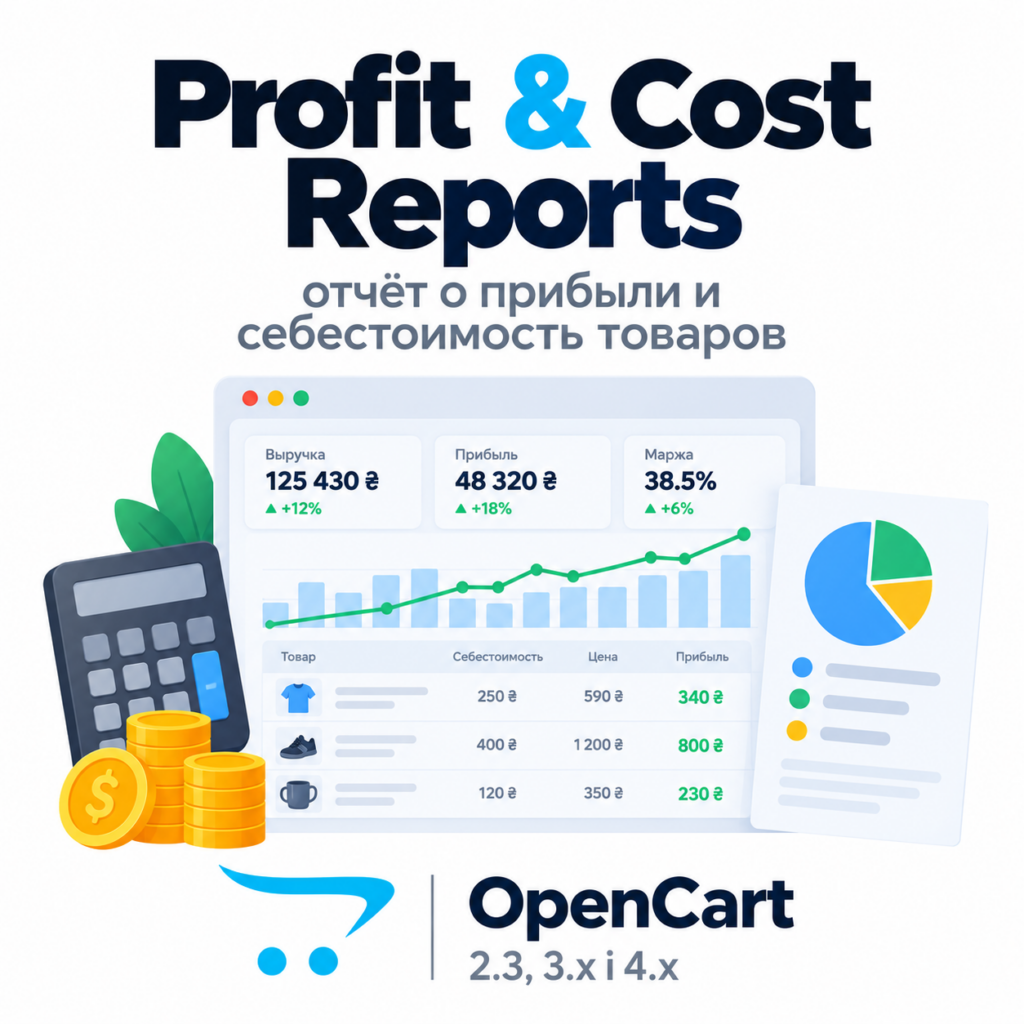
Cost price on the product and on every option value, frozen into each order, and a profit report under Reports. OpenCart 4.x, 3.x, 2.3.

Download Free
Pro · lifetime licence The more sites, the less each one costs
Compatibility
OpenCart 2.3, 3.0.x and 4.0.2 – 4.1.x
Version
v1.0.1 (OpenCart 4)
v1.0.0 (OpenCart 3.x)
v1.0.0 (OpenCart 2.3)
Licence
one site, lifetime
Trial
7 days, no card, one per site
Updated
26 September 2026
Or all 144 Pro modules with All Access — 4 990 ₴ / year

The module in action — 45 sec

Clear even without sound: Ukrainian subtitles

What Free has,
and what Pro adds

The free version works with no time limit. Pro adds the rest of the features in the table.

Feature Free Pro
Cost price field under the price in the product form, with live margin ✔ ✔
Cost of every option value — added to the product cost ✔ ✔
Cost is frozen into the order line — a new purchase price never rewrites past profit ✔ ✔
Report under Reports: net sales excl. tax, cost of goods, gross profit, margin, markup, orders ✔ ✔
P&L: sales, discounts, returns, cost of goods, gross profit ✔ ✔
Native OpenCart returns are subtracted from sales and cost ✔ ✔
Order profit block on the order page with a per-product breakdown ✔ ✔
Cost editor page: search, category, "no cost", inline editing ✔ ✔
Store and currency filter, order statuses of your choice ✔ ✔
Profit by product top 20 all products
Builds for OpenCart 4.x, 3.x and 2.3 without core file edits ✔ ✔
Net profit after payment fees, shipping cost and monthly expenses — ✔
Report by day, week and month with a chart — ✔
Breakdowns by category, manufacturer and customer — ✔
CSV export of every breakdown — ✔
Bulk: cost = % of price, freeze costs into past orders — ✔

What it looks like

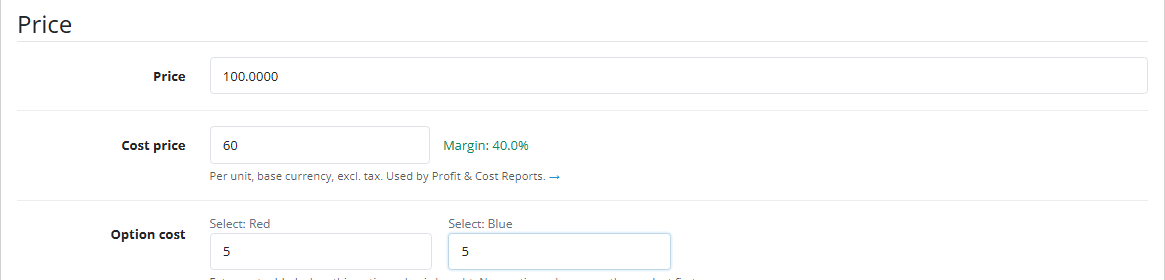
Cost price field under the price in the OpenCart product form
OpenCart 4.1 product form → Data: cost price with live margin under “Price”, and below it the cost of every option value.
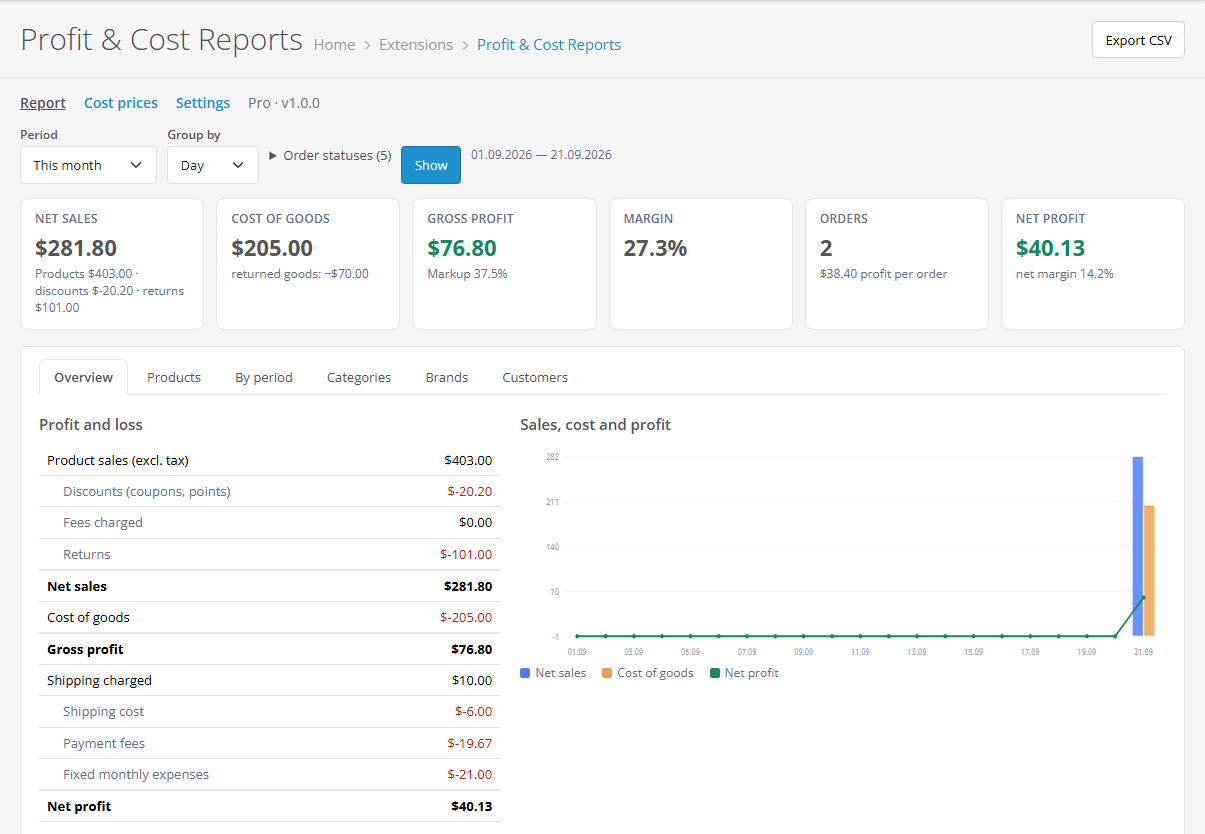
OpenCart profit report: tiles, P&L and chart
Report → Overview: net sales after discounts and returns, cost of goods, gross profit with markup, margin, orders. With Pro — net profit, shipping, payment fees and monthly expenses in the P&L, and a chart.
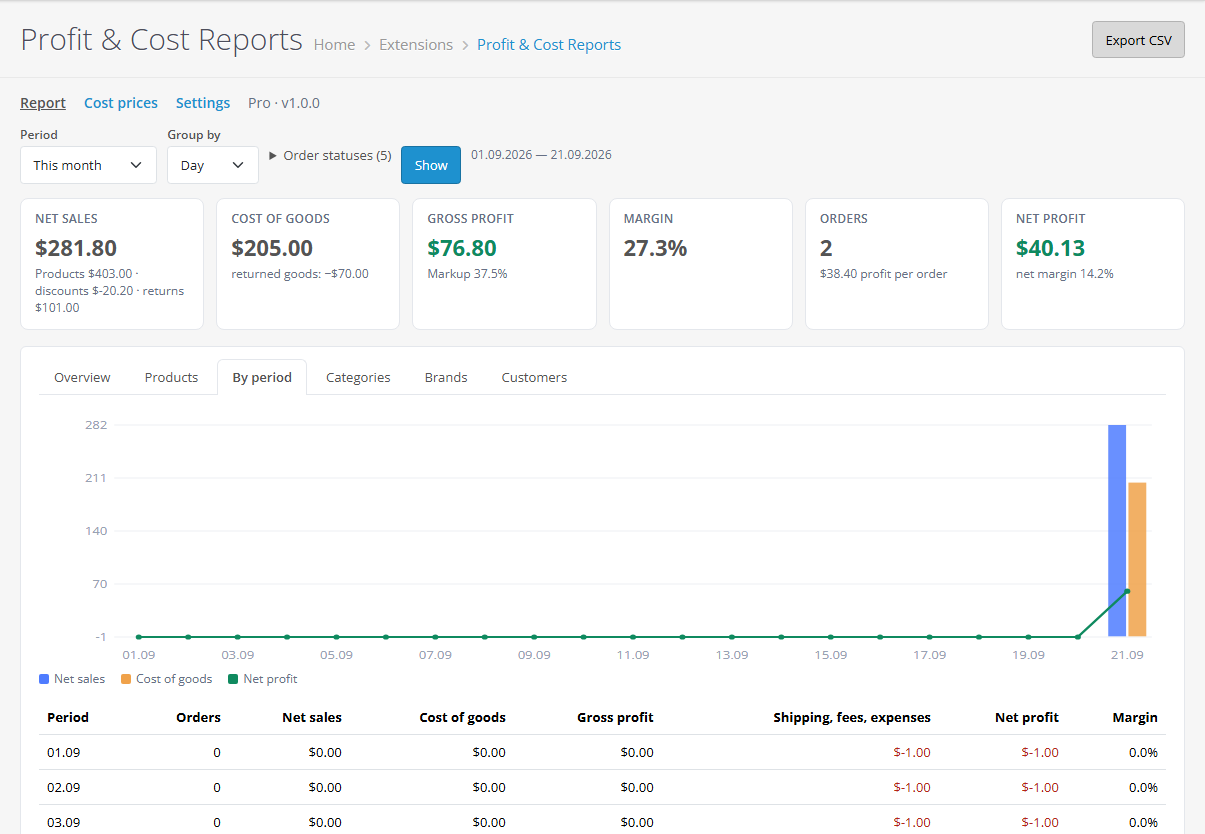
Profit report by day with a chart
Pro “By period” tab: net sales, cost of goods and net profit chart plus a table by day, week or month. Every tab exports to CSV.

The trial starts when you ask

A fresh install is the free version, nothing switches on by itself. The “Try Pro for 7 days” button → e-mail → the key right in the window and by e-mail.

One key — one site

Moving the store? Unbind the licence on the old domain and activate it on the new one yourself. If our server is unreachable, Pro keeps working for 14 more days. For studios — keys for 5 or 25 sites, or unlimited.

Technical requirements

  • OpenCart 4.0.2 – 4.1.x (tested on 4.1.0.3), 3.0.x (tested on 3.0.5.0) or 2.3.0.2
  • PHP 8.0+ for OpenCart 4, 7.3+ for OpenCart 3, 7.0+ for OpenCart 2.3
  • No core file edits: only OpenCart events and the module’s own tables
  • Languages: English, Ukrainian, Russian

Version history

v1.0.1 OC 4.x Current 26 September 2026

The profit report with a currency filter and the cost page with a search open again on the PDO database driver.

v1.0.0 First release September 2026

For OpenCart 4.x, 3.x and 2.3: cost prices for products and options, snapshots on order lines, a profit report with P&L and the top 20 products, native returns, order page block, cost…

Frequently bought with Profit & Cost Reports for OpenCart

4 modules in one order — 40% cheaper than separately

“Store starter” bundle Profit & Cost Reports Nova Poshta Premium LiqPay Telegram notifications and Viber/SMS for customers Need more — all 144 modules in All Access for 4 990 ₴.
3 790 ₴ lifetime instead of 6 260 UAH bought separately
Buy the bundle →

Full module description

Profit & Cost Reports for OpenCart shows how much the store earned, not just how much it sold. OpenCart knows the selling price but not what the goods cost you. The module adds a cost price to products and option values, freezes it into every order line and builds a report under Reports: net sales excluding tax, cost of goods, gross profit, margin and markup for any period. Builds for OpenCart 4.x, 3.x and 2.3, no core file edits.

What the customer sees

Nothing. Costs live in the module’s own tables and never reach the storefront or e-mails. Checkout and product pages stay stock.

What the admin gets

  • Cost in the product form — a field under “Price” with live margin and, for products with options, the cost of every option value (added to the base cost). On OpenCart 4 a variant without its own cost uses the master product’s.
  • Report under Reports → “Profit & cost”: periods from today to any range, store, currency and status filters. Tiles for net sales, cost of goods, gross profit, margin and orders, a profit & loss table and the top 20 products by profit. If sold products have no cost, the report warns you and links to the editor.
  • Cost editor — every product in one table: search, category, “no cost”, “sold at least once”, inline editing and option costs.

How it works — step by step

  1. You enter costs in the product form or on the cost editor page (in Pro — in bulk: “cost = N% of price” for products without one, optionally in one category).
  2. A customer places an order. When the order gets a status, the module records the cost of every line — the product plus the chosen options.
  3. The purchase price changes and you update the cost. Profit of orders already placed does not change.
  4. OpenCart returns with the chosen statuses (or with an action assigned) are subtracted from sales and cost. Coupons and reward points count as discounts.
  5. The report counts orders with the chosen statuses by order date — “Processing” and “Complete” by default.

Under the hood

  • Own tables for product costs, option value costs and order-line snapshots — OpenCart tables are left untouched.
  • Idempotent snapshot: another status change never overwrites a cost already frozen.
  • Revenue excludes tax; coupons and reward points are discounts, gift vouchers are not.
  • Computed in chunks of 500 orders, so the report does not hit the memory limit on large stores.
  • Amounts in the store base currency; the currency filter only narrows the selection, there is no conversion.
  • Saving the product form without the field (imports, third-party editors) never wipes the cost.

Installation

  1. OpenCart 4: Extensions → Installer → upload cc_profit.ocmod.zip and click Install. OpenCart 3: Extensions → Installer → cc_profit-oc3.ocmod.zip, then refresh Modifications. OpenCart 2.3: upload the contents of the upload/ folder from cc_profit-oc2.ocmod.zip to the store root (FTP or the hosting file manager).
  2. Extensions → Extensions → Modules → Profit & Cost Reports → Install, then Edit and save the settings.
  3. Fill in costs on products or on the cost editor page.
  4. The report is under Reports → “Profit & cost”.
  5. For Pro: “Try Pro” → an e-mail for the trial or the key after purchase.

Questions
about the module

Didn't find the answer? Message us on Telegram and we'll reply within a business day.

@catcode_support Setup, compatibility, activation
Do I need to renew the licence?

No. For OpenCart the licence is a one-time payment, forever.

Do customers see the cost price?

No. Costs live in the module's own tables and appear only in the admin.

What about orders placed before installation?

They have no frozen cost — the report uses the current one and marks the line as "estimated". Pro can freeze costs into past orders.

Does the module change core files or templates?

No. Only OpenCart events and its own tables; switch it off and the admin is stock.

Not quite what you are looking for?

We build custom modules for WordPress, WooCommerce, OpenCart and Shopify. Tell us about the task and we'll prepare an estimate.

Order a custom module