
















OpenCart
Abandoned Cart Recovery for OpenCart 2.3, 3.x and 4.x
Free + Pro
1 290 UAH≈ €26
v1.2.4
 Website auditA PDF report by email in 3 minutesCheck a website
Everyday tasks
Image compressorSize, quality and WebP in bulkQR generatorLink, Wi-Fi, payment to IBANVAT calculator20, 14, 7% and amount in wordsTransliterationOfficial Ukrainian standardWebsite checks
PHP and pluginsPHP version, WordPress, pluginsGoogle Merchant feedFields, prices, GTIN, imagesDomain emailSPF, DKIM, DMARC, blacklistsAI search readinessllms.txt, bots, markupAll 9 toolsEnter at least 2 characters

OpenCart 4.x, 3.x, 2.3 orders to the Poster register; Pro adds menu, stock and status from the register. Lifetime licence.
The free version works with no time limit. Pro adds the rest of the features in the table.


Nothing new: the storefront and the checkout stay as they are.

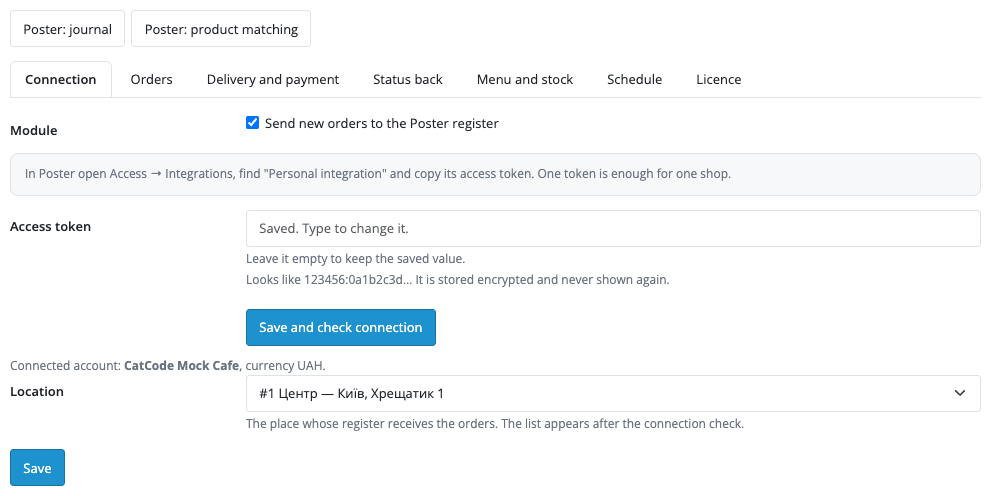
Extensions → Modules → Poster POS: tabs Connection, Orders, Delivery and payment, Status back, Menu and stock, Schedule and Licence, plus the Journal and Product matching pages.

A fresh install is the free version, nothing switches on by itself. The “Try Pro for 7 days” button → e-mail → the key right in the window and by e-mail.

Moving the site? Unlink the licence on the old domain and activate it on the new one yourself. A staging copy (staging., dev.) works with the same key and does not take a site slot. For studios — keys for 5 or 25 sites, or unlimited.
 OpenCart 4.0.2+, 3.0.x or 2.3.0.2; PHP 7.0+ for 2.3, the cURL extension.A Poster account and a Personal integration token.Shop and Poster products are matched: SKU = Poster product code, model, ID or the matching table.For retries, statuses, menu and stock within minutes: a server cron every 5 minutes on the address from the Schedule tab; OpenCart 4 also runs the module from its own cron hourly. Without PHP-FPM the background pass runs only on admin pages and by cron, so the cron is required on mod_php hosting.
For OpenCart 4.x, 3.x and 2.3: online orders to the Poster register, product matching by SKU, model or table, a location choice, a journal with retries.



Poster POS for OpenCart 4.x, 3.x and 2.3 sends shop orders to the Poster register as online orders: the cashier sees the items, total, phone and a comment, and accepts or declines the order right at the register. The module uses the official Poster API and suits cafes, pizzerias, bakeries and shops that run on Poster.
What you need from Poster. A Poster account and the access token from Access → Integrations → Personal integration. One token is enough for one shop.
Nothing new: the storefront and the checkout stay as they are. The buyer orders as usual, and the venue gets an online order at the register with the #OC-number marker, the name, a phone in the +380 form, delivery and payment details and the sum the buyer paid.
Extensions → Modules → Poster POS: tabs Connection, Orders, Delivery and payment, Status back, Menu and stock, Schedule and Licence, plus the Journal and Product matching pages. Paste the token and press Save and check connection: the module shows the account name and currency and fills the list of locations. The token is stored encrypted and never shown back in the form.
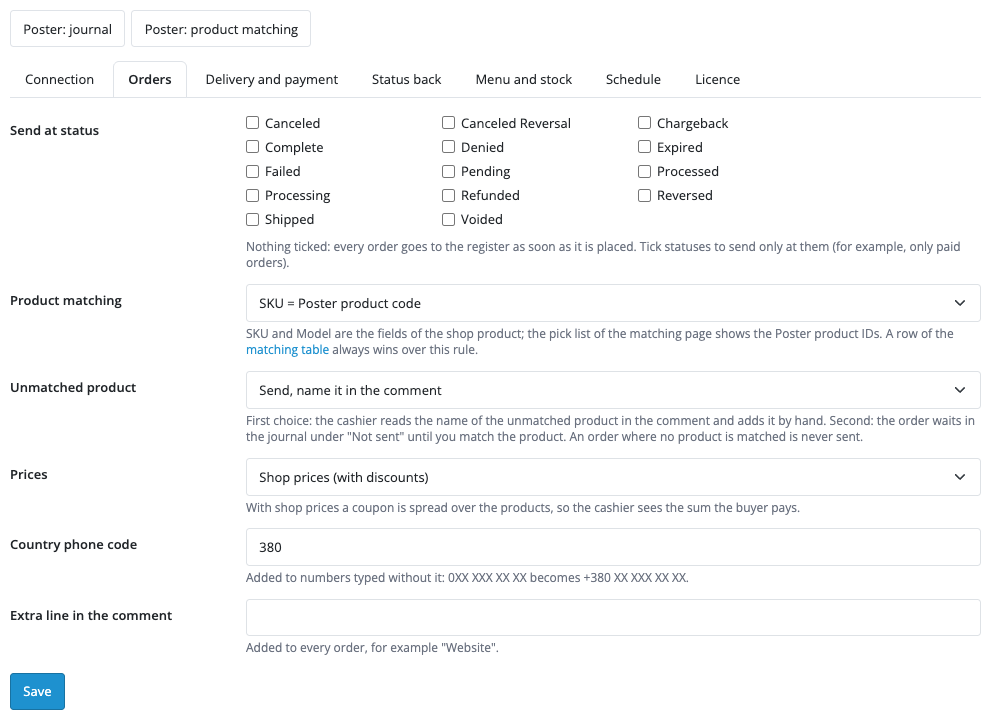
On the Orders tab you choose when an order goes to the register: right after checkout or only at chosen statuses (for example, when paid). The default matching rule is shop SKU = Poster product code; model or ID can be used instead. Prices are the shop prices (a coupon is spread over the items, so the register shows the sum the buyer paid) or the Poster prices. If a product is not matched, the order can go with that product named in the comment, or wait in the journal until you match it; an order in which no product is matched is not sent.
The Product matching page sets a Poster product by hand: type its ID or pick it from a list, with search by name, SKU or model. Option values map to a Poster product modifier or a dish modification. The journal shows each order, its state at the register, an error in plain words, state filters, and the buttons Retry, Remove and Ask Poster. The panel on the order page has the same: a preview of what will go to the register, Send, Send again and Ask Poster.
One shop order is one Poster order: before a retry the module looks for the #OC-number marker at the register, so after a lost answer the order is not doubled. A Poster outage does not lose an order: it waits in the queue and the module retries with a growing pause.
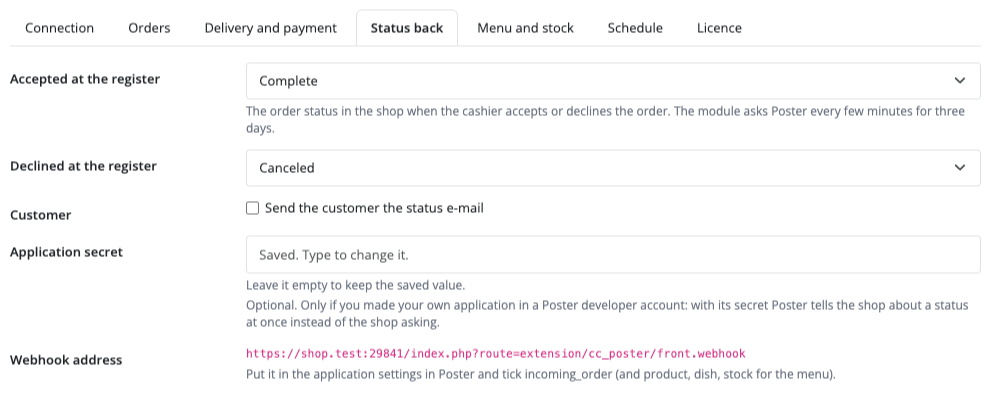
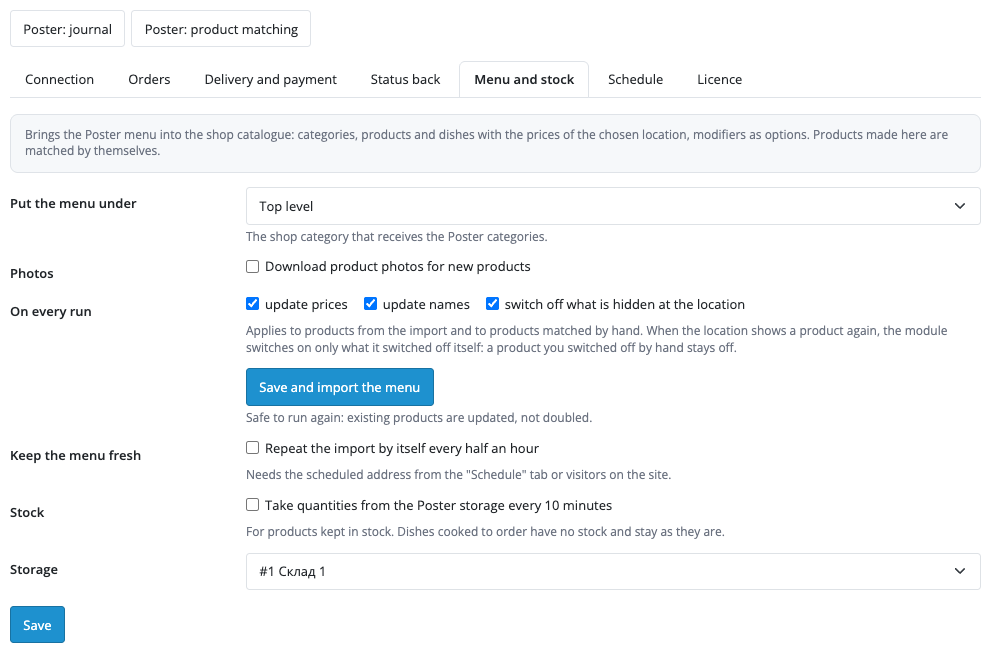
In Pro the Menu and stock tab brings the Poster menu into the catalogue: nested categories, products and dishes with the prices of the chosen location, product modifiers as a Variant option, dish modification sets as radio or checkbox options, and optionally photos. The import can be repeated without doubles and left to the schedule every 30 minutes; products hidden at the location are switched off. Stock from the Poster storage is updated every 10 minutes. The Status back tab reads from Poster whether the cashier accepted the order and sets the shop statuses you chose (Complete and Canceled by default) with a history line and, if you like, an e-mail to the buyer. The module asks Poster every few minutes for three days after the order was sent.
Didn't find the answer? Message us on Telegram and we'll reply within a business day.
 @catcode_support
Setup, compatibility, activation
No, it is an independent integration through the official Poster API. Poster is a trademark of its owner.
The module sends the order right after checkout (or at the chosen status). If Poster does not answer, the order stays in the queue and is retried by the cron and on visits.
No. The module asks Poster every few minutes, so the status changes with a short delay. For faster retries add a cron on the address from the Schedule tab.
By default the order goes to the register with the product name in the comment, so the cashier adds it by hand. You can make it wait in the journal instead. If no product is matched, it is not sent.
Yes, in Pro: the location is chosen by store, shipping code, city or region.
OpenCart 4.0.2+, 3.0.x and 2.3.0.2 — three separate archives in one product.
Yes, every new order. If the shop also sells goods that are not in Poster, choose statuses or the "do not send" mode.
Yes, for OpenCart it is one payment and a lifetime licence for two sites.
No reviews yet. Be the first.
No questions yet. Ask one — we answer within 24 hours.
We build custom modules for WordPress, WooCommerce, OpenCart and Shopify. Tell us about the task and we'll prepare an estimate.
Order a custom module
—
Charged in UAH; your bank converts it to your currency. EUR price is approximate.

CatCode assistant
Just now


CatCode assistant
Online

I’ll help with your website task
Describe your website task — I’ll find a ready-made module or pass it to a developer for an estimate. Modules, custom features, layout, integrations, speed, migration, technical SEO.
