
















OpenCart
Abandoned Cart Recovery for OpenCart 2.3, 3.x and 4.x
Free + Pro
1 290 UAH≈ €26
v1.2.4
 Website auditA PDF report by email in 3 minutesCheck a website
Everyday tasks
Image compressorSize, quality and WebP in bulkQR generatorLink, Wi-Fi, payment to IBANVAT calculator20, 14, 7% and amount in wordsTransliterationOfficial Ukrainian standardWebsite checks
PHP and pluginsPHP version, WordPress, pluginsGoogle Merchant feedFields, prices, GTIN, imagesDomain emailSPF, DKIM, DMARC, blacklistsAI search readinessllms.txt, bots, markupAll 9 toolsEnter at least 2 characters
Oxygen Pelatologio receipts, invoices and credit notes from OpenCart 4.x, 3.x, 2.3 orders; Pro adds automation, AFM and VIES, warehouse. Lifetime licence.
The free version works with no time limit. Pro adds the rest of the features in the table.


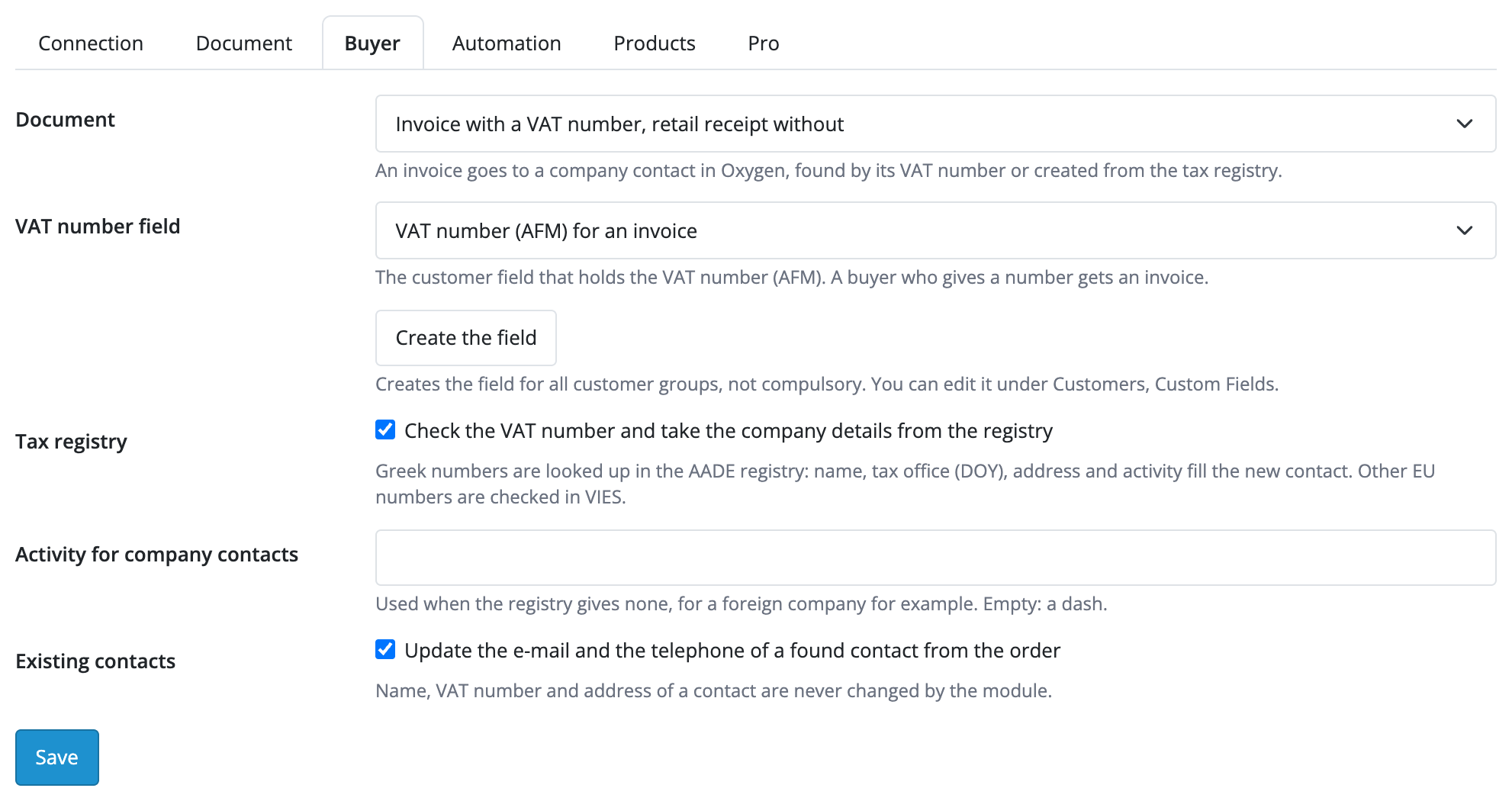
At the OpenCart checkout the buyer enters the usual data. The module adds an optional AFM (ΑΦΜ) field: a buyer who fills it in gets an invoice for the company (in Pro), the others get a retail receipt as a private person.

Extensions → Modules → Oxygen Pelatologio has the tabs “Connection”, “Document”, “Buyer”, “Automation”, “Products” and “Pro”.

The base version is free. Pro costs 1 290 UAH, a one-time payment for a lifetime licence.

A fresh install is the free version, nothing switches on by itself. The “Try Pro for 7 days” button → e-mail → the key right in the window and by e-mail.

Moving the site? Unlink the licence on the old domain and activate it on the new one yourself. A staging copy (staging., dev.) works with the same key and does not take a site slot. For studios — keys for 5 or 25 sites, or unlimited.
 OpenCart 4.0.2.0–4.1.x, 3.0.x or 2.3.0.2; PHP 7.0+ for 2.3, the cURL extension.An Oxygen Pelatologio account and an API key from its dashboard.Numbering sequences and document types set up in Oxygen.Automatic issuing without cron moves on site visits; on hosting without PHP-FPM the queue is run from the admin or by a server cron on a secret URL.
For OpenCart 4.x, 3.x and 2.3: retail receipts from orders in Oxygen Pelatologio, a contact by e-mail, VAT rates and payment methods from the account, the PDF on the order, a documents…


Oxygen Pelatologio Invoices for OpenCart 4.x, 3.x and 2.3 creates a document from an order in the Greek service Oxygen Pelatologio (pelatologio.gr) through its API: a retail receipt, an invoice or a credit note. The document is created in Oxygen in your numbering sequence with the buyer, the rows and the VAT rates, and Oxygen passes it to myDATA according to the settings of your account.
What you need. An Oxygen Pelatologio account and an API key from its dashboard. You set the document types, the myDATA income classification and the numbering sequences together with your accountant: the module uses what you have chosen.
At the OpenCart checkout the buyer enters the usual data. The module adds an optional AFM (ΑΦΜ) field: a buyer who fills it in gets an invoice for the company (in Pro), the others get a retail receipt as a private person. The module finds the buyer in Oxygen by e-mail or creates the contact, so there are no duplicates.
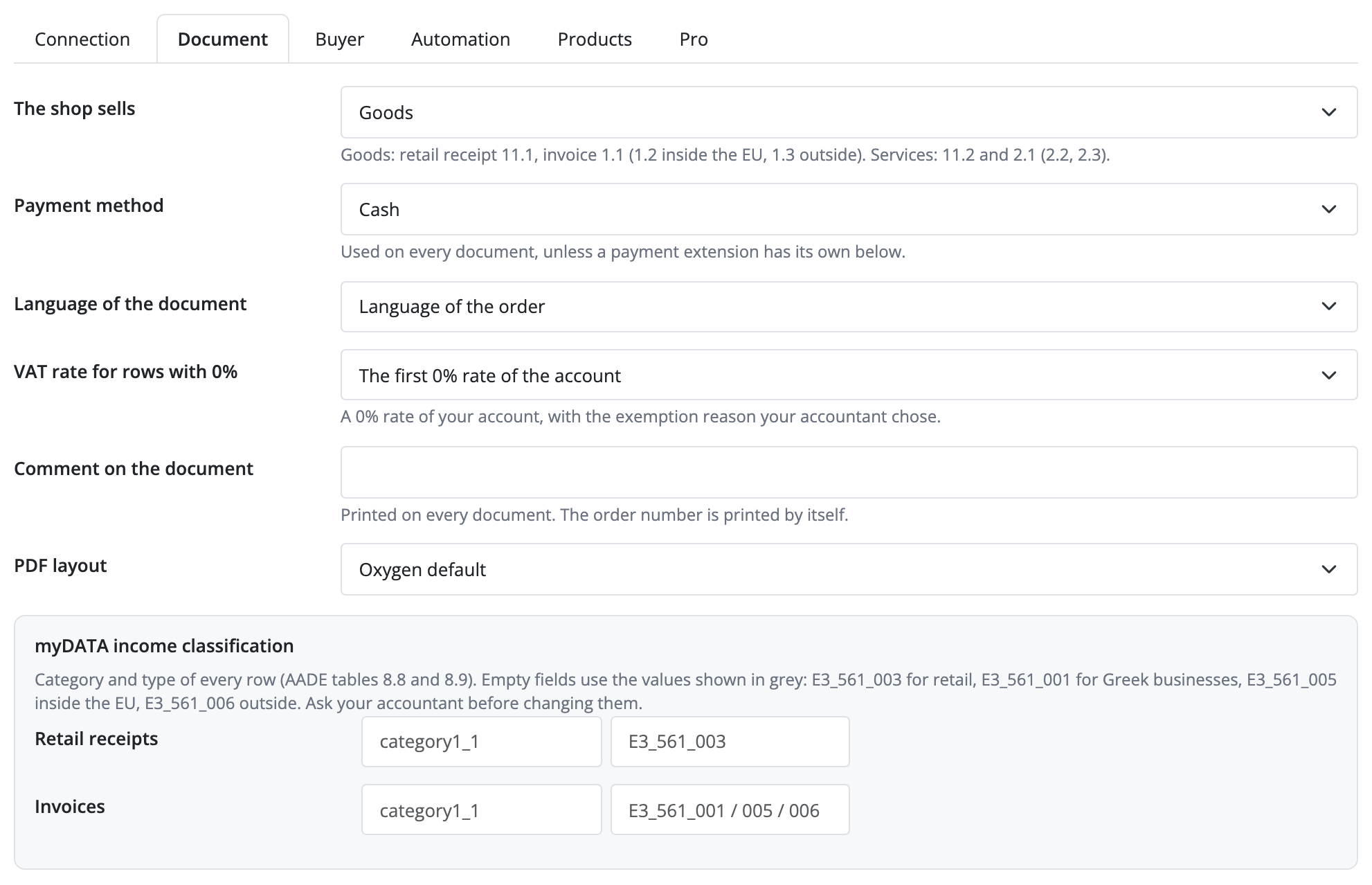
Extensions → Modules → Oxygen Pelatologio has the tabs “Connection”, “Document”, “Buyer”, “Automation”, “Products” and “Pro”. On “Connection” you paste the API key from the Oxygen dashboard (it is stored encrypted and never returned to the form), switch the sandbox on if needed and press “Save and check the connection”: the module reads the VAT rates, payment methods, numbering sequences and warehouses from the account. On “Document” you choose the document type, the sequence, the default payment method and the myDATA income classification.
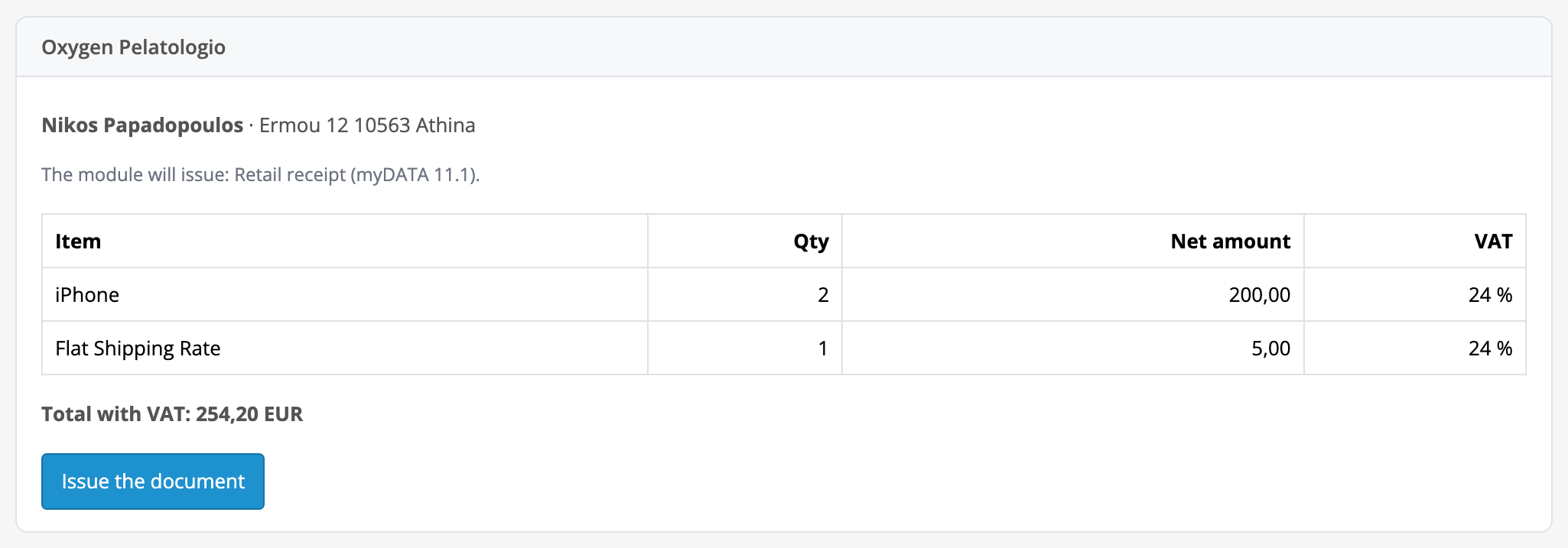
The order page gets an “Oxygen Pelatologio” panel: the buyer, a preview of the rows with net prices and the rate, the total and the document type. After issuing it shows the document number, the myDATA MARK, the state and the buttons: PDF, e-mail the PDF and credit note. Under Sales there is a list of all documents with the states “In progress”, “Stopped” and “Issued”. A stopped document can be retried once the reason, for example the AFM, is fixed.
A document is never created twice: after a lost answer from Oxygen the module finds the document that already exists instead of creating another. Network errors, 5xx and 429 are retried by the module itself. The document total equals the order total to the cent; for other currencies the document goes in euro. If an order cannot be split into rows (a gift voucher, a fixed fee, reward points), no document is created and the module explains why.
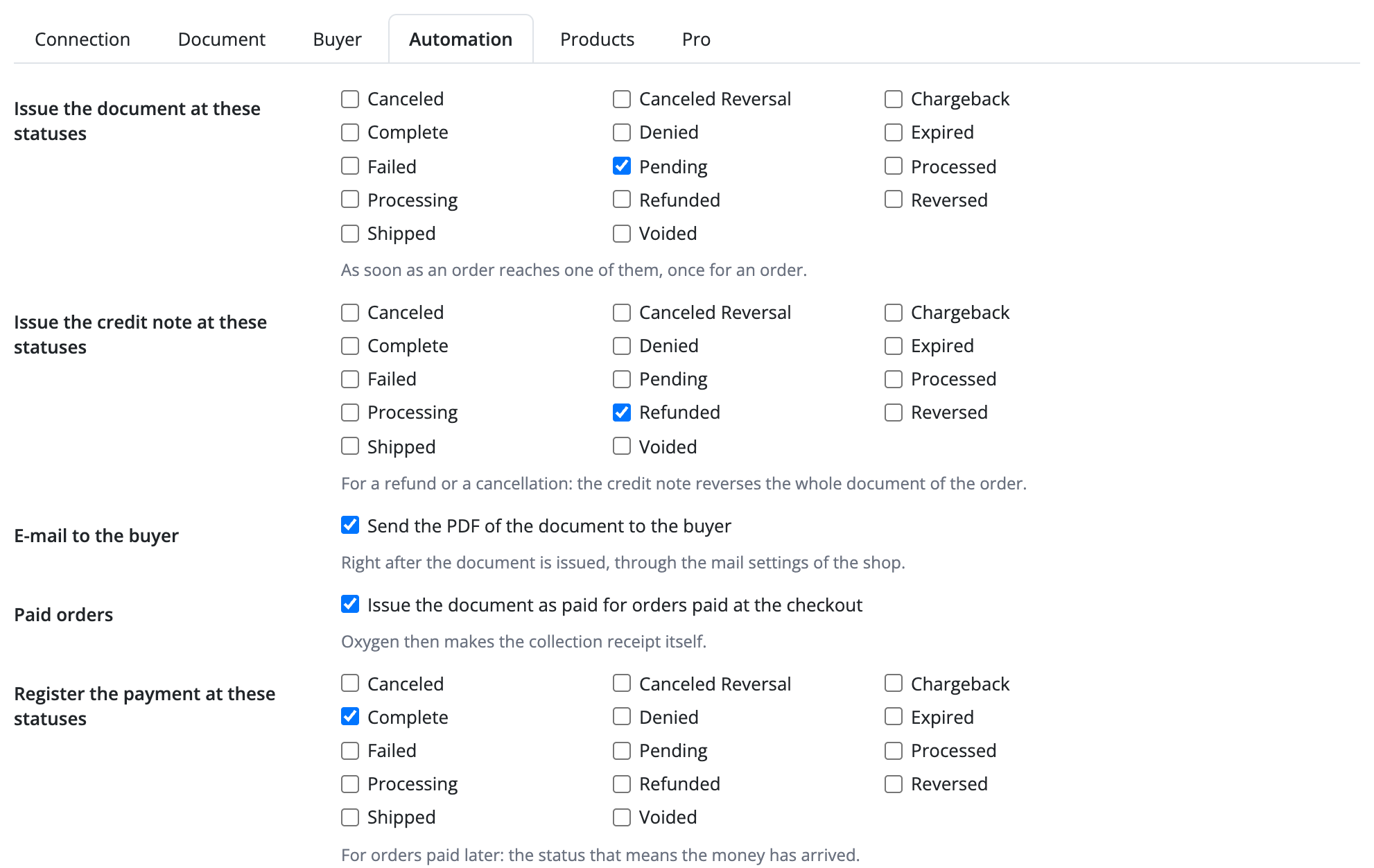
In Pro the document is issued by itself at the order statuses, without slowing down the buyer’s page. For companies the module issues an invoice: it tells Greek, EU and non-EU buyers apart by the AFM, looks the AFM up in the registry (the name, tax office, address and activity go into the contact) and in VIES. An invalid AFM stops the document with a clear text, and fixing the AFM in the order lets you retry. A credit note is made by a button or by a status, for a receipt and for an invoice; a credit note covers the whole order.
Pro also has numbering sequences and a payment method for each payment extension, order rows tied to Oxygen products by SKU or model with a warehouse, creating missing products, updating the e-mail and phone of the contact, marking the payment for online payments and for cash on delivery by status, and an e-mail with the PDF in the language of the order.
Didn't find the answer? Message us on Telegram and we'll reply within a business day.
 @catcode_support
Setup, compatibility, activation
No, it is an independent integration through the public Oxygen Pelatologio API. Oxygen Pelatologio is a trademark of its owner.
The module creates the document and passes it to Oxygen Pelatologio. Oxygen passes it to myDATA according to the settings of your account.
No, the document date is always today in Athens.
No, a credit note from the module covers the whole order.
If an order cannot be split into rows (a gift voucher, a fixed fee, reward points), the document stops and the reason is shown on the order page.
OpenCart 4.0.2.0–4.1.x, 3.0.x and 2.3.0.2: three separate archives in one product.
Yes, for OpenCart it is one payment and a lifetime licence for two sites.
No reviews yet. Be the first.
No questions yet. Ask one — we answer within 24 hours.
We build custom modules for WordPress, WooCommerce, OpenCart and Shopify. Tell us about the task and we'll prepare an estimate.
Order a custom module
—
Charged in UAH; your bank converts it to your currency. EUR price is approximate.

CatCode assistant
Just now


CatCode assistant
Online

I’ll help with your website task
Describe your website task — I’ll find a ready-made module or pass it to a developer for an estimate. Modules, custom features, layout, integrations, speed, migration, technical SEO.
