















OpenCart
Abandoned Cart Recovery for OpenCart 2.3, 3.x and 4.x
Free + Pro
1 290 UAH≈ €26
v1.2.4
 Website auditA PDF report by email in 3 minutesCheck a website
Everyday tasks
Image compressorSize, quality and WebP in bulkQR generatorLink, Wi-Fi, payment to IBANVAT calculator20, 14, 7% and amount in wordsTransliterationOfficial Ukrainian standardWebsite checks
PHP and pluginsPHP version, WordPress, pluginsGoogle Merchant feedFields, prices, GTIN, imagesDomain emailSPF, DKIM, DMARC, blacklistsAI search readinessllms.txt, bots, markupAll 9 toolsEnter at least 2 characters
OpenCart 4.x, 3.x, 2.3 products as OLX adverts; Pro keeps prices and stock in sync and takes sold-out adverts off. Lifetime licence.
The free version works with no time limit. Pro adds the rest of the features in the table.


A buyer on OLX sees an ordinary advert of your account: the product title and description, images from the shop, the price by your rules (tax, exchange rate, markup, rounding), and the city and contacts you entered in the module.

Extensions → Modules → OLX Connector: the Connection, Adverts, Categories, Prices and stock, Products, Orders, Licence and Log tabs.

The base version is free. Pro costs 1 290 UAH, a one-time payment for a lifetime licence.

A fresh install is the free version, nothing switches on by itself. The “Try Pro for 7 days” button → e-mail → the key right in the window and by e-mail.

Moving the site? Unlink the licence on the old domain and activate it on the new one yourself. A staging copy (staging., dev.) works with the same key and does not take a site slot. For studios — keys for 5 or 25 sites, or unlimited.
 OpenCart 4.0.2.0–4.1.x, 3.0.x or 2.3.0.2; PHP 7.0+ for 2.3, the cURL extension.An OLX account and your own application approved by OLX in the developer portal of your country (Client ID and Client Secret).A shop on HTTPS that is open to the internet: OLX returns to the Callback URL after the login and downloads the product images from the shop by itself.For Pro: a scheduled job (cron) every 5 minutes; OpenCart 4 can run it from its own cron.For OLX orders: an OLX.pl account with OLX delivery.
For OpenCart 4.x, 3.x and 2.3: connecting the OLX account, country choice, categories and attributes, adverts from products (publish, update, activate, deactivate, extend, delete), price rules, log.


OLX Connector for OpenCart 4.x, 3.x and 2.3 publishes the products of your shop as adverts on OLX through the official Partner API: OLX.ua, and OLX in Poland, Romania, Bulgaria, Portugal and Kazakhstan. You map shop categories to OLX categories, and the advert is built from the product name, description, images, price and stock.
What you need from OLX. Every shop registers its own application in the OLX developer portal (developer.olx.ua for Ukraine, developer.olx.pl for Poland) and waits until OLX approves it: only then does OLX give the Client ID and Client Secret. One application works for one country; a second country needs another application with an OLX account of that country.
A buyer on OLX sees an ordinary advert of your account: the product title and description, images from the shop, the price by your rules (tax, exchange rate, markup, rounding), and the city and contacts you entered in the module. In Pro, when the product runs out the advert becomes inactive, so nobody orders what you do not have.
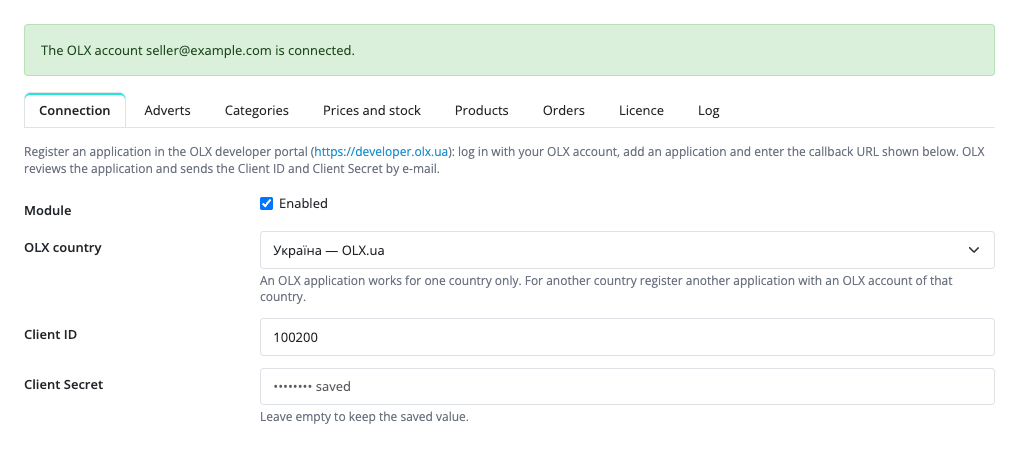
Extensions → Modules → OLX Connector: the Connection, Adverts, Categories, Prices and stock, Products, Orders, Licence and Log tabs. On the Connection tab you choose the OLX country, enter the Client ID and Client Secret, copy the Callback URL shown there into your OLX application and press “Connect the OLX account”: OLX asks you to log in and allow access. The secret is stored encrypted and is never put back into the form.
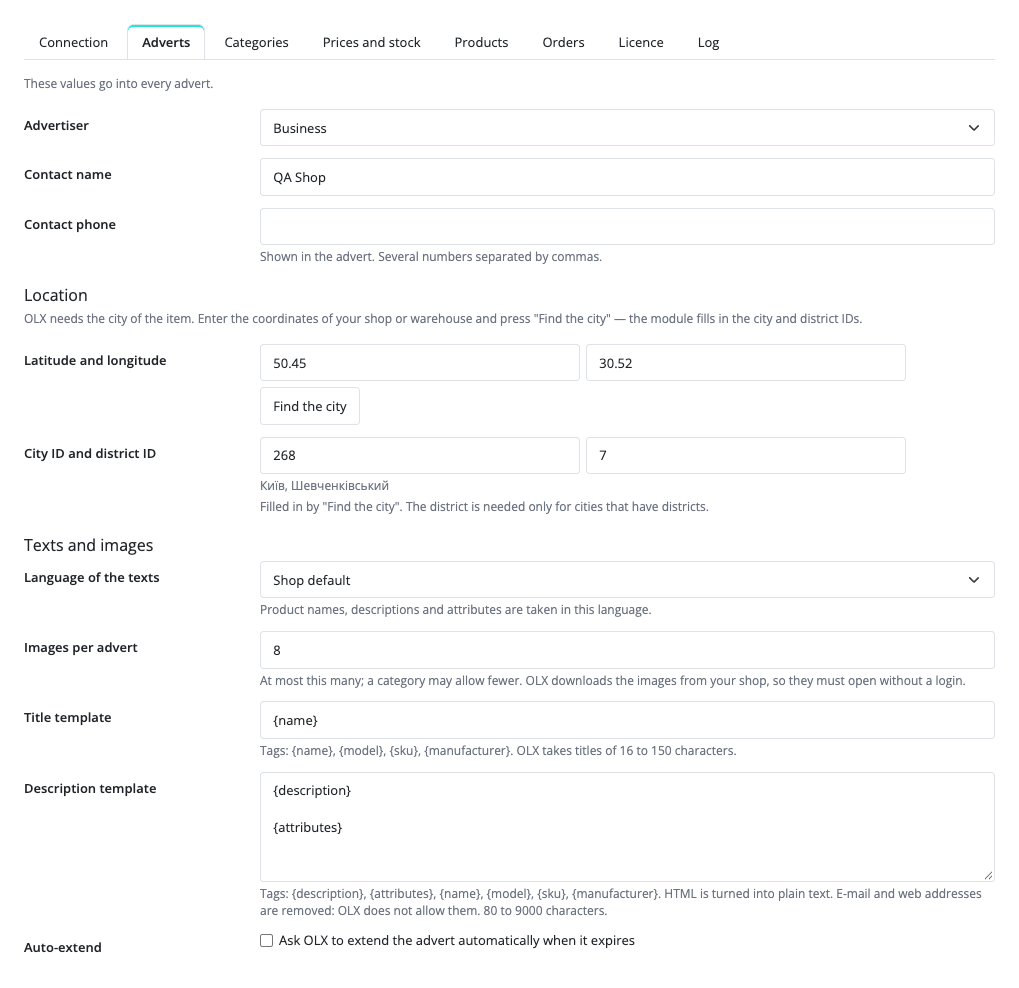
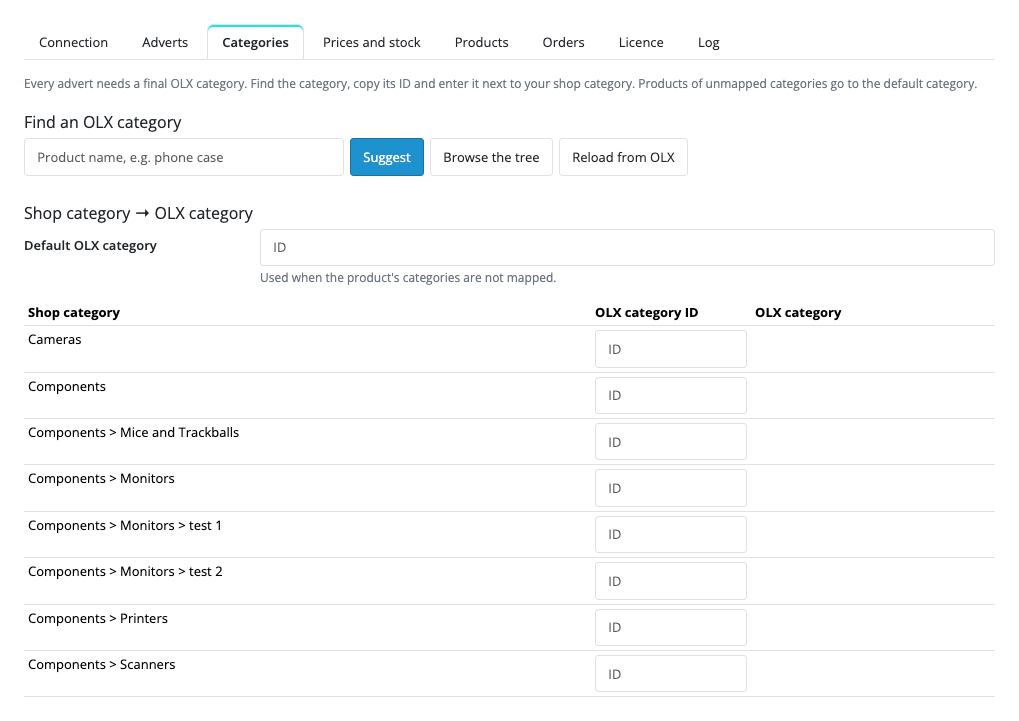
The Adverts tab holds what goes into every advert: private person or business, name and phone, the city (you enter the coordinates of the shop and “Find the city” fills in the OLX city and district), the language of the texts and the number of images. On the Categories tab “Suggest” finds an OLX category by product name and “Browse the tree” shows all categories; for categories with required attributes you set where each value comes from: a fixed value or a product attribute.
The product form gets an OLX tab: “Sell this product on OLX”, plus a title and a category of its own for this product. “Check” shows the advert as it will be sent: title, category, price, stock, number of images, and what exactly is in the way when it is not ready. “Publish on OLX” creates the advert; after that the same tab has Update, Deactivate, Activate, Extend and Delete, the advert number with a link, its state and expiry date. One product is one advert: product options are not published as separate adverts, and the stock is the quantity of the product.
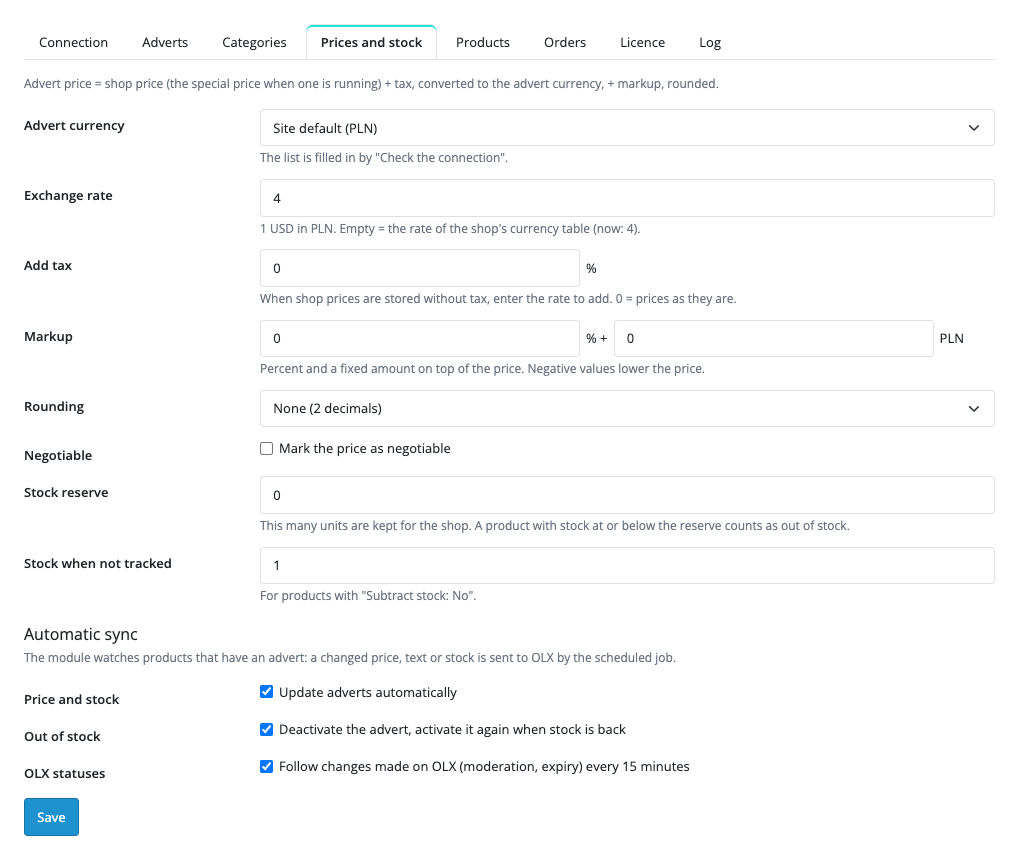
The advert price is calculated from the shop price (the special price when one is running): plus tax, the exchange rate to the advert currency, a markup in percent and as a fixed amount, and rounding. The stock reserve keeps a set number of units for the shop. In Pro the module watches the products that have an advert: when the price, text or stock changes, the scheduled job sends the change to OLX; when the stock reaches the reserve the advert is deactivated, and activated again when the stock is back. Pro also reads moderation and expiry from OLX, publishes a whole shop category with one button and applies the title and description templates.
OLX opens orders through its API in Poland only. For a Polish account Pro turns an OLX order into an OpenCart order, lowers the stock, keeps the status in step with OLX and adds a panel to the order page with Accept, Shipping label (PDF) and cancelling. OLX does not pass the delivery address or the e-mail of the buyer to the seller: the shop order has the invoice details when the buyer gave them, and the delivery address is on the OLX label. For Ukraine and the other countries the Orders tab does nothing yet.
Didn't find the answer? Message us on Telegram and we'll reply within a business day.
 @catcode_support
Setup, compatibility, activation
No, it is an independent integration through the official OLX Partner API. OLX is a trademark of its owner.
First you need an application in the OLX developer portal: OLX reviews the request and gives the Client ID and Client Secret only after approval. How long the review takes is up to OLX.
No. An OLX application works for one country. Another country needs another application registered with an OLX account of that country.
No. One product is one advert, options are not published separately, and the stock is the quantity of the product.
No. OLX opens orders through its API in Poland only; for a Polish account Pro handles them. OLX does not pass the delivery address or the e-mail of the buyer to the seller.
No. Advert packages and promotion are bought in the OLX account.
OpenCart 4.0.2.0–4.1.x, 3.0.x and 2.3.0.2: three separate archives in one product.
Yes, for OpenCart it is one payment and a lifetime licence for two sites.
No reviews yet. Be the first.
No questions yet. Ask one — we answer within 24 hours.
We build custom modules for WordPress, WooCommerce, OpenCart and Shopify. Tell us about the task and we'll prepare an estimate.
Order a custom module
—
Charged in UAH; your bank converts it to your currency. EUR price is approximate.

CatCode assistant
Just now


CatCode assistant
Online

I’ll help with your website task
Describe your website task — I’ll find a ready-made module or pass it to a developer for an estimate. Modules, custom features, layout, integrations, speed, migration, technical SEO.
