WordPress
Marketplace Returns Control for WooCommerce — returns and unclaimed parcels under control
Free + Pro
990 UAH/year
v1.0.0
Enter at least 2 characters
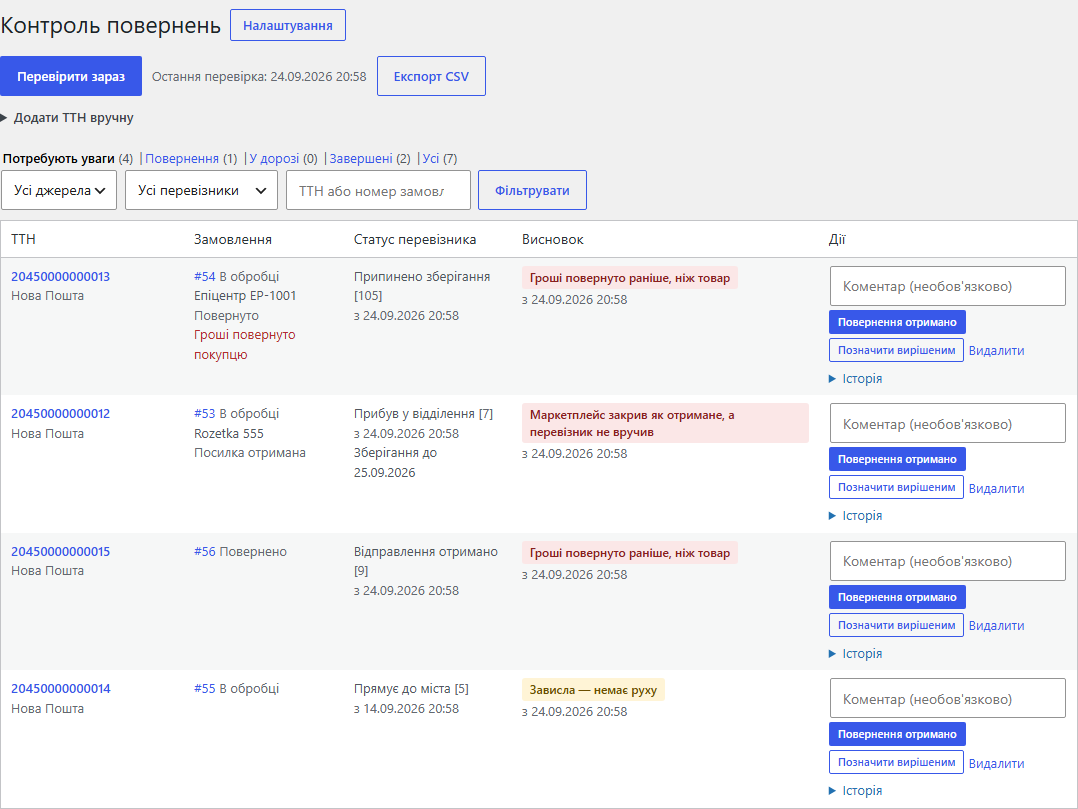
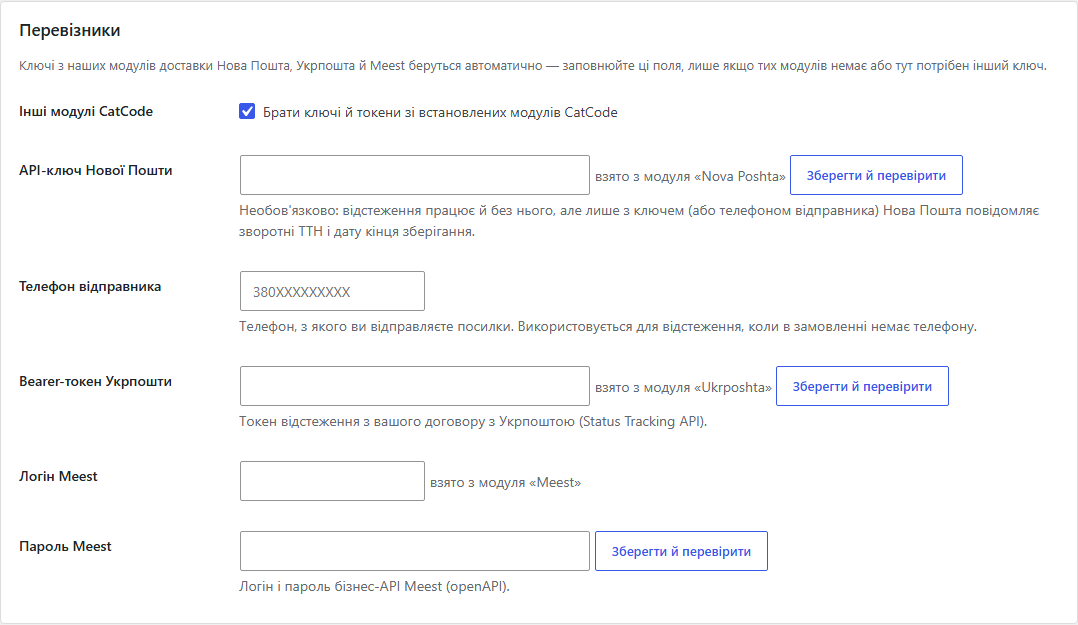
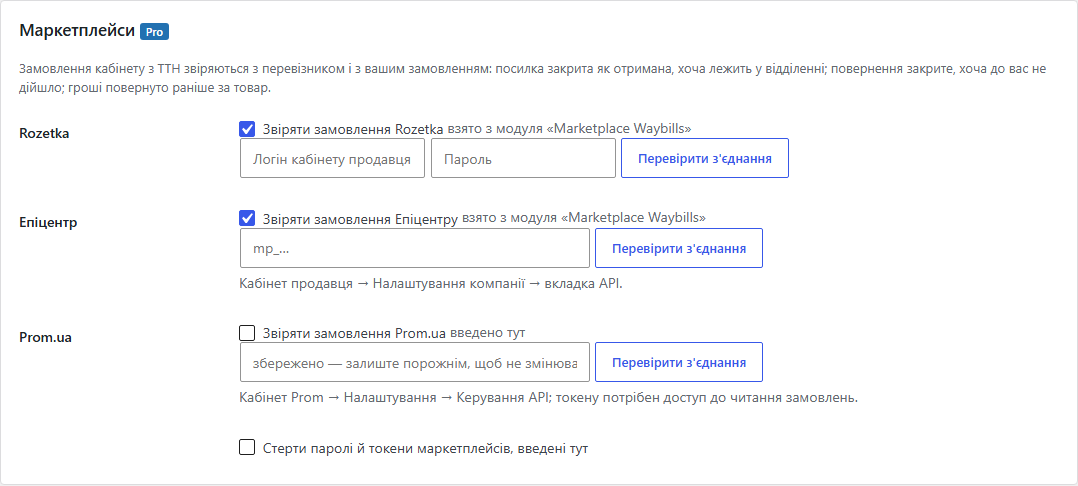
A WooCommerce module that checks the waybills of your orders against Nova Poshta, Ukrposhta and Meest and shows the parcels that need a person: a return "arrived" but the goods are not on the shelf; storage at the branch is ending; a parcel is stuck; the order status contradicts the parcel; money was refunded before the goods came back. Pro also reconciles Rozetka, Prom and Epicentr orders, checks every hour and sends a digest by e-mail and to Telegram.
The free version works with no time limit. Pro adds the rest of the features in the table.


Customers do not see the module: nothing changes on the storefront or at checkout, and there are no extra requests or scripts on the shop pages.

WooCommerce → “Returns control”: the parcel list with the number of problems on the menu item, and “Returns control settings”.

A fresh install is the free version, nothing switches on by itself. The “Try Pro for 7 days” button → e-mail → the key right in the window and by e-mail.

Moving the store? Unbind the licence on the old domain and activate it on the new one yourself. If our server is unreachable, Pro keeps working for 14 more days. For studios — keys for 5 or 25 sites, or unlimited.
 WordPress 6.2+, WooCommerce 7.0+ (tested on WordPress 7.1 and WooCommerce 11.1), PHP 7.4+ (run on PHP 8.3).HPOS and the classic order storage — both tested.Outgoing HTTPS requests from the server to the carrier APIs (and to the marketplace cabinets in Pro).WP-Cron or a system cron — for the hourly check in Pro.For Nova Poshta return waybills — the sender’s key or the recipient’s phone in the order; without them the module tracks the main waybill.
First public release: waybills from orders (Nova Poshta, Ukrposhta, Meest, own meta key, by hand), tracking of three carriers, Nova Poshta return waybills, verdicts (return without…
4 modules in one order — 40% cheaper than separately



Marketplace Returns Control for WooCommerce is a module for shops that ship with Nova Poshta, Ukrposhta or Meest and sell on Rozetka, Prom or Epicentr. A parcel the customer never picked up costs twice: delivery both ways plus goods that are “somewhere on the road”. Worse, a carrier or a marketplace sometimes closes such a parcel as “delivered” or “returned” while it still sits at a branch. A week later nobody remembers that it had to be collected.
The module checks every waybill of your orders against the carrier (with the “Check now” button, in Pro also every hour) and shows only the parcels that need a person. A return is closed not by the carrier status but by your “Return received” — when the goods are really back on the shelf. Waybills and keys come from our Nova Poshta, Ukrposhta and Meest modules, so after installation there is usually nothing to fill in.
Customers do not see the module: nothing changes on the storefront or at checkout, and there are no extra requests or scripts on the shop pages. It works in the admin. Customers notice only the effects: you call them while the parcel is still at the branch, not after it has gone back; the money for a return is refunded when the goods have really arrived; the order status matches what happened to the parcel.
WooCommerce → “Returns control”: the parcel list with the number of problems on the menu item, and “Returns control settings”.
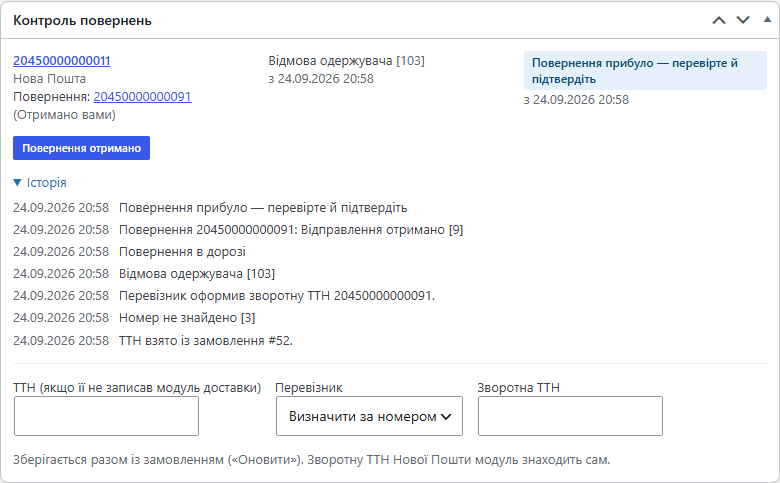
The box on the order screen shows the parcels of this order, the verdict, the “Return received” / “Cancel confirmation” / “Mark resolved” buttons and the history: who confirmed what and when. If no shipping module wrote the waybill, you can type it here and save it with the order.
wp_ccmrc_parcels (one waybill — one row; the order and marketplace data are merged into it) and wp_ccmrc_events (history). Every query goes through $wpdb->prepare().manage_woocommerce capability. Anonymous requests to the handlers are rejected.catcode-marketplace-returns-control-for-woocommerce-1.0.0.zip with the button at the top of the page (or the Pro archive from your account after payment) and install it: Plugins → Add New → Upload Plugin. WooCommerce must be active.Didn't find the answer? Message us on Telegram and we'll reply within a business day.
 @catcode_support
Setup, compatibility, activation
@catcode_support
Setup, compatibility, activation
No. Nova Poshta tracking works without a key. With the sender's key (or with the phone in the order) Nova Poshta also reports the return waybill and the date storage ends. If the key is wrong or expired, the module repeats the request without it and shows a warning in the parcel list saying where to fix the key.
Because the carrier status is exactly what goes wrong: a return marked "delivered to the sender" while the parcel is still at the branch. Such a parcel stays in "Needs attention" until you press "Return received" — that is, until the goods are really back on the shelf.
Enter its meta key in the settings ("Another order meta key") and choose the carrier, or "detect by the number". You can also type the waybill in the "Returns control" box of the order.
Rozetka, Prom.ua and Epicentr. The module reads cabinet orders that have a waybill and compares the marketplace status with the carrier. The link to the WooCommerce order comes from our Marketplace Waybills module; marketplace orders without a WooCommerce order are tracked too. Logins and tokens already entered in our modules are picked up automatically.
Nova Poshta — live, on its API. Ukrposhta, Meest, Rozetka, Prom and Epicentr — by their official documentation on test answers: these services have no public sandbox. So try the module on your own parcels in the 7-day Pro trial, and if some status is read the wrong way, tell us and we will fix it.
Parcels, statuses and history are stored in your site's database. Waybill numbers go only to the carriers (and, in Pro, requests go to the marketplace cabinets you connected). The digest and Telegram go only to the addresses you entered.
In Free — no, it only adds private notes when a problem is found or a return is confirmed (can be turned off). In Pro you can choose the order status after a confirmed return and after a refusal; the default is "do not change".
No reviews yet. Be the first.
No questions yet. Ask one — we answer within 24 hours.
We build custom modules for WordPress, WooCommerce, OpenCart and Shopify. Tell us about the task and we'll prepare an estimate.
Order a custom module
—

CatCode assistant
Just now


CatCode assistant
Online

I’ll help with your website task
Describe your website task — I’ll find a ready-made module or pass it to a developer for an estimate. Modules, custom features, layout, integrations, speed, migration, technical SEO.
