
















OpenCart
990 UAH644 UAH≈ €14
Black November: −35% on all modules until 30 November Black November: −35% until 30 November Choose a module
 Website auditA PDF report by email in 3 minutesCheck a website
Everyday tasks
Image compressorSize, quality and WebP in bulkQR generatorLink, Wi-Fi, payment to IBANVAT calculator20, 14, 7% and amount in wordsTransliterationOfficial Ukrainian standardWebsite checks
PHP and pluginsPHP version, WordPress, pluginsGoogle Merchant feedFields, prices, GTIN, imagesDomain emailSPF, DKIM, DMARC, blacklistsAI search readinessllms.txt, bots, markupAll 9 toolsEnter at least 2 characters

iugu for OpenCart 4.x, 3.x, 2.3 (Brazil): Pix and boleto through an iugu invoice; Pro adds cards with instalments, webhooks, refunds, split, a payments list. Licence for life.
The free version works with no time limit. Pro adds the rest of the features in the table.


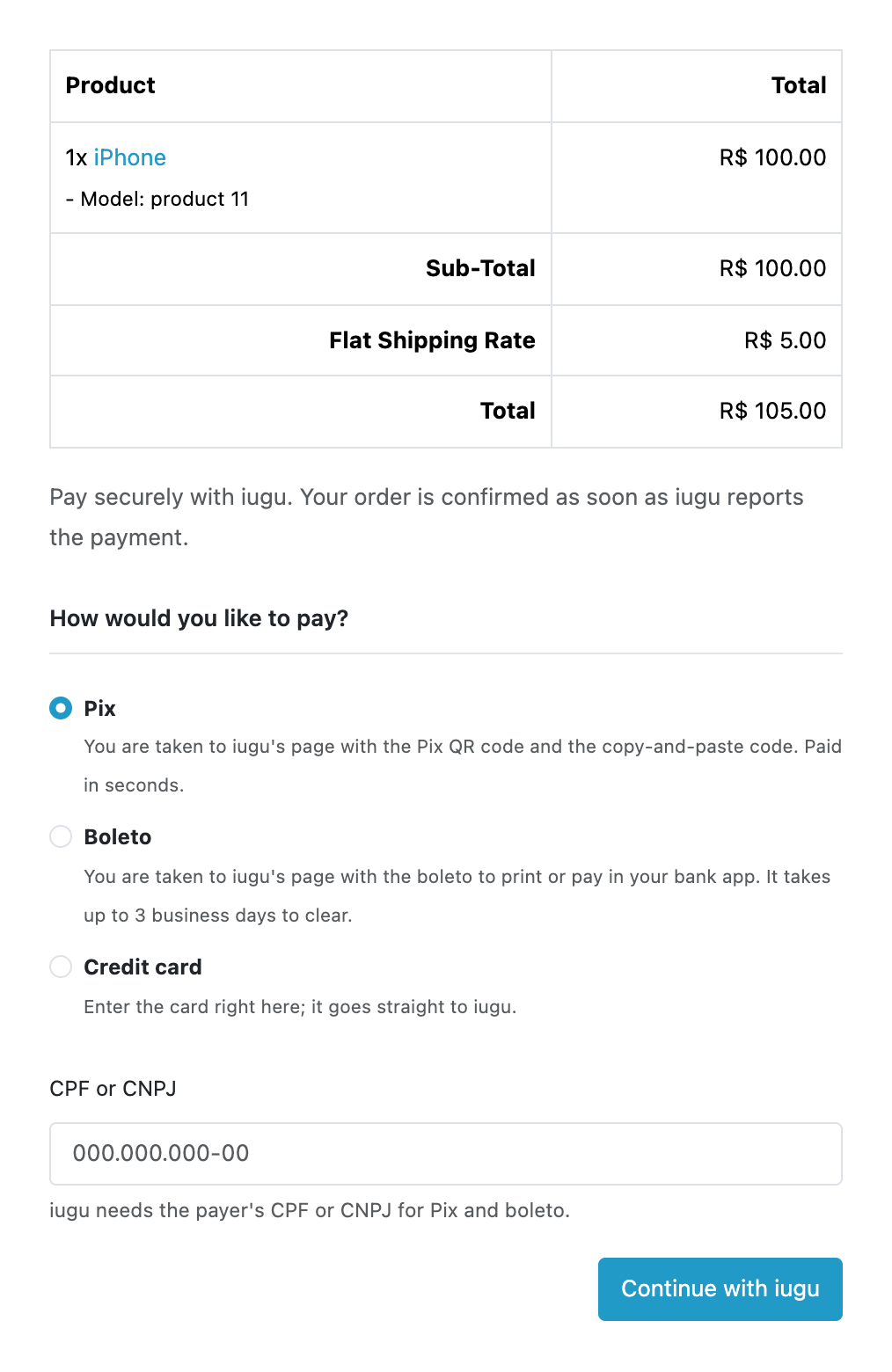
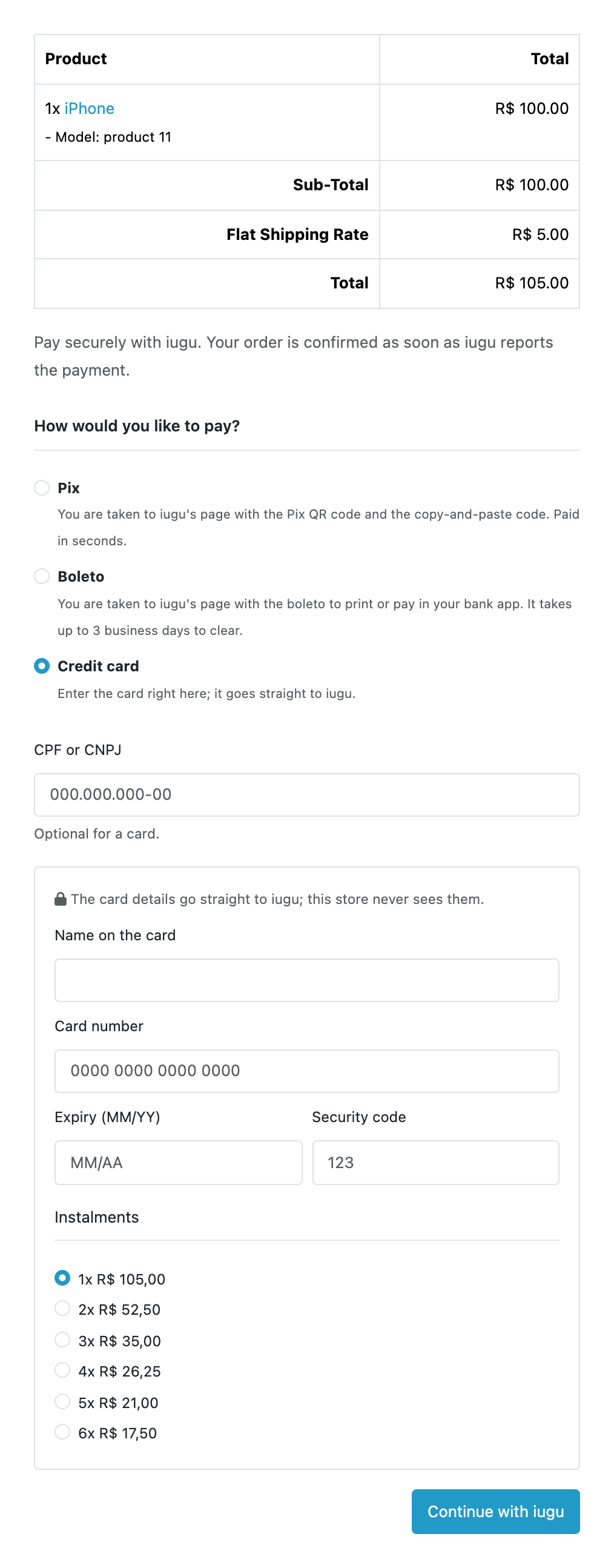
At checkout the shopper chooses Pix, boleto or (in Pro) a card. The CPF or CNPJ is typed by the shopper or taken by the module from a custom field of the store; the check digits are verified, so a wrong number never reaches iugu.

Extensions → Extensions → Payments → iugu by CatCode: tabs for the connection, checkout, order statuses, Pro and the log.

A fresh install is the free version, nothing switches on by itself. The “Try Pro for 7 days” button → e-mail → the key right in the window and by e-mail.

Moving the site? Unlink the licence on the old domain and activate it on the new one yourself. A staging copy (staging., dev.) works with the same key and does not take a site slot. For studios — keys for 5 or 25 sites, or unlimited.
 OpenCart 4.0.2.x–4.1.x, 3.0.x or 2.3.0.2; PHP 7.0+ for 2.3, the cURL extension.An iugu account and API tokens from the Alia dashboard are required. For live payments iugu requires verification of the merchant company in Brazil (CNPJ).Payment currency: BRL. If the session currency is different or the total is below R$ 1.00, the method is not offered at checkout.A boleto needs the payer’s full address: CEP, street and house number in the address_1 field as “Rua X, 123”. Without them iugu rejects the invoice and the shopper sees a message about the address.The free version does not receive webhooks: a boleto paid later is updated only with the “Check status at iugu” button or when the shopper returns to the site. Automatic statuses through webhooks and the cron check are Pro.The order is placed as “awaiting payment” before the payment, so unpaid Pix and boleto stay in the order list until the store cancels them or (in Pro) iugu reports the expiry.Card payments need the Account ID (32 characters from Alia → Configurações → Informações da Conta). An ad blocker in the shopper’s browser blocks iugu.js, and the shopper then sees a message about it. Instalments start at R$ 5 a month; the instalment fees are set in the iugu account.iugu subscriptions and plans are not supported: the module takes a one-off payment for the order.
For OpenCart 4.x, 3.x and 2.3: Pix and boleto through an iugu invoice, CPF/CNPJ with check digits, the order awaiting payment with the payment link, status on the shopper’s return and by a…


iugu by CatCode for OpenCart 4.x, 3.x and 2.3 takes Pix and boleto payments in Brazilian reais through an iugu invoice (fatura) with your own iugu account. The shopper picks the way to pay at checkout, enters a CPF or CNPJ and goes to iugu’s payment page with the Pix QR code or the boleto.
At checkout the shopper chooses Pix, boleto or (in Pro) a card. The CPF or CNPJ is typed by the shopper or taken by the module from a custom field of the store; the check digits are verified, so a wrong number never reaches iugu. The invoice is created with the order total in cents, the payer’s data (name, phone, address, CEP) and the due date you set in the settings.
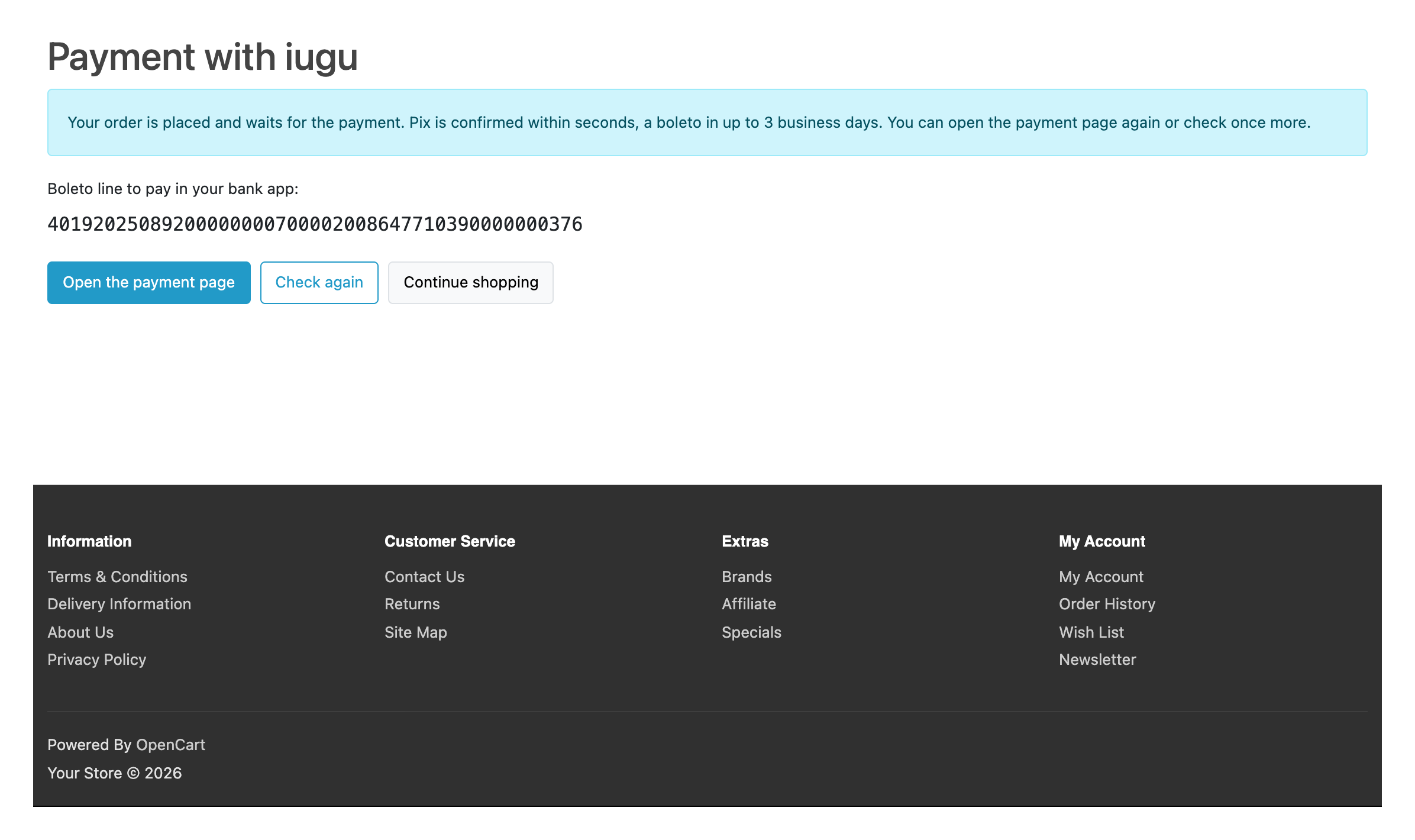
The order is placed as “awaiting payment”, the cart is emptied, and the payment link (for a boleto also the line to pay in the bank app) sits in the order history and in the customer’s e-mail. The shopper is taken to iugu’s page; if they come back without paying, they see an “order waits for the payment” page with the “Open the payment page” and “Check again” buttons.
The module reads the invoice status at iugu and follows iugu’s table of status transitions: a late or repeated answer never undoes a payment that is already booked, and if the paid amount differs from the order, the status stays and a note is left. Two clicks on “Continue with iugu” at the same moment give one invoice, not two.
If iugu is unreachable, answers with an error or rejects the address, the shopper sees a short, clear message, no order is created and the cart stays; the details go to the attempts log.
Extensions → Extensions → Payments → iugu by CatCode: tabs for the connection, checkout, order statuses, Pro and the log. In iugu (Alia → Configurações → Integrações API) create a token of type Teste and one of type Produção, paste them, choose the environment and press “Check connection”: the module shows whether iugu accepted the token and how many invoices the account has. Tokens are stored encrypted and never shown on the page; an empty field keeps the saved token.
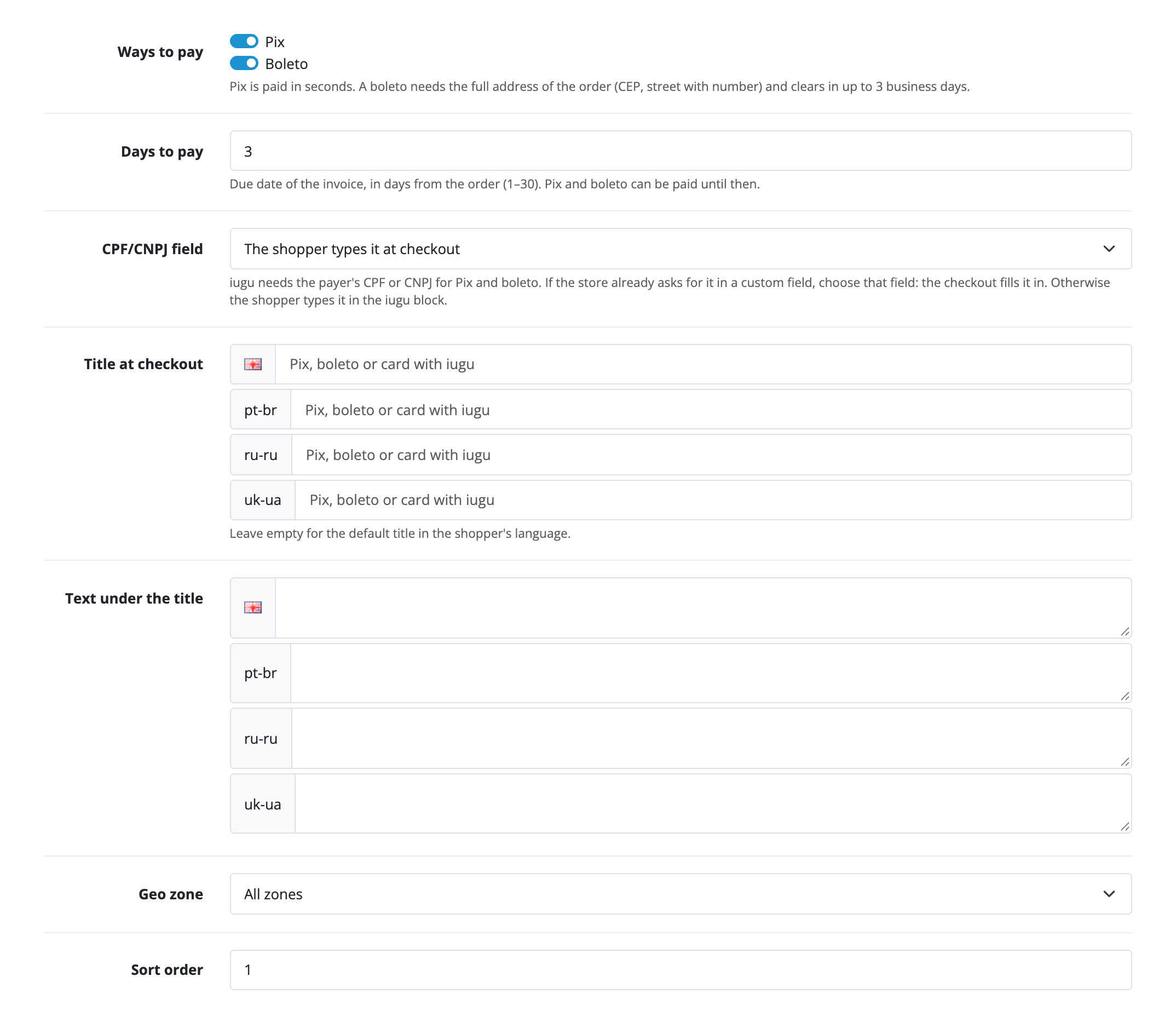
Checkout settings: method title and text for every store language, due date, geo zone, sort order, and the order statuses for “awaiting payment”, “paid”, “cancelled”, “expired” and “refunded”. The module interface is in English and Portuguese (Brazil).
The iugu tab on the order page lists the invoices with the way of payment, state, amount and the event log of each one, and “Check status at iugu” reads the invoice again. In Pro the same tab cancels an invoice and refunds (a card also in part). The payments list with filters, totals and CSV export opens from the settings.
Without a licence the Pro fields are shown disabled with an explanation, and saved Pro values are not sent to iugu. The “Try Pro” button starts a 7-day trial.
Didn't find the answer? Message us on Telegram and we'll reply within a business day.
 @catcode_support
Setup, compatibility, activation
No, it is an independent integration through iugu's public API. iugu is a trademark of its owner.
In the iugu dashboard (Alia): Configurações → Integrações API. Create a token of type Teste for trial payments and Produção for live ones.
Pix and boleto in the free version, a credit card with 2 to 12 instalments in Pro.
No. iugu.js in the shopper's browser creates a one-time token, and only that goes to your server.
In Pro iugu's webhook and the background check change the order status by themselves. In the free version the "Check status at iugu" button on the order updates it.
iugu requires the payer's full address: CEP, street and number. The module takes the number from the address_1 field ("Rua X, 123"); if it is missing, the shopper sees a message about the address and no order is created.
Yes, in Pro: a refund from the order page, for a card also in part.
BRL only. In another currency the method is not shown at checkout.
OpenCart 4.0.2.x–4.1.x, 3.0.x and 2.3.0.2: three separate archives in one product.
Yes, for OpenCart it is one payment and a licence for life, valid on two sites.
Pro switches off, the free part keeps working.
No reviews yet. Be the first.
No questions yet. Ask one — we answer within 24 hours.
We build custom modules for WordPress, WooCommerce, OpenCart and Shopify. Tell us about the task and we'll prepare an estimate.
Order a custom module
—
Charged in UAH; your bank converts it to your currency. EUR price is approximate.

CatCode assistant
Just now


CatCode assistant
Online

I’ll help with your website task
Describe your website task — I’ll find a ready-made module or pass it to a developer for an estimate. Modules, custom features, layout, integrations, speed, migration, technical SEO.