

















OpenCart
Abandoned Cart Recovery for OpenCart 2.3, 3.x and 4.x
Free + Pro
1 290 UAH≈ €26
v1.2.4
 Website auditA PDF report by email in 3 minutesCheck a website
Everyday tasks
Image compressorSize, quality and WebP in bulkQR generatorLink, Wi-Fi, payment to IBANVAT calculator20, 14, 7% and amount in wordsTransliterationOfficial Ukrainian standardWebsite checks
PHP and pluginsPHP version, WordPress, pluginsGoogle Merchant feedFields, prices, GTIN, imagesDomain emailSPF, DKIM, DMARC, blacklistsAI search readinessllms.txt, bots, markupAll 9 toolsEnter at least 2 characters

Innoship courier rates at the OpenCart 4.x, 3.x, 2.3 checkout, AWB from the order; Pro adds AWB by status, tracking, bulk labels. Lifetime licence.
The free version works with no time limit. Pro adds the rest of the features in the table.


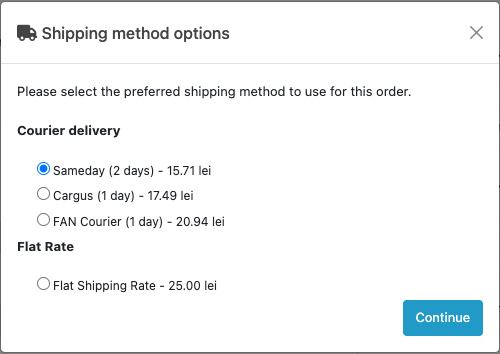
At the OpenCart checkout the buyer sees a “Courier delivery” block with the rates of the couriers you have chosen: name, delivery time (for example “2 days”) and the price in lei.

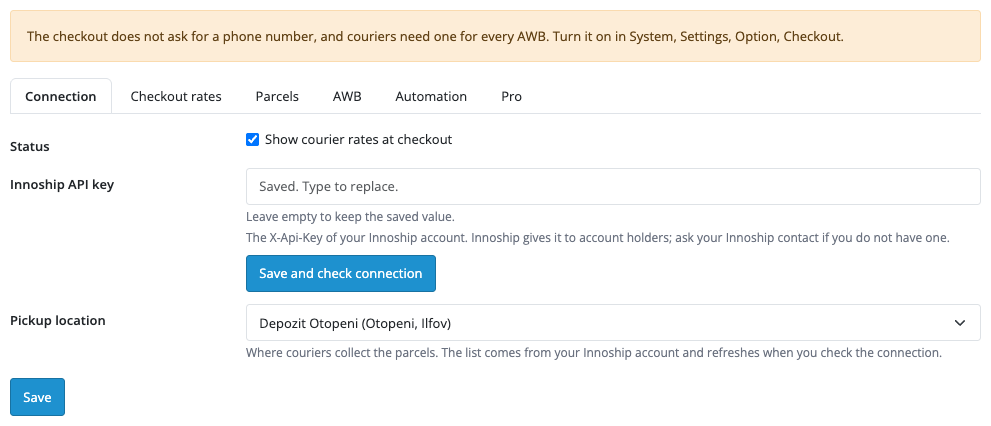
Extensions → Shipping → Innoship Shipping: tabs “Connection”, “Checkout rates”, “Parcels”, “AWB”, “Automation”, “Pro”.

The base version is free. Pro costs 1 290 UAH, a one-time payment for a lifetime licence.

A fresh install is the free version, nothing switches on by itself. The “Try Pro for 7 days” button → e-mail → the key right in the window and by e-mail.

Moving the site? Unlink the licence on the old domain and activate it on the new one yourself. A staging copy (staging., dev.) works with the same key and does not take a site slot. For studios — keys for 5 or 25 sites, or unlimited.
 OpenCart 4.0.2.0–4.1.x, 3.0.x or 2.3.0.2; PHP 7.0+ for 2.3, the cURL extension.An Innoship account with an API key and couriers connected.The Romanian leu (RON) in the shop currency list (System → Localisation → Currencies): Innoship prices in lei are converted to the shop currency at the shop rate.The buyer’s phone number at the checkout (System → Settings → Option → Checkout): couriers need it for every AWB.For OpenCart 3.x and 2.3 the hourly tracking and the follow-up of “Not confirmed” AWBs run from a server cron job with the URL from the settings; OpenCart 4 uses its built-in scheduler.
For OpenCart 4.x, 3.x and 2.3: Innoship courier rates at the checkout, AWB from the order page with the price of every courier shown, cash on delivery, PDF label, status refresh, cancelling, AWB list.



Innoship Shipping for OpenCart 4.x, 3.x and 2.3 connects your Innoship account (the Alsendo group): the rates of the couriers connected to your account, such as Cargus, FAN Courier, Sameday, DPD and GLS, show up at the checkout as ordinary shipping methods, and an AWB is created straight from the order page.
What you need. An Innoship account with an API key (X-Api-Key) and couriers connected: Innoship gives the key to account holders and the courier contracts are made through the Innoship platform. Without a key the module shows nothing at the checkout. Pickup points (lockers, PUDO) are not supported in this version: delivery goes to the buyer’s address.
At the OpenCart checkout the buyer sees a “Courier delivery” block with the rates of the couriers you have chosen: name, delivery time (for example “2 days”) and the price in lei. Innoship calculates the rates from the buyer’s address and the cart weight, and they are cached for 15 minutes. The price can be shown with or without VAT, with a fixed surcharge, and you can set a fallback fixed price for when Innoship does not answer: the cart and the checkout carry on.
Extensions → Shipping → Innoship Shipping: tabs “Connection”, “Checkout rates”, “Parcels”, “AWB”, “Automation”, “Pro”. Paste the API key and press “Save and check connection”: the module checks the key and reads the pickup locations and couriers from the account. The key is stored encrypted and is never shown again.
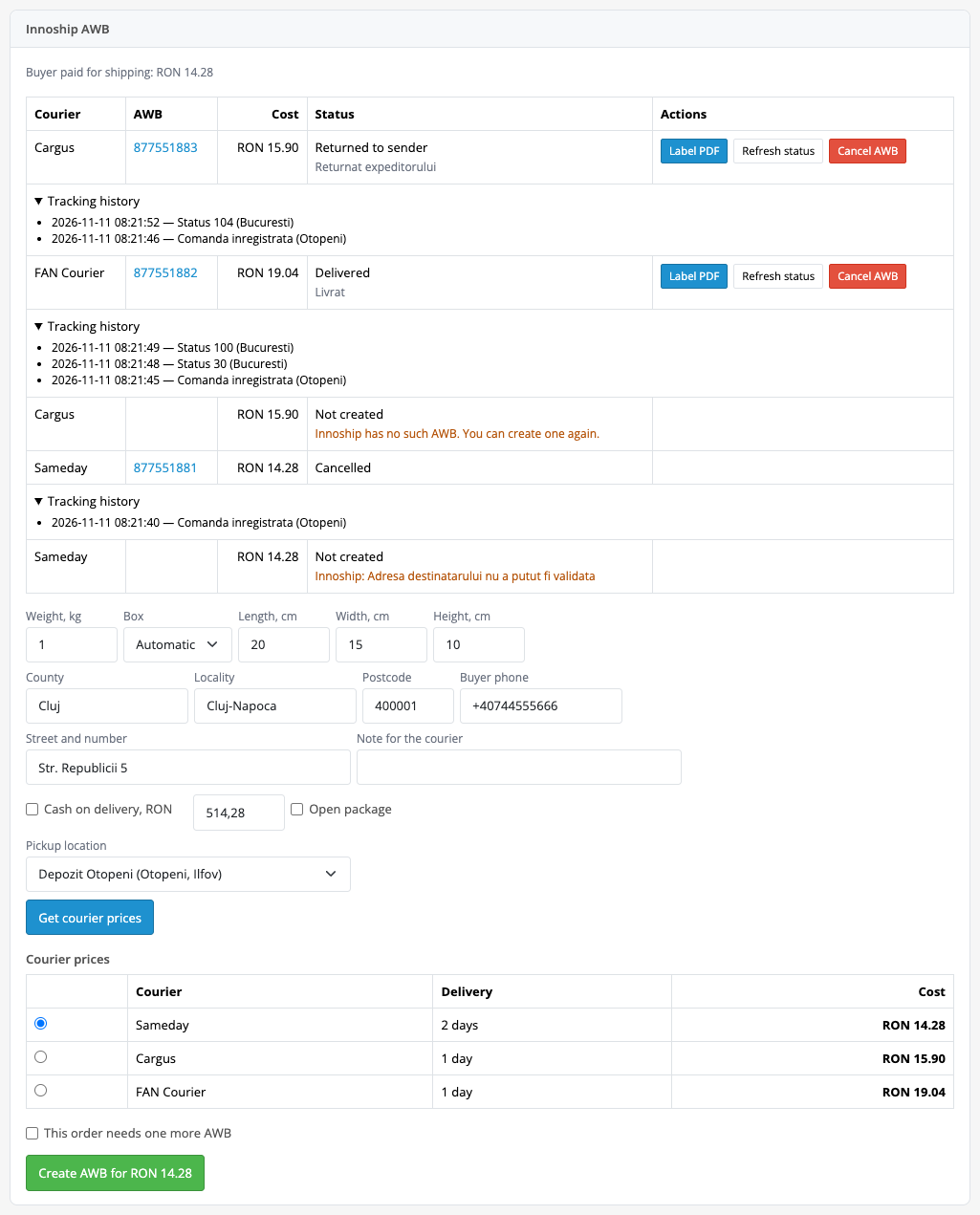
The order page gets an “Innoship AWB” panel. The weight, box and size come from the order, the buyer’s address and phone come from the order data and can be corrected. The “Get courier prices” button shows the price of every courier, you pick one and create the AWB at the price you can see. Cash on delivery (cash or bank account) and package opening can be added.
On the same card: a PDF label (A6, A4, A5, 4xA6, 10×9, 85×85), manual status refresh, the tracking history and AWB cancelling. A double click does not create a second AWB, and if the Innoship answer gets lost, the “Check result” button finds the AWB that was already created by the order number. The buyer gets an e-mail with the AWB number and the order moves to the status you set.
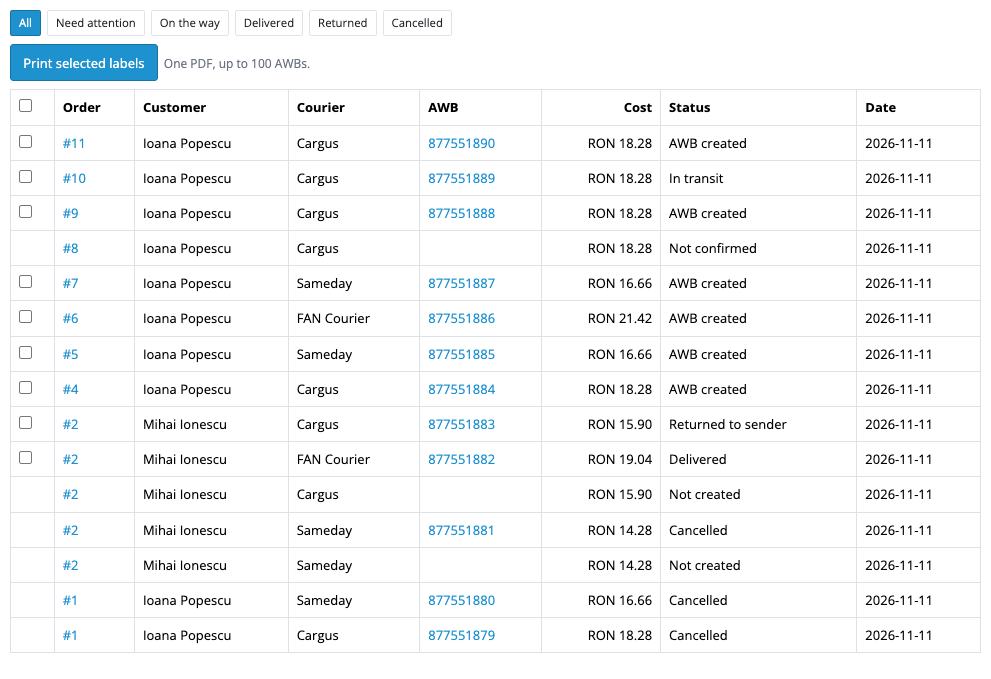
Sales → Innoship AWBs is a list of all shipments with the filters “Need attention”, “On the way”, “Delivered”, “Returned”, “Cancelled”. In Pro, on the “Automation” tab the AWB is created by itself as soon as the order reaches the chosen status; the courier is the buyer’s choice, the cheapest one or the preferred one within the markup percentage you set. Every hour the module reads the tracking of all shipments on their way and sets the “delivered” and “returned” order statuses itself, sending the buyer “on its way” and “delivered” e-mails.
Pro also gives several pickup locations and a second AWB per order (two parcels, for example), bulk printing of labels in one PDF for up to 100 AWBs, a percentage markup, free shipping above an amount and your own boxes with sizes.
Didn't find the answer? Message us on Telegram and we'll reply within a business day.
 @catcode_support
Setup, compatibility, activation
No, it is an independent integration through the public Innoship API. Innoship and Alsendo are trademarks of their owners.
Innoship gives the key (X-Api-Key) to account holders. If you do not have one, ask your Innoship contact. Courier contracts are also made through Innoship.
No, in this version delivery goes to the buyer's address. If your account has services with pickup points, switch the matching courier off in the checkout settings.
Yes, in the free version: cash or bank account, with the amount on the order card. Which option applies depends on the courier's contract.
The rates are not shown, or the fallback fixed price applies if you have switched it on. The cart and the checkout keep working.
OpenCart 4.0.2.0–4.1.x, 3.0.x and 2.3.0.2: three separate archives in one product.
Yes, for OpenCart it is one payment and a lifetime licence for two sites.
No reviews yet. Be the first.
No questions yet. Ask one — we answer within 24 hours.
We build custom modules for WordPress, WooCommerce, OpenCart and Shopify. Tell us about the task and we'll prepare an estimate.
Order a custom module
—
Charged in UAH; your bank converts it to your currency. EUR price is approximate.

CatCode assistant
Just now


CatCode assistant
Online

I’ll help with your website task
Describe your website task — I’ll find a ready-made module or pass it to a developer for an estimate. Modules, custom features, layout, integrations, speed, migration, technical SEO.
