
















OpenCart
1 290 UAH839 UAH≈ €17
Black November: −35% on all modules until 30 November Black November: −35% until 30 November Choose a module
 Website auditA PDF report by email in 3 minutesCheck a website
Everyday tasks
Image compressorSize, quality and WebP in bulkQR generatorLink, Wi-Fi, payment to IBANVAT calculator20, 14, 7% and amount in wordsTransliterationOfficial Ukrainian standardWebsite checks
PHP and pluginsPHP version, WordPress, pluginsGoogle Merchant feedFields, prices, GTIN, imagesDomain emailSPF, DKIM, DMARC, blacklistsAI search readinessllms.txt, bots, markupAll 9 toolsEnter at least 2 characters

iDoklad for OpenCart 4.x, 3.x, 2.3 (Czech Republic): invoices from orders, IČO and DIČ at the checkout, PDF; Pro adds invoices by status, payments both ways, credit notes, a journal. Lifetime licence.
The free version works with no time limit. Pro adds the rest of the features in the table.


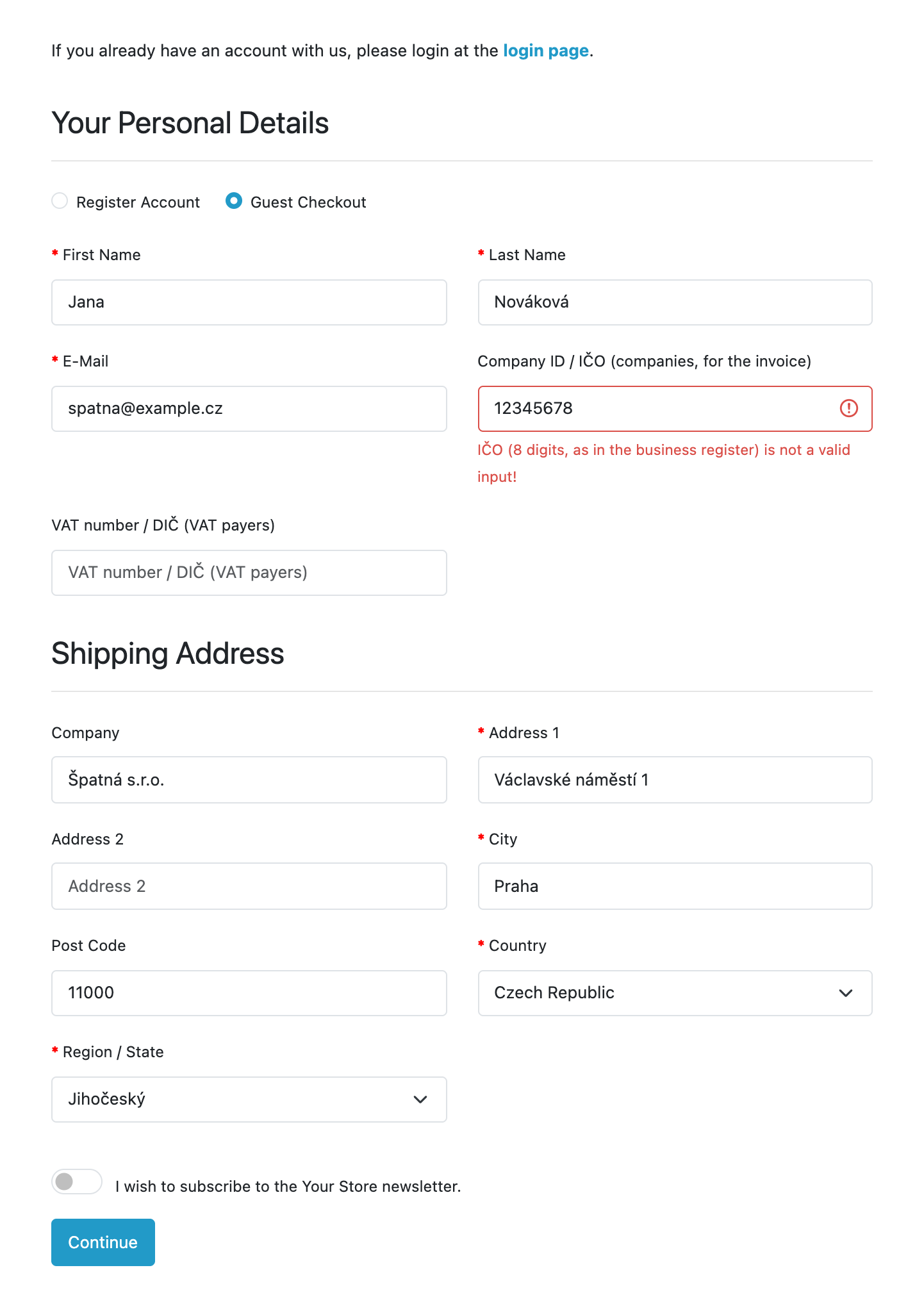
At the checkout the buyer sees the optional fields «Company ID / IČO» and «VAT number / DIČ».

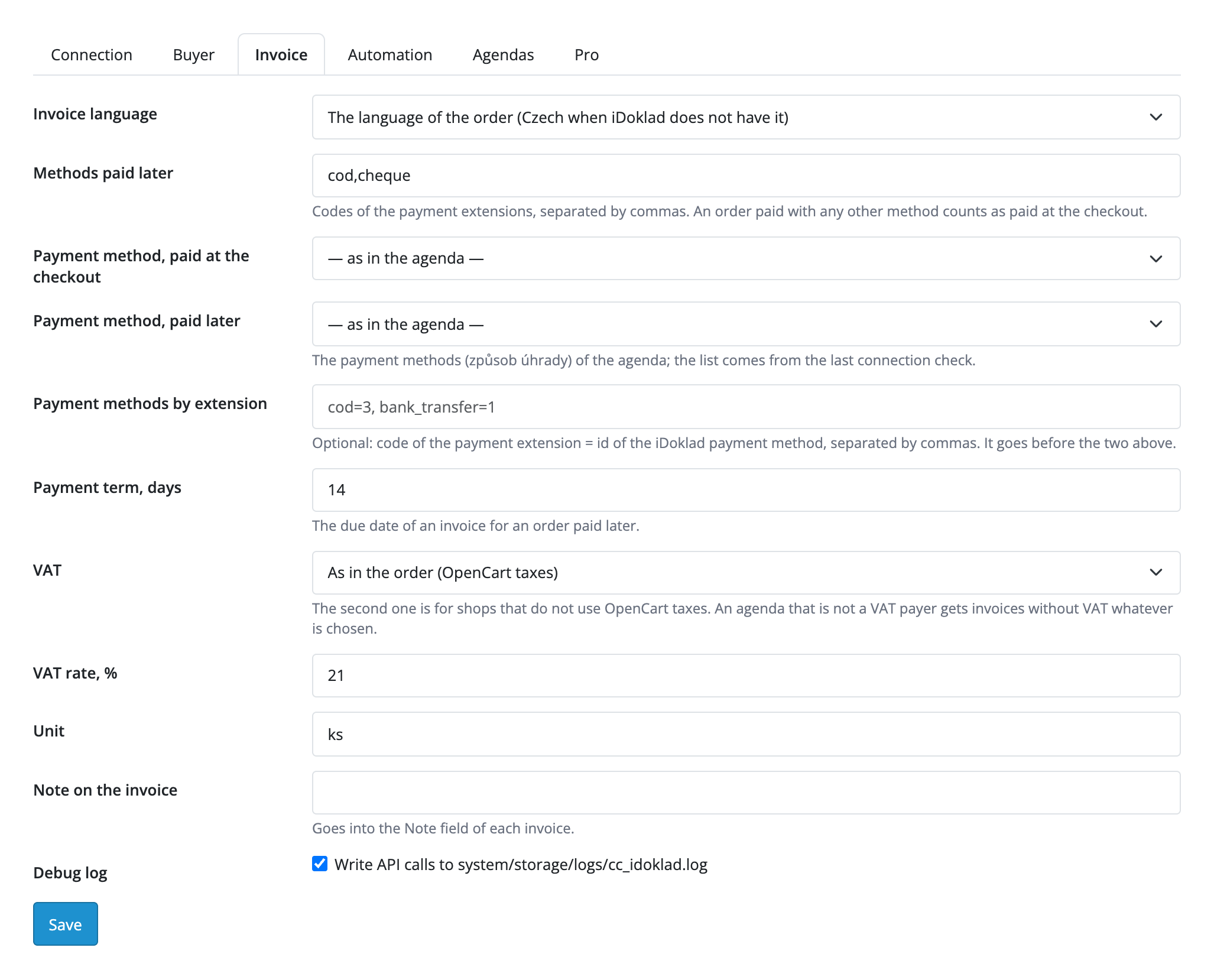
Extensions → Extensions → Modules → iDoklad Invoices (CatCode): tabs «Connection», «Buyer», «Invoice», «Automation», «Agendas» and «Pro».

A fresh install is the free version, nothing switches on by itself. The “Try Pro for 7 days” button → e-mail → the key right in the window and by e-mail.

Moving the site? Unlink the licence on the old domain and activate it on the new one yourself. A staging copy (staging., dev.) works with the same key and does not take a site slot. For studios — keys for 5 or 25 sites, or unlimited.
 OpenCart 4.0.2.x–4.1.x, 3.0.x or 2.3.0.2; PHP 7.0+ for 2.3, the cURL extension.An iDoklad agenda with API access is required. Each store registers its own application in the iDoklad Developer portal and pastes its Application ID together with the Client ID and Client Secret of the agenda; a step-by-step hint is in the settings.The iDoklad webhook is only an addition to the check by the schedule: the store owner creates the webhook definition in their own Developer portal application (the store address and a secret) and presses «Save and subscribe the agenda». Without the webhook, payments come back through the check by the schedule.The payment check goes in portions of up to 40 documents per request to the invoice list of the agenda, to stay inside the request limits of the iDoklad API. A payment that iDoklad showed in its list late is picked up by the next pass.On OpenCart 4 the check and the queue run through the built-in scheduler once an hour; on 3.x and 2.3, and for a faster run, call the cron URL from the settings on your hosting every 5 minutes.The invoice is made in the agenda with its VAT rates. An agenda that is not a VAT payer gets invoices without VAT whatever the settings are.The order status after a payment from iDoklad is written directly, without an e-mail to the buyer and without OpenCart core events.An additional agenda or a second číselná řada in the Pro slots is connected with its own Client ID and Secret; the module continues the numbering of the series from the last number.
For OpenCart 4.x, 3.x and 2.3: invoices from orders in iDoklad through API v3, contacts with IČO and DIČ, the VAT rates of the agenda, coupon and shipping in the total, IČO and DIČ fields…


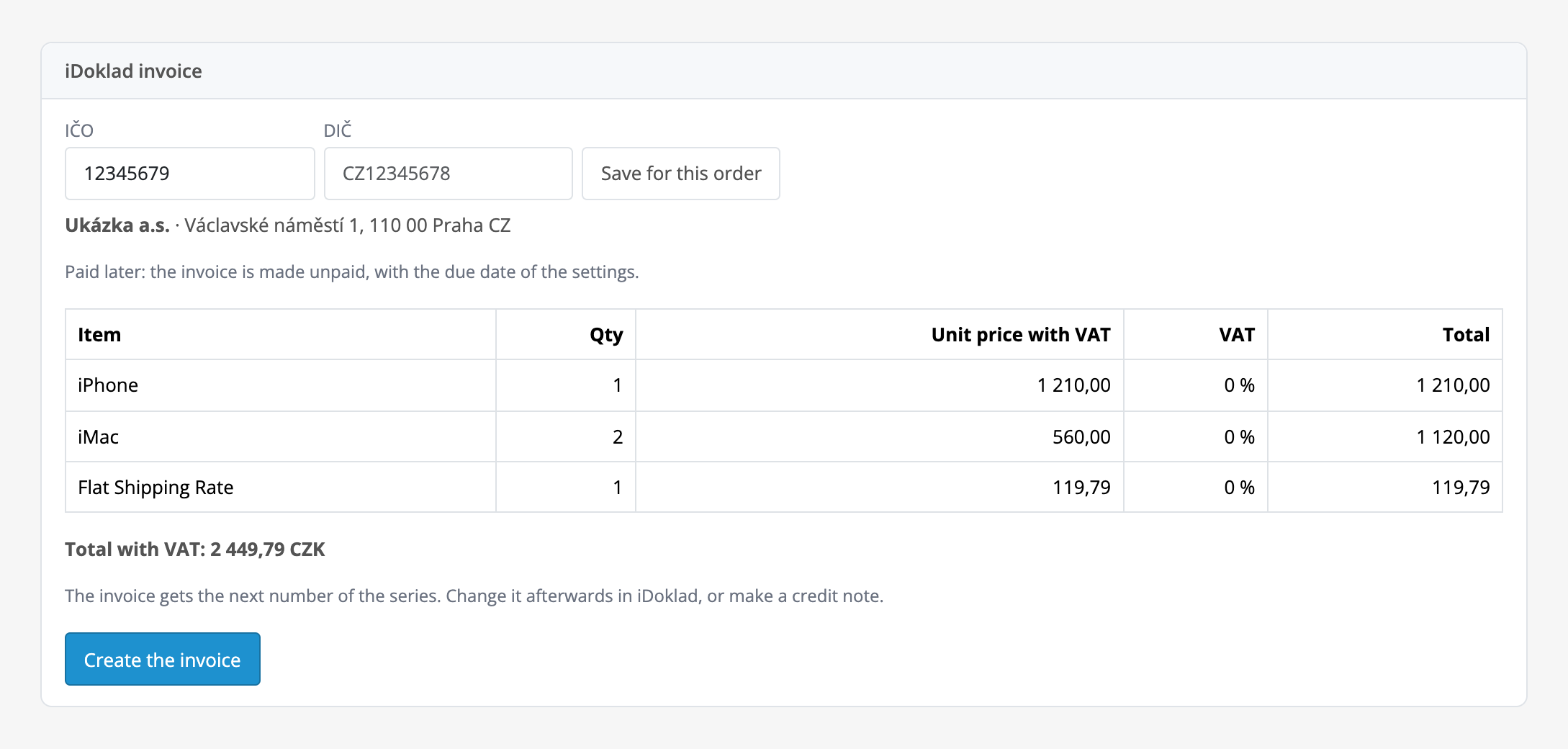
iDoklad Invoices for OpenCart 4.x, 3.x and 2.3 creates Czech invoices in iDoklad from the orders of your store through the iDoklad API v3. One «Create the invoice» button in the order shows the rows with prices including VAT and sends the document to your iDoklad agenda; the buyer is saved as an iDoklad contact with IČO and DIČ, and the PDF of the invoice opens right from the order.
At the checkout the buyer sees the optional fields «Company ID / IČO» and «VAT number / DIČ». The module tests the check digit of the IČO and the form of the DIČ for the Czech Republic and Slovakia and shows an error next to the field; for a buyer from another country the IČO is not judged. The IČO and DIČ go into the contact and the invoice.
The invoice comes in the language of the order (Czech when iDoklad does not have it), in the currency of the order with the rate of iDoklad, with the due date from the settings. The PDF opens from the order; in Pro iDoklad can e-mail each document itself with the template of your agenda.
Payments made in iDoklad come back into the order automatically: the module checks unpaid invoices and proformas by the schedule, and the iDoklad webhook works in addition to that. The status changes once and never goes back.
Extensions → Extensions → Modules → iDoklad Invoices (CatCode): tabs «Connection», «Buyer», «Invoice», «Automation», «Agendas» and «Pro». Paste the Application ID from the iDoklad Developer portal, the Client ID and the Client Secret of your agenda and press «Save and check the connection»: the module shows the name of the agenda, the IČO, whether it is a VAT payer, and the number of numbering series. The Client ID and Secret are stored encrypted and never shown again.
The «Invoice» tab sets the document language, the methods paid later (cod and cheque by default), the payment methods (způsob úhrady) of your agenda, the payment term in days, the VAT mode, the unit and the note. VAT rates come from the agenda (21, 12 and 0 %); a coupon goes into the row price, shipping and fees carry the remaining tax, and the total is compared with the order.
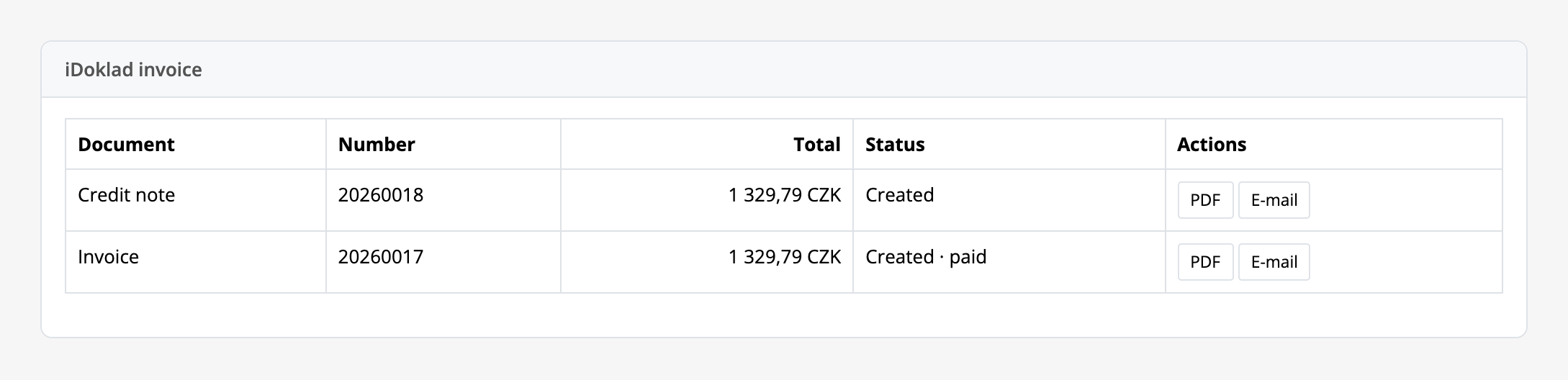
The order page gets an «iDoklad invoice» panel: the IČO and DIČ of the buyer (editable by hand for this order), the preview of the rows and the create button. After that the panel shows the number, the total, the status «unpaid» or «paid» and a PDF button; in Pro also e-mail, credit note and record payment buttons. When a document cannot be created, the panel shows the reason and the buttons to retry or to delete the row.
The «Automation» tab (Pro) creates the invoice at chosen statuses, makes a proforma for orders paid later, records the payment in iDoklad, makes a credit note at a status and turns on payments from iDoklad with the order status «paid in iDoklad». The journal with filters, totals for a period and CSV opens from the settings.
Didn't find the answer? Message us on Telegram and we'll reply within a business day.
 @catcode_support
Setup, compatibility, activation
No, it is an independent integration through the public API. iDoklad is a trademark of its owner.
An account with an agenda and API access, and a free developer account at developer.idoklad.cz for the Application ID, plus the Client ID and Client Secret of the agenda.
In the free version with one button in the order. Automatically by order status in Pro.
Yes, in Pro: payments made in iDoklad come back into the order automatically through the check by the schedule; the iDoklad webhook works in addition to it.
Invoices come without VAT. For a VAT payer the rates 21, 12 and 0 % come from the agenda.
The module tests the check digit of the IČO and the form of the DIČ for the Czech Republic and Slovakia, and does not judge another country. The fields are optional.
Yes, in Pro: a credit note for the whole invoice by a button in the order or at a status.
The document goes into a queue and is retried, and before a new try the module looks for an already created document by the reference, so there is no duplicate.
OpenCart 4.0.2.x–4.1.x, 3.0.x and 2.3.0.2: three separate archives in one product.
Yes, for OpenCart it is one payment and a lifetime licence, for two sites.
Pro switches off, the free part keeps working.
No reviews yet. Be the first.
No questions yet. Ask one — we answer within 24 hours.
We build custom modules for WordPress, WooCommerce, OpenCart and Shopify. Tell us about the task and we'll prepare an estimate.
Order a custom module
—
Charged in UAH; your bank converts it to your currency. EUR price is approximate.

CatCode assistant
Just now


CatCode assistant
Online

I’ll help with your website task
Describe your website task — I’ll find a ready-made module or pass it to a developer for an estimate. Modules, custom features, layout, integrations, speed, migration, technical SEO.