
















OpenCart
1 290 UAH839 UAH≈ €17
Black November: −35% on all modules until 30 November Black November: −35% until 30 November Choose a module
 Website auditA PDF report by email in 3 minutesCheck a website
Everyday tasks
Image compressorSize, quality and WebP in bulkQR generatorLink, Wi-Fi, payment to IBANVAT calculator20, 14, 7% and amount in wordsTransliterationOfficial Ukrainian standardWebsite checks
PHP and pluginsPHP version, WordPress, pluginsGoogle Merchant feedFields, prices, GTIN, imagesDomain emailSPF, DKIM, DMARC, blacklistsAI search readinessllms.txt, bots, markupAll 9 toolsEnter at least 2 characters

factureaza.ro Invoices for OpenCart 4.x, 3.x, 2.3 (Romania): an invoice from an order in one click, CUI/CNP at the checkout; Pro adds automation by status, proformas, payments, e-Factura, storno. Licence for life.
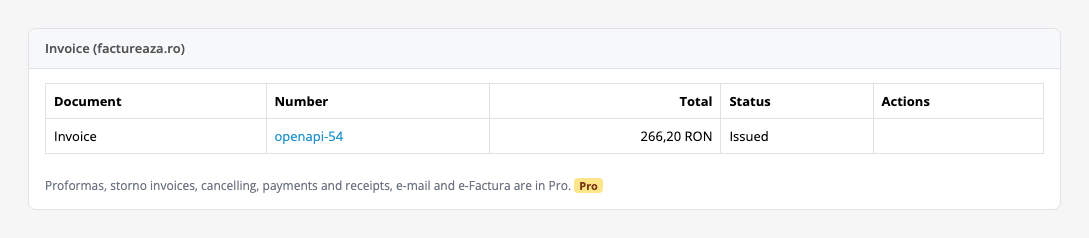
The free version works with no time limit. Pro adds the rest of the features in the table.


The manager opens an order and sees the “Invoice (factureaza.ro)” box: the CUI, Reg.

Extensions → Extensions → Modules → factureaza.ro Invoices: the tabs “Connection”, “Buyer”, “Invoice”, “Pro: automation” and “Licence”.

A fresh install is the free version, nothing switches on by itself. The “Try Pro for 7 days” button → e-mail → the key right in the window and by e-mail.

Moving the site? Unlink the licence on the old domain and activate it on the new one yourself. A staging copy (staging., dev.) works with the same key and does not take a site slot. For studios — keys for 5 or 25 sites, or unlimited.
 OpenCart 4.0.2+, 3.0.x or 2.3.0.2; PHP 7.0+ for 2.3, the cURL extension.A factureaza.ro account with an API key (Contul meu → Cheie API); the API must be part of the subscription, and every subscription has its own limit of requests per hour, day and month.An invoice series in factureaza.ro for the current year with the same prefix as in the settings; on 1 January the series of the new year is needed, otherwise invoices stop with an explanation.The “Region / State” field at the checkout must be required; for orders in another currency the shop must have the RON currency (System → Localisation → Currencies).For e-Factura (Pro) the e-Factura integration must be on in the factureaza.ro account; for Bucharest the city or the address of the order must say “Sector 1” … “Sector 6”.A storno reverses the whole invoice; a partial return is done by hand in factureaza.ro. OpenCart gift vouchers and fixed-amount taxes are not supported.On OpenCart 3.x and 2.3 the regular tasks run when pages are opened; a server cron on the address from the settings every 5 minutes makes it more dependable. OpenCart 4 uses its built-in scheduler, once an hour.
For OpenCart 4.x, 3.x and 2.3: invoices from orders in factureaza.ro, the client found or made automatically, the CUI, trade register number and CNP fields with an optional check, a table…


factureaza.ro Invoices for OpenCart 4.x, 3.x and 2.3 creates invoices in factureaza.ro straight from shop orders: the module shows the buyer, the CUI and the total on the order page, and after a click on “Issue the invoice in factureaza.ro” the client and the invoice appear in your books and the manager gets the PDF link. The module talks to the GraphQL API of factureaza.ro with the API key of your account.
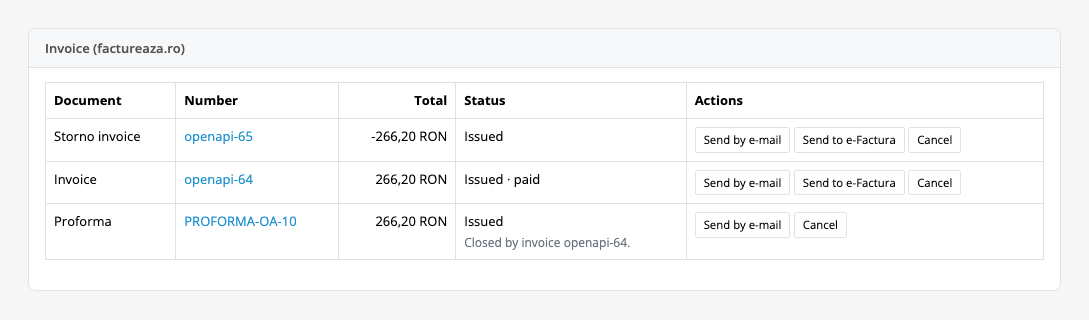
The manager opens an order and sees the “Invoice (factureaza.ro)” box: the CUI, Reg. Com. and CNP fields, the company or private buyer, the address, a table of lines (item, quantity, price with VAT, VAT) and the “Total with VAT”. The “Issue the invoice in factureaza.ro” button issues an invoice with the next number of the series; the box then shows a document row with its number, total, status and the PDF link.
The module looks the client up in factureaza.ro by CUI or CNP, or by name and e-mail, updates it from the order, and creates it when it is not found. A company gets an invoice with its CUI (with or without RO), trade register number and address; a buyer without a CUI gets an invoice as a private person. A coupon goes onto the invoice as rows with quantity −1, shipping and fees go as separate rows, and the VAT rate of each row comes from the OpenCart tax. For an order in another currency the module takes the RON rate from the shop currencies.
Before sending, the module checks that the invoice total equals the order total and makes no document when they differ. If the answer of factureaza.ro is lost, the module looks the document up by the order reference in its note and does not make a second one. One invoice per order: a second click says the invoice already exists.
Extensions → Extensions → Modules → factureaza.ro Invoices: the tabs “Connection”, “Buyer”, “Invoice”, “Pro: automation” and “Licence”. In factureaza.ro open “Contul meu” → “Cheie API” and copy the key (you can limit what it may do there: the module needs to read and write clients and invoices, and for Pro also proformas, payments and receipts), choose the environment (live or the test environment of factureaza.ro) and press “Save and check the connection”: the module shows your company name, its CUI and the invoice series of the current year. The key is stored encrypted and is not shown again.
The “Buyer” tab: the “Create the fields” button creates optional CUI, Reg. Com. and CNP fields for all customer groups, and “Check the numbers” makes the checkout refuse a Romanian CUI or CNP with a wrong check digit (off by default). The “Invoice” tab: the prefix of the invoice series (factureaza.ro keeps a series per year and the series must exist for the current year), the unit of measure, the product code (Model or SKU), the payment term, the methods paid later, the VAT mode (from the order, or prices with VAT at a default rate), whether your company charges VAT, and a note on the invoice.
The module speaks English and Romanian and shows amounts in the shop format. The box on the order page also tells what is missing: the buyer address, the region (needed by e-Factura), the sector for a Bucharest address, a company without a CUI.
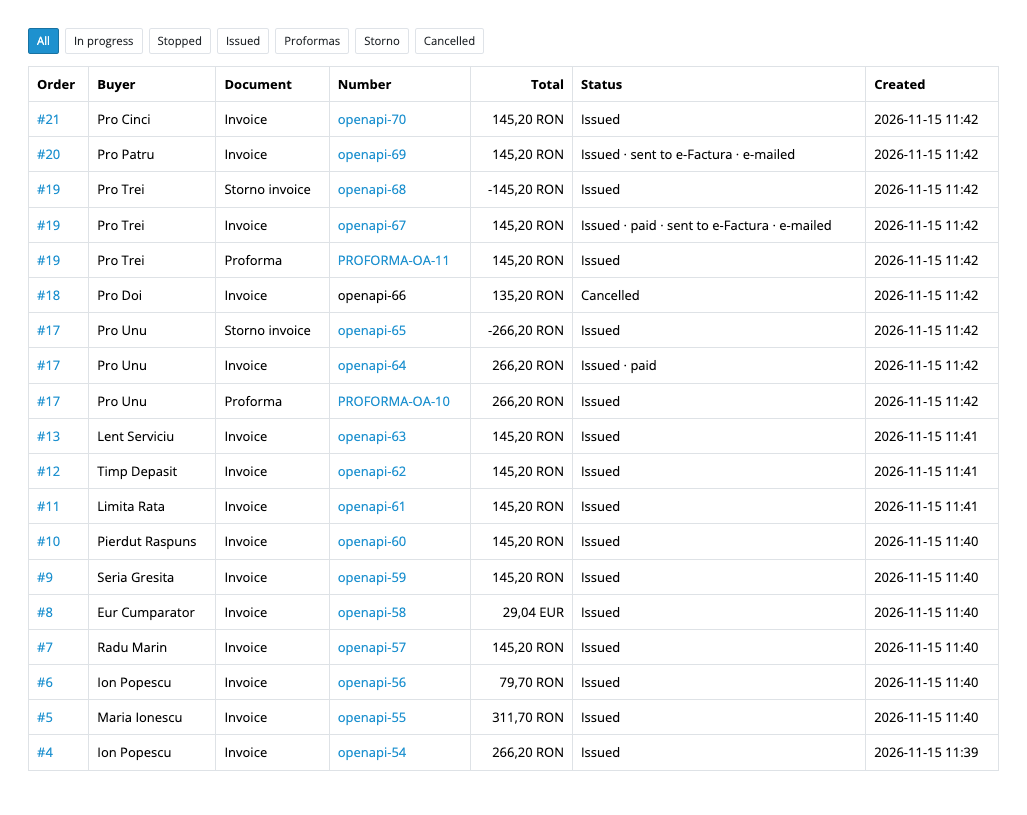
In Pro the “Pro: automation” tab opens invoices at chosen statuses, a proforma by status or button (the invoice made later says it comes from the proforma, and the proforma is closed), a payment right after the invoice for orders paid at the checkout, a payment by status, a chitanță with its own series for chosen methods (such as cash on delivery), the document e-mailed by factureaza.ro, e-Factura to SPV (off, for buyers with a CUI, or for all) with a state button, a storno invoice of the whole order by status or button, and cancelling an invoice, a storno or a proforma, plus separate series for private buyers, storno invoices and proformas. The “factureaza.ro invoices” list in the Sales menu has the filters “In progress”, “Stopped”, “Issued”, “Proformas”, “Storno” and “Cancelled”.
Didn't find the answer? Message us on Telegram and we'll reply within a business day.
 @catcode_support
Setup, compatibility, activation
No, it is an independent integration through the public API. factureaza.ro is a trademark of its owner.
In factureaza.ro: Contul meu → Cheie API. You can make a new key there and limit its rights. A key belongs to one user of one account.
Not for ordinary invoices. Sending to SPV (Pro) needs the e-Factura integration turned on in the factureaza.ro account; your accountant knows which of your invoices must go there.
They get an invoice as private persons. The CNP can be added at the checkout as an optional field; most shops leave it out. For an order with a company name but no CUI the module warns you: enter the CUI in the order box and save it.
Yes: the connection, the CUI/CNP fields, a manual invoice with the table of lines, the PDF, the list with filters, retry and remove all work in the free version. Invoices by status, proformas, payments, chitanță, e-mail, e-Factura, storno and cancelling are in Pro.
factureaza.ro may refuse to cancel an invoice that is paid or sent to SPV: the module shows the reason, and for those cases you issue a storno.
OpenCart 4.0.2+, 3.0.x and 2.3.0.2: three separate archives in one product.
Yes, for OpenCart it is one payment and a licence for life, for two sites.
Pro switches off, Pro tasks in the queue stop with a reason, and the free part keeps working.
No reviews yet. Be the first.
No questions yet. Ask one — we answer within 24 hours.
We build custom modules for WordPress, WooCommerce, OpenCart and Shopify. Tell us about the task and we'll prepare an estimate.
Order a custom module
—
Charged in UAH; your bank converts it to your currency. EUR price is approximate.

CatCode assistant
Just now


CatCode assistant
Online

I’ll help with your website task
Describe your website task — I’ll find a ready-made module or pass it to a developer for an estimate. Modules, custom features, layout, integrations, speed, migration, technical SEO.