
















OpenCart
Viva.com Payments for OpenCart 2.3, 3.x and 4.x — Smart Checkout payments
Free + Pro
1 290 UAH≈ €26
v1.0.1
 Website auditA PDF report by email in 3 minutesCheck a website
Everyday tasks
Image compressorSize, quality and WebP in bulkQR generatorLink, Wi-Fi, payment to IBANVAT calculator20, 14, 7% and amount in wordsTransliterationOfficial Ukrainian standardWebsite checks
PHP and pluginsPHP version, WordPress, pluginsGoogle Merchant feedFields, prices, GTIN, imagesDomain emailSPF, DKIM, DMARC, blacklistsAI search readinessllms.txt, bots, markupAll 9 toolsEnter at least 2 characters

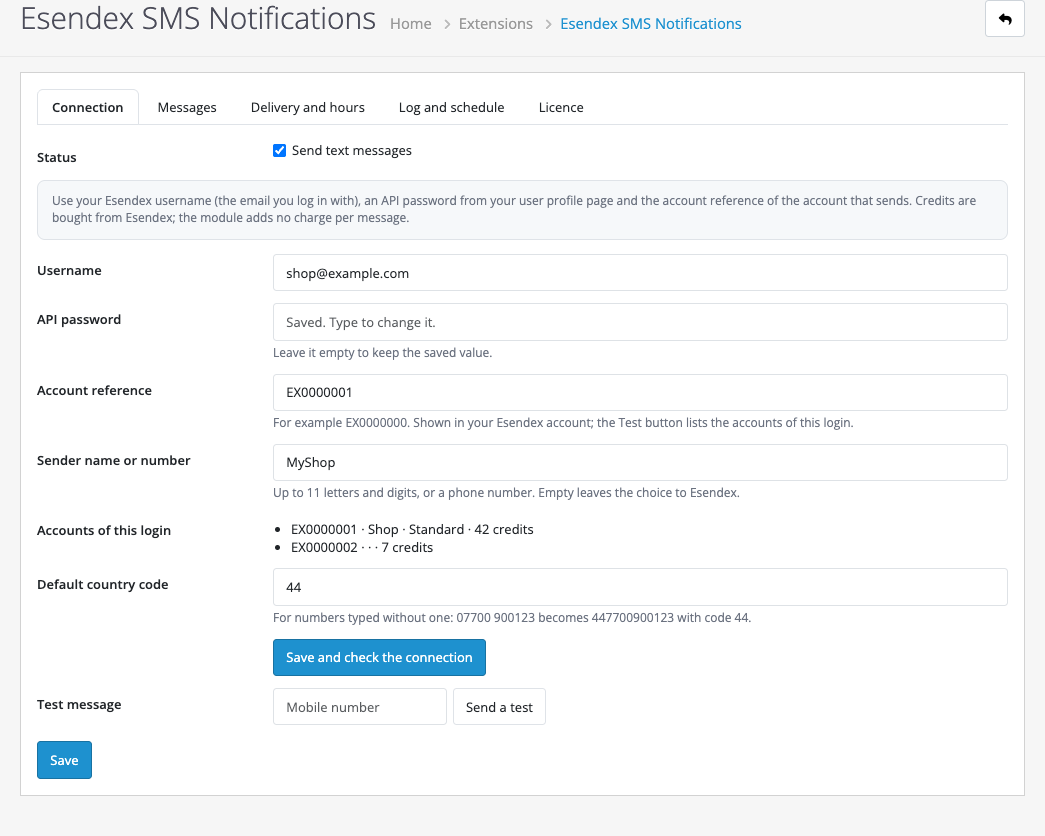
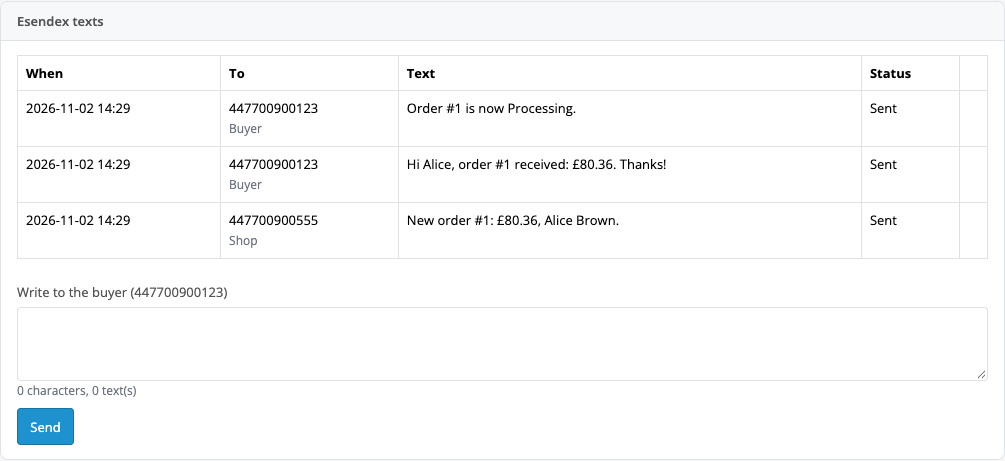
Order texts in OpenCart 4 through your Esendex account: queue, log, no duplicates. Pro adds texts per status, delivery reports and quiet hours.
The free version works with no time limit. Pro adds the rest of the features in the table.


For a new order the buyer gets one text (from a template: name, number, total) and you get an alert on your own number.

Username, API password and account reference (the settings list the credits of every account of the login), a “Save and check the connection” button and a test text.

Your own text for each status, delivery reports (Esendex push notifications: “delivered” or “not delivered” with the reason), an opt-out list check, quiet hours that hold the buyer texts back, and extra shop numbers.

A fresh install is the free version, nothing switches on by itself. The “Try Pro for 7 days” button → e-mail → the key right in the window and by e-mail.

Moving the site? Unlink the licence on the old domain and activate it on the new one yourself. A staging copy (staging., dev.) works with the same key and does not take a site slot. For studios — keys for 5 or 25 sites, or unlimited.
 OpenCart 4.0.2 and newer (4.1 too), PHP 7.4+ (checked on 8.1 and 8.3).An Esendex account with credits.For delivery reports (Pro): enter the push notification address from the module settings at Esendex.
Texts for a new order and a status change, a shop alert, queue, log with CSV.

Esendex SMS Notifications connects OpenCart 4 with your Esendex account: a new order sends a text to the buyer and to you, a status change sends a text to the buyer. You buy credits from Esendex at their rate; the module does not sell SMS.
This module has never run against the real Esendex.
For a new order the buyer gets one text (from a template: name, number, total) and you get an alert on your own number. A status change has its own text: in the free version for one status, in Pro for each status. The same status never sends two texts. British mobile numbers are put into the 447… form by the module; a landline or empty number is skipped and the log says why.
Username, API password and account reference (the settings list the credits of every account of the login), a “Save and check the connection” button and a test text. A log with CSV export and a queue with retries: if Esendex answers with a server error or the credits run out, the text waits and goes again, and after several tries stays in the log with the reason. An order is never blocked by a failed text.
Your own text for each status, delivery reports (Esendex push notifications: “delivered” or “not delivered” with the reason), an opt-out list check, quiet hours that hold the buyer texts back, and extra shop numbers.
The module is not on opencart.com yet: the free version and Pro are one archive. Without a key it works as the free version.
Didn't find the answer? Message us on Telegram and we'll reply within a business day.
 @catcode_support
Setup, compatibility, activation
No, you buy them from Esendex.
No, this module is for OpenCart 4.0.2+ only.
Pro switches off, and texts about new orders keep working.
No reviews yet. Be the first.
No questions yet. Ask one — we answer within 24 hours.
We build custom modules for WordPress, WooCommerce, OpenCart and Shopify. Tell us about the task and we'll prepare an estimate.
Order a custom module
—
Charged in UAH; your bank converts it to your currency. EUR price is approximate.

CatCode assistant
Just now


CatCode assistant
Online

I’ll help with your website task
Describe your website task — I’ll find a ready-made module or pass it to a developer for an estimate. Modules, custom features, layout, integrations, speed, migration, technical SEO.
