Get in touch
  • WordPress
  • Shipping
  • v1.0.1

Conditional Shipping & Payment Rules for WooCommerce — show shipping and payment methods by condition

Hide or keep only the shipping methods and payment gateways that fit: by customer role, a site cookie, city, postcode, weight, cart total and cart contents. WooCommerce classic and block checkout.

Download Free
Pro · one-year licence The more sites, the less each one costs
Compatibility
WordPress 5.6+ · WooCommerce 6.0+ (tested on WP 7.1 / Woo 11.1) · PHP 7.4+ · HPOS · classic and block checkout
Licence
one site, annual
Trial
7 days, no card, one per site
Or all 119 Pro modules with All Access — 4 990 ₴ / year

What Free has,
and what Pro adds

The free version works with no time limit. Pro adds the rest of the features in the table.

Feature Free Pro
"Hide" and "Keep only" actions for shipping methods and payment gateways ✔ ✔
Active rules 1 unlimited
Conditions: customer role (plus "guest" and "any logged-in customer"), country, cart total from / to ✔ ✔
WooCommerce classic and block checkout — one decision made in PHP, HPOS ✔ ✔
The shipping-rate cache is invalidated exactly when a rule's answer changes ✔ ✔
"Never leave the checkout with no method at all" guard ✔ ✔
Decision log in WooCommerce → Status → Logs ✔ ✔
Languages: English, Ukrainian, Russian ✔ ✔
Site cookie condition: name, !name, name=value, name=abc* — ✔
City, state, postcode (exact, 12*, range 10000...20000) — ✔
Cart weight and item count — ✔
Category, product IDs and shipping class in the cart — ✔
Cross conditions: hide a gateway for a shipping method, or a shipping method for a gateway — ✔
Date range — ✔
Rule priority and "match any condition" — ✔

What it looks like

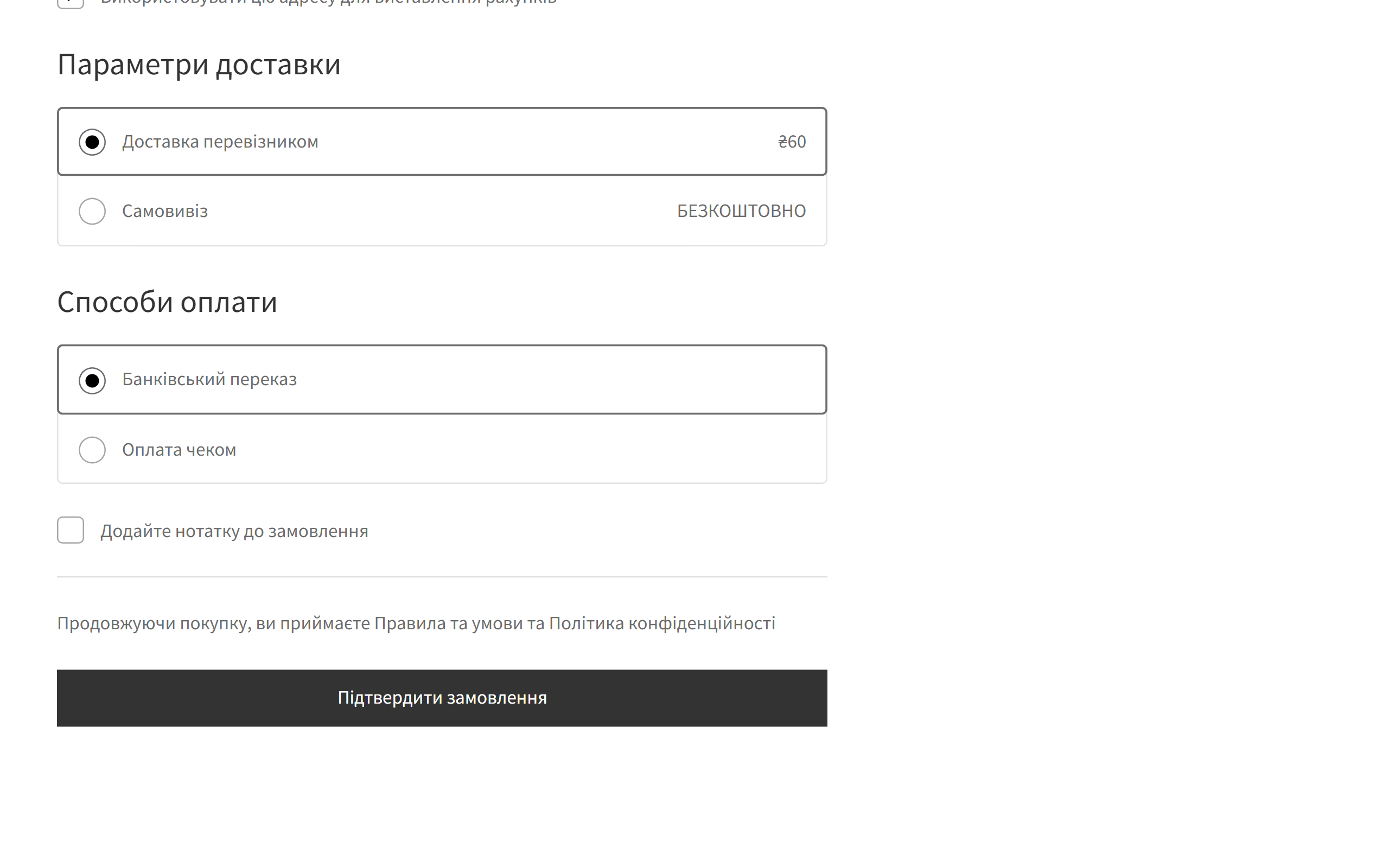
WooCommerce block checkout: cash on delivery hidden by a rule when the courier is chosen
Block checkout, rule “hide cash on delivery for the courier”: Flat rate is selected, so only bank transfer and cheque are left among the gateways. Switch to local pickup and cash on delivery comes back without a reload.
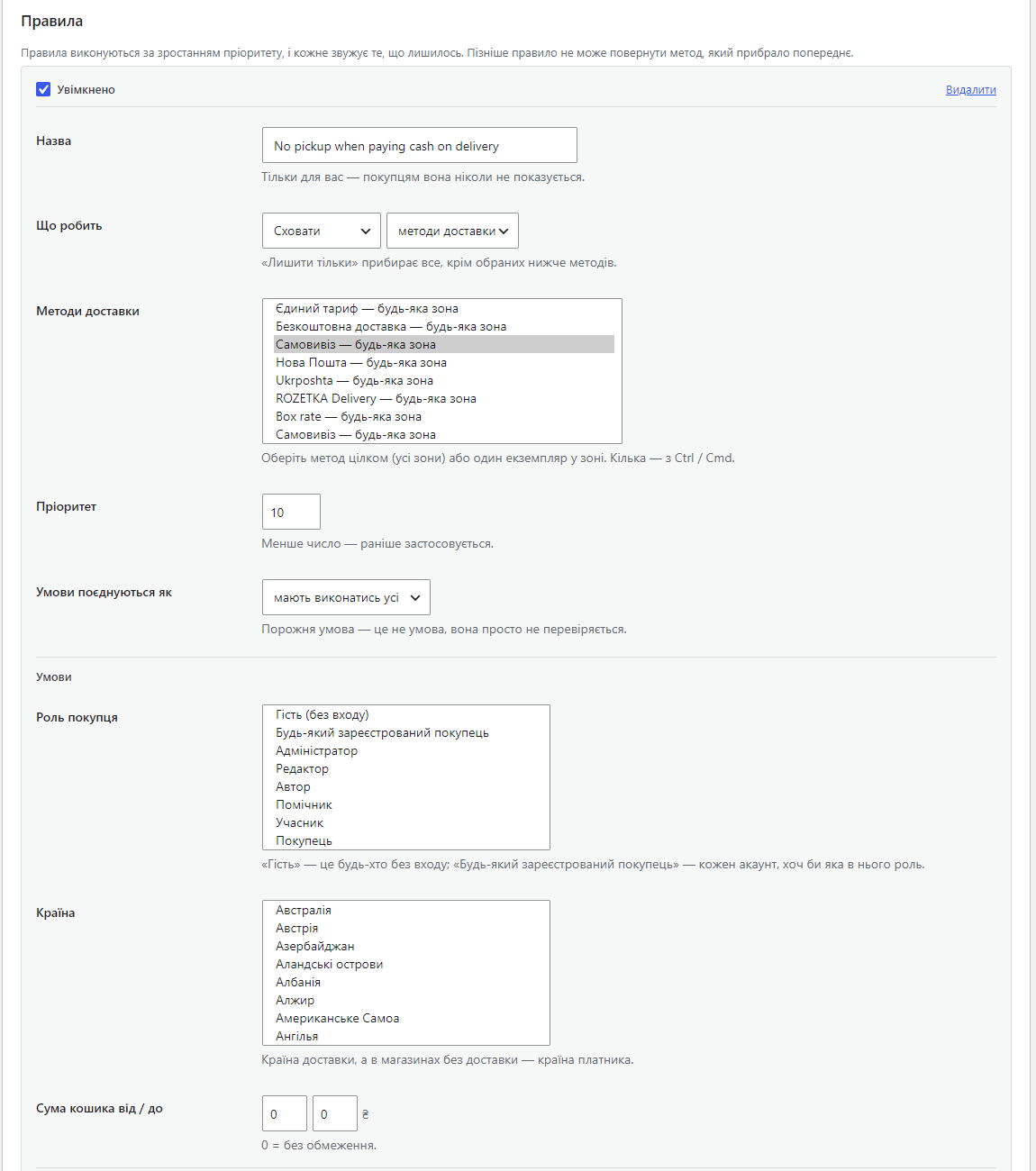
A rule card in the settings: action, shipping methods, priority, customer role, country, cart total
A rule card: “Hide” → shipping methods → Local pickup, priority, how conditions combine, and the free-tier conditions — customer role, country, cart total. The admin on this screenshot is in Ukrainian.
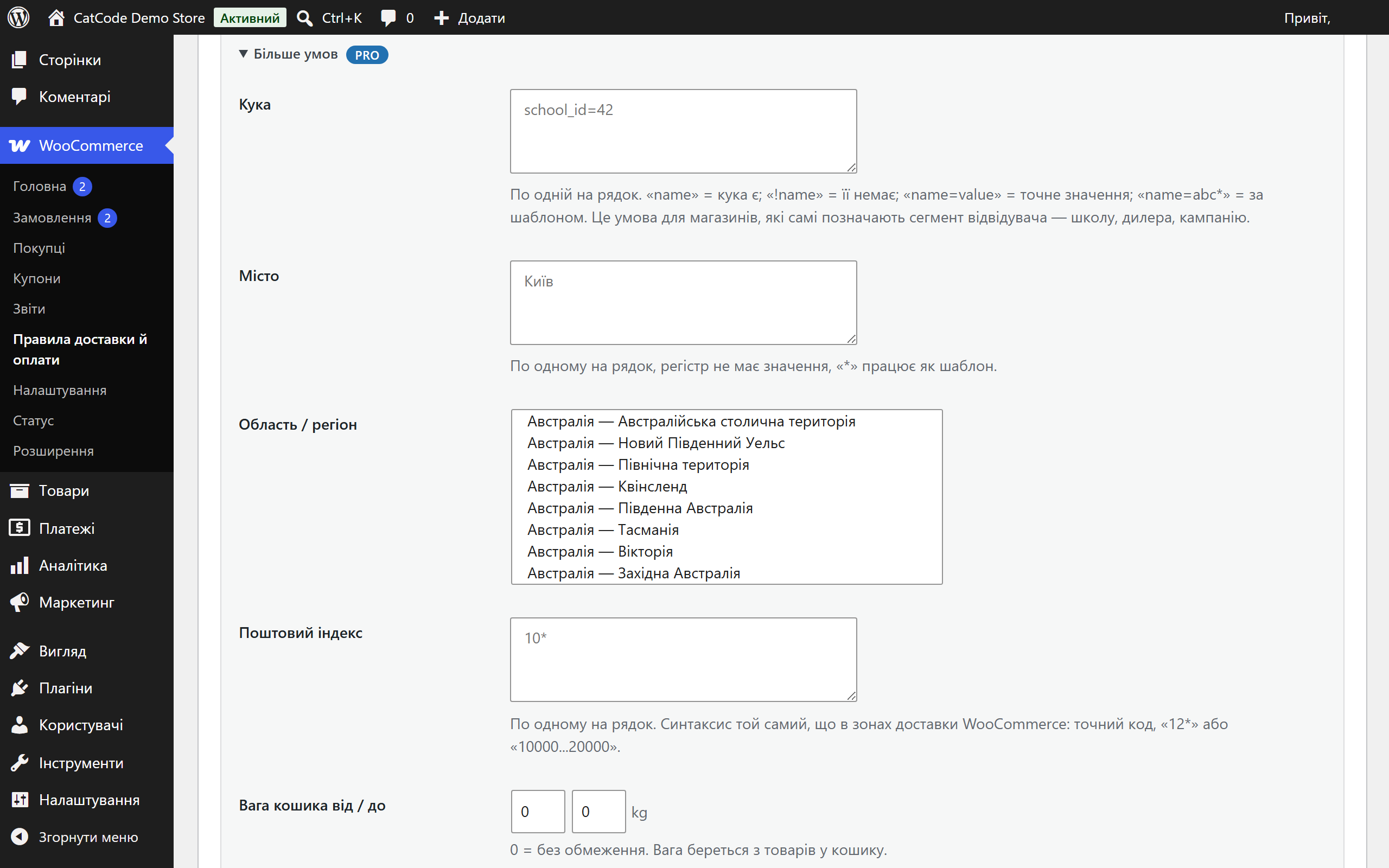
Pro conditions of a rule: cookie, city, state, postcode, weight, item count, category, products, shipping class, chosen method, dates
Pro conditions: site cookie, city, state, postcode, weight and item count, category, product IDs, shipping class, chosen gateway or shipping method, date range.

Key points

What the customer sees

The customer sees nothing special — and that is the point. They simply get a shorter, correct list.

What the admin gets

A separate page, WooCommerce → Shipping & payment rules. Each rule is a card: what to do, with which methods, under which conditions.

The trial starts when you ask

A fresh install is the free version, nothing switches on by itself. The “Try Pro for 7 days” button → e-mail → the key right in the window and by e-mail.

One key — one site

Moving the store? Unbind the licence on the old domain and activate it on the new one yourself. If our server is unreachable, Pro keeps working for 14 more days. For studios — keys for 5 or 25 sites, or unlimited.

Technical requirements

  • WooCommerce 6.0+ with the classic or the block checkout, HPOS compatible.
  • WordPress 5.6+ · PHP 7.4+
  • Works with any shipping method and payment gateway registered the standard way: flat rate, local pickup, free shipping, carrier plugins, payment gateways.
  • The plugin does not change shipping prices — it decides which methods are offered. Prices stay with WooCommerce and your table-rate plugin.
  • Tested on WordPress 7.1 and WooCommerce 11.1 and 10.7: classic and block checkout, guest and logged-in customer, orders placed to the end.

Version history

v1.0.1 Current

The free and Pro versions no longer conflict when installed together, and removing one copy does not erase the rules.

v1.0.0 First release

“hide / keep only” rules for shipping methods and payment gateways; conditions by role, cookie, country, state, city, postcode, total, weight, item count, category, product, shipping class,…

Frequently bought with Conditional Shipping & Payment Rules for WooCommerce

4 modules in one order — 40% cheaper than separately

“Store starter” bundle Conditional Shipping & Payment Rules Nova Poshta Premium LiqPay Telegram notifications and Viber/SMS for customers Need more — all 119 modules in All Access for 4 990 ₴.
3 590 ₴ / year instead of 5 960 UAH bought separately
Buy the bundle →

Full module description

Conditional Shipping & Payment Rules for WooCommerce shows each customer only the shipping methods and payment gateways that actually fit them. WooCommerce offers everything that matches the shipping zone. A real shop needs less than that: no cash on delivery for guests, courier for one city only, no pickup for a heavy basket, one delivery option for wholesale accounts, its own option for a school or a dealer that arrives through its own link.

The plugin turns that into rules you can read: hide (or keep only) these shipping methods or these payment gateways when the cart and the customer look like this.

What the customer sees

The customer sees nothing special — and that is the point. They simply get a shorter, correct list. They change the city and the shipping list updates without a page reload. They pick the courier and cash on delivery disappears. They pick cash on delivery and local pickup disappears, if that is how you set it up.

  • Guests and customers with an account see different sets: for example, cash on delivery only for people who already bought and have an account.
  • A school, a dealer, a partner. Your site sets a cookie when someone arrives through their own link, and at checkout they see only their own delivery option. This is exactly the request the plugin started from.
  • A hidden method cannot be forced through. Paying with a hidden gateway through a request that bypasses the page returns an error on the block checkout and no order is created. On the classic checkout WooCommerce answers “Invalid payment method”.

What the admin gets

A separate page, WooCommerce → Shipping & payment rules. Each rule is a card: what to do, with which methods, under which conditions.

  • Two actions: “Hide” removes the chosen methods, “Keep only” removes everything except them.
  • A whole method or one instance in a zone: hide “Flat rate” in every zone or in one zone only.
  • Priority: rules run from the lowest number up, and each one only narrows the list. A later rule cannot bring back what an earlier one removed, so the result is easy to predict.
  • “All conditions” or “any” — per rule. An empty condition is simply not checked.
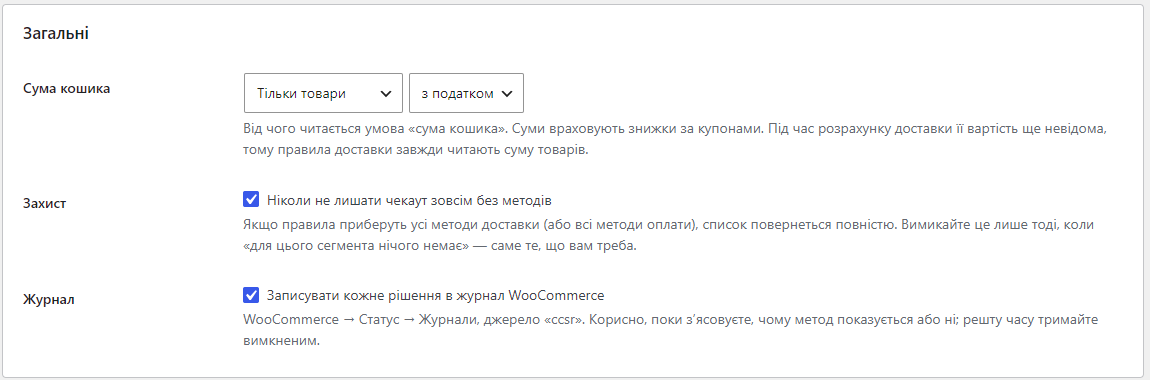
  • Log: every decision goes to WooCommerce → Status → Logs, so you can see why a method showed up or not.
  • Manual orders in the admin are not touched by the rules: the manager sees every method.

How it works, step by step

  1. The customer opens the cart or the checkout. WooCommerce calculates the shipping methods available for their address.
  2. The plugin takes a snapshot: role, the cookies your rules read, address, weight, item count, total, categories and shipping classes in the cart, the chosen gateway or shipping method, today’s date in the store’s time zone.
  3. Rules run in priority order. Each rule whose conditions match hides its methods or keeps only them.
  4. If no method is left and the guard is on, the customer gets the full list back and a warning goes to the log.
  5. The classic checkout and the block checkout through the Store API get the same result.
  6. The customer changes the city, a cookie or a method, and WooCommerce recalculates the rates, because the plugin puts everything the rules read into the shipping package fingerprint. An old list never gets stuck in the cache.

Under the hood

  • The shipping-rate cache. WooCommerce caches calculated rates in the session under a hash of the shipping package. Everything a rule reads that is not in that package (role, cookies, chosen gateway, date, the rules themselves, licence state) goes into the package as one extra key. The cache is invalidated exactly when the answer changes, and never more often. This is where similar plugins trip: the customer changed a condition but still sees the old list.
  • Block checkout and payments. On the block checkout the list of gateways is assembled in the browser, so a PHP filter alone is not enough. PHP makes the decision and sends it along with the Store API cart; the plugin’s script applies it on the page.
  • Cross conditions “payment by shipping” and “shipping by payment” work on both checkouts; their scripts are loaded only when such a rule actually exists.
  • An honest free tier. A rule that relies on a Pro condition is skipped entirely on Free rather than run without it. Otherwise “no courier for Hamburg” would turn into “no courier for anyone” after the trial.
  • Nothing extra in the database: no custom tables, settings and rules are two options. Deleting the plugin cleans up after itself.

Installation

  1. Plugins → Add New → Upload Plugin: choose conditional-shipping-and-payment-rules-for-woocommerce-1.0.1.zip and activate it.
  2. Open WooCommerce → Shipping & payment rules.
  3. Add a rule: “Hide” or “Keep only”, shipping methods or payment gateways, conditions. Switch it on and save.
  4. Open the checkout in a private window (as a guest) and with an account — check that the list changes the way you intended.
  5. For Pro: paste the licence key from the e-mail after payment, or start the 7-day trial with the button on the same page.

Questions
about the module

Didn't find the answer? Message us on Telegram and we'll reply within a business day.

@catcode_support Setup, compatibility, activation
I saved the rule but the method is still showing. Why?

Rules only run on the storefront. Check that the rule is switched on, that the method you picked is the one the zone actually offers, and that the conditions really match your test cart. Switch on the log in the settings and look at WooCommerce → Status → Logs, source "ccsr" — every decision is written there.

Does it work with the block checkout?

Yes. Shipping methods are filtered on the server, so the block checkout gets the same list. Payment gateways are decided on the server too, and the block checkout receives that decision through the Store API. An attempt to pay with a hidden gateway around the page is refused by the server.

I hid everything and now nobody can order.

"Never leave the checkout with no method at all" is on by default and hands the full list back if the rules empty it. If you switched it off, switch it back on.

Can I hide cash on delivery for one city only?

Yes, in Pro: "Hide" → "payment gateways" → pick the gateway, then fill in the City condition. Add the country too if the same city name exists elsewhere.

Does it change shipping prices?

No. It decides which methods are offered; prices stay with WooCommerce and your table-rate plugin.

What happens when the trial ends?

The first switched-on rule with the basic conditions keeps working. Rules that use Pro conditions are kept but skipped until a licence is active: without its condition such a rule would hide more than you asked.

Not quite what you are looking for?

We build custom modules for WordPress, WooCommerce, OpenCart and Shopify. Tell us about the task and we'll prepare an estimate.

Order a custom module