
















WooCommerce
890 UAH579 UAH/year≈ €12
Black November: −35% on all modules until 30 November Black November: −35% until 30 November Choose a module
 Website auditA PDF report by email in 3 minutesCheck a website
Everyday tasks
Image compressorSize, quality and WebP in bulkQR generatorLink, Wi-Fi, payment to IBANVAT calculator20, 14, 7% and amount in wordsTransliterationOfficial Ukrainian standardWebsite checks
PHP and pluginsPHP version, WordPress, pluginsGoogle Merchant feedFields, prices, GTIN, imagesDomain emailSPF, DKIM, DMARC, blacklistsAI search readinessllms.txt, bots, markupAll 9 toolsEnter at least 2 characters

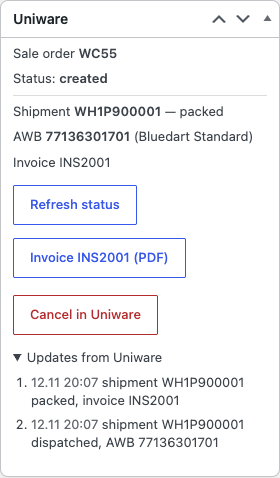


WooCommerce orders to Unicommerce Uniware as sale orders: checks, status, shipments and AWB; Pro adds automatic sending, stock, notifications, cancellation and the invoice PDF.
The free version works with no time limit. Pro adds the rest of the features in the table.


The order gets a “Uniware” box.

WooCommerce → Uniware: enter the account code (the first part of the address you log in at: for acme.unicommerce.com it is “acme”; you can paste the full address too), the username and the password and press “Check connection”: the plugin signs in to Uniware and lists the facility codes of your account.

Automatic sending. The order goes to Uniware in the background when it gets the status you choose (through Action Scheduler); a failed attempt is repeated after 5, 30 and 120 minutes after a network error or a 5xx answer.

A fresh install is the free version, nothing switches on by itself. The “Try Pro for 7 days” button → e-mail → the key right in the window and by e-mail.

Moving the site? Unlink the licence on the old domain and activate it on the new one yourself. A staging copy (staging., dev.) works with the same key and does not take a site slot. For studios — keys for 5 or 25 sites, or unlimited.
 WordPress 6.2+, WooCommerce 7.0+ (HPOS, block checkout), PHP 7.4+.A Uniware account with API access and a user that is an admin with access to the facility.Every product of the order has a SKU that matches Uniware.
The connection to Uniware, a sale order from the order with checks, the status, shipments, AWB and invoice in the order, HPOS and block checkout.


Unicommerce Connector for WooCommerce sends WooCommerce orders to Unicommerce Uniware as sale orders and shows the Uniware status, the shipments, the courier and the AWB number in the order. It works through the REST API of your own Uniware account and is made for Indian online shops that run their warehouse and dispatch in Uniware.
What you need in Uniware. Your own Uniware account with API access: a separate user for the shop, an admin with access to the facility the orders go to. The account is issued to your company by Unicommerce; the plugin neither sells nor includes one. Products are matched by SKU: every product of the order needs the SKU it has in Uniware.
The order gets a “Uniware” box. Before sending it shows the code the sale order will get (for example WC1234) and checks the order: a product without a SKU, an empty address, no city or state, no phone number, a PIN code that is not 6 digits. Everything it finds is listed, and the “Send to Uniware” button stays off until it is fixed.
The sale order carries the buyer, the billing and delivery address (the state is matched to the Uniware state code table), the phone, the products by SKU with their prices, discounts and shipping charges, the payment type (prepaid or cash on delivery) and the customer note. Uniware keeps one sale order item per unit, so a line with a quantity of 3 becomes three items with the price of one unit; the rounding is adjusted on the last unit and the items add up to the order exactly. If a sale order with that code already exists in Uniware, the plugin links it instead of showing an error.
“Refresh status” reads the sale order back: its status, the shipping packages, the courier, the AWB number with the tracking link and the invoice number. Every sale order, AWB and change of status is written to the order notes. A refusal from Uniware (an unknown SKU, for example) is shown in the order in plain text.
WooCommerce → Uniware: enter the account code (the first part of the address you log in at: for acme.unicommerce.com it is “acme”; you can paste the full address too), the username and the password and press “Check connection”: the plugin signs in to Uniware and lists the facility codes of your account. The password is stored encrypted and the access token renews itself.
Then enter the facility code the orders go to, the prefix of the sale order code (for example WC), the sales channel code as it is named in Uniware (empty: the default channel) and whether cash on delivery orders wait for verification in Uniware.
Automatic sending. The order goes to Uniware in the background when it gets the status you choose (through Action Scheduler); a failed attempt is repeated after 5, 30 and 120 minutes after a network error or a 5xx answer. Bulk actions on the orders list: “Send to Uniware” and refreshing the status (50 per run).
Stock from Uniware. The stock of WooCommerce products follows the Uniware Inventory Snapshot every 15, 30, 60 or 180 minutes as the sum over the facilities you choose; each run asks only for what changed since the previous one, and once a day everything is read again. Only products with stock management on and a SKU known to Uniware are changed. “Sync stock now” starts a read at once.
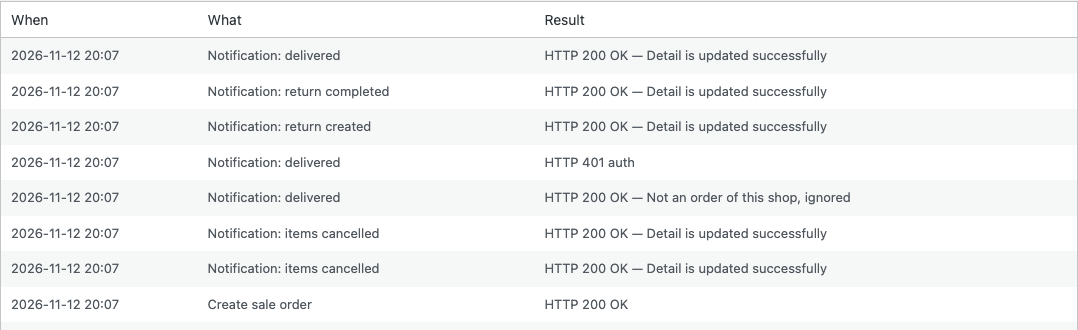
Notifications from Uniware. The Notification Service receiver takes shipment created, packed and invoiced, dispatched with AWB and courier, delivered, cancelled items, return created and completed, writes them to the order and does not duplicate a repeated event. The receiver is protected with Basic Auth; the credentials for Unicommerce are made with “Make credentials”. Your Unicommerce account manager switches the notifications on at the account side.
Order status from the events. Choose the WooCommerce status for dispatched, delivered, cancelled in Uniware and return completed; it is applied by the notification or when the status is refreshed. For accounts without notifications the open orders are read again every 2 hours.
Cancellation. The sale order is cancelled in Uniware from the order screen, or automatically when the order is cancelled in WooCommerce.
Invoice PDF. The Uniware invoice of each shipment opens from the order screen.
Tracking for the buyer. The AWB number and the tracking link show on the order page in My account and in the order e-mails, plain-text ones too.
Uniware SKU. A separate field on the Inventory tab for a product or variation whose code in Uniware differs from its WooCommerce SKU.
Journal. The last 200 calls to Uniware and notifications from it with the result, no passwords and no buyer data.
Languages and updates. The interface is in English; updates come from catcode.com.ua.
Didn't find the answer? Message us on Telegram and we'll reply within a business day.
 @catcode_support
Setup, compatibility, activation
No, it is an independent integration made by CatCode. Unicommerce and Uniware are trademarks of their owner; the plugin is not affiliated with or endorsed by Unicommerce.
Yes, your own, with API access. The plugin works with your account; it neither sells nor includes one.
By SKU. Every product of the order needs a SKU that exists in Uniware; a variation without its own SKU uses the SKU of its product. If the code in Uniware is different, Pro has the "Uniware SKU" field.
Uniware keeps one sale order item per unit, so the line becomes three items with the price of one unit. The rounding is adjusted on the last one and the total matches the order.
No. If a sale order with that code already exists in Uniware, the plugin links it to the order instead of showing an error.
In Pro you copy the address of the receiver and the credentials from the settings page, and your Unicommerce account manager switches the notifications on at the account side. Without them the status is updated with the button and by reading again every 2 hours.
Yes: a cash on delivery order goes with its own payment type and, if you want, waits for verification in Uniware.
Pro switches off and the free part keeps working: the connection, sending with the button, the checks, the status, the shipments and the AWB in the order.
One key covers two sites: the shop and its test copy.
No reviews yet. Be the first.
No questions yet. Ask one — we answer within 24 hours.
We build custom modules for WordPress, WooCommerce, OpenCart and Shopify. Tell us about the task and we'll prepare an estimate.
Order a custom module
—
Charged in UAH; your bank converts it to your currency. EUR price is approximate.

CatCode assistant
Just now


CatCode assistant
Online

I’ll help with your website task
Describe your website task — I’ll find a ready-made module or pass it to a developer for an estimate. Modules, custom features, layout, integrations, speed, migration, technical SEO.