
















WooCommerce
990 UAH644 UAH/year≈ €14
Black November: −35% on all modules until 30 November Black November: −35% until 30 November Choose a module
 Website auditA PDF report by email in 3 minutesCheck a website
Everyday tasks
Image compressorSize, quality and WebP in bulkQR generatorLink, Wi-Fi, payment to IBANVAT calculator20, 14, 7% and amount in wordsTransliterationOfficial Ukrainian standardWebsite checks
PHP and pluginsPHP version, WordPress, pluginsGoogle Merchant feedFields, prices, GTIN, imagesDomain emailSPF, DKIM, DMARC, blacklistsAI search readinessllms.txt, bots, markupAll 9 toolsEnter at least 2 characters

Danea Easyfatt for WooCommerce (Italy): orders as Easyfatt-Xml files and a product CSV for free; Pro adds the automatic exchange of products, photos and orders.
The free version works with no time limit. Pro adds the rest of the features in the table.


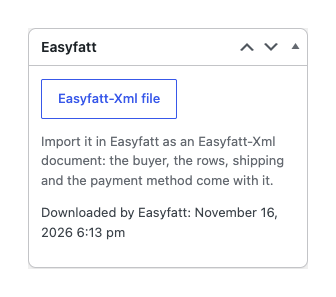
The order screen gets a box “Easyfatt”. Press “Easyfatt-Xml file” and import the file in Easyfatt: the buyer, the delivery address, the rows, shipping, fees, coupons and the payment method come with it.

When you start Easyfatt with a shop that already has its products, the button “Download the product list (CSV)” gives a file with the columns of the Easyfatt product sheet: code, description, category and sub-category, VAT code, price, notes, barcode, producer, HTML description, stock, size, weight.

Products from Easyfatt. “Aggiorna articoli” sends the catalogue to the shop: products are created and updated by their code (= SKU) with the name, the HTML description or the notes, the price of the price list you choose (1–9, with or without VAT), stock, weight and size in the units of the shop, the category path with “>>” levels (missing categories are made) and the producer as a brand.

A fresh install is the free version, nothing switches on by itself. The “Try Pro for 7 days” button → e-mail → the key right in the window and by e-mail.

Moving the site? Unlink the licence on the old domain and activate it on the new one yourself. A staging copy (staging., dev.) works with the same key and does not take a site slot. For studios — keys for 5 or 25 sites, or unlimited.
 WordPress 6.4+, WooCommerce 8.6+ (HPOS and the block checkout are supported), PHP 7.4+.Danea Easyfatt; Pro needs Easyfatt Enterprise with the e-commerce functions.The site reachable by Easyfatt at an HTTPS address; a hosting that accepts the product file of the size you need (upload_max_filesize, post_max_size).For the tax data of the buyer: the checkout fields of “Exporter for Danea” or “PDF Invoices Italian Add-on”, or your own order fields.
Orders as an Easyfatt-Xml file (the document type, a company buyer with a reference person, CF, P.IVA, PEC, SDI, the codes of the VAT table, shipping, fees, coupons, payment), the product…


Danea Easyfatt for WooCommerce moves the orders of your shop to Danea Easyfatt, the Italian management software (gestionale) for invoices, warehouse and orders, and takes products and photos from it. Every order has an “Easyfatt-Xml file” button: Easyfatt imports the file as a customer order, an invoice, a receipt, a counter sale or a pro forma. The files follow the Easyfatt e-commerce specification of Danea (Easyfatt-Xml).
What you need. Danea Easyfatt on your computer: for the automatic exchange (Pro) you need the Easyfatt Enterprise edition, the one with the e-commerce functions. For the files and the CSV the usual import of Easyfatt is enough. No account in any service is needed: the plugin sends no orders or products to outside services, Easyfatt calls the addresses of your shop.
The order screen gets a box “Easyfatt”. Press “Easyfatt-Xml file” and import the file in Easyfatt: the buyer, the delivery address, the rows, shipping, fees, coupons and the payment method come with it. The date of the last saved file is shown in the box.
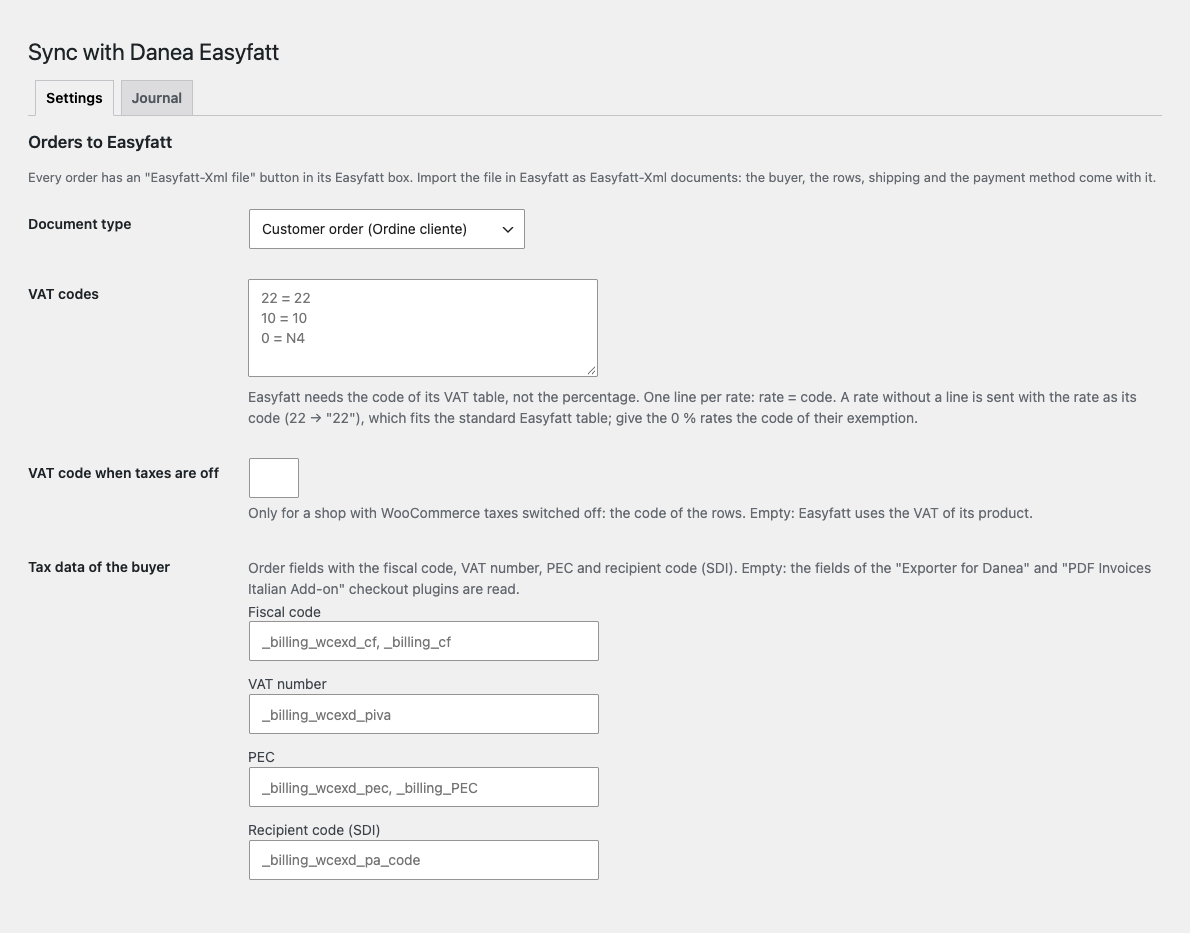
A company buyer goes in as the company, and the person as the reference. The tax data (codice fiscale, partita IVA, PEC, codice destinatario SDI) is read from the checkout fields of the “Exporter for Danea” and “PDF Invoices Italian Add-on” plugins or from the order fields you name. The mobile number goes to CustomerCellPhone, and the delivery is written as “SURNAME NAME c/o COMPANY”.
Prices go with the flag “prices include VAT”, so the document shows the same sums as the shop. Each row carries the code of the Easyfatt VAT table, not the percentage: you set your own codes in the settings (for example 0 = N4 for an exemption). Shipping goes as a cost, fees as rows, coupons as a percentage discount in the row, the customer note as an internal comment. The order number becomes the document number, a non-numeric one goes to CustomField1. A product without SKU gets the code WC-
The document type is chosen in the settings: customer order, invoice, receipt, counter sale, pro forma. The plugin works with HPOS and with the block checkout.
When you start Easyfatt with a shop that already has its products, the button “Download the product list (CSV)” gives a file with the columns of the Easyfatt product sheet: code, description, category and sub-category, VAT code, price, notes, barcode, producer, HTML description, stock, size, weight. Variations are rows of their own. Open the file in Excel, save it as an Excel workbook and import it in Easyfatt: Prodotti → Utilità → Importa. The byte-order mark, the “;” separator and the decimal comma fit the Italian Excel.
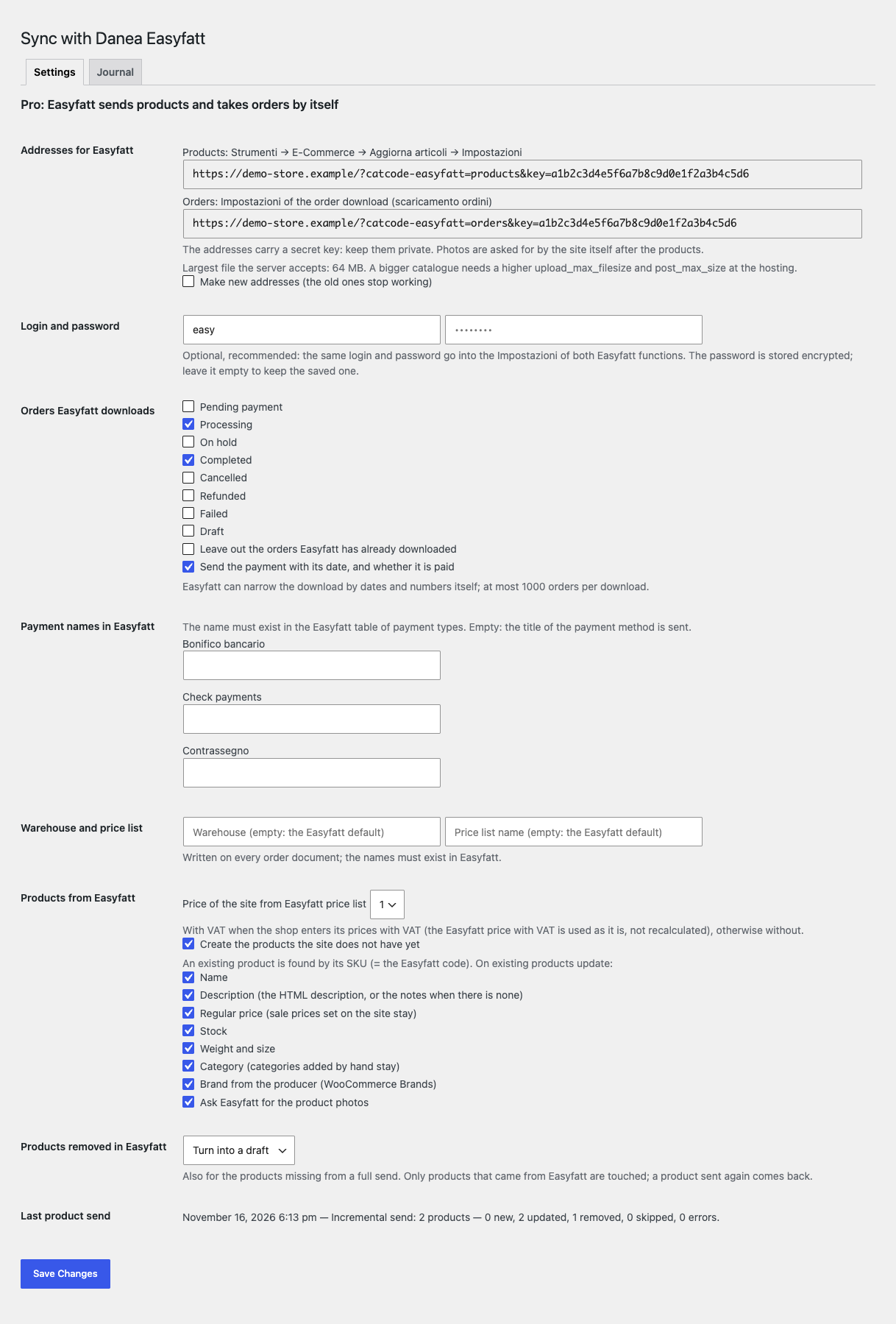
Products from Easyfatt. “Aggiorna articoli” sends the catalogue to the shop: products are created and updated by their code (= SKU) with the name, the HTML description or the notes, the price of the price list you choose (1–9, with or without VAT), stock, weight and size in the units of the shop, the category path with “>>” levels (missing categories are made) and the producer as a brand. Full and incremental sends are supported, the GTIN is kept. Sizes and colours (taglie e colori) become a variable product.
Photos. The photos come after the products and become the product image; a changed photo changes the image, and a photo removed in Easyfatt is removed. JPG, PNG, GIF and WebP are accepted, and the file is checked to be a real image.
Nothing added on the site is lost. Sale prices, the gallery, the short description, categories added by hand and everything else Easyfatt does not have stay as they are. Each group of fields (name, description, price, stock, weight and size, categories, brand, photos) can be left out of the update, and the creation of new products can be switched off.
Products removed in Easyfatt. They go to the trash, to drafts, or stay: as you choose. Only products that once came from Easyfatt are touched, and a product sent again comes back. An empty full send removes nothing.
Orders to Easyfatt. “Scarica ordini” downloads the orders of the statuses you choose, within the dates and numbers Easyfatt asks for, with the payment (date, paid or not), your payment names, warehouse and price list. Orders already downloaded can be left out.
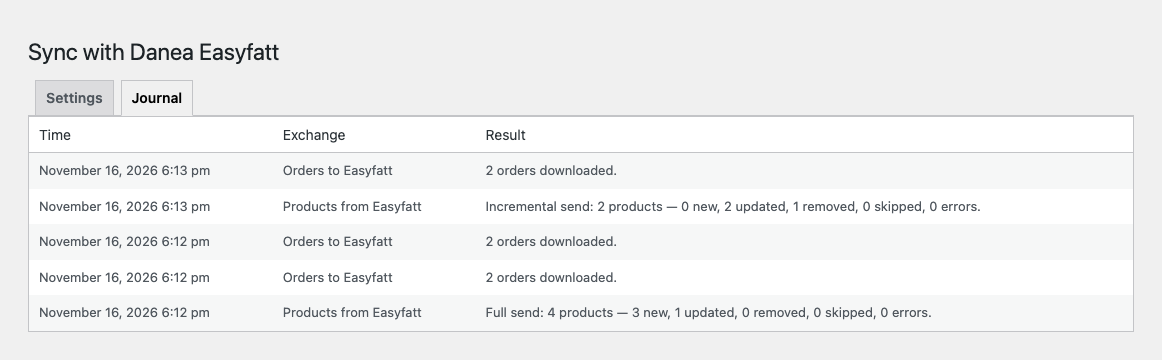
Protection and the journal. The addresses carry a secret key (it can be renewed), and the login and password set in Easyfatt are checked too; the password is stored encrypted. A bulk action in the orders list gives one Easyfatt-Xml file of the selected orders. The journal keeps the last 300 exchanges.
A big catalogue is processed in the background in parts of 25, with a resume inside a part and an hourly safety net. Updates of the plugin come from catcode.com.ua, and the Italian interface is part of Pro.
Didn't find the answer? Message us on Telegram and we'll reply within a business day.
 @catcode_support
Setup, compatibility, activation
No, it is an independent integration made by CatCode following the public e-commerce specification. Danea and Easyfatt are trademarks of their owner; the plugin is not affiliated with Danea Soft or TeamSystem and is not endorsed by them.
Easyfatt wants the code of its VAT table, not the percentage. A rate without a line in the "VAT codes" field is sent as the rate itself (22 → "22"), as in the standard Easyfatt table. Give the 0 % rates the code of their exemption, for example "0 = N4".
From the order fields billing_wcexd_cf, billing_wcexd_piva, billing_wcexd_pec and billing_wcexd_pa_code (the checkout fields of "Exporter for Danea") or billing_cf and billing_PEC ("PDF Invoices Italian Add-on"). Another plugin: enter its field names in the settings.
It gets the code WC- in the CSV and in the order files, so Easyfatt finds it in both.
No. Easyfatt does: the order comes in as a document, and Easyfatt makes and sends the invoice as usual.
The "Easyfatt-Xml file" button in the order with the document type, the tax data of the buyer, the VAT codes, shipping, fees and coupons, and the product list CSV for the first import. The automatic exchange, photos, the bulk file and the journal are in Pro.
Yes.
Pro switches off, a product send left in the queue stops with a journal row giving the reason, the free part keeps working.
One key works on two sites: the shop and its development copy.
For the automatic exchange (Pro) you need Danea Easyfatt Enterprise, the edition with the e-commerce functions. The order files and the CSV are imported by the usual import of Easyfatt.
No reviews yet. Be the first.
No questions yet. Ask one — we answer within 24 hours.
We build custom modules for WordPress, WooCommerce, OpenCart and Shopify. Tell us about the task and we'll prepare an estimate.
Order a custom module
—
Charged in UAH; your bank converts it to your currency. EUR price is approximate.

CatCode assistant
Just now


CatCode assistant
Online

I’ll help with your website task
Describe your website task — I’ll find a ready-made module or pass it to a developer for an estimate. Modules, custom features, layout, integrations, speed, migration, technical SEO.