
















WooCommerce
990 UAH644 UAH/year≈ €14
Black November: −35% on all modules until 30 November Black November: −35% until 30 November Choose a module
 Website auditA PDF report by email in 3 minutesCheck a website
Everyday tasks
Image compressorSize, quality and WebP in bulkQR generatorLink, Wi-Fi, payment to IBANVAT calculator20, 14, 7% and amount in wordsTransliterationOfficial Ukrainian standardWebsite checks
PHP and pluginsPHP version, WordPress, pluginsGoogle Merchant feedFields, prices, GTIN, imagesDomain emailSPF, DKIM, DMARC, blacklistsAI search readinessllms.txt, bots, markupAll 9 toolsEnter at least 2 characters

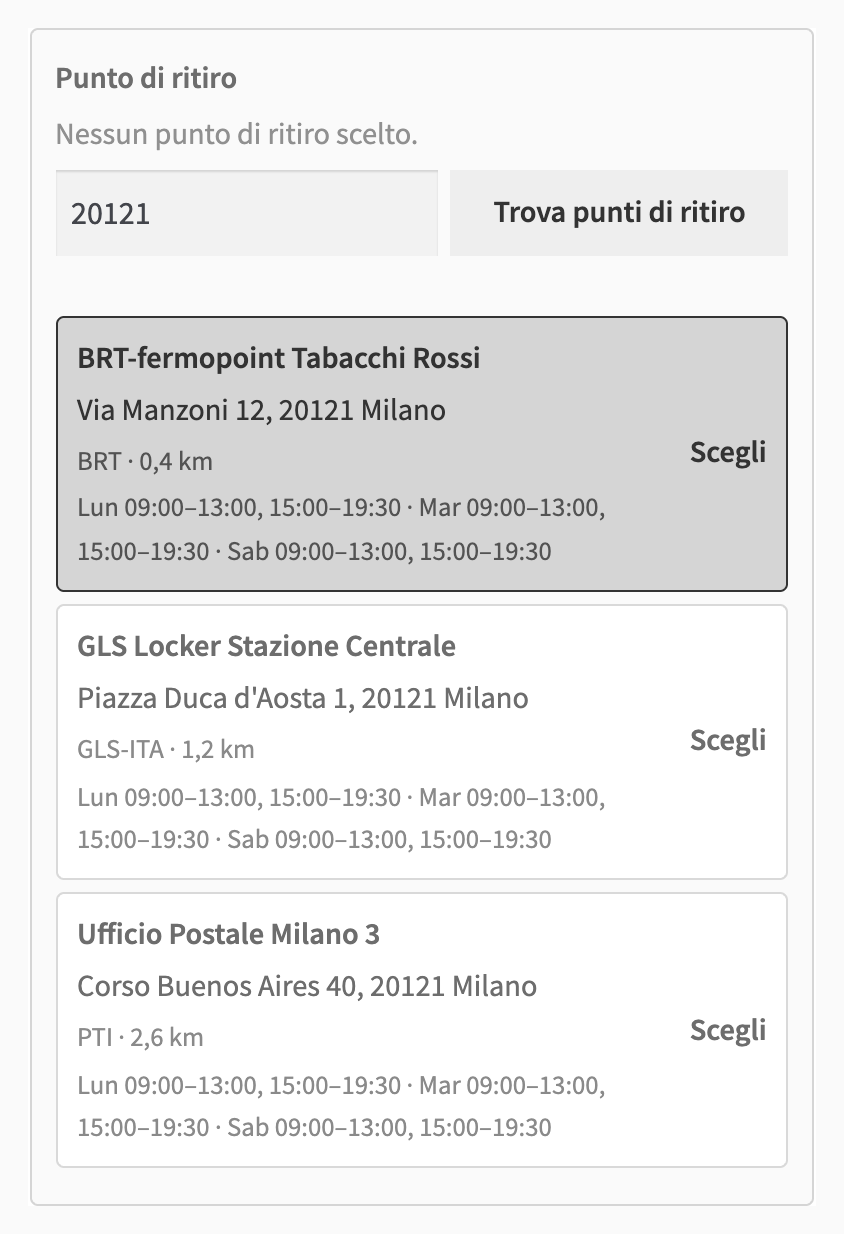
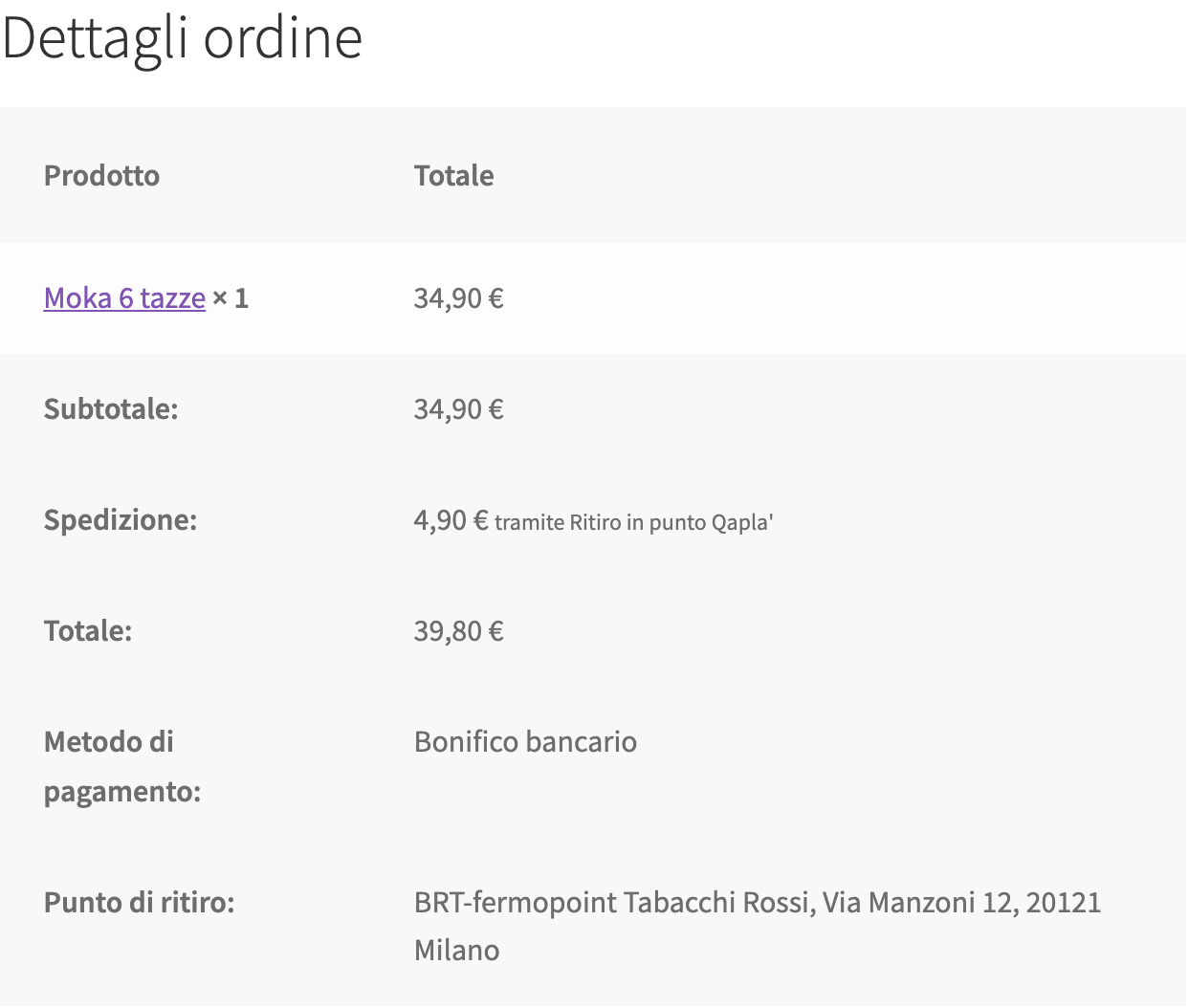
Pickup points at the WooCommerce checkout and shipping to Qapla'; in Pro — labels, automation, bulk actions, tracking and the buyer email.
The free version works with no time limit. Pro adds the rest of the features in the table.


A “Pickup point (Qapla’)” method appears in the shipping zone.

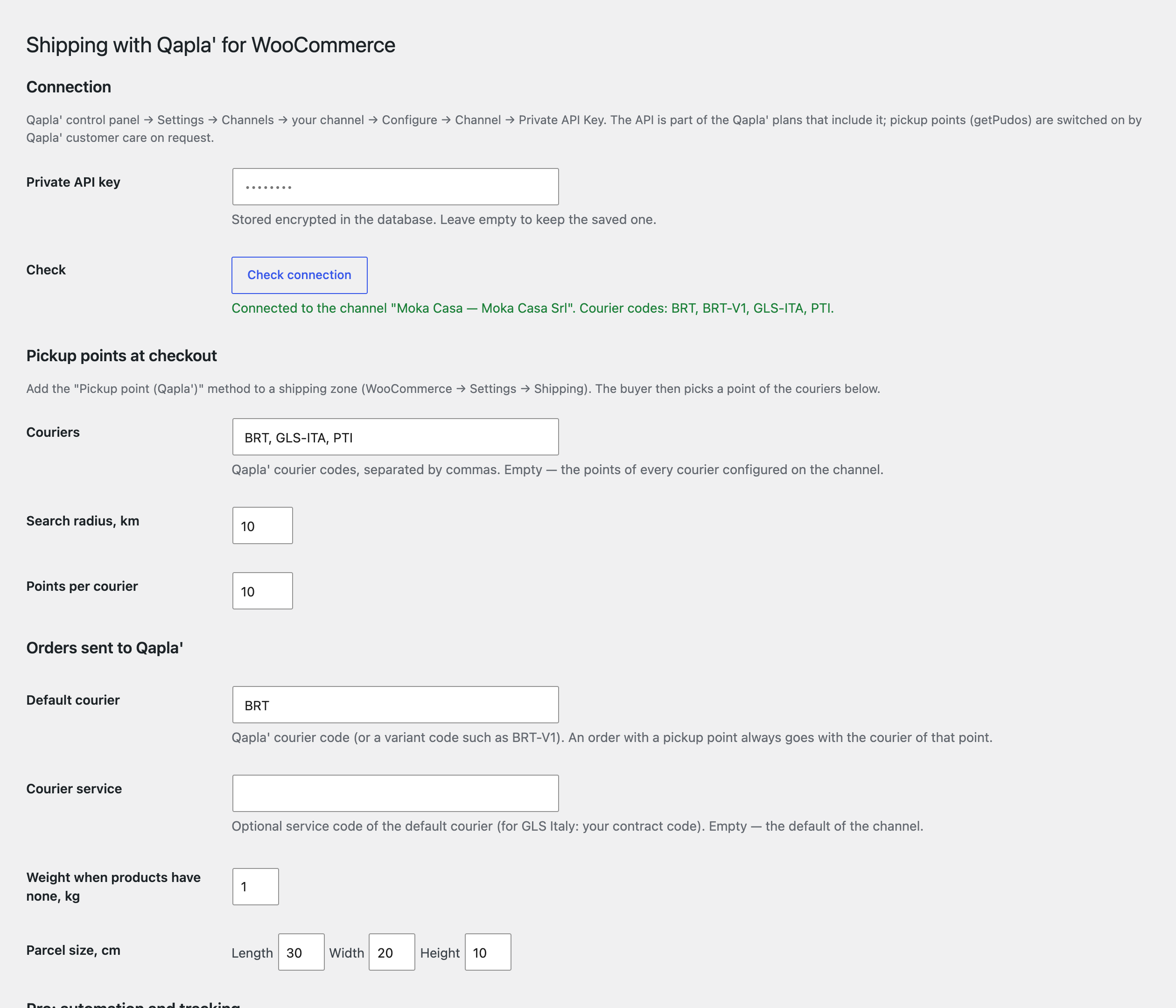
WooCommerce → Qapla’: paste the private key, press “Check connection” — the module shows the channel name and the courier codes connected to it — and enter the courier codes for pickup points, the default courier, and the weight and parcel size to use when products have none.

In Pro the “Create label” button creates the shipment and the label at the courier right from the order: PDF, JPG or ZPL to download, and the return label when Qapla’ created one (for example Poste Andata e Ritorno).

A fresh install is the free version, nothing switches on by itself. The “Try Pro for 7 days” button → e-mail → the key right in the window and by e-mail.

Moving the site? Unlink the licence on the old domain and activate it on the new one yourself. A staging copy (staging., dev.) works with the same key and does not take a site slot. For studios — keys for 5 or 25 sites, or unlimited.
 WordPress 6.4+, WooCommerce 8.6+, PHP 7.4+.A Qapla’ account with API access and the private key of the channel; the pickup point search is switched on by Qapla’ support on request.Background tasks, bulk labels and automation in Pro run on the Action Scheduler of WooCommerce.Creating shipments through the API is part of the Qapla’ plans that include it; Qapla’ prices apply to your account.
Qapla’ pickup points on the classic and block checkout, sending the order to Qapla’ with one click.


Shipping with Qapla’ for WooCommerce connects the store to Qapla’, the Italian shipping and tracking platform. At checkout the buyer picks a pickup point (punto di ritiro) of a courier, and the order goes to Qapla’ with one click, together with the recipient, the parcel, the products and the chosen point. Pro adds labels, automation by status, tracking in the order and an email to the buyer with the tracking number.
What you need from Qapla’. Your own Qapla’ account with API access and the private API key of your channel: Qapla’ panel → Settings → Channels → your channel → Configure → Channel → Private API Key. The API is part of the Qapla’ plans that include it, and the pickup point search (getPudos) is switched on by Qapla’ support on request. Qapla’ plans are paid separately. The key is stored encrypted in the database and is never shown on the page again.
A “Pickup point (Qapla’)” method appears in the shipping zone. At checkout the buyer types a postcode (CAP) and sees the pickup points of the couriers on your channel, for example BRT, GLS Italy, Poste Italiane, InPost, UPS or DHL: name, address, distance, opening hours and courier. The chosen point is saved in the order, and an order without a point cannot be placed, on the classic checkout and on the block one.
The method price is a flat price, free from an order amount or with a free-shipping coupon. The point is shown in the order in the admin, on the thank-you page, in My Account and in the emails. The buyer’s interface is in Italian when the site is in Italian; English is included too. Search results are cached for 6 hours and the searches are limited to 20 per 10 minutes per session, so the Qapla’ limit of 150 requests a minute per channel is not reached.
WooCommerce → Qapla’: paste the private key, press “Check connection” — the module shows the channel name and the courier codes connected to it — and enter the courier codes for pickup points, the default courier, and the weight and parcel size to use when products have none. The “Try it” box searches points by postcode, so you see what the buyer will see, and if Qapla’ answers with an error its text is shown right there.
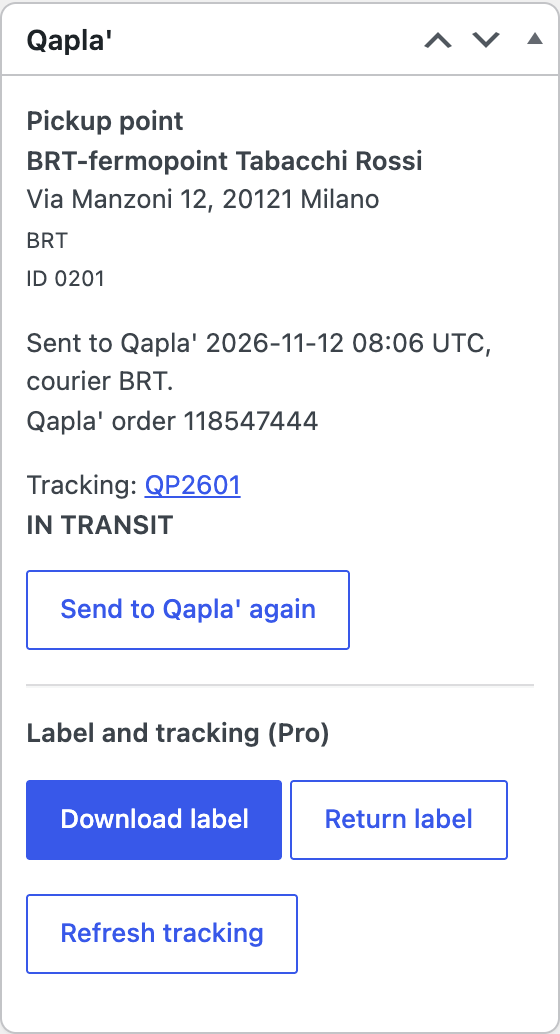
In the order (with HPOS and with the classic storage) a “Qapla’” box appears with the chosen point and the “Send to Qapla’” button. The module sends the recipient, the parcel, the products and the point: the courier of the chosen point, or the default courier for home delivery. The result is written as an order note: “Sent to Qapla’”, the Qapla’ order number and the courier. If Qapla’ rejects the request, its reason is in the note and the order in your store is not affected; you can send it again.
In Pro the “Create label” button creates the shipment and the label at the courier right from the order: PDF, JPG or ZPL to download, and the return label when Qapla’ created one (for example Poste Andata e Ritorno). One label is created per order: a second click does not create another, and a shipment in the pending state is read again when Qapla’ has prepared it. The test mode creates labels in the Qapla’ sandbox, where nothing is booked or charged.
Automation: you choose the status at which the order is sent to Qapla’ and the status at which the label is created; everything runs in the background through the Action Scheduler of WooCommerce. The orders list (HPOS and classic) has bulk actions: send up to 50 orders to Qapla’ per call, create labels (10 at once, the rest in the background) and download all labels in one ZIP.
Tracking: Qapla’ sends statuses to the webhook address of your store (it is shown in the settings, you put it into the Qapla’ panel), and an hourly check picks the statuses up if a webhook was missed; the “Refresh tracking” button updates one order at once. The carrier status appears in the order, and “Delivered” can complete the order automatically. The buyer gets the tracking number and the link to the tracking page by email (a WooCommerce customer note), once and not for test labels.
Courier rules: one rule per line as “courier | countries | weight in kg | shipping method ID”; the first matching rule wins and without a match the default courier is used. The journal shows every call to Qapla’ and every webhook: time, order, what was sent and the result; the last 300 entries are kept.
Didn't find the answer? Message us on Telegram and we'll reply within a business day.
 @catcode_support
Setup, compatibility, activation
No, it is an independent integration with Qapla' by CatCode. Qapla' is a trademark of its owner; the module is not a Qapla' product.
Yes. The module works with your Qapla' channel and its private key. API access depends on your Qapla' plan, and the pickup point search is switched on by Qapla' support on request.
Press “Find pickup points” in the “Try it” box on the settings page: it shows the answer of Qapla', for example that the search is not switched on for the channel yet.
The courier of the chosen pickup point; for home delivery the default courier from the settings. In Pro the courier can be set by rules by country, weight and shipping method.
No. One label is created per order and a second click does not duplicate it.
Pro switches off and the free part keeps working: the “Pickup point (Qapla')” method and the “Send to Qapla'” button stay.
One key covers two sites: the store and its test copy.
No reviews yet. Be the first.
No questions yet. Ask one — we answer within 24 hours.
We build custom modules for WordPress, WooCommerce, OpenCart and Shopify. Tell us about the task and we'll prepare an estimate.
Order a custom module
—
Charged in UAH; your bank converts it to your currency. EUR price is approximate.

CatCode assistant
Just now


CatCode assistant
Online

I’ll help with your website task
Describe your website task — I’ll find a ready-made module or pass it to a developer for an estimate. Modules, custom features, layout, integrations, speed, migration, technical SEO.