
















WooCommerce
890 UAH579 UAH/year≈ €12
Black November: −35% on all modules until 30 November Black November: −35% until 30 November Choose a module
 Website auditA PDF report by email in 3 minutesCheck a website
Everyday tasks
Image compressorSize, quality and WebP in bulkQR generatorLink, Wi-Fi, payment to IBANVAT calculator20, 14, 7% and amount in wordsTransliterationOfficial Ukrainian standardWebsite checks
PHP and pluginsPHP version, WordPress, pluginsGoogle Merchant feedFields, prices, GTIN, imagesDomain emailSPF, DKIM, DMARC, blacklistsAI search readinessllms.txt, bots, markupAll 9 toolsEnter at least 2 characters



Shopflix orders in WooCommerce: import by reference, accept and reject; Pro adds automatic import, the webhook, vouchers, invoices, returns and an XML feed.
The free version works with no time limit. Pro adds the rest of the features in the table.


In WooCommerce → Shopflix you type the order reference and press “Import”.

WooCommerce → Shopflix: paste the Merchant API username and password, save and press “Check connection”: the module reads the number of orders in the account and shows the result.

Automatic import and the webhook. New Shopflix orders arrive every 15 minutes (the last 14 days) and the state of the imported ones is refreshed.

A fresh install is the free version, nothing switches on by itself. The “Try Pro for 7 days” button → e-mail → the key right in the window and by e-mail.

Moving the site? Unlink the licence on the old domain and activate it on the new one yourself. A staging copy (staging., dev.) works with the same key and does not take a site slot. For studios — keys for 5 or 25 sites, or unlimited.
 WordPress 6.2+, WooCommerce (HPOS and the block checkout are supported), PHP 7.4+.A Shopflix seller account and the Merchant API credentials: the username and password.The module adds nothing to the checkout of your shop: requests to Shopflix come only from the admin, from background jobs and from the webhook.
The Merchant API connection, import of an order by its reference, accept and reject, the order box, Greek regions, HPOS, English and Ελληνικά.


Shopflix Connector for WooCommerce brings the orders you receive on the Greek marketplace Shopflix (shopflix.gr) into your shop through the Shopflix Merchant API. You type the order reference (for example GR–3001–MER78) and WooCommerce gets the order with the buyer, the delivery address, the products, the delivery method (Box Now, Courier Center, Diakinisis…) and the totals. The shop keeps one list of orders and one stock. The module is made for Greek Shopflix sellers.
What you need from Shopflix. A Shopflix seller account and the Merchant API credentials (username and password): Shopflix gives them to sellers to sellers, and your account manager can issue them. The password is encrypted in the database and never shown in the browser.
In WooCommerce → Shopflix you type the order reference and press “Import”. The module reads the order from Shopflix and creates it in WooCommerce: the buyer, the address (the Greek region is matched to the WooCommerce region), the lines, the delivery, the total in euro with VAT and the invoice details (ΑΦΜ, ΔΟΥ). Importing the same reference again creates no copy: it refreshes the state, tracking and invoices.
Products are found by the merchant SKU of the line, then by the EAN in the GTIN field; the stock goes down as for any WooCommerce order (you can switch it off). A line whose SKU is not in the shop is added by name and the order note says so. The WooCommerce e-mails to Shopflix buyers are not sent by default: Shopflix informs the buyer itself, and the e-mails to the shop owner are sent as usual.
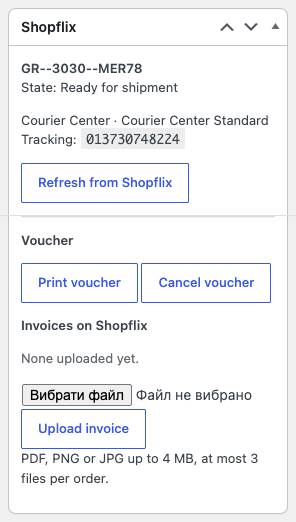
The order box shows the Shopflix state, “dispatch until”, the carrier and tracking. “Refresh from Shopflix” reads the order again, “Accept” accepts it, “Reject” rejects it with one of the reasons Shopflix allows (out of stock, damaged, wrong price, disabled product, wrong product). Shopflix errors are shown in plain words in the language of the admin.
WooCommerce → Shopflix: paste the Merchant API username and password, save and press “Check connection”: the module reads the number of orders in the account and shows the result. Then choose whether the stock is reduced on import and whether the WooCommerce e-mails go to Shopflix buyers.
Make sure the SKUs of your WooCommerce products equal the merchant SKUs of your Shopflix offers: the order finds the product by it. The interface and the notes: English and Ελληνικά, the language follows the site language.
Automatic import and the webhook. New Shopflix orders arrive every 15 minutes (the last 14 days) and the state of the imported ones is refreshed. The webhook address from the settings, registered in the Merchant Portal, delivers new orders, cancellations, deliveries and returns within seconds; repeats of one event create no duplicates.
Statuses both ways. “Delivered” becomes Completed, cancelled becomes Cancelled, a failed delivery becomes Failed. Moving an order to Processing accepts it on Shopflix, cancelling it rejects it with the reason you choose. Optionally a new order is accepted automatically when every product is in stock.
Vouchers. The courier voucher is created from the order (number of packages, a comment, the pickup warehouse), printed in the label format and cancelled. In the orders list you can accept, create and print vouchers for many orders; the print comes as one zip.
Invoices. A PDF, PNG or JPG invoice up to 4 MB (at most 3 files) is uploaded to the order and deleted again.
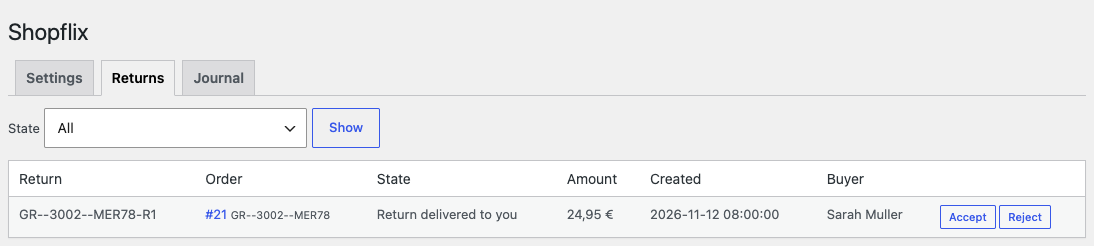
Returns. The “Returns” tab lists the returns of your account with the state, the amount and the buyer, and “Accept” and “Reject” buttons; return webhooks add a note to the order.
XML feed for ShopflixBot. The product feed holds the SKU, the EAN (or “shop-SKU”), the brand, the price with VAT, the old price of products on sale, the stock, the shipping lead time per product, images and the category; single products can be left out. You register the feed address in the Merchant Portal.
Journal. Every import, webhook, accept, reject, voucher, invoice and return action with its result.
Selling on OpenCart? There is a separate module for it: Shopflix Connector for OpenCart.
Didn't find the answer? Message us on Telegram and we'll reply within a business day.
 @catcode_support
Setup, compatibility, activation
No, it is an independent integration by CatCode. Shopflix is a trademark of its owner; the module is not affiliated with or endorsed by Shopflix.
Shopflix gives them to its sellers. If they are not in your Merchant Portal, ask your Shopflix account manager.
The line is matched by the merchant SKU of the Shopflix offer. Give the WooCommerce product the same SKU and import the order again: the next import refreshes the Shopflix data, and the lines already created stay as they are.
No. The second import finds the order by its Shopflix reference and refreshes its state, tracking and invoices.
Euro, with VAT included, as Shopflix sends them.
Not by default: Shopflix informs the buyer. You can switch the e-mails on in the settings.
In Pro the webhook address from the settings is registered in the Merchant Portal; new orders, cancellations, deliveries and returns arrive within seconds, and the token from the settings refuses foreign calls.
Pro switches off, the free part keeps working: the connection, importing an order, accept and reject.
One key covers two sites: the shop and its test copy.
No reviews yet. Be the first.
No questions yet. Ask one — we answer within 24 hours.
We build custom modules for WordPress, WooCommerce, OpenCart and Shopify. Tell us about the task and we'll prepare an estimate.
Order a custom module
—
Charged in UAH; your bank converts it to your currency. EUR price is approximate.

CatCode assistant
Just now


CatCode assistant
Online

I’ll help with your website task
Describe your website task — I’ll find a ready-made module or pass it to a developer for an estimate. Modules, custom features, layout, integrations, speed, migration, technical SEO.