
















WooCommerce
990 UAH644 UAH/year≈ €14
Black November: −35% on all modules until 30 November Black November: −35% until 30 November Choose a module
 Website auditA PDF report by email in 3 minutesCheck a website
Everyday tasks
Image compressorSize, quality and WebP in bulkQR generatorLink, Wi-Fi, payment to IBANVAT calculator20, 14, 7% and amount in wordsTransliterationOfficial Ukrainian standardWebsite checks
PHP and pluginsPHP version, WordPress, pluginsGoogle Merchant feedFields, prices, GTIN, imagesDomain emailSPF, DKIM, DMARC, blacklistsAI search readinessllms.txt, bots, markupAll 9 toolsEnter at least 2 characters

Conta Azul for WooCommerce (Brazil): orders as sales, customer by CPF/CNPJ; Pro adds sending at a status, products by SKU, cancelling, PDF, stock.
The free version works with no time limit. Pro adds the rest of the features in the table.


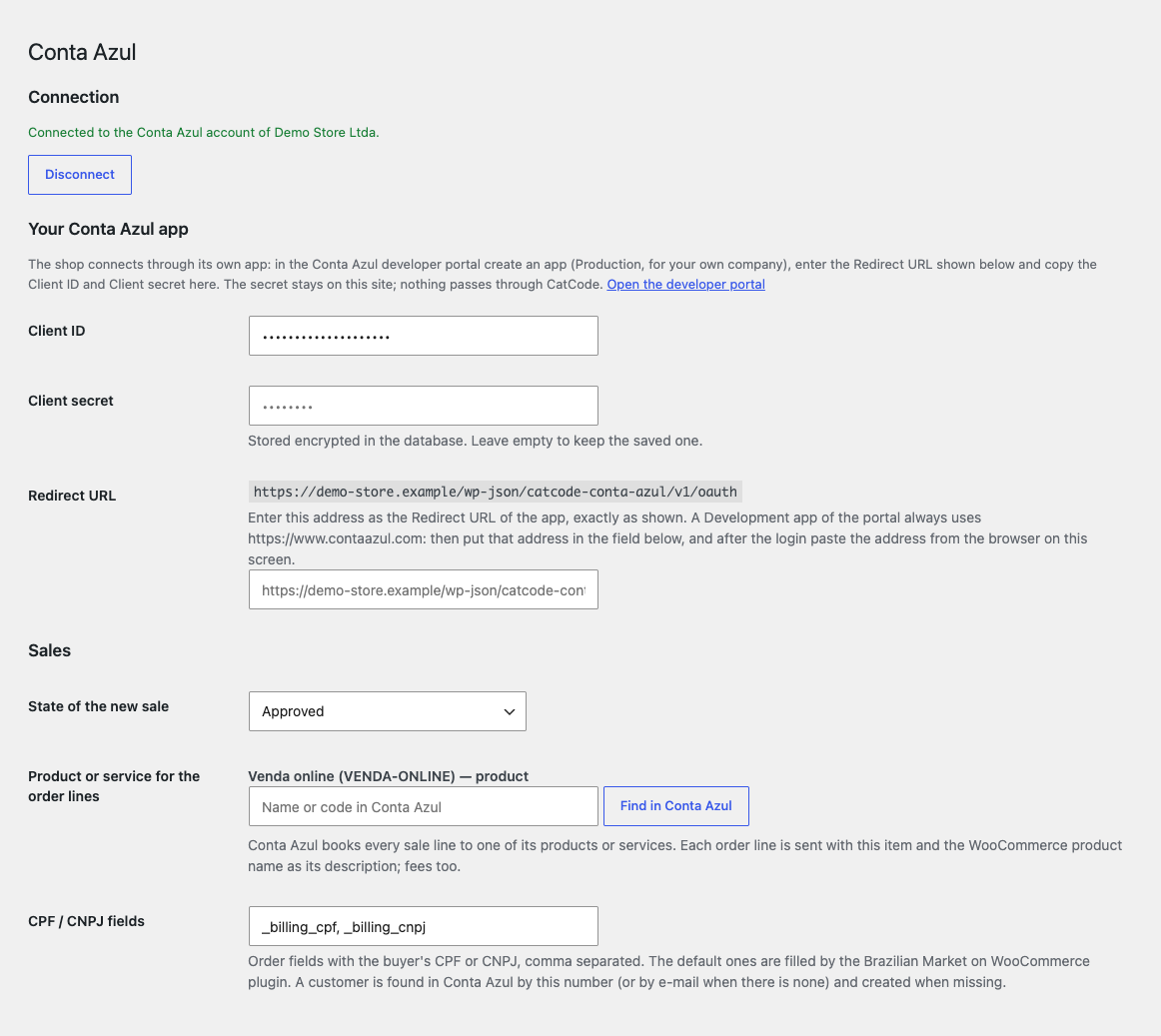
WooCommerce → Conta Azul: create an app in the Conta Azul developer portal, enter in it the Redirect URL the module shows, copy the Client ID and Client secret into the module and press “Connect to Conta Azul”.

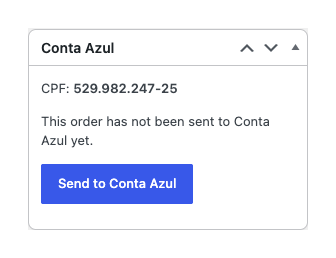
The order gets a “Conta Azul” box with the CPF or CNPJ of the buyer.

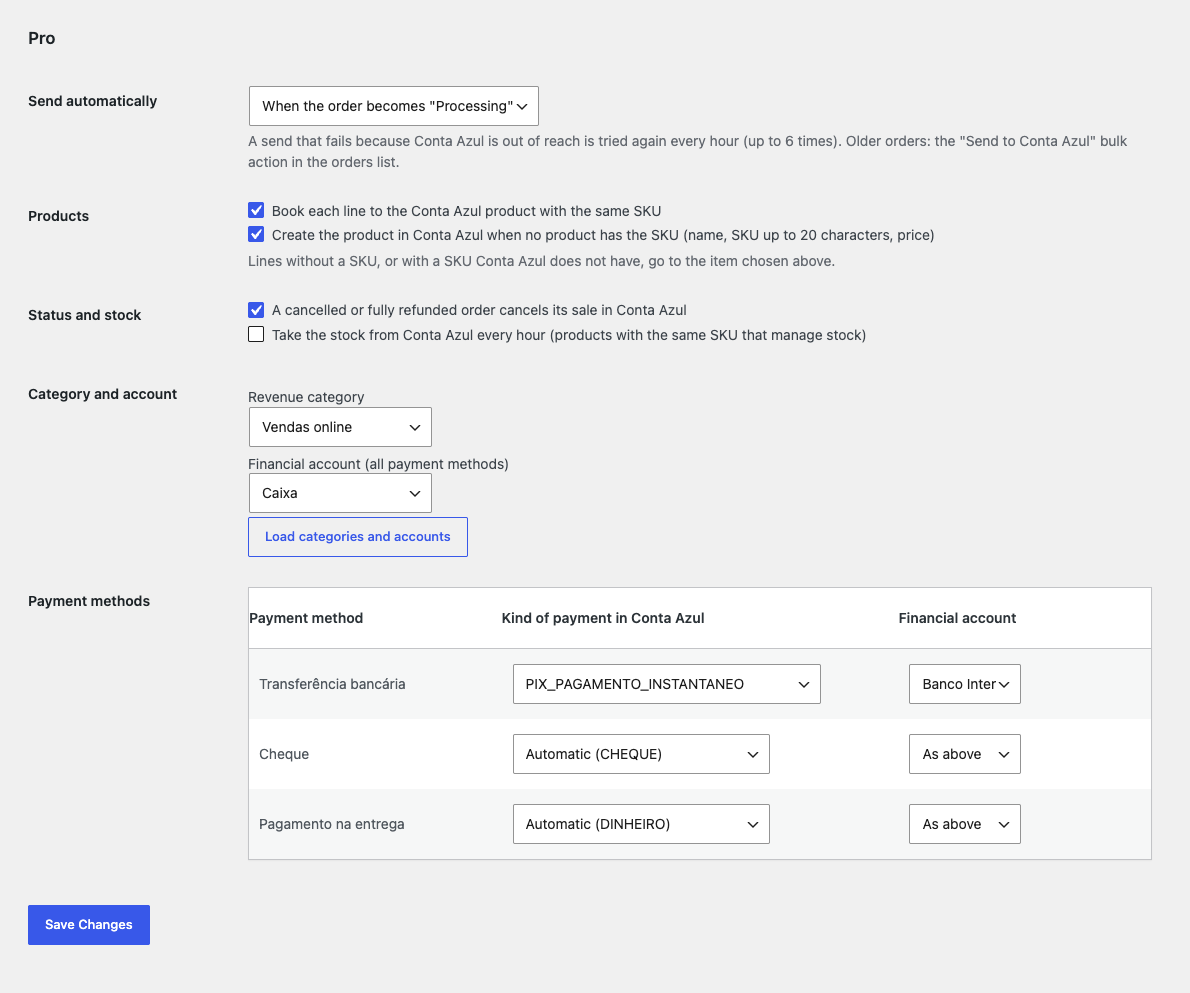
Sending at a status. Choose an order status (for example “Processing”): the sale is created automatically, once per order.

A fresh install is the free version, nothing switches on by itself. The “Try Pro for 7 days” button → e-mail → the key right in the window and by e-mail.

Moving the site? Unlink the licence on the old domain and activate it on the new one yourself. A staging copy (staging., dev.) works with the same key and does not take a site slot. For studios — keys for 5 or 25 sites, or unlimited.
 WordPress 6.4+, WooCommerce 8.6+ (HPOS, block checkout), PHP 7.4+.A Conta Azul account and your own app in the Conta Azul developer portal.The Redirect URL of the module (/wp-json/catcode-conta-azul/v1/oauth) must be reachable from the internet over https.For the CPF/CNPJ at the checkout: a plugin such as Brazilian Market on WooCommerce, or your own order fields whose names are set in the settings.Interface languages: English and Português (Brasil).
Connection with your own Conta Azul app, sending an order with a button, customer by CPF/CNPJ or e-mail, numbering, shipping, discount and payment kind, protection against a second sale…


Conta Azul for WooCommerce sends the orders of your shop to the Brazilian cloud ERP Conta Azul as sales. The “Send to Conta Azul” button in the order creates a sale with the next number, the lines, shipping, discount and total, and the buyer becomes a Conta Azul customer by CPF or CNPJ. The module is for Brazilian shops that keep their books in Conta Azul; module languages: English and Português (Brasil).
What you need in Conta Azul. Your own Conta Azul account and an app in the Conta Azul developer portal: you paste its Client ID and Client secret into the module and enter the Redirect URL of the module in the app. The secret stays on your site in encrypted form; there is no CatCode server in between. The module does not issue NF-e: tax documents are made in your Conta Azul account.
WooCommerce → Conta Azul: create an app in the Conta Azul developer portal, enter in it the Redirect URL the module shows, copy the Client ID and Client secret into the module and press “Connect to Conta Azul”. The secret is stored encrypted and never shown in the form. The token is renewed by itself; if the access is revoked, the admin says so and offers to connect again.
Then choose the state of a new sale (“Approved” or “In progress”), the product or service for the lines (search by name or code in your Conta Azul catalogue) and the CPF/CNPJ fields of the order. For a “Development” app of the portal, which always returns to https://www.contaazul.com, there is a mode where you paste the address with code= after the login.
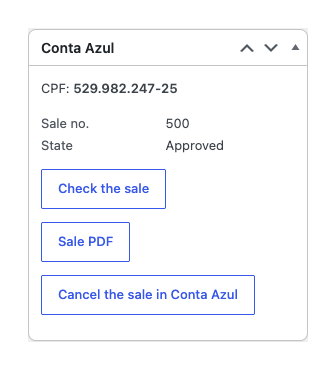
The order gets a “Conta Azul” box with the CPF or CNPJ of the buyer. The “Send to Conta Azul” button creates the sale once: every order is locked while it is sent, the sale number is stored, and a lost answer from Conta Azul is checked by looking up the reserved number before any new try. A double click or a second tab never makes a second sale.
The customer in Conta Azul is looked up by CPF or CNPJ (the check digits are verified), and without a document by e-mail; when there is no such customer the module creates one: a person or a company, e-mail, phones, an address with CEP, number and neighbourhood. The document fields come from the Brazilian Market on WooCommerce plugin; other field names are set in the settings. After sending, the order keeps the sale number and state, and the “Check the sale” button reads the state of the sale back from Conta Azul.
The order lines go into the sale under one chosen Conta Azul product or service (the API needs an item for every line), and the WooCommerce product name becomes the description of the line. Shipping is a separate part, coupons and negative fees go in as a discount, and the total matches the order to the cent. The payment kind (Pix, boleto, card and others) is chosen from the payment method of the order, and the order notes and the WooCommerce log show the result and the reason of a refusal.
Sending at a status. Choose an order status (for example “Processing”): the sale is created automatically, once per order. If Conta Azul cannot be reached, the try is repeated every hour, up to 6 times.
Products by SKU. A line goes to the Conta Azul product with the same SKU (variations too); a missing product can be created automatically (name, SKU up to 20 characters, price). Lines without a SKU go to the chosen item.
Cancelling. A cancelled or fully refunded order cancels its sale in Conta Azul, and there is a “Cancel the sale in Conta Azul” button. A cancelled sale is never brought back.
Category, account, payment kind. The revenue category and the financial account by default and separately for every payment method of the shop, and the payment kind for every method.
Bulk action, PDF, stock. “Send to Conta Azul” in the orders list (up to 50 orders at a time), the “Sale PDF” button in the order, and an hourly update of the stock of products with the same SKU from Conta Azul (off by default).
Journal and updates. The “Conta Azul journal” page keeps the last 300 entries with the reasons of refusals; updates of the module come from catcode.com.ua.
Didn't find the answer? Message us on Telegram and we'll reply within a business day.
 @catcode_support
Setup, compatibility, activation
No, it is an independent integration made by CatCode through the public API. Conta Azul is a trademark of its owner; the module is not affiliated with Conta Azul and not endorsed by it.
Conta Azul signs every connection with the secret of an app. With your own app the secret stays on your site and only your shop uses it; there is no CatCode server in between.
In the free version all lines go under one product or service that you choose. In Pro the lines are matched by SKU, and missing products can be created automatically; that option is off by default.
The customer is looked up by e-mail, and if there is none, created from the order data. An invalid number is not sent.
No. The module creates the sale in Conta Azul; tax documents are made in your Conta Azul account.
No. An order is locked while it is sent and keeps its sale number, and a lost answer is checked by looking up the number before any new try.
Yes, in Pro: a cancelled or fully refunded order cancels its sale, or use the "Cancel the sale in Conta Azul" button.
Pro switches off, the free part keeps working: the connection, sending with the button, customers, the check of the sale. Jobs that waited in the queue stop with the reason, and a sale can be made by hand with the button.
One key covers two sites: the shop and its test copy.
No reviews yet. Be the first.
No questions yet. Ask one — we answer within 24 hours.
We build custom modules for WordPress, WooCommerce, OpenCart and Shopify. Tell us about the task and we'll prepare an estimate.
Order a custom module
—
Charged in UAH; your bank converts it to your currency. EUR price is approximate.

CatCode assistant
Just now


CatCode assistant
Online

I’ll help with your website task
Describe your website task — I’ll find a ready-made module or pass it to a developer for an estimate. Modules, custom features, layout, integrations, speed, migration, technical SEO.