
















WooCommerce
Abandoned Cart Recovery for WooCommerce
Free + Pro
990 UAH/year≈ €20
v1.3.1
 Website auditA PDF report by email in 3 minutesCheck a website
Everyday tasks
Image compressorSize, quality and WebP in bulkQR generatorLink, Wi-Fi, payment to IBANVAT calculator20, 14, 7% and amount in wordsTransliterationOfficial Ukrainian standardWebsite checks
PHP and pluginsPHP version, WordPress, pluginsGoogle Merchant feedFields, prices, GTIN, imagesDomain emailSPF, DKIM, DMARC, blacklistsAI search readinessllms.txt, bots, markupAll 9 toolsEnter at least 2 characters
Pix through your own Banco Inter account: QR code, Pix Copia e Cola, orders settled by the bank.
The free version works with no time limit. Pro adds the rest of the features in the table.


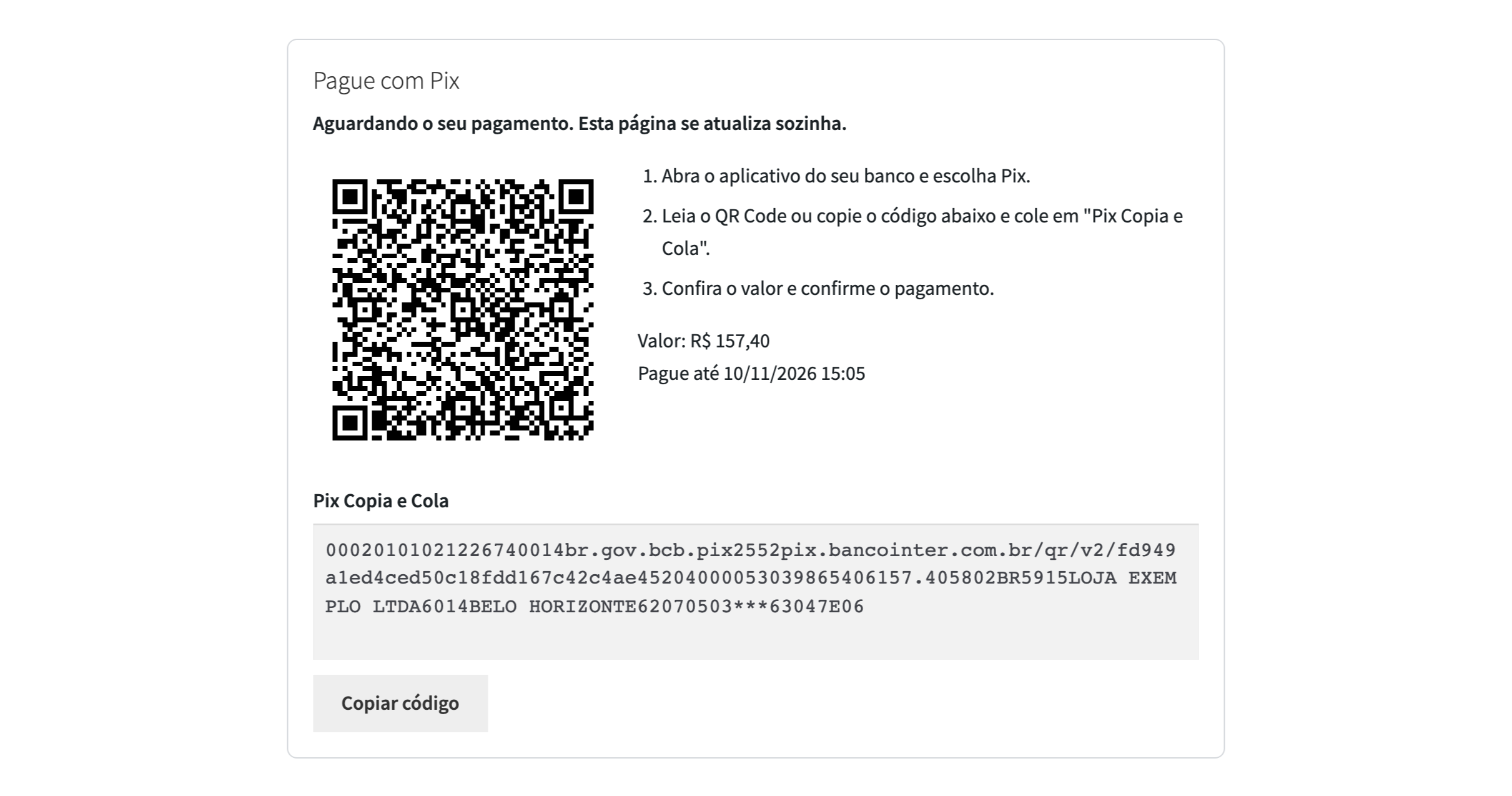
Every order gets a dynamic Pix charge for the order total with an expiry you choose (60 minutes by default).

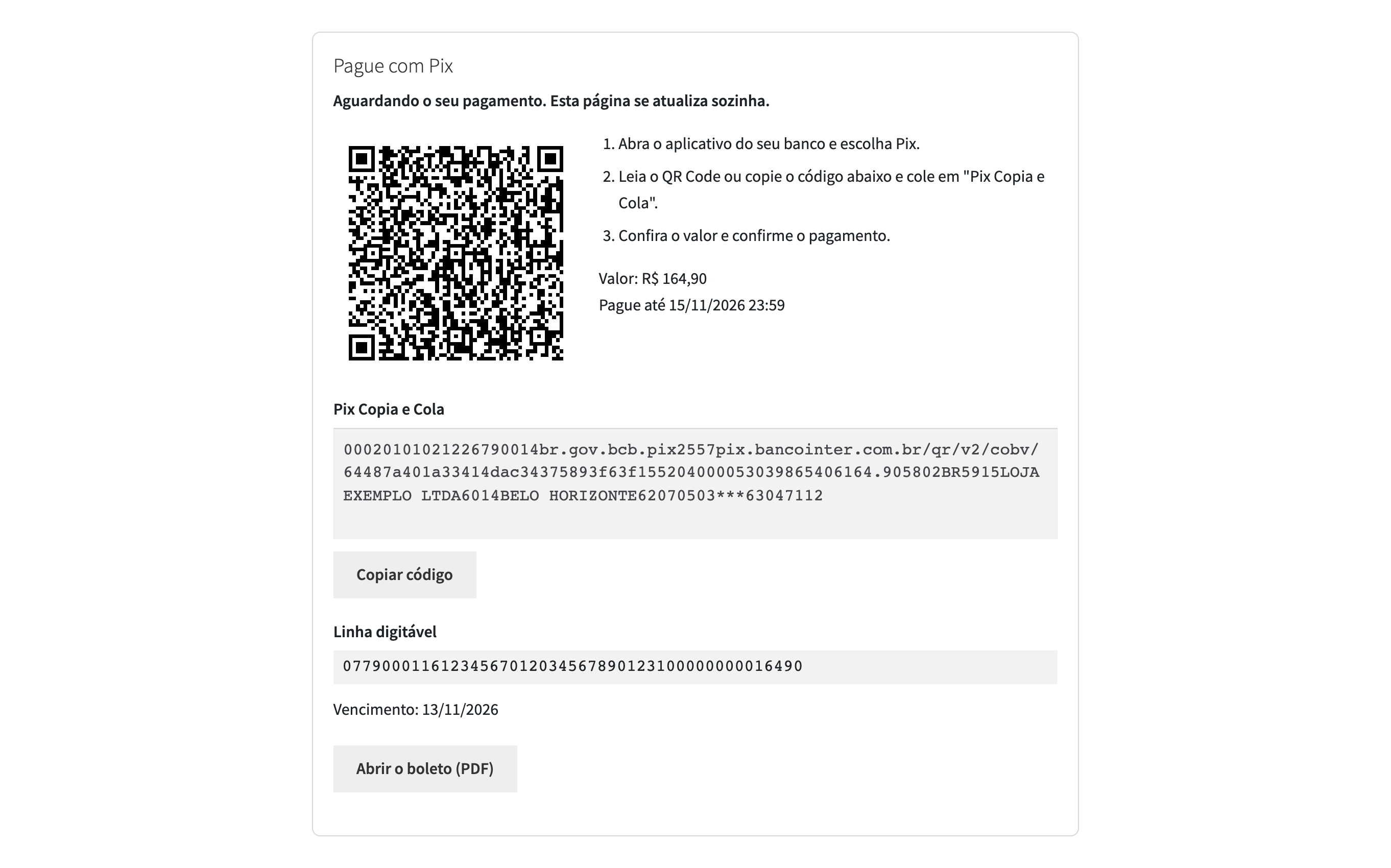
BolePix: a second payment method, a Banco Inter boleto with a Pix QR code inside.

The base version is free. Pro costs 990 UAH for a one-year licence. A year of updates, technical support and all Pro features.

A fresh install is the free version, nothing switches on by itself. The “Try Pro for 7 days” button → e-mail → the key right in the window and by e-mail.

Moving the site? Unlink the licence on the old domain and activate it on the new one yourself. A staging copy (staging., dev.) works with the same key and does not take a site slot. For studios — keys for 5 or 25 sites, or unlimited.
 WordPress 6.4+, WooCommerce 7.0+, PHP 7.4+, shop currency: the Brazilian real.A Banco Inter Empresas account with an API integration and a Pix key in it.A site on https that the bank can send webhooks to.
Pix with a QR code and Pix Copia e Cola, confirmation by the bank, certificate upload, connection check, webhook registration, a test Pix charge, a certificate expiry reminder.


CatCode Pix with Banco Inter for WooCommerce adds Pix to WooCommerce, connected straight to the API of your Banco Inter business account (Inter Empresas). There is no intermediary: the charge is created in your account, the money lands on your Pix key and the integration credentials are your own. The shop works in Brazilian reais (BRL).
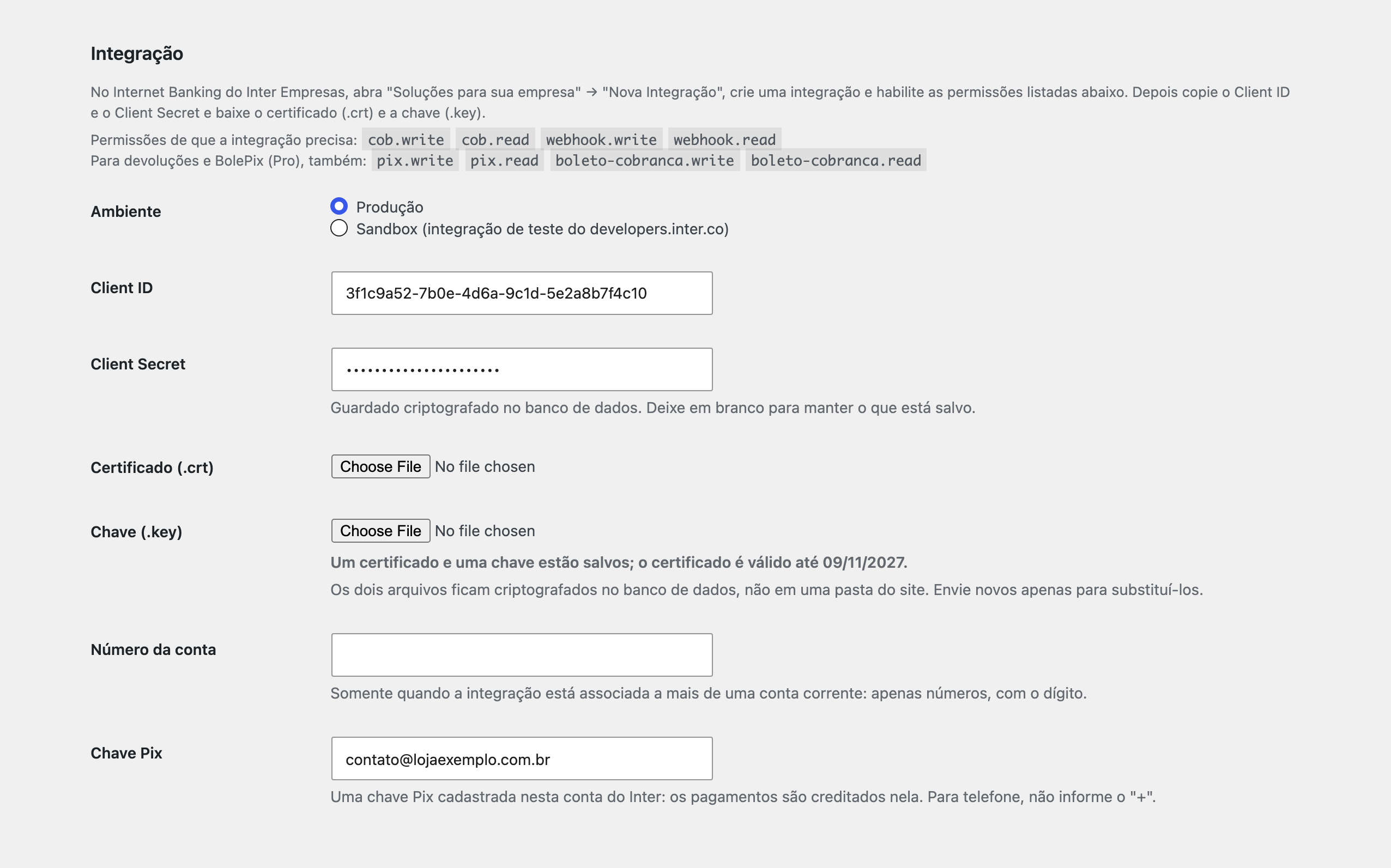
Every order gets a dynamic Pix charge for the order total with an expiry you choose (60 minutes by default). The buyer sees the QR code and the “Pix Copia e Cola” code on the thank-you page, in “My account” and in the e-mail. The module draws the QR picture itself; the code is not sent to any QR service. An order is marked as paid only after the module reads the charge back from the bank: the bank webhook just says it is time to ask. A Pix of a different amount puts the order on hold with a note. The order page switches to “Pagamento recebido” by itself, even when the webhook is late. The .crt and .key files of the integration are uploaded on the settings screen and stored encrypted in the database together with the Client Secret. The site administrator gets an e-mail 30 days and 7 days before the certificate ends. Three buttons tell in plain words what the bank answered: check the connection, register the webhook and create a test Pix charge of R$ 1,00. The order screen has a “Check payment status” button. It works with the classic and the block checkout and with HPOS, in production and in the test environment of the bank. Interface languages: português do Brasil and English.
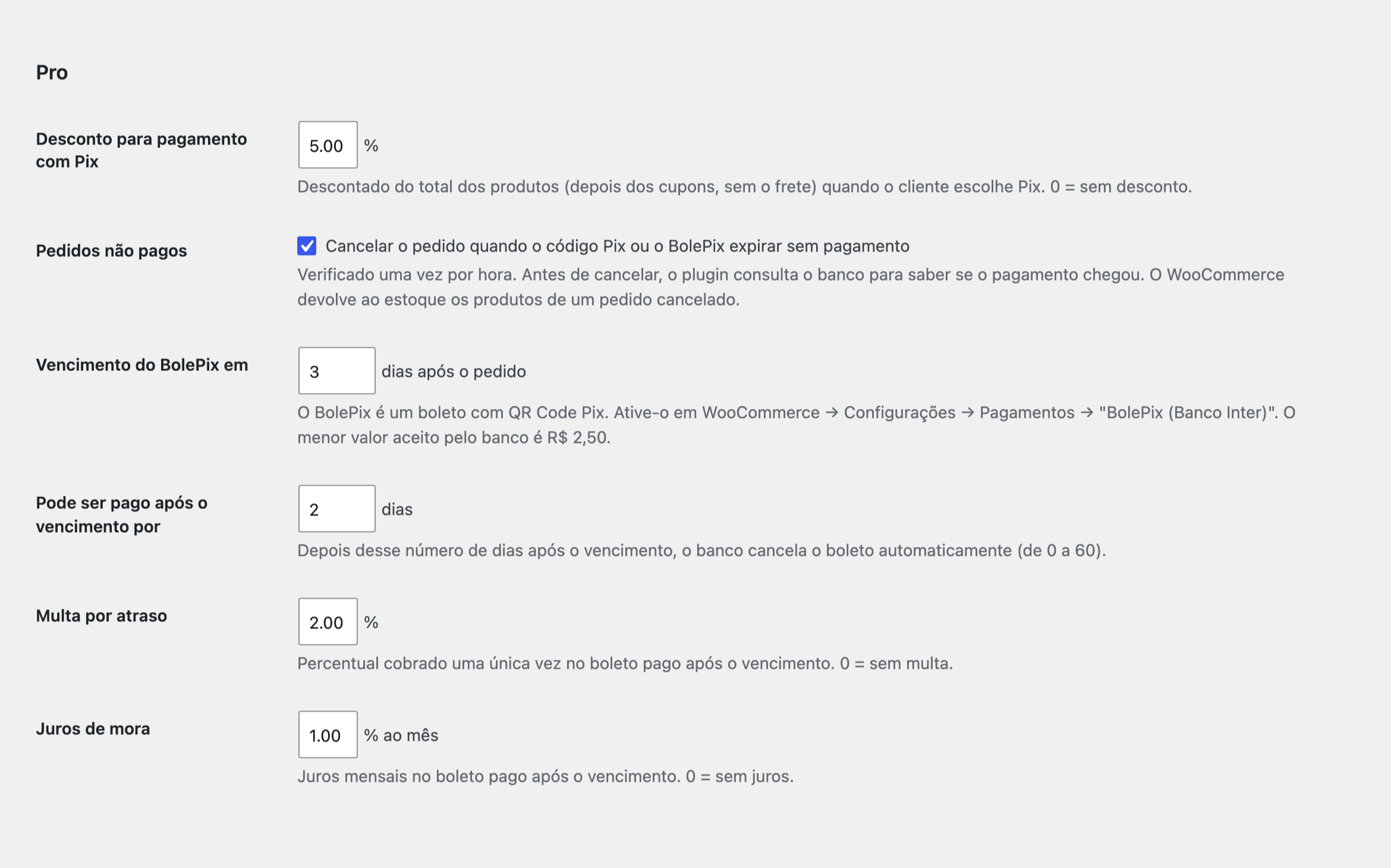
BolePix: a second payment method, a Banco Inter boleto with a Pix QR code inside. You set the due date in days, how many days after it the bank still takes the payment, a late fine in percent and monthly interest. The buyer gets the boleto line, the Pix code and the PDF. Unpaid orders cancel themselves: once an hour the module asks the bank, and an order whose Pix code or BolePix has expired unpaid is cancelled, and WooCommerce returns its products to stock. An order cancelled in the shop cancels its unpaid boleto at the bank. A Pix refund (full or partial) from WooCommerce goes to the bank as a devolução. A discount for paying with Pix: a percentage of the products total (after coupons, without shipping) on the classic and the block checkout. The log keeps the last 200 calls to the bank with their answers, without keys or buyer data. Updates of the module come from catcode.com.ua.
The module is not on wordpress.org yet: the free version and Pro are one archive from this page. Without a key it works as the free version.
Didn't find the answer? Message us on Telegram and we'll reply within a business day.
 @catcode_support
Setup, compatibility, activation
An Inter Empresas (PJ) business account: the API integration is created in its internet banking. The module does not open the account or create the integration.
The bank calls the webhook address of your site. The module does not trust the content of the call: it asks the bank for the charge and settles the order from the answer. While the buyer keeps the order page open, the module also asks the bank itself.
No. It is an independent integration made by CatCode. Banco Inter and Inter Empresas are trademarks of Banco Inter S.A.; the plugin is not affiliated with them.
It waits for the payment and moves to Processing when the bank reports the Pix as received.
In the internet banking open your integrations and choose "Renovar" (the bank offers it from 90 days before the end), then upload the new .crt and .key in the module. The Client ID and the Client Secret stay the same.
Not in version 1.0.0: Pix Automático is not supported.
Pro switches off, the free part keeps working.
No reviews yet. Be the first.
No questions yet. Ask one — we answer within 24 hours.
We build custom modules for WordPress, WooCommerce, OpenCart and Shopify. Tell us about the task and we'll prepare an estimate.
Order a custom module
—
Charged in UAH; your bank converts it to your currency. EUR price is approximate.

CatCode assistant
Just now


CatCode assistant
Online

I’ll help with your website task
Describe your website task — I’ll find a ready-made module or pass it to a developer for an estimate. Modules, custom features, layout, integrations, speed, migration, technical SEO.
