
















WooCommerce
990 UAH644 UAH/year≈ €13
Black November: −35% on all modules until 30 November Black November: −35% until 30 November Choose a module
 Website auditA PDF report by email in 3 minutesCheck a website
Everyday tasks
Image compressorSize, quality and WebP in bulkQR generatorLink, Wi-Fi, payment to IBANVAT calculator20, 14, 7% and amount in wordsTransliterationOfficial Ukrainian standardWebsite checks
PHP and pluginsPHP version, WordPress, pluginsGoogle Merchant feedFields, prices, GTIN, imagesDomain emailSPF, DKIM, DMARC, blacklistsAI search readinessllms.txt, bots, markupAll 9 toolsEnter at least 2 characters
Konduto for WooCommerce: fraud analysis of orders, score and recommendation in the order. Automatic analysis, webhook and lists in Pro. Unofficial module; the analysis is billed by Konduto.
The free version works with no time limit. Pro adds the rest of the features in the table.


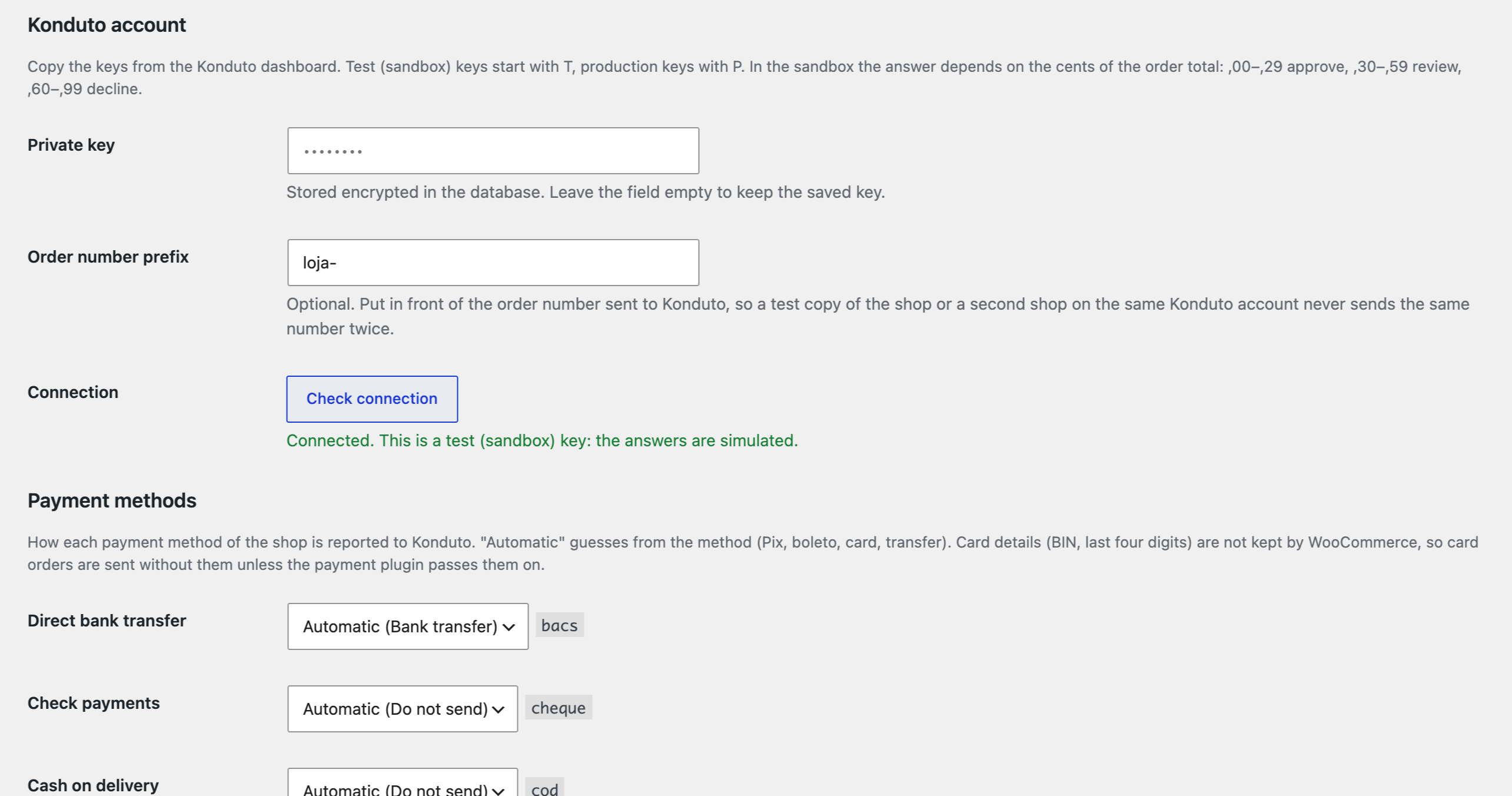
Everything is set on one page: WooCommerce → Konduto. Enter the private key from the Konduto dashboard (it is stored encrypted and never shown again) and press “Check connection”: Konduto tells you whether it accepted the key.

Automatic analysis.

The base version is free. Pro costs 1290 UAH for a one-year licence. A year of updates, technical support and all Pro features.

A fresh install is the free version, nothing switches on by itself. The “Try Pro for 7 days” button → e-mail → the key right in the window and by e-mail.

Moving the site? Unlink the licence on the old domain and activate it on the new one yourself. A staging copy (staging., dev.) works with the same key and does not take a site slot. For studios — keys for 5 or 25 sites, or unlimited.
 WordPress 6.2+, WooCommerce 7.0+, PHP 7.4+.A Konduto account and contract: the keys from the Konduto dashboard.For CPF/CNPJ a checkout field is needed, for example from Brazilian Checkout Fields. For the webhook (Pro) the site must be reachable from the internet over HTTPS.
Analysis of an order in Konduto from the order screen (score, recommendation, Konduto status, rules), encrypted key with a check, order-number prefix, payment type of each payment method…


Konduto Antifraud for WooCommerce sends the orders of your shop to Konduto, the Brazilian fraud-prevention service, and shows the answer right in the order: a risk score from 0 to 1, the recommendation (approve, review or decline) and the rules that fired. The module is made for shops that sell in Brazil: the buyer’s CPF/CNPJ, addresses with CEP, reais, Pix, boleto and cards. It works with the classic and the block checkout and HPOS. The interface is in English and português (pt-BR).
Unofficial module. Konduto is a trademark of its owner; this is an independent integration by CatCode, not a Konduto product. The analysis itself is billed by Konduto: you need your own Konduto account and contract, and Konduto, not the module, sets the prices and terms.
Everything is set on one page: WooCommerce → Konduto. Enter the private key from the Konduto dashboard (it is stored encrypted and never shown again) and press “Check connection”: Konduto tells you whether it accepted the key. A key starting with T belongs to the test environment, P to production. The order-number prefix is there because Konduto accepts an order number only once per account: give the shop and its test copy different prefixes when they share an account. For each payment method you choose the payment type reported to Konduto: Pix, boleto, credit or debit card, transfer, voucher or balance. The module guesses the type from the payment method and you can set it yourself. WooCommerce does not keep the BIN and the last four digits of a card, so a card order goes without them; if Konduto refuses the data because of the card, the order is sent again without the payment block.
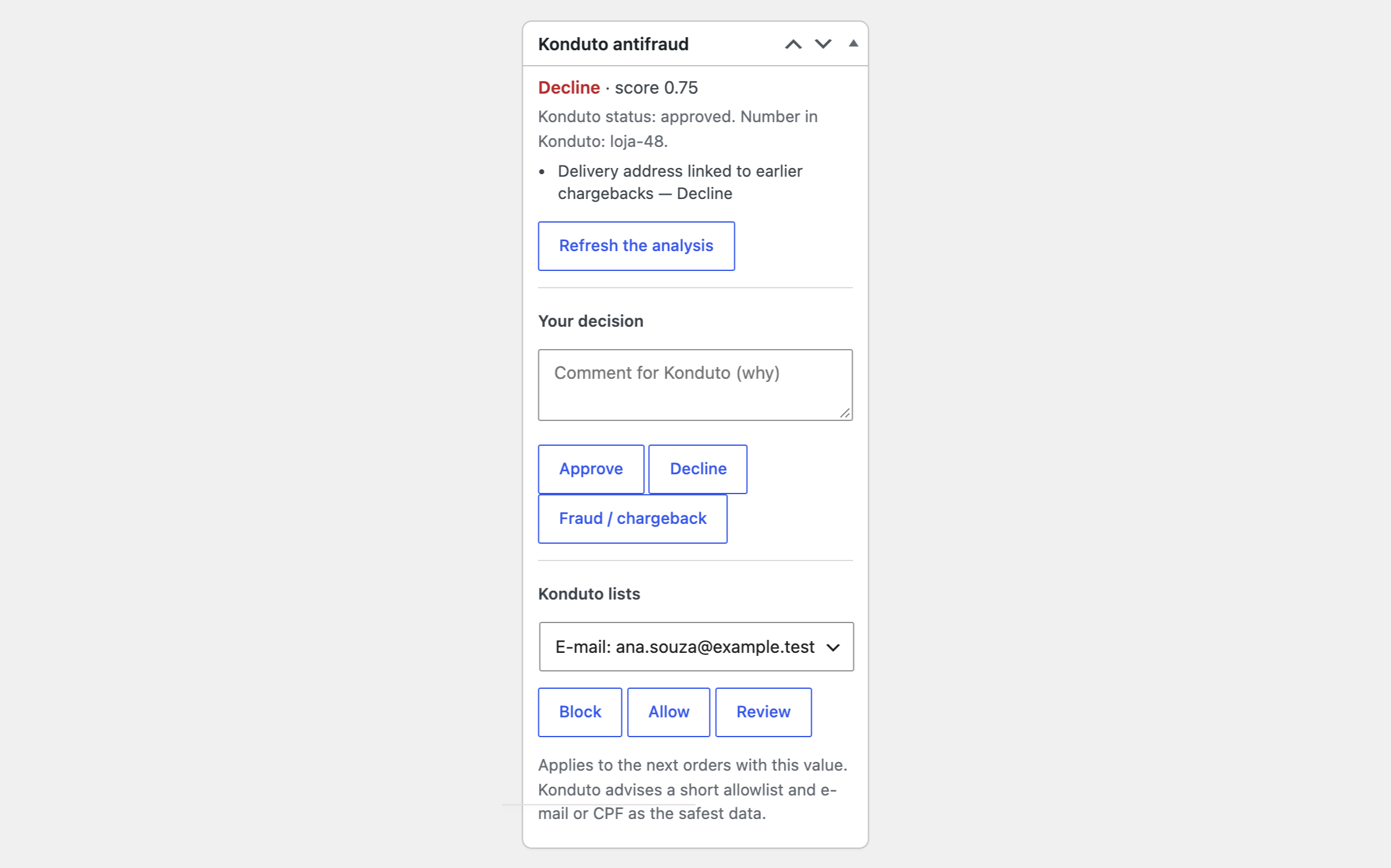
The order screen gets a “Konduto antifraud” box. The button “Send to Konduto for analysis” sends the buyer (name, e-mail, phone, CPF/CNPJ), billing and shipping addresses, the items of the cart, the totals, the IP address and the payment type. CPF/CNPJ, house number and neighbourhood are read from the fields that Brazilian checkout-field plugins create (for example our Brazilian Checkout Fields). The box then shows the recommendation, the score, the Konduto status and the rules that fired, and the same goes to the order notes. An order cannot be sent twice: the button becomes “Refresh the analysis” and reads the current status, for example after an analyst decided in Konduto. In the free version the WooCommerce order status is never changed. Instead of raw API errors you see clear messages: key refused, a missing field (“/customer/tax_id”), Konduto not reachable.
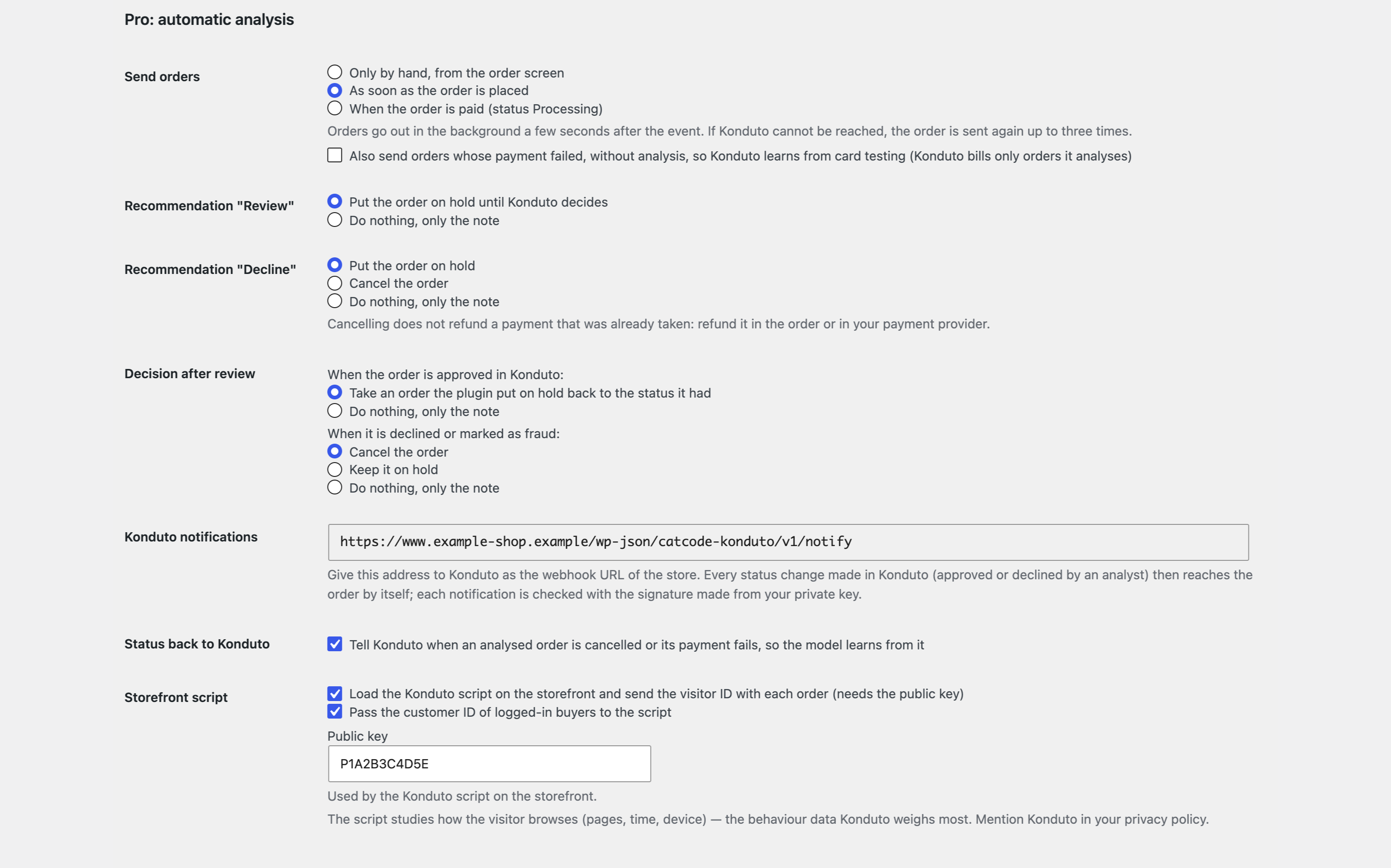
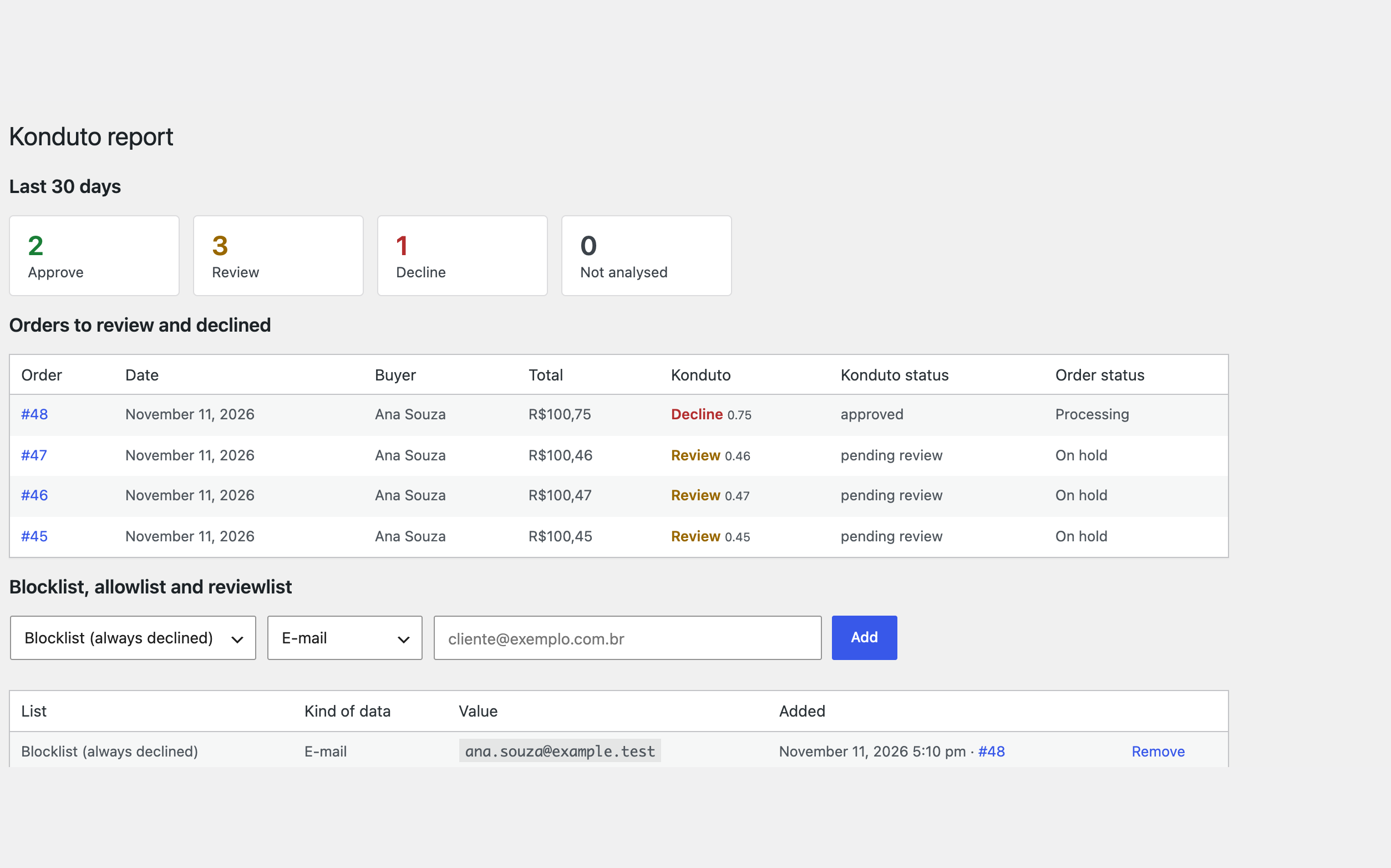
Automatic analysis. An order goes to Konduto by itself, as soon as it is placed or when it is paid (status “Processing”), in the background through Action Scheduler; if Konduto cannot be reached, the order is sent again up to three times. Action on the recommendation. “Review” puts the order on hold, “Decline” puts it on hold or cancels it (cancelling does not refund a payment already taken, and the setting says so). An unpaid Pix or boleto order is not touched until the payment arrives; then it waits on hold instead of going to “Processing”. Konduto webhook. When a Konduto analyst approves or declines the order, the order follows: back to its status, or cancelled. Every notification is checked with the HMAC signature. The webhook address is shown in the settings and has to be given to Konduto support. Your decision back to Konduto. Approve, decline or mark as fraud (chargeback) with a comment from the order screen; cancelled orders and failed payments are reported to Konduto so that the model learns from them. Failed payments can be sent without analysis (Konduto bills only analysed orders). Storefront script. The Konduto script, the page tags and the visitor ID in each order: the behaviour data Konduto weighs most. Blocklist, allowlist and reviewlist. The e-mail, CPF/CNPJ, phone or IP of an order are added with one click, and any value can be added or removed from the report page. Orders list and report. The orders list gets a Konduto column with the recommendation and the score and the bulk action “Send to Konduto for analysis”. The report page shows the last 30 days by recommendation, the orders waiting for review or declined, the lists and the journal of every call to Konduto. Updates from catcode.com.ua.
The module is not on wordpress.org yet: the free version and Pro are one archive from this page. Without a key it works as the free version.
Didn't find the answer? Message us on Telegram and we'll reply within a business day.
 @catcode_support
Setup, compatibility, activation
No, it is an independent integration made by us. Konduto is a trademark of its owner.
Yes, by Konduto: it is a paid service billed under your contract with Konduto. The module, its free version and Pro do not include the cost of the analysis.
A Konduto account: the public and the private key from the dashboard. Keys starting with T belong to the test environment, P to production.
In the free version no, it only shows the recommendation. With Pro "Review" and "Decline" can put the order on hold or cancel it, as you choose.
From the checkout fields that Brazilian checkout-field plugins create, including our Brazilian Checkout Fields. Without the buyer's document Konduto refuses the analysis.
No. WooCommerce does not keep card numbers. A payment plugin that knows the BIN and the last four digits can pass them to the module.
Yes, with the classic and the block checkout and with HPOS.
Pro switches off, the free part keeps working.
No reviews yet. Be the first.
No questions yet. Ask one — we answer within 24 hours.
We build custom modules for WordPress, WooCommerce, OpenCart and Shopify. Tell us about the task and we'll prepare an estimate.
Order a custom module
—
Charged in UAH; your bank converts it to your currency. EUR price is approximate.

CatCode assistant
Just now


CatCode assistant
Online

I’ll help with your website task
Describe your website task — I’ll find a ready-made module or pass it to a developer for an estimate. Modules, custom features, layout, integrations, speed, migration, technical SEO.
