
















OpenCart
1 290 UAH839 UAH≈ €17
Black November: −35% on all modules until 30 November Black November: −35% until 30 November Choose a module
 Website auditA PDF report by email in 3 minutesCheck a website
Everyday tasks
Image compressorSize, quality and WebP in bulkQR generatorLink, Wi-Fi, payment to IBANVAT calculator20, 14, 7% and amount in wordsTransliterationOfficial Ukrainian standardWebsite checks
PHP and pluginsPHP version, WordPress, pluginsGoogle Merchant feedFields, prices, GTIN, imagesDomain emailSPF, DKIM, DMARC, blacklistsAI search readinessllms.txt, bots, markupAll 9 toolsEnter at least 2 characters

Capsule CRM for OpenCart 4.x, 3.x, 2.3 (United Kingdom): buyers as contacts for free, in Pro opportunities with milestones, custom fields, tasks, a journal. Lifetime licence.
The free version works with no time limit. Pro adds the rest of the features in the table.


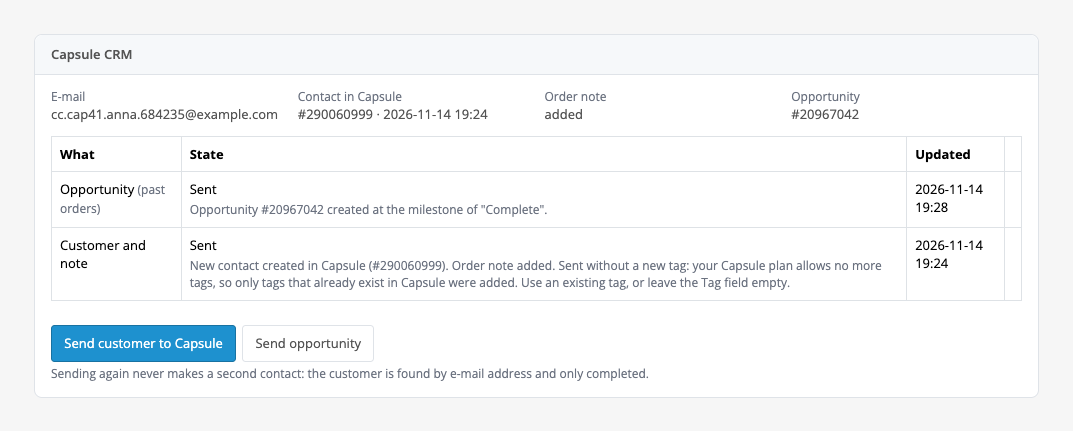
The order page gets a «Capsule CRM» box: the buyer’s e-mail, the contact number in Capsule, the state of the note and the opportunity, a table of the jobs of that order with state and time, and the buttons «Send customer to Capsule» and «Send opportunity» (Pro).

Extensions → Extensions → Modules → Capsule CRM Sync: the tabs «Connection», «Customers», «Opportunities», «Tasks», «Custom fields», «Past orders» and «Licence».

The basic version is free. Pro costs 1290 UAH, a one-time payment, a lifetime licence.

A fresh install is the free version, nothing switches on by itself. The “Try Pro for 7 days” button → e-mail → the key right in the window and by e-mail.

Moving the site? Unlink the licence on the old domain and activate it on the new one yourself. A staging copy (staging., dev.) works with the same key and does not take a site slot. For studios — keys for 5 or 25 sites, or unlimited.
 OpenCart 4.0.2.x–4.1.x, 3.0.x or 2.3.0.2 (PHP 7.0+ for 2.3); cURL and OpenSSL extensions.A Capsule CRM account and a personal API token with write access: a read-only token finds contacts but cannot create them, and Capsule refuses with an explanation.Data goes one way: from OpenCart to Capsule. Changes made in Capsule do not come back to the shop, and cancelling an order does not change or delete the contact in Capsule.On the free Capsule plan the number of tags is limited: a new tag is not created there, the contact goes without it and the journal says so. A tag that already exists in Capsule is kept. Choose an existing tag or leave the field empty.A contact is looked up by e-mail only: a buyer with another address becomes a separate contact.After a lost answer from Capsule a retry can add a second note or a second task for the order; this is written in the journal, and the note is named by the order number.After a lost answer the module finds the opportunity by the name «OpenCart order #N» among the contact’s opportunities; if the name is changed by hand in Capsule, a retry creates a second one.The module pauses about a second between calls, so a manual send from the order page takes a few seconds.The module interface is in English.
Buyers as Capsule contacts without duplicates, a tag, an order note and an order box, and in Pro opportunities with milestones, custom fields, past orders, tasks and a journal.


Capsule CRM Sync for OpenCart 4.x, 3.x and 2.3 sends the buyers of your store to Capsule CRM: when an order reaches a status you chose, Capsule gets a contact with the name, e-mail, phone and billing address, a tag and a note about the order. The module talks to the Capsule API directly with your own token, and the data goes one way: from OpenCart to Capsule.
What you need. A Capsule CRM account and a personal API token with write access, created in Capsule under My Preferences → API Authentication Tokens. Capsule plans are paid separately.
The order page gets a «Capsule CRM» box: the buyer’s e-mail, the contact number in Capsule, the state of the note and the opportunity, a table of the jobs of that order with state and time, and the buttons «Send customer to Capsule» and «Send opportunity» (Pro).
The buyer is looked up in Capsule by e-mail: a contact that is already there is used instead of a second one, even when the address is written in capitals. To an existing contact the module adds only what is missing (phone, address, name, organisation, tag), or changes nothing if you choose so: what your team typed in Capsule is never overwritten. Sending again never makes a second contact.
The company name from the order links the person to an organisation in Capsule. The billing address is used, or the shipping address when there is no billing one, with the country name the way Capsule spells it. The contact history gets one note per order: number, status, date, total, payment, items, delivery and the buyer’s comment.
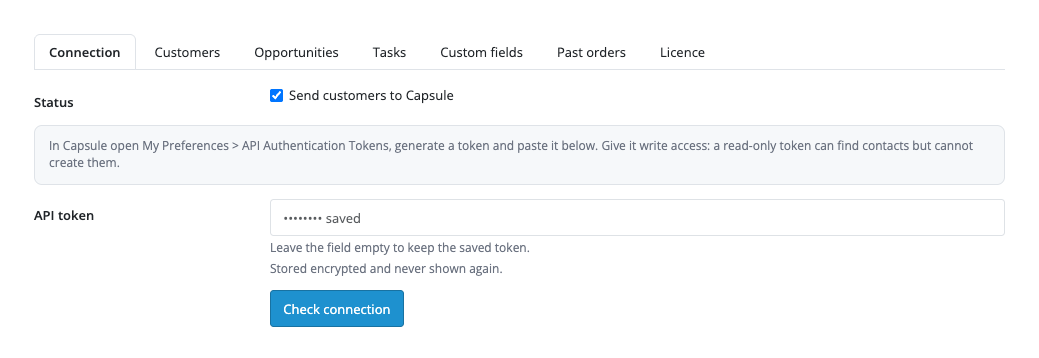
Extensions → Extensions → Modules → Capsule CRM Sync: the tabs «Connection», «Customers», «Opportunities», «Tasks», «Custom fields», «Past orders» and «Licence». The first has the module switch, the token field, the «Check connection» button that shows the Capsule account name and user, and a switch to write every call to the log. The token is stored encrypted and never shown again.
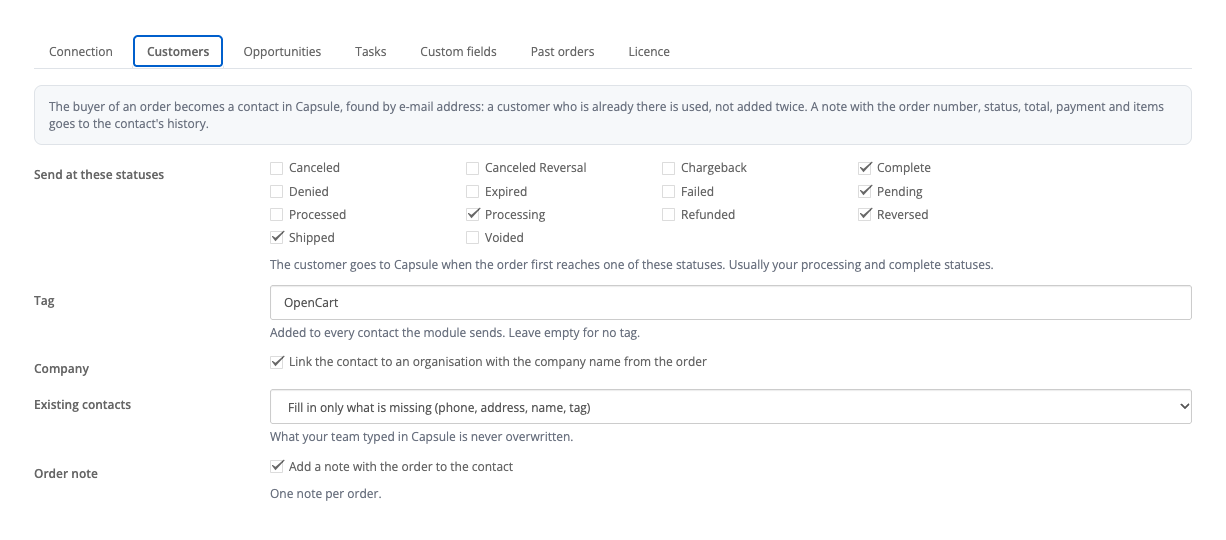
The «Customers» tab: the order statuses at which the buyer goes to Capsule (after the first install, processing and complete), the tag («OpenCart» by default, can be left empty), the link to an organisation, what to do with an existing contact (fill in only what is missing, or change nothing) and the order note. Orders placed before the connection do not go to Capsule by themselves: send them with the button on the order page or, with Pro, from the «Past orders» tab.
Without a key the Pro tabs open with an explanation and disabled fields, and stored Pro values are not shown.
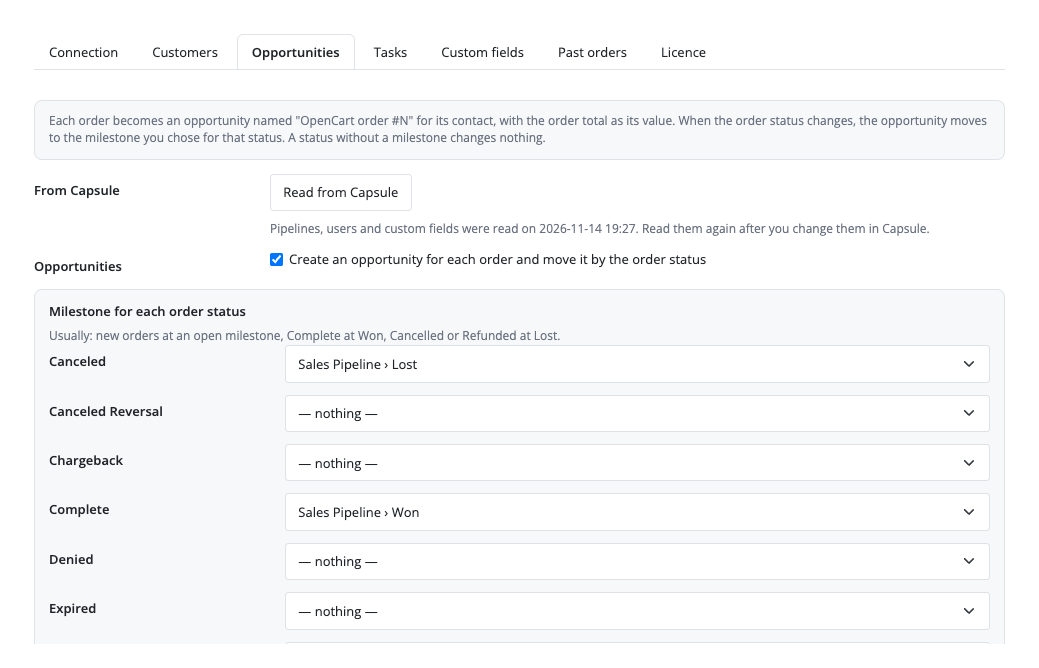
Pro creates an opportunity «OpenCart order #N» for each order on the contact, with the order total and currency. For every order status you pick a pipeline milestone (pipelines, milestones and users are read from your Capsule), and the opportunity moves with the status; a late job never moves it back. The owner of opportunities and tasks is set in the settings.
Custom fields of contacts and opportunities in Capsule are filled from order data: customer group, payment method, total, store name. A value that does not fit the field (text in a number field, a value missing from a list) is left out, and the contact still goes. Past orders from a date are sent in the background in portions of 25, to stay within Capsule’s hourly limit. For a large order (a threshold in the shop’s default currency) your team gets a «contact the customer» task with a due date and an assignee, one per order. The customer group is added as a tag. The journal behind the «Capsule CRM journal» button lists everything sent to Capsule for all orders, with filters by state and «Retry» for stopped jobs.
Selling on WooCommerce? There is a separate plugin for it: Capsule CRM for WooCommerce.
Didn't find the answer? Message us on Telegram and we'll reply within a business day.
 @catcode_support
Setup, compatibility, activation
No, it is an independent Capsule CRM integration by CatCode. Capsule is a trademark of its owner.
A Capsule account and a personal API token with write access (My Preferences → API Authentication Tokens), pasted into the module settings.
No: the contact is looked up by e-mail, an existing one is used, and sending again never makes a second contact.
No. An existing contact only gets what is missing (phone, address, name, organisation, tag), or nothing if you choose so.
The number of tags is limited there: a new tag is not created, the contact goes without it and the journal says so. A tag that already exists in Capsule is kept; choose it in the «Tag» field or leave the field empty.
No, the data goes one way: from OpenCart to Capsule.
The job is retried with a pause, the module waits for the time Capsule names when the limit is reached, and a refused token shows in the journal. The box on the order page has a «Retry» button.
One order, with the button on its page; with Pro all orders from a date, in the background, in portions of 25.
OpenCart 4.0.2.x–4.1.x, 3.0.x and 2.3.0.2: three separate archives in one product.
Yes, for OpenCart it is one payment and a lifetime licence for two sites.
Pro switches off, Pro jobs stop with a reason, and the free part keeps working.
No reviews yet. Be the first.
No questions yet. Ask one — we answer within 24 hours.
We build custom modules for WordPress, WooCommerce, OpenCart and Shopify. Tell us about the task and we'll prepare an estimate.
Order a custom module
—
Charged in UAH; your bank converts it to your currency. EUR price is approximate.

CatCode assistant
Just now


CatCode assistant
Online

I’ll help with your website task
Describe your website task — I’ll find a ready-made module or pass it to a developer for an estimate. Modules, custom features, layout, integrations, speed, migration, technical SEO.