
















OpenCart
990 UAH644 UAH≈ €14
Black November: −35% on all modules until 30 November Black November: −35% until 30 November Choose a module
 Website auditA PDF report by email in 3 minutesCheck a website
Everyday tasks
Image compressorSize, quality and WebP in bulkQR generatorLink, Wi-Fi, payment to IBANVAT calculator20, 14, 7% and amount in wordsTransliterationOfficial Ukrainian standardWebsite checks
PHP and pluginsPHP version, WordPress, pluginsGoogle Merchant feedFields, prices, GTIN, imagesDomain emailSPF, DKIM, DMARC, blacklistsAI search readinessllms.txt, bots, markupAll 9 toolsEnter at least 2 characters

99minutos for OpenCart 4.x, 3.x, 2.3 (Mexico): the price at checkout and a shipment from the order page for free; Pro adds a choice of types, automatic shipments, statuses. Lifetime licence.
The free version works with no time limit. Pro adds the rest of the features in the table.


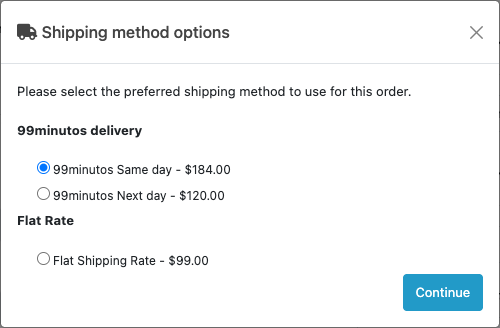
When the buyer enters a Mexican address with a postcode (código postal), the shop asks 99minutos for the price from your pickup postcode to the buyer’s and shows an option such as “99minutos Same day – $184.00” at the shipping step.

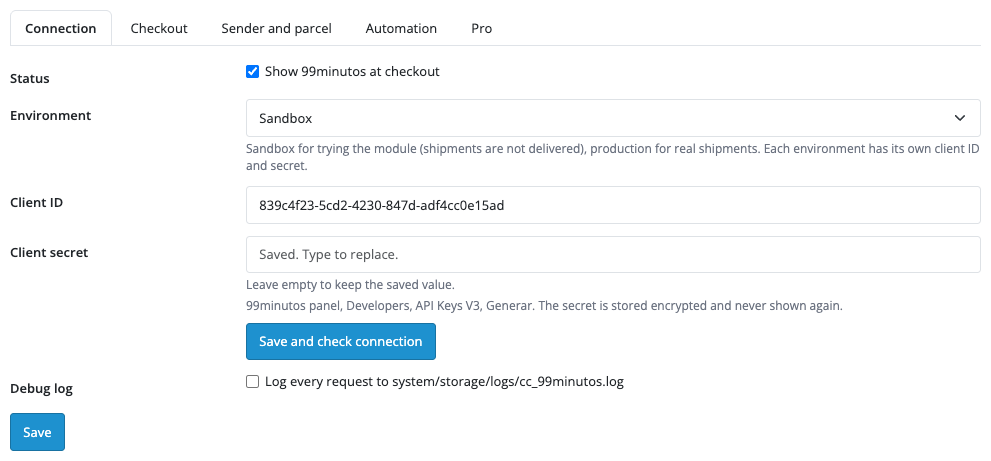
Extensions → Extensions → Shipping → 99minutos Delivery has the tabs Connection, Checkout, Sender and parcel, Automation and Pro.

In Pro every delivery type you switch on becomes its own option at checkout: you can add a markup in percent and set free delivery from a cart subtotal.

A fresh install is the free version, nothing switches on by itself. The “Try Pro for 7 days” button → e-mail → the key right in the window and by e-mail.

Moving the site? Unlink the licence on the old domain and activate it on the new one yourself. A staging copy (staging., dev.) works with the same key and does not take a site slot. For studios — keys for 5 or 25 sites, or unlimited.
 OpenCart 4.0.2.x–4.1.x, 3.0.x or 2.3.0.2; the cURL extension; the shop needs the Mexican peso (MXN) among its currencies, otherwise 99minutos prices are not shown at checkout.A 99minutos account with API V3 keys. The module works with Mexican addresses only (a five-digit postcode); 99minutos operates in other countries too, but the module does not offer them at checkout.Not every delivery type is active in every 99minutos account: if you pick a type your account does not have, prices appear at checkout but creating the shipment returns an error. Pick a type your account has.99minutos takes parcels up to 70 x 70 x 70 cm and 25 kg of volumetric weight. The cart weight limit above which the option is hidden can be changed in the settings.The price of a shipment is asked at the moment it is created: if it is created later, the price is fetched again and you see it before you confirm.The module has no tracking page of its own: the buyer gets the tracking number, and a link appears if you set a tracking page address with {tracking} in it.
99minutos prices at checkout for Mexican postcodes, a shipment from the order page with the price shown first, cash on delivery, a PDF label, cancellation, a list of shipments, English and…


99minutos Delivery for OpenCart (OpenCart 4.x, 3.x and 2.3) shows the 99minutos delivery price for Mexican postcodes at checkout and creates a shipment from the order page: the price is shown before it is created, and the tracking number, the PDF label and cancellation sit in the order itself.
What you need from 99minutos. Your own 99minutos account and API V3 keys (Client ID and Client secret), generated in the 99minutos panel under Developers, API Keys V3. Sandbox and production have separate keys; sandbox shipments are not delivered. 99minutos sets its rates under the agreement with your account, separately from the price of the module.
When the buyer enters a Mexican address with a postcode (código postal), the shop asks 99minutos for the price from your pickup postcode to the buyer’s and shows an option such as “99minutos Same day – $184.00” at the shipping step. In the free version this is one option with the type chosen in the settings; in Pro there are separate options for the buyer to choose from: Same day, Next day, Sprint (24 to 48 hours), Express under 99 minutes (Mexico City), National and CO2 free.
An address outside Mexico, a postcode 99minutos does not serve and a cart heavier than your weight limit (25 kg by default) get no 99minutos option. If 99minutos does not answer, or the buyer has not typed a postcode yet, the shop can show a fixed price that you set; when an answer drags on, the buyer waits a few seconds at most and sees that price. A handling fee, a tax class and a geo zone are set in the settings.
Extensions → Extensions → Shipping → 99minutos Delivery has the tabs Connection, Checkout, Sender and parcel, Automation and Pro. On Connection you choose the environment (Sandbox or Production), paste the Client ID and Client secret and press “Save and check connection”: the module tells you whether 99minutos accepted the keys. The secret is stored encrypted and never shown again; there is a debug log of requests.
Checkout holds the delivery type the buyer sees, whether prices are asked with IVA included, the cart weight limit, a handling fee, a fixed price for when 99minutos cannot be reached, a tax class and a geo zone. Sender and parcel holds the sender and the pickup address (a five-digit postcode), the minutes you need to pack an order, the default parcel size and weight, the label size (Letter, Thermal 4 x 6 in, Small 4 x 3 in) and the payment codes that mean cash on delivery.
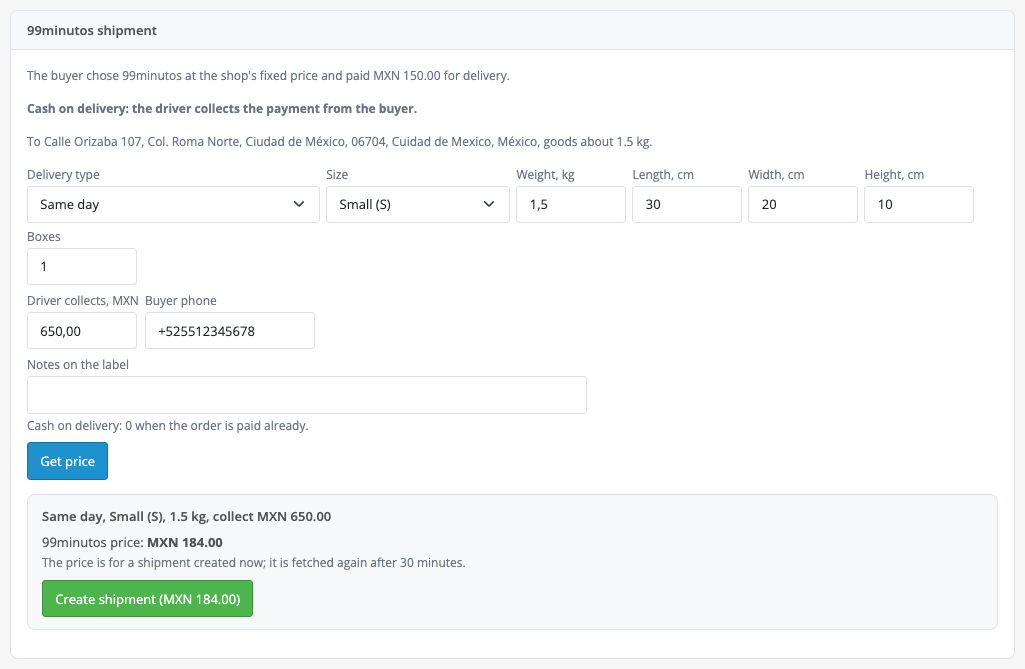
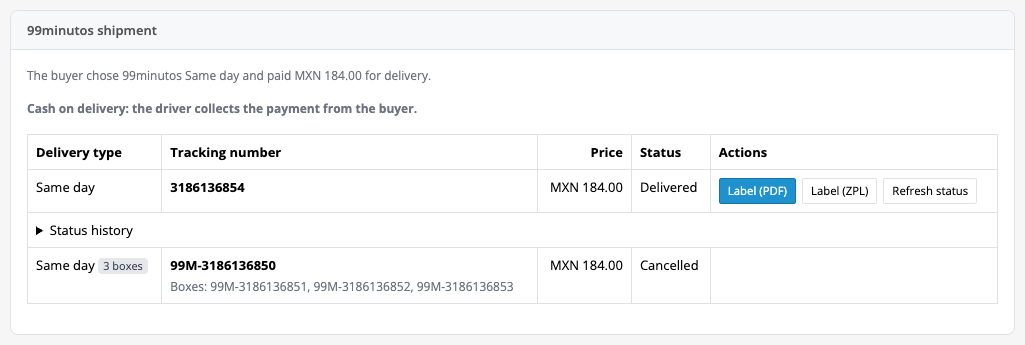
The order gets a “99minutos shipment” block: what the buyer chose, the type, size, weight and dimensions, the amount the driver collects from the buyer, the phone, a “Get price” button and, only after it, “Create shipment” with the confirmed price. The block then shows the tracking number, the status, “Label (PDF)” and “Cancel”. If 99minutos did not confirm a creation, the shipment stays marked “Check at 99minutos” and a second click does not create another. Sales → 99minutos shipments lists every shipment with the filters Need attention, On the way, Delivered and Problems and cancelled.
In Pro every delivery type you switch on becomes its own option at checkout: you can add a markup in percent and set free delivery from a cart subtotal. The prices of the extra types are asked separately, and an option whose price 99minutos did not return is not shown.
Automatic shipments: when an order reaches the status you choose, the module creates a shipment with the type the buyer chose. You set how much more 99minutos may ask than the buyer paid; beyond that no shipment is created and the order keeps a note. The tracking number reaches the buyer in the order history and by e-mail, with a link if you set a tracking page address.
Status updates from 99minutos: a webhook registered from the settings (the storefront needs https) and an hourly batch check (the OpenCart scheduler or a cron address) move orders to collected, delivered and problem statuses, only between your processing and complete statuses. Also in Pro: several boxes in one shipment (up to 20), insurance for the value of the goods, the recipient’s signature, a ZPL label for thermal printers, creating shipments for many orders at once (up to 50), printing labels in a batch and a CSV report for a period.
Didn't find the answer? Message us on Telegram and we'll reply within a business day.
 @catcode_support
Setup, compatibility, activation
No, it is an independent integration with 99minutos by CatCode. 99minutos is a trademark of its owner, and the module is not a 99minutos product.
Yes. The module works with your 99minutos account and its API V3 keys (Developers → API Keys V3).
Same day, Next day, Sprint (24 to 48 hours), Express under 99 minutes (Mexico City), National and CO2 free. The free version shows one type at checkout, picked by the admin; Pro shows several for the buyer to choose. Whether a type is active depends on your 99minutos account.
The module works with Mexican addresses only. For other addresses there is no 99minutos option at checkout.
There is no 99minutos option at checkout (the fixed price is not shown for such a postcode either), and when you create a shipment from the order the module asks you to check the postcode and the street.
For the payment codes you marked as cash on delivery the amount in the shipment block is filled in and the driver collects it from the buyer; for an order that is already paid set 0. Cash on delivery works for one box.
The 99minutos prices come in pesos: the shop needs the MXN currency, otherwise the module says so in the admin.
OpenCart 4.0.2.x–4.1.x, 3.0.x and 2.3.0.2: three separate archives in one product.
Yes, for OpenCart it is one payment and a lifetime licence, for two sites.
Pro switches off and the free part keeps working: the 99minutos option at checkout, creating a shipment from the order page, the PDF label and cancellation.
No reviews yet. Be the first.
No questions yet. Ask one — we answer within 24 hours.
We build custom modules for WordPress, WooCommerce, OpenCart and Shopify. Tell us about the task and we'll prepare an estimate.
Order a custom module
—
Charged in UAH; your bank converts it to your currency. EUR price is approximate.

CatCode assistant
Just now


CatCode assistant
Online

I’ll help with your website task
Describe your website task — I’ll find a ready-made module or pass it to a developer for an estimate. Modules, custom features, layout, integrations, speed, migration, technical SEO.