
WordPress
Ukrposhta International for WooCommerce — Ukrposhta shipping abroad with the rate in the cart
Free + Pro
890 UAH/year
v1.0.1
Enter at least 2 characters

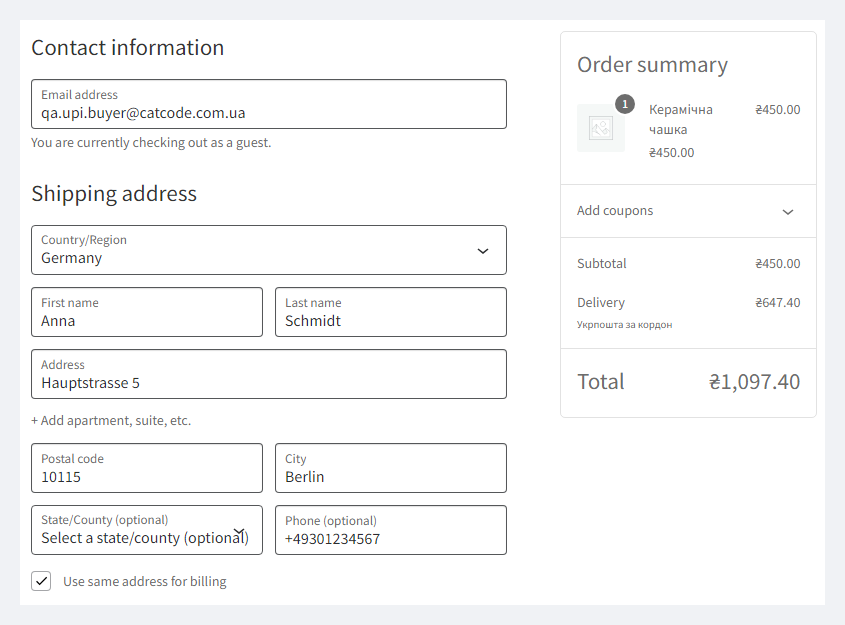
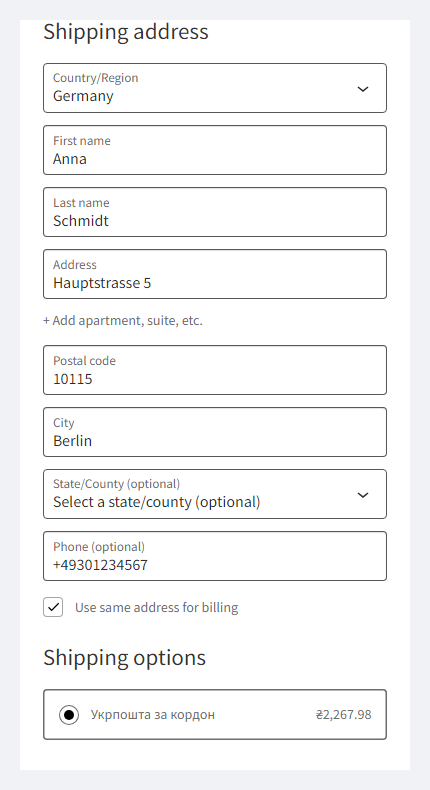
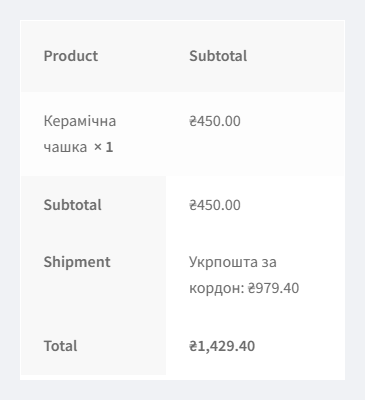
Ukrposhta shipping abroad right in the WooCommerce cart: Ukrposhta's own rate for the country, weight and size of the order — small packet, parcel, EMS, Prime, by air or surface. HS codes for customs, Latin-letters check at checkout. Pro — shipments from the order, CN22/CN23, tracking number.
The free version works with no time limit. Pro adds the rest of the features in the table.



A fresh install is the free version, nothing switches on by itself. The “Try Pro for 7 days” button → e-mail → the key right in the window and by e-mail.

Moving the store? Unbind the licence on the old domain and activate it on the new one yourself. If our server is unreachable, Pro keeps working for 14 more days. For studios — keys for 5 or 25 sites, or unlimited.
 WooCommerce 7.0+ with the classic or block checkout, HPOS compatible · WordPress 6.2+ · PHP 7.4+. Tested on WordPress 7.1, WooCommerce 11.1 and PHP 8.3.A contract with Ukrposhta for international shipments and eCom API keys with international access: the Bearer for rates; the user token and a sender with an address in Latin letters for shipments (Pro).A shipping zone with the countries you ship to. The method does not work for Ukraine — for branches in Ukraine there is the Ukrposhta module for WooCommerce.Product weight and size — products without them get the defaults from the settings.US — only with 10-digit HS codes on the products or a default code.Currency — UAH or USD right away; any other currency with an exchange rate in the settings.
The Pro version now activates without an error when the free copy “CatCode International Shipping with Ukrposhta for WooCommerce” from WordPress.org is already active.
The Ukrposhta rate abroad in the cart (small packet, parcel, EMS, Prime; by air or surface), customs fields on products, the US rate with HS codes, the Latin-letters and phone check on the…
4 modules in one order — 40% cheaper than separately



Ukrposhta International for WooCommerce — international shipping with Ukrposhta, with the rate right in the cart. A Ukrainian shop that ships abroad usually quotes the delivery by hand: the customer places the order, the manager opens the Ukrposhta calculator and writes back with a price. The plugin asks Ukrposhta for the rate itself — for the customer’s country and the weight and size of the cart — and shows it like any other shipping method. Small packet, parcel, EMS or Prime, by air or surface: whatever Ukrposhta does not take to that country, the customer simply does not see. For OpenCart 4, 3 and 2.3 there is a separate version — Ukrposhta International for OpenCart.
What you need. A contract with Ukrposhta for international shipments and eCom API keys with international access: the Bearer for rates; for shipments (Pro) also the user token and a sender with an address in Latin letters. Your Ukrposhta manager or api-support issues the keys; without them the method does not appear in the cart. Honestly about testing: the plugin is built on Ukrposhta’s official international shipments API documentation (edition of 23.07.2026) and run on a test store with answers in the format of that documentation; it has not yet run on a live Ukrposhta contract. Try it with your keys in the 7-day Pro trial — if Ukrposhta answers differently from the documentation, we will fix it promptly.
The customer enters an address abroad — and sees Ukrposhta with the price for their country among the shipping methods. The rate is calculated for the whole cart as one box: total weight, total volume, the longest item as the longest side, plus the packaging weight from the settings. Change the quantity or the country — the price is recalculated. For addresses in Ukraine the method never shows: the regular Ukrposhta or Nova Poshta works there.
Not every shipment type goes to every country. In automatic mode the plugin takes a small packet while the cart fits its limits (2 kg, 60 cm) and a parcel when it does not, or when Ukrposhta does not take small packets to that country. A fixed type (for example, EMS only) simply does not show where Ukrposhta refused. Orders over 30 kg get no method without Pro; with Pro they are split into several shipments.
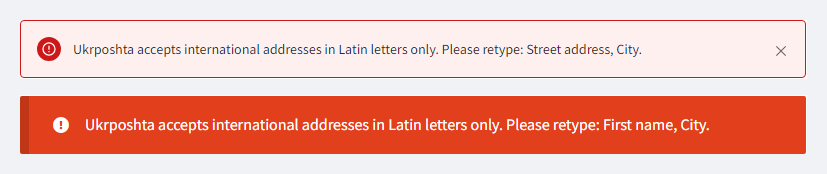
Ukrposhta accepts international addresses in Latin letters only and does not accept a shipment without a phone number. So when this method is chosen, the checkout checks the address and the phone and tells the customer which fields to retype — on the classic and block checkout. The check can be switched off in the settings.
UAH 890 — a one-year licence. A year of updates, technical support and all Pro features.
You can take a longer term right away — the longer, the cheaper per year:
No automatic charges: renewal is manual, reminders come by e-mail. A purchased licence keeps the Pro features forever — when the term ends, the shop only stops getting new versions and support. The Ukrposhta rate in the cart from the free version works either way.
One key — one domain. Moving the shop — release the licence on the old domain with the “Release the licence” button and activate it on the new one.
Trial first, payment later. The 7-day free Pro trial starts with a button in the plugin settings, no card needed. It never starts by itself: a fresh install is the plain Free version. After the trial only the Pro features switch off.
/international/delivery-price of the Ukrposhta eCom API: weight in grams, the longest side, width, height, country, shipment type and transport. For the US also the category and the goods with HS codes and value in USD, as Ukrposhta requires./addresses), non-resident recipient (/clients) and an INTERNATIONAL shipment with customs items (/shipments); forms via Ukrposhta’s forms service.ukrposhta-international-for-woocommerce-1.0.1.zip and activate.Didn't find the answer? Message us on Telegram and we'll reply within a business day.
 @catcode_support
Setup, compatibility, activation
@catcode_support
Setup, compatibility, activation
A contract for international shipments and eCom API keys with access to international services: the Bearer for rates, and for shipments also the user (counterparty) token and a sender with an address in Latin letters. Your Ukrposhta manager or api-support issues them. Without the keys the method does not show in the cart.
The plugin is built on Ukrposhta's official international shipments API documentation (edition of 23.07.2026) and tested on a test store with answers in the format of that documentation. It has not yet run on a live Ukrposhta contract. The plugin shows Ukrposhta's errors in Ukrposhta's own words and writes them to the WooCommerce log, so try it with your keys in the 7-day Pro trial — if Ukrposhta answers differently, we will fix it promptly.
For the US Ukrposhta prices only together with the goods: every product needs a 10-digit HS code (or set a default code in the settings). Without the code the method does not show for the US.
They work side by side without errors, but if international shipping is on in the old module, a customer abroad sees two Ukrposhta options with different prices. Switch off international shipments in the old module ("International shipments" in the method settings): that module stays for branches in Ukraine, this one is for shipping abroad.
No. For the US the duty estimate Ukrposhta returns is shown next to the rate for information only. For EU countries Ukrposhta does not calculate duty in the rate.
The Ukrposhta rate abroad in the cart, the customs fields on products and the checkout check stay free with no time limit.
No reviews yet. Be the first.
No questions yet. Ask one — we answer within 24 hours.
We build custom modules for WordPress, WooCommerce, OpenCart and Shopify. Tell us about the task and we'll prepare an estimate.
Order a custom module
—

CatCode assistant
Just now


CatCode assistant
Online

I’ll help with your website task
Describe your website task — I’ll find a ready-made module or pass it to a developer for an estimate. Modules, custom features, layout, integrations, speed, migration, technical SEO.
