
















OpenCart
1 290 UAH839 UAH≈ €17
Black November: −35% on all modules until 30 November Black November: −35% until 30 November Choose a module
 Website auditA PDF report by email in 3 minutesCheck a website
Everyday tasks
Image compressorSize, quality and WebP in bulkQR generatorLink, Wi-Fi, payment to IBANVAT calculator20, 14, 7% and amount in wordsTransliterationOfficial Ukrainian standardWebsite checks
PHP and pluginsPHP version, WordPress, pluginsGoogle Merchant feedFields, prices, GTIN, imagesDomain emailSPF, DKIM, DMARC, blacklistsAI search readinessllms.txt, bots, markupAll 9 toolsEnter at least 2 characters

TaxJar Sales Tax for OpenCart 4.x, 3.x, 2.3 (US): a sales tax line in the cart and checkout; Pro adds orders and refunds to TaxJar, tax codes, exempt customers, a journal. A licence for life.
The free version works with no time limit. Pro adds the rest of the features in the table.


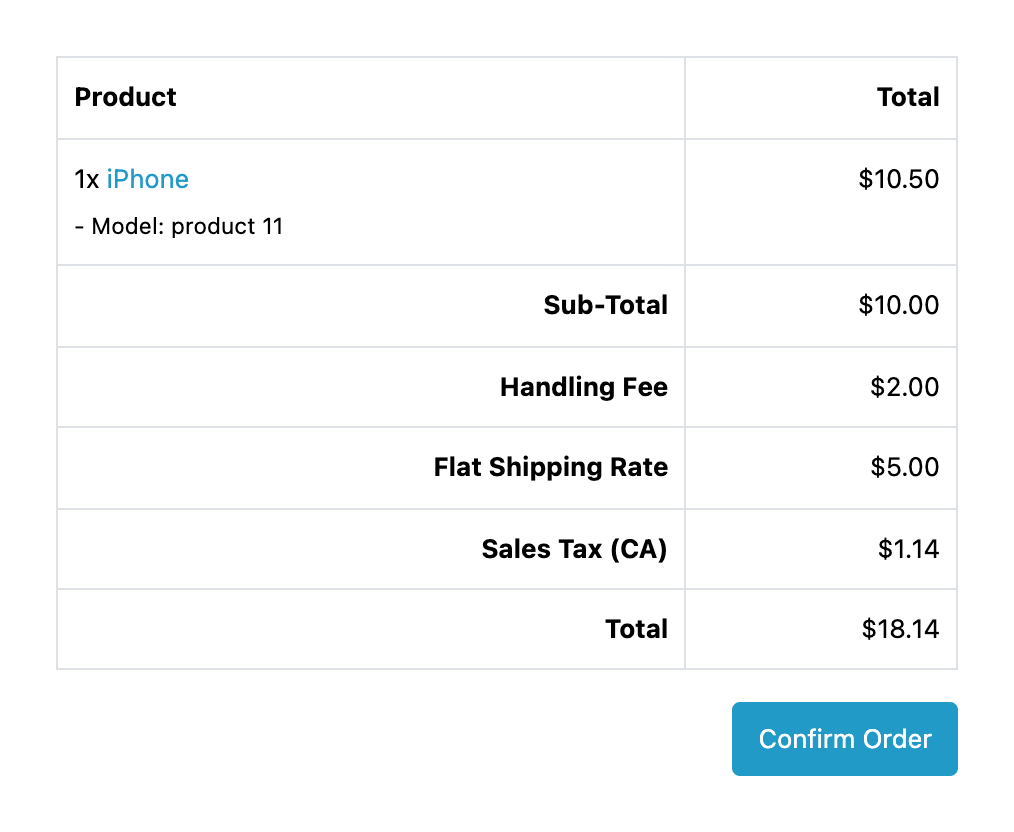
The buyer enters a US address and the totals get a tax line whose title can show the state (“Sales Tax (CA)”).

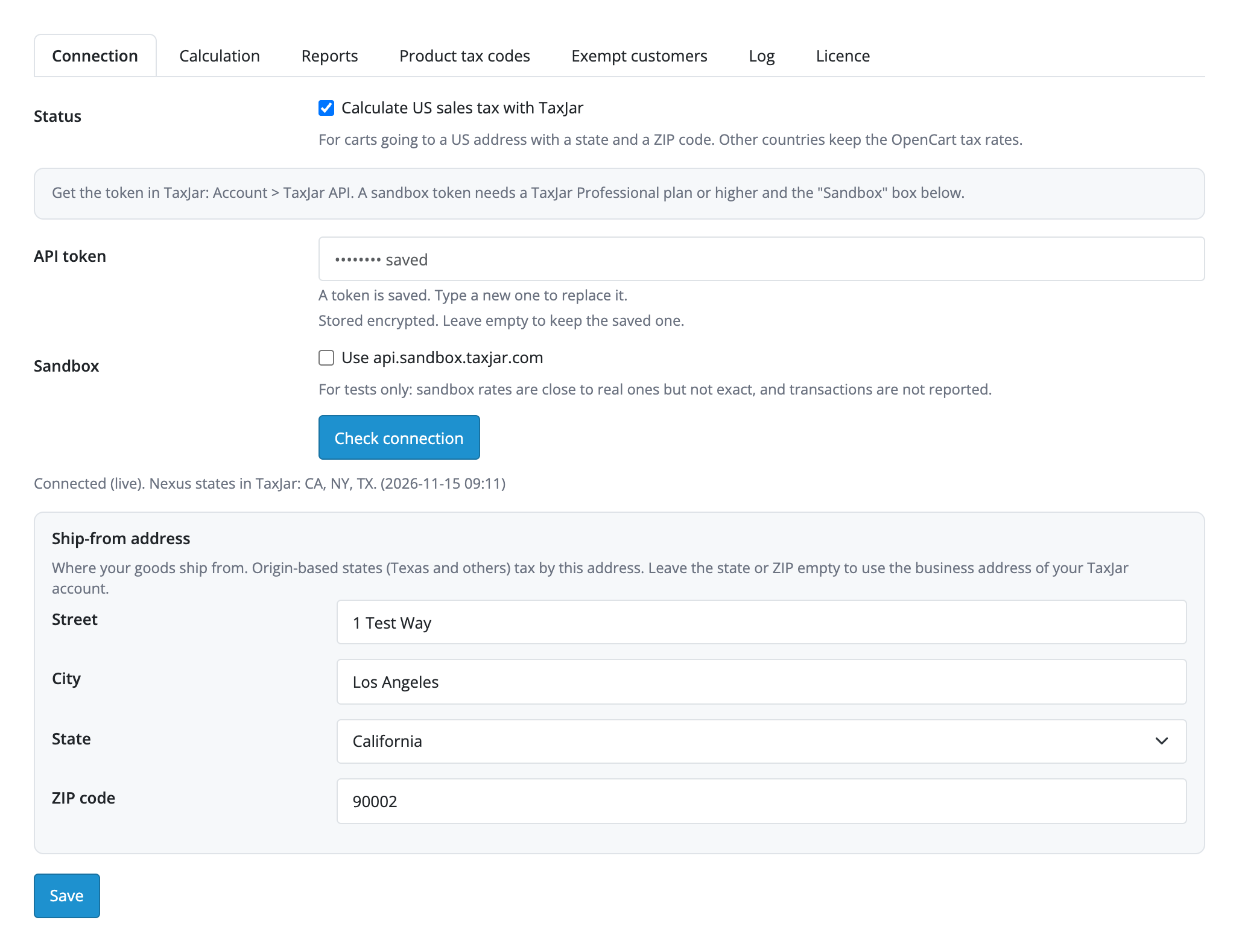
Extensions → Extensions → Order Total → TaxJar Sales Tax. Tabs: “Connection”, “Calculation”, “Reports”, “Product tax codes”, “Exempt customers”, “Log”, “Licence”.

A fresh install is the free version, nothing switches on by itself. The “Try Pro for 7 days” button → e-mail → the key right in the window and by e-mail.

Moving the site? Unlink the licence on the old domain and activate it on the new one yourself. A staging copy (staging., dev.) works with the same key and does not take a site slot. For studios — keys for 5 or 25 sites, or unlimited.
 OpenCart 4.0.2.0–4.1.x, 3.0.x or 2.3.0.2; PHP 7.0+ for 2.3, the cURL extension.A TaxJar account with an API token (Account → TaxJar API). Every calculation and every order sent counts toward your TaxJar plan, so the module caches answers and calls only the nexus states.The shop needs a currency with the code USD (System → Localisation → Currencies): TaxJar works in dollars.The sort order among the totals must be higher than “Taxes”; the module sets 6 on install. If the order is changed, the module adds no tax and writes the reason to the log.TaxJar calculates only US addresses with a state and a 5-digit ZIP code; other countries keep the OpenCart rates.If the shop still has US tax rates set up and “Display Prices With Tax” is on, product prices in the storefront show the shop tax: turn that display off or remove those rates.A refund goes to TaxJar for the whole order: partial refunds are not sent.Address validation in the TaxJar API is available from the Professional plan, according to the TaxJar documentation.
For OpenCart 4.x, 3.x and 2.3: US sales tax from TaxJar in the cart, the mini cart, the checkout and orders from the admin, the ship-from address, nexus states, cached answers, a fallback…


TaxJar Sales Tax for OpenCart 4.x, 3.x and 2.3 calculates US sales tax through TaxJar: for a cart going to a US address with a state and a ZIP code the module asks TaxJar and shows one tax line in the totals, for example “Sales Tax (CA)”, in place of the “Taxes” lines of OpenCart. The same works in the mini cart, at the checkout and in orders created from the admin.
The buyer enters a US address and the totals get a tax line whose title can show the state (“Sales Tax (CA)”). TaxJar calculates the line from the shipping address, and the module puts it in place of the “Taxes” lines OpenCart added before. Discounts (coupon, reward points) are spread over the product lines, fees such as “Handling Fee” stay as separate lines, and gift vouchers and credit are left alone. Product prices in the storefront stay as the shop is set up: TaxJar calculates the tax line in the totals.
The module calls TaxJar only for US addresses with a state and a ZIP code, and, if you choose, only for the states where your account has nexus: no request goes out for the other states. Addresses in other countries keep the OpenCart tax rates. A product without a tax class is either not taxed, as in OpenCart, or left to TaxJar: the seller chooses.
Every order keeps its own calculation: the order page shows what calculated it, the tax amount, the rate, the jurisdiction and the sourcing (destination or origin). If TaxJar does not answer in 8 seconds or rejects the token, the buyer still checks out with the shop tax rates and the reason goes to the log; after an error the module waits a minute (10 minutes for a rejected token) before calling again.
Extensions → Extensions → Order Total → TaxJar Sales Tax. Tabs: “Connection”, “Calculation”, “Reports”, “Product tax codes”, “Exempt customers”, “Log”, “Licence”. In TaxJar open Account → TaxJar API, copy the token and paste it on the “Connection” tab: the token is stored encrypted and is never shown again. Press “Check connection”: the module shows which environment it connected to and loads the nexus states and the product tax categories of your account. The ship-from address is set here too: for the states that tax by the place of shipping (Texas and others) it goes into the request.
The “Calculation” tab holds the line title (with or without the state), showing a zero line, nexus states only, how products without a tax class are treated, the cache lifetime in minutes (60 by default) and the position among the totals: the module sets 6 itself on install and does not add tax when the order stands before “Taxes”.
Pro opens three tabs. “Reports” has the statuses at which an order goes to TaxJar, the statuses for a full refund and for removal, an order ID prefix for several shops and the address validation. “Product tax codes” holds the TaxJar tax codes per category and per product, with a list of codes from your account. “Exempt customers” holds the customer groups exempt from tax (wholesale, government, other), with the customers sent to TaxJar. The order gets a “Reports in TaxJar” box with the buttons “Update in TaxJar”, “Send a refund”, “Remove from TaxJar” and “Validate the address”.
The journal lists all orders with the filters “Waiting”, “Stopped”, “Done” and “Shop rates used”, the buttons “Send what is waiting now” and “Retry the stopped ones”, and “Send past orders”: adding the orders of a period to the queue, up to 200 a click.
Didn't find the answer? Message us on Telegram and we'll reply within a business day.
 @catcode_support
Setup, compatibility, activation
No, it is an independent integration through the public API. TaxJar is a trademark of its owner.
In TaxJar: Account → TaxJar API. Paste it on the "Connection" tab and press "Check connection".
They are paid under your TaxJar plan. The module keeps their number down: answers are cached, requests go out only for the nexus states, and when TaxJar is unavailable the shop tax rates apply.
TaxJar calculates the tax line in the totals. Product prices in the storefront stay as the shop is set up, so it is best to remove the US tax rates or turn off the display of prices with tax.
The buyer checks out with the OpenCart tax rates, the reason is written to the log, and the next attempt comes in a minute.
No: TaxJar is called only for US addresses with a state and a ZIP code. Other countries keep the OpenCart rates.
Yes: the connection, the calculation in the cart and checkout, nexus states, the cache and the log work in the free version. Sending orders and refunds, product tax codes, exempt customers, address validation and the journal are in Pro.
OpenCart 4.0.2.0–4.1.x, 3.0.x and 2.3.0.2: three separate archives in one product.
Yes, for OpenCart it is one payment and a licence for life, for two sites.
Pro switches off, the orders in the queue stop with a reason, and the free part keeps working.
No reviews yet. Be the first.
No questions yet. Ask one — we answer within 24 hours.
We build custom modules for WordPress, WooCommerce, OpenCart and Shopify. Tell us about the task and we'll prepare an estimate.
Order a custom module
—
Charged in UAH; your bank converts it to your currency. EUR price is approximate.

CatCode assistant
Just now


CatCode assistant
Online

I’ll help with your website task
Describe your website task — I’ll find a ready-made module or pass it to a developer for an estimate. Modules, custom features, layout, integrations, speed, migration, technical SEO.