
















OpenCart
1 290 UAH839 UAH≈ €17
Black November: −35% on all modules until 30 November Black November: −35% until 30 November Choose a module
 Website auditA PDF report by email in 3 minutesCheck a website
Everyday tasks
Image compressorSize, quality and WebP in bulkQR generatorLink, Wi-Fi, payment to IBANVAT calculator20, 14, 7% and amount in wordsTransliterationOfficial Ukrainian standardWebsite checks
PHP and pluginsPHP version, WordPress, pluginsGoogle Merchant feedFields, prices, GTIN, imagesDomain emailSPF, DKIM, DMARC, blacklistsAI search readinessllms.txt, bots, markupAll 9 toolsEnter at least 2 characters

Stannp for OpenCart 4.x, 3.x, 2.3 (UK): postcards and letters by post from the order page; Pro adds automatic sends, win-back, carts, bulk sends, delivery status, a report. Licence for life.
The free version works with no time limit. Pro adds the rest of the features in the table.


The order page gets a “Stannp Mail” card above the history.

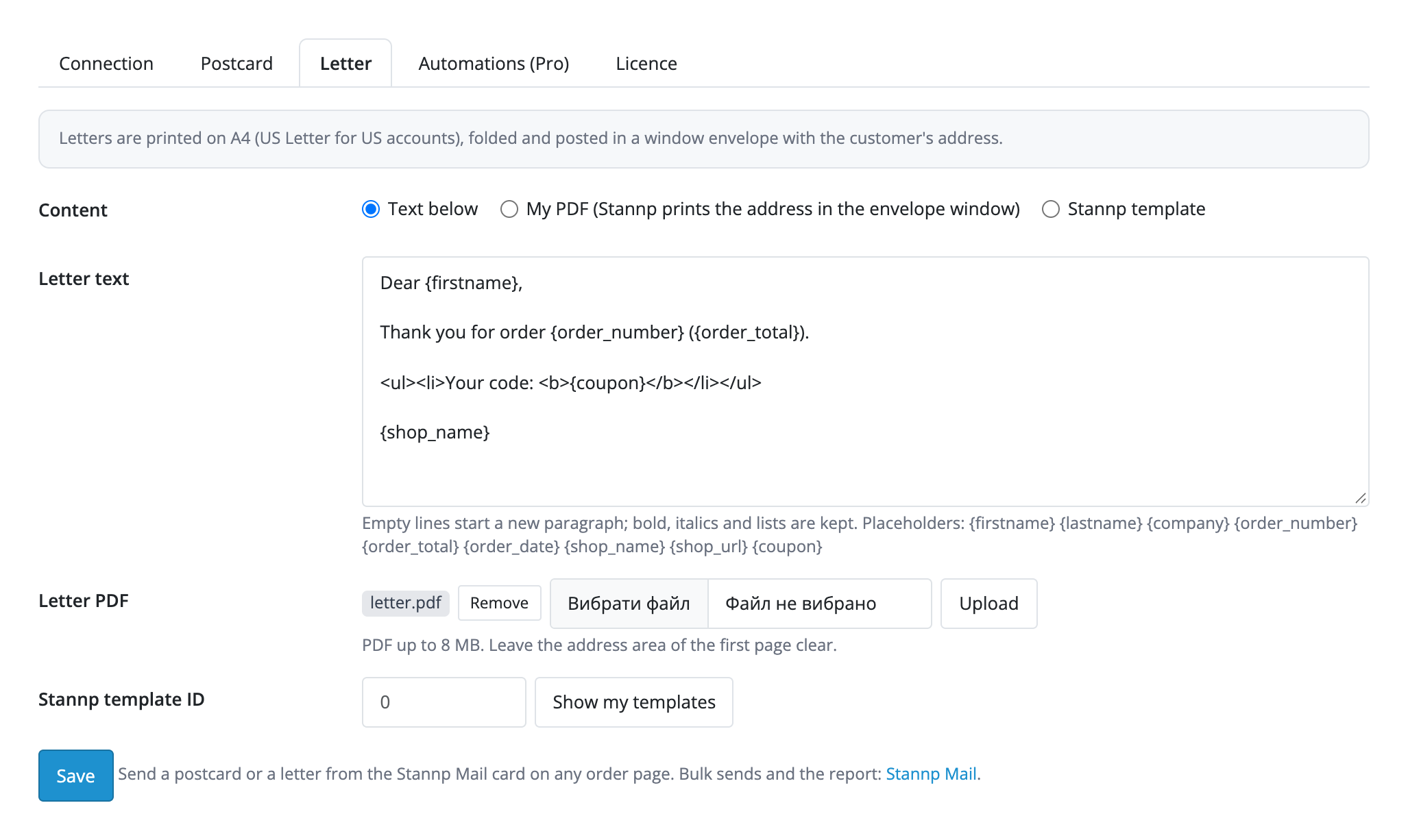
Extensions → Extensions → Modules → Stannp Postcards and Letters. Tabs: “Connection”, “Postcard”, “Letter”, “Automations (Pro)”, “Licence”.

A fresh install is the free version, nothing switches on by itself. The “Try Pro for 7 days” button → e-mail → the key right in the window and by e-mail.

Moving the site? Unlink the licence on the old domain and activate it on the new one yourself. A staging copy (staging., dev.) works with the same key and does not take a site slot. For studios — keys for 5 or 25 sites, or unlimited.
 OpenCart 4.0.2.0–4.1.x, 3.0.x or 2.3.0.2; PHP 7.0+ for 2.3, the cURL extension.A Stannp account and its API key. For sends in “Live” mode the account balance must hold funds.Delivery status by webhook needs a shop address reachable from the internet; without it the hourly Stannp polling still works.The recipient address comes from the order. Without a postcode or a full address the card says what is missing and sends nothing.The free Stannp plan allows 10 requests a minute: background sends go out 8 seconds apart, and at the limit a piece is delayed and retried.Background work (automatic sends, win-back, carts, retries) runs through the OpenCart 4 scheduler every hour, after page views on PHP-FPM, and through a server cron address shown in the settings. OpenCart 3 and 2.3 have no scheduler, so they need a cron on that address or PHP-FPM.Win-back and abandoned carts are marketing mail: the shop needs a lawful basis under the rules of your country (UK GDPR in the UK). Both are off until you switch them on, and the settings say so.Uploaded images and PDFs live in system/storage/upload/cc_stannp/ under random names, with an .htaccess in the folder that denies direct access (nginx ignores it). If the storage sits inside the web root on nginx, move it outside.Links to the PDF proofs of “Test” mode are kept by Stannp for a limited time and may stop opening later. OpenCart 3.0 and 2.3 store text without emoji, so the module asks you to remove them.
For OpenCart 4.x, 3.x and 2.3: Stannp postcards and letters from the order card, Stannp templates or your own images and PDFs, order placeholders, the Test mode, status, cancel and a safe retry.


Stannp Postcards and Letters for OpenCart 4.x, 3.x and 2.3 prints and posts real postcards and letters to your customers through your Stannp account. The order page gets a “Stannp Mail” card: the address from the order, “Send postcard” and “Send letter” buttons, and a list of pieces with status and cost. The design comes from a Stannp template or from your own images, and Stannp merges the name, order number and total, coupon and shop name itself.
The order page gets a “Stannp Mail” card above the history. It shows the address that will be printed (shipping, else payment, else the name on the order) and says at once what is missing, a postcode for example. “Send postcard” and “Send letter” create a piece; in live mode a confirmation dialog appears before sending. Below is the list of pieces: date, type, Stannp id, status, cost, a link to the PDF, and for a piece that can still be stopped “Refresh status” and “Cancel”.
Postcard: size by account region (A6 or A5 for the UK and Europe, 4×6, 6×9 or 6×11 for the US and Canada), a template from the Stannp editor by its ID (“Show my templates” lists yours) or your own front and back images (JPG, PNG or PDF up to 8 MB), a message on the back and a return address. Letter: your own text with paragraphs, bold, italics and lists, your own PDF, or a Stannp template. You can add first class postage and a coupon. These placeholders work in the text: {firstname}, {lastname}, {company}, {order_number}, {order_total}, {order_date}, {shop_name}, {shop_url}, {coupon}.
Every piece carries an idempotency key: if the Stannp answer is lost to a timeout, a server error or the rate limit, the piece becomes “pending” with a “Retry” button, and the retry goes out with the same key, so a second postcard is never created. Stannp refusals are shown in words, and the order history gets one note for every real step. The status only moves forward.
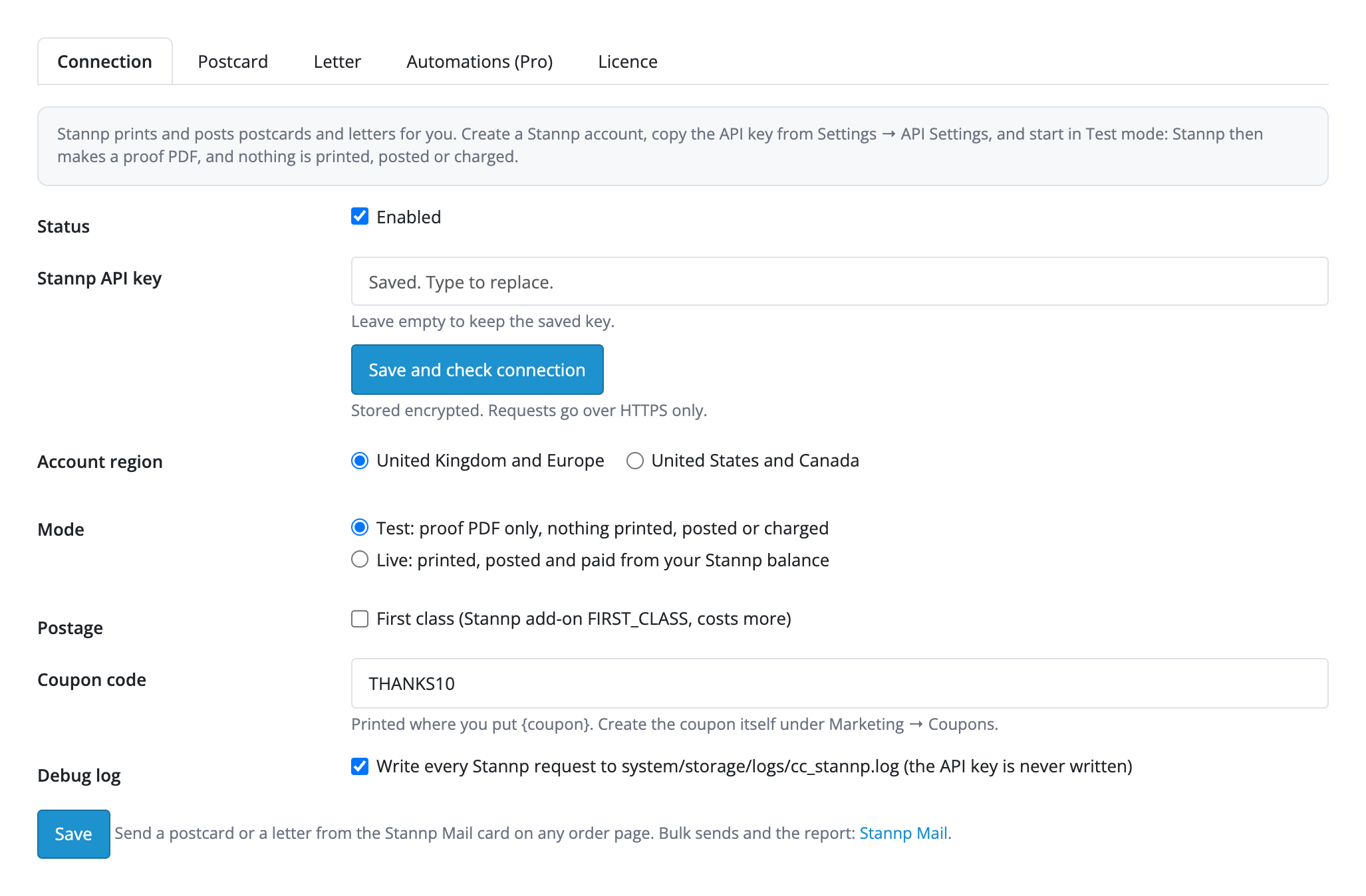
Extensions → Extensions → Modules → Stannp Postcards and Letters. Tabs: “Connection”, “Postcard”, “Letter”, “Automations (Pro)”, “Licence”. On “Connection” paste the API key from Stannp (Settings → API Settings): it is stored encrypted and never printed back into the form. Choose the account region (UK and Europe, or US and Canada) and the mode. “Test” gives only a proof PDF: nothing is printed, posted or charged. “Live” prints, posts and pays from the balance of your Stannp account. “Save and check connection” shows the balance.
Pieces, bulk queues and the report are in Marketing → Stannp Mail. The free version shows the card on every order page; the Stannp Mail page with bulk sends and the report is part of Pro.
Didn't find the answer? Message us on Telegram and we'll reply within a business day.
 @catcode_support
Setup, compatibility, activation
No, it is an independent integration through the public Stannp API. Stannp is a trademark of its owner.
Every postcard or letter in "Live" mode is paid from the balance of your Stannp account at Stannp rates. The module adds no charge per piece; the cost of each piece is in the order card, and the spend for a month is in the Pro report.
Stannp makes a proof PDF: nothing is printed, posted or charged. It is the default, and switching to "Live" asks for confirmation before every send.
Yes, until Stannp passes it to print: the order card has "Cancel" for a piece with the status "received". A cancelled piece is not counted in the spend.
The shipping address of the order, else the payment address, else the name on the order. If a postcode or a full address is missing, the card says what is missing and sends nothing.
Yes: the connection, a postcard and a letter from the order page, the test mode, status, cancel and retry work in the free version. Automatic sends, win-back, abandoned carts, bulk sends, Stannp groups, delivery status by webhook and the report are Pro.
No: every order, type and attempt has an idempotency key, the automatic send by status goes once per order, and a bulk send skips orders that already have a piece of that type.
OpenCart 4.0.2.0–4.1.x, 3.0.x and 2.3.0.2: three separate archives in one product.
Yes, for OpenCart it is one payment and a licence for life, for two sites.
Pro switches off, queued automatic sends stop with the reason in the order, and the free part keeps working.
No reviews yet. Be the first.
No questions yet. Ask one — we answer within 24 hours.
We build custom modules for WordPress, WooCommerce, OpenCart and Shopify. Tell us about the task and we'll prepare an estimate.
Order a custom module
—
Charged in UAH; your bank converts it to your currency. EUR price is approximate.

CatCode assistant
Just now


CatCode assistant
Online

I’ll help with your website task
Describe your website task — I’ll find a ready-made module or pass it to a developer for an estimate. Modules, custom features, layout, integrations, speed, migration, technical SEO.