
















WooCommerce
Przelewy24 & BLIK Payments for WooCommerce — bank transfer, card and BLIK payments in Poland
Free + Pro
890 UAH/year≈ €18
v1.0.1
 Website auditA PDF report by email in 3 minutesCheck a website
Everyday tasks
Image compressorSize, quality and WebP in bulkQR generatorLink, Wi-Fi, payment to IBANVAT calculator20, 14, 7% and amount in wordsTransliterationOfficial Ukrainian standardWebsite checks
PHP and pluginsPHP version, WordPress, pluginsGoogle Merchant feedFields, prices, GTIN, imagesDomain emailSPF, DKIM, DMARC, blacklistsAI search readinessllms.txt, bots, markupAll 9 toolsEnter at least 2 characters
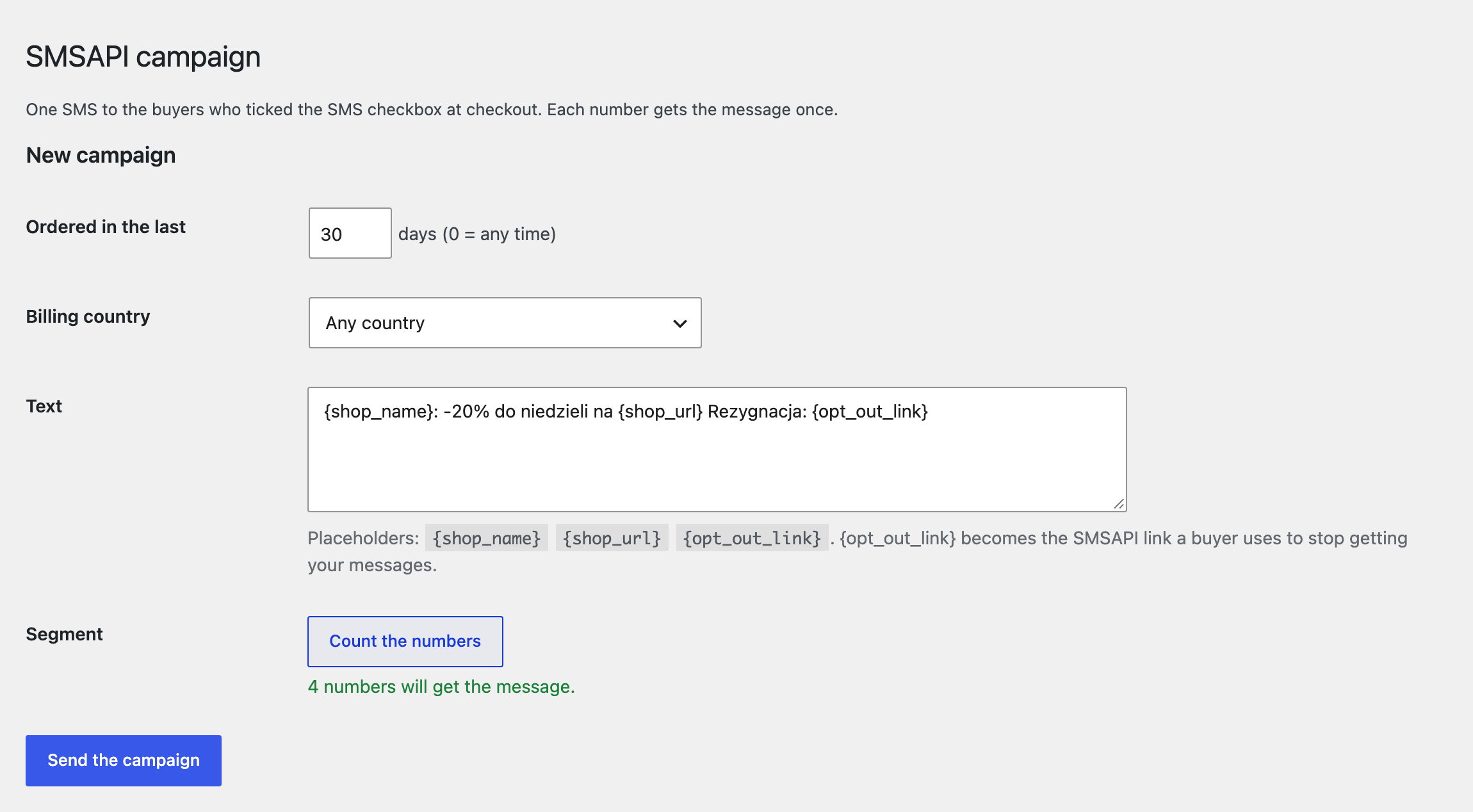
SMS about WooCommerce orders through your SMSAPI account.
The free version works with no time limit. Pro adds the rest of the features in the table.


The buyer is texted on Processing and on Completed: each has its own text and its own switch.

A text for every order status: On hold, Cancelled, Refunded, Failed and your own statuses.

The base version is free. Pro costs 990 UAH for a one-year licence. A year of updates, technical support and all Pro features.

A fresh install is the free version, nothing switches on by itself. The “Try Pro for 7 days” button → e-mail → the key right in the window and by e-mail.

Moving the site? Unlink the licence on the old domain and activate it on the new one yourself. A staging copy (staging., dev.) works with the same key and does not take a site slot. For studios — keys for 5 or 25 sites, or unlimited.
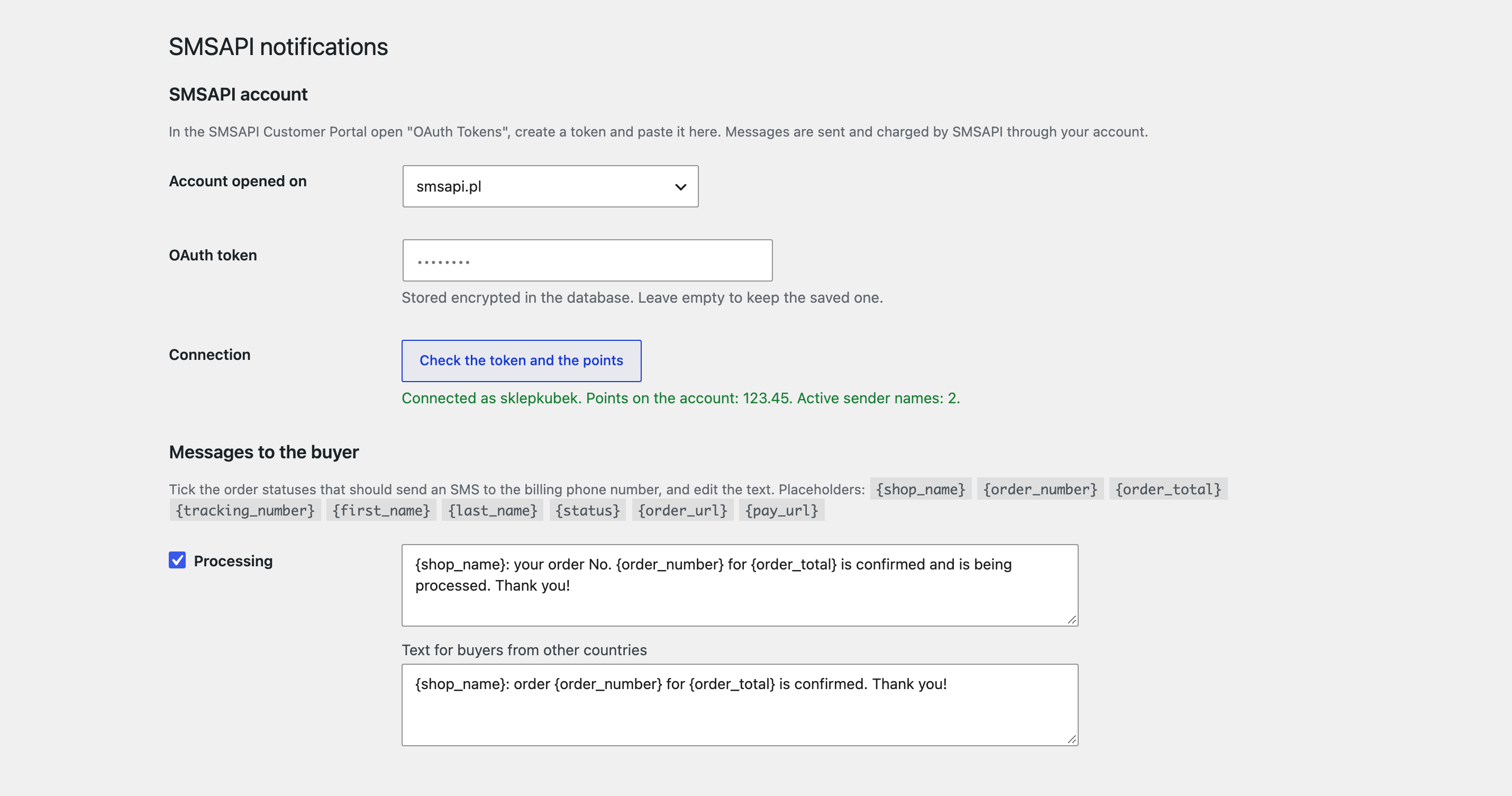
 WordPress 6.2+, WooCommerce 7.0+, PHP 7.4+.An SMSAPI account (smsapi.pl or smsapi.com) with an OAuth token and points.For your own sender name: a name verified in the SMSAPI Customer Portal.
SMS to the buyer on Processing and Completed, an SMS to the owner about a new order, the token and points check, the price of a message, a test SMS, the journal.


CatCode SMSAPI Notifications for WooCommerce sends the buyer an SMS through your account at SMSAPI (smsapi.pl or smsapi.com), the Polish SMS gateway, when an order changes status, and a text to your own phone when a new order comes in. You write the text; the module does the rest in the background.
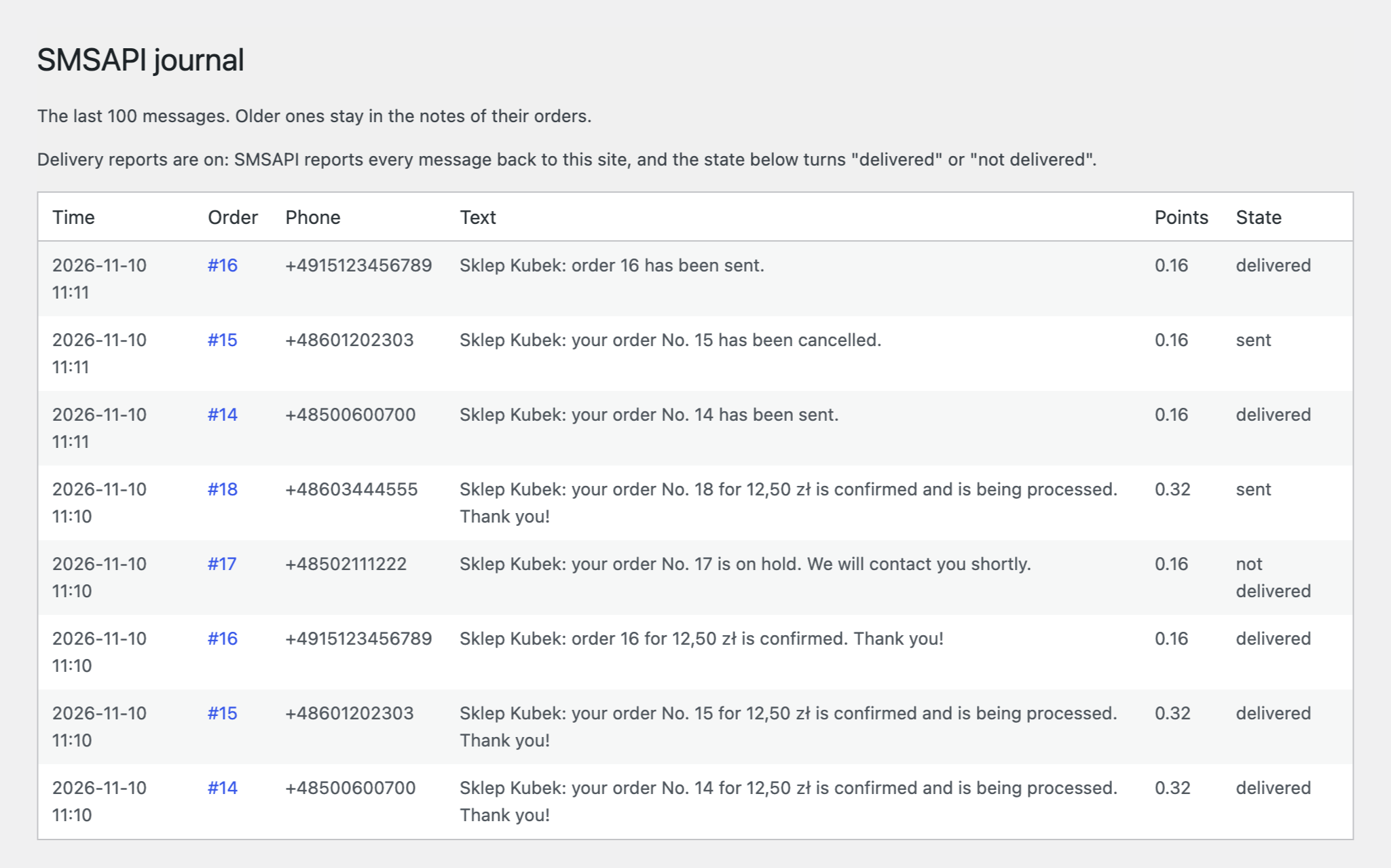
The buyer is texted on Processing and on Completed: each has its own text and its own switch. The text takes placeholders: shop name, order number and total, tracking number, first and last name, status name, the link to the order and the link to pay. The tracking number comes from the order field you name in the settings, the one your shipping plugin writes it to. The shop owner gets a separate SMS about every new order. The phone number is turned into international form using the buyer country, so “500 600 700”, “0048 500 600 700” and “+48 500 600 700” all work. Each status sends one message per order. If SMSAPI refuses (bad number, not enough points) the message is not repeated and the reason is written to the order notes. One button tells you whether SMSAPI accepts the token and how many points the account has; another asks SMSAPI how many points a text would cost, without sending anything. There is a test SMS, an option that replaces Polish letters with plain ones so that a text fits into fewer SMS, and a message journal: the order, the number, the text, the points and the state.
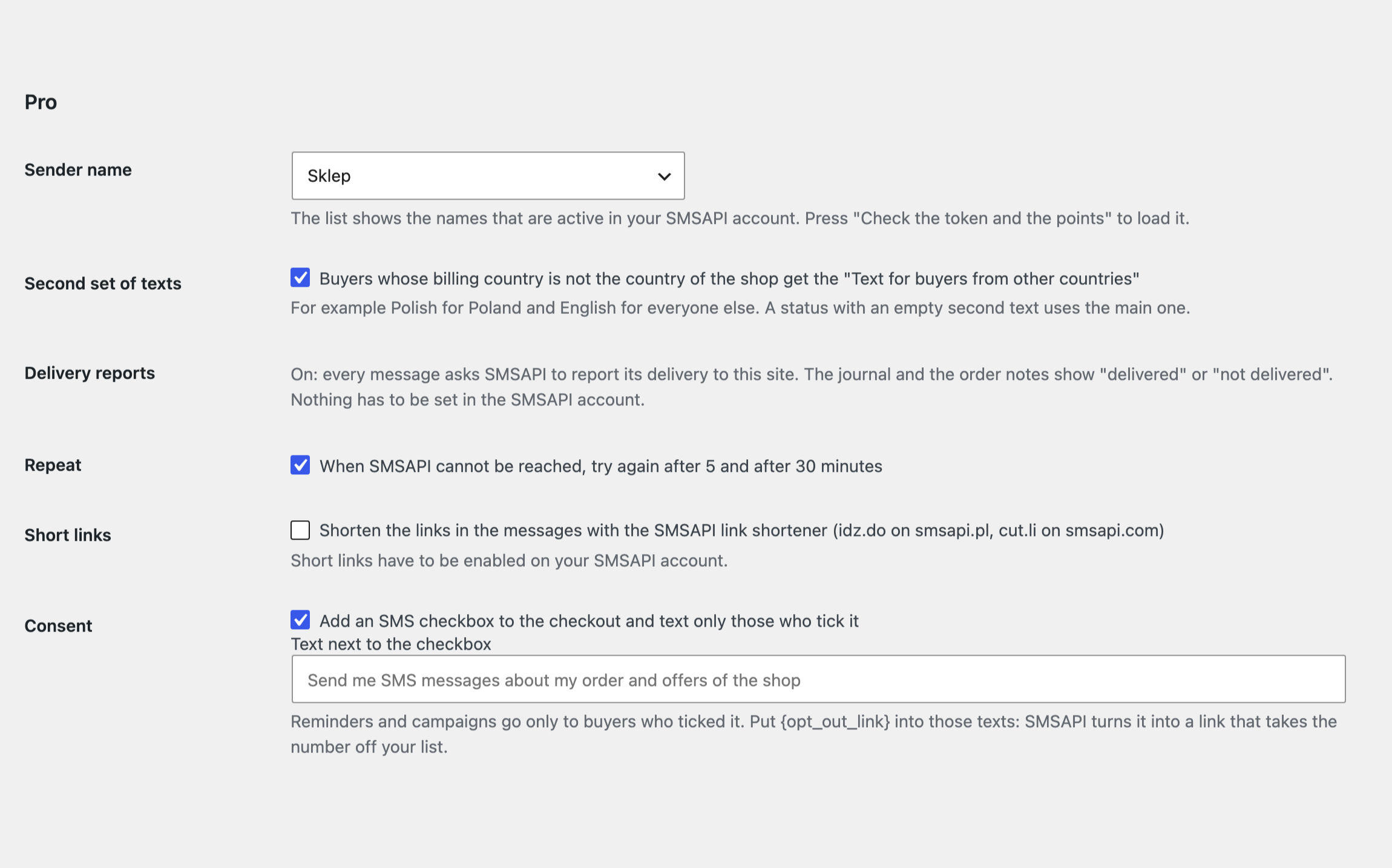
A text for every order status: On hold, Cancelled, Refunded, Failed and your own statuses. A second set of texts for buyers from other countries, for example Polish for Poland and English for everyone else. Delivery reports: SMSAPI reports every message back to your site, and the journal and the order notes show delivered or not delivered. A sender name of your choice from those that are active in your SMSAPI account. A repeat after 5 and after 30 minutes when SMSAPI cannot be reached. Short links through the SMSAPI link shortener (idz.do, cut.li). An SMS consent checkbox at checkout, classic and block. A reminder for an unpaid order with the payment link, and for a cart left by a logged-in customer. A campaign: one SMS to a segment of your buyers, only to those who ticked the consent checkbox at checkout, filtered by how recently they ordered and by country. An e-mail to the site admin when the points fall below the limit you set, and a free-text SMS to the buyer from the order screen.
The module is not on wordpress.org yet: the free version and Pro are one archive from this page. Without a key it works as the free version.
Didn't find the answer? Message us on Telegram and we'll reply within a business day.
 @catcode_support
Setup, compatibility, activation
No. It is an independent integration made by us; the SMSAPI trademark belongs to its owner.
The billing phone of the order. With a missing or invalid number nothing is sent and an order note says so.
The default sender name of your SMSAPI account. On a new account that is “Test” until you verify a name of your own. In Pro you choose the name from the active ones.
From the order field you name in the settings: the one your shipping plugin writes the number to.
In Pro: an SMS for an unpaid order with the payment link, and for a cart left by a logged-in customer. Both go only to buyers who gave consent at checkout.
In the order notes and in WooCommerce → SMSAPI journal.
Pro switches off, the free part keeps working.
No reviews yet. Be the first.
No questions yet. Ask one — we answer within 24 hours.
We build custom modules for WordPress, WooCommerce, OpenCart and Shopify. Tell us about the task and we'll prepare an estimate.
Order a custom module
—
Charged in UAH; your bank converts it to your currency. EUR price is approximate.

CatCode assistant
Just now


CatCode assistant
Online

I’ll help with your website task
Describe your website task — I’ll find a ready-made module or pass it to a developer for an estimate. Modules, custom features, layout, integrations, speed, migration, technical SEO.
