
















OpenCart
1 290 UAH839 UAH≈ €17
Black November: −35% on all modules until 30 November Black November: −35% until 30 November Choose a module
 Website auditA PDF report by email in 3 minutesCheck a website
Everyday tasks
Image compressorSize, quality and WebP in bulkQR generatorLink, Wi-Fi, payment to IBANVAT calculator20, 14, 7% and amount in wordsTransliterationOfficial Ukrainian standardWebsite checks
PHP and pluginsPHP version, WordPress, pluginsGoogle Merchant feedFields, prices, GTIN, imagesDomain emailSPF, DKIM, DMARC, blacklistsAI search readinessllms.txt, bots, markupAll 9 toolsEnter at least 2 characters

Printful for OpenCart 4.x, 3.x, 2.3 (USA): linking products and sending orders free; Pro adds automatic sending, rates at checkout and webhooks. A licence for life.
The free version works with no time limit. Pro adds the rest of the features in the table.


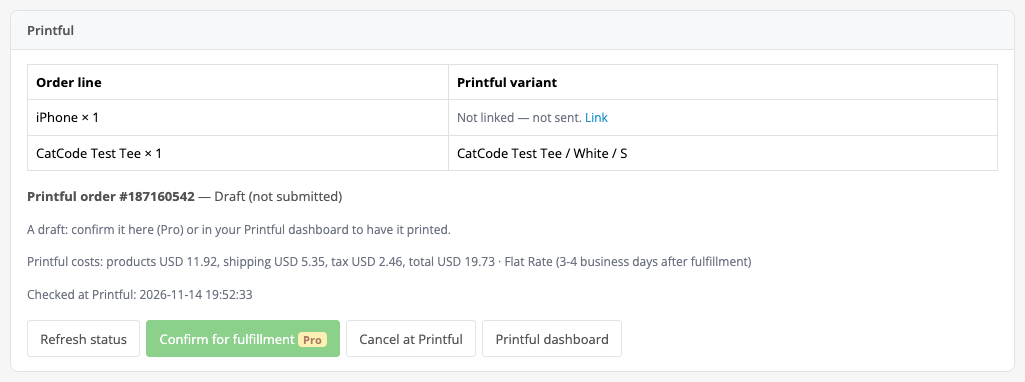
An order from your store reaches Printful as a draft: until the draft is confirmed nothing is charged and nothing is printed.

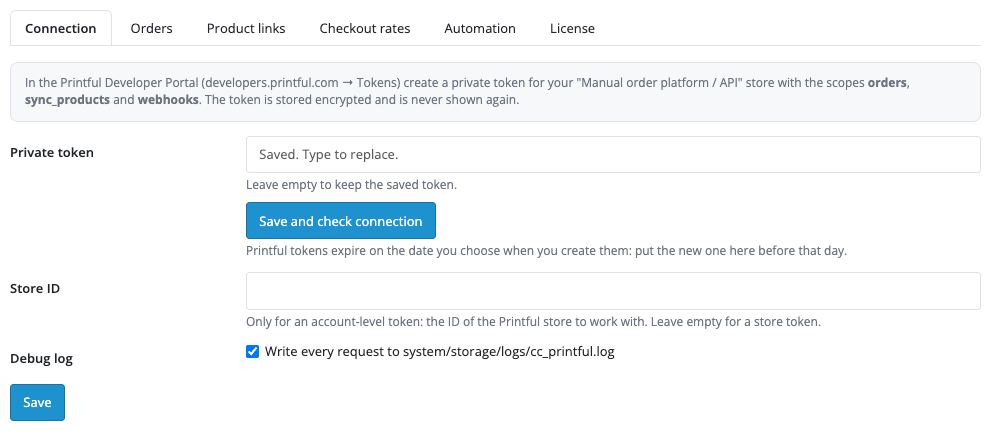
The “Connection” tab: the private token from the Printful Developer Portal and an optional Store ID for an account-level token.

A fresh install is the free version, nothing switches on by itself. The “Try Pro for 7 days” button → e-mail → the key right in the window and by e-mail.

Moving the site? Unlink the licence on the old domain and activate it on the new one yourself. A staging copy (staging., dev.) works with the same key and does not take a site slot. For studios — keys for 5 or 25 sites, or unlimited.
 OpenCart 4.0.2.x–4.1.x, 3.0.x or 2.3.0.2; the cURL extension; PHP 7.0 or newer.A Printful account and a private token with the scopes orders, sync_products, webhooks; an account-level token also needs a Store ID.Automatic confirmation in Pro charges the card of your store at Printful, so it is off by default; the “Confirm for fulfillment” button asks you to confirm the amount.There is no import of products from Printful into OpenCart: you create the products in OpenCart by hand and the module links them (by hand, or in Pro automatically by SKU and option names).Order lines are matched by option values. Text and file options (personalisation) do not pass a design to Printful: the file of the sync variant is printed.A Printful store has one webhook address: registering replaces the address set by another integration; the admin shows a warning.Without PHP-FPM background sending runs by cron: the OpenCart 4 scheduler every hour, OpenCart 3.x and 2.3 a server cron on the address from the “Automation” tab (every 5 minutes). The admin says so.When the buyer did not pick a Printful rate, the default method (STANDARD) is used, and the shipping price for the buyer may differ from the Printful cost. The Printful limit on rates is 5 requests per minute.The interface language is English (en-gb and en-us).
For OpenCart 4.x, 3.x and 2.3: linking products to Printful sync products, sending orders as drafts, status and tracking, an e-mail to the buyer, duplicate protection.


Printful Print-on-Demand for OpenCart 4.x, 3.x and 2.3 passes the orders of your store to Printful: OpenCart products are linked to Printful sync products by option values, and a panel on the order page sends the order to Printful and shows the status, the Printful costs and the tracking of shipments. The integration uses a Printful private token through API v1.
What you need from Printful. A Printful account, a store of the “Manual order platform / API” type and a private token with the scopes orders, sync_products and webhooks. Products in Printful are created as sync products: the module does not import products from Printful into the OpenCart catalogue, so you create the products in OpenCart by hand and the module links them.
An order from your store reaches Printful as a draft: until the draft is confirmed nothing is charged and nothing is printed. The order page shows which lines are linked to Printful and which are not, and only the linked lines are sent. The “Send to Printful as draft” button passes one order with a unique external_id that carries the store prefix, the retail prices and a packing slip with your contacts.
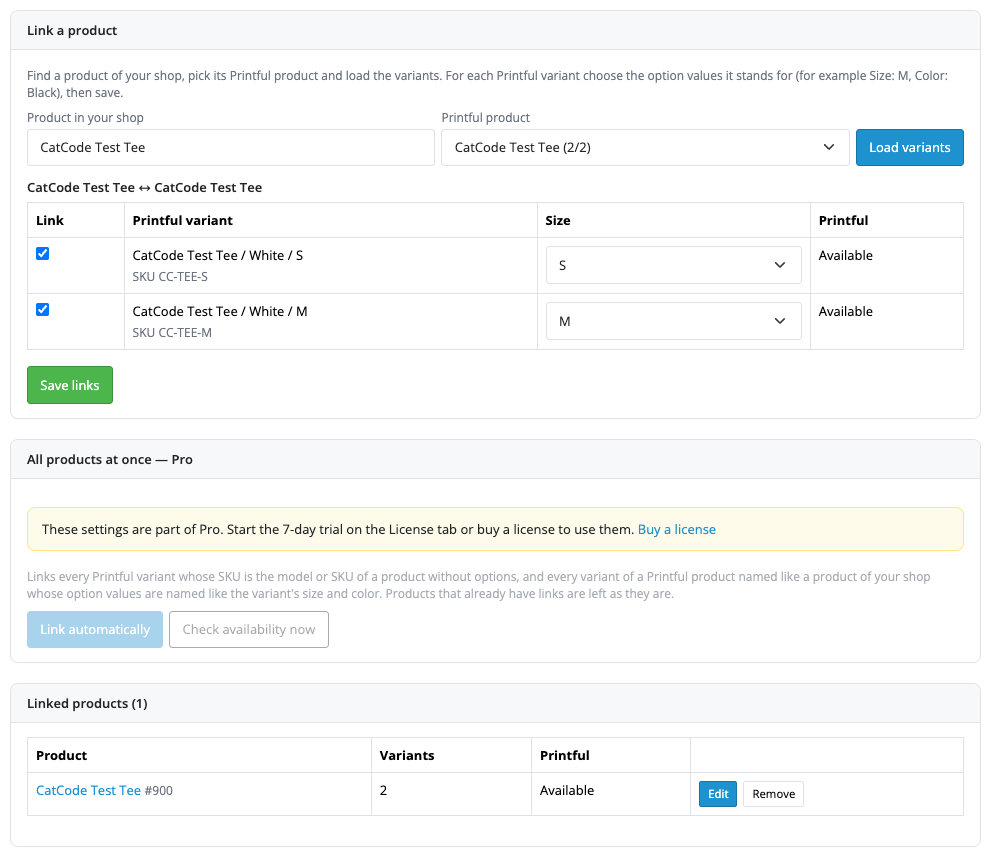
Linking is the “Product links” page: find a product of your store, pick its Printful product, load the variants and set the option values for each one (for example Size: M). Two variants with the same options cannot be linked. Order lines are matched to variants by option values, the closest match wins, and extra options such as gift wrapping do not get in the way.
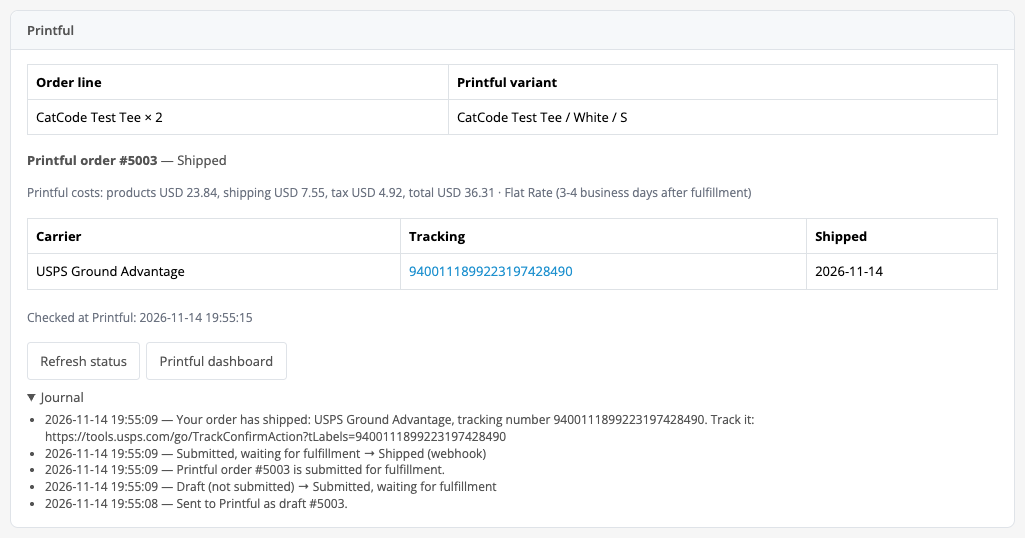
When Printful ships a package, the order shows the carrier, the tracking number and the date, the order history gets a note, and the buyer gets an e-mail with the tracking link (the e-mail can be switched off in the settings). The journal under the panel shows each step: draft, confirmed, shipped.
The “Connection” tab: the private token from the Printful Developer Portal and an optional Store ID for an account-level token. The “Save and check connection” button shows the name of the Printful store and the number of products in it, and if a scope is missing it says which one. A Printful token has an expiry date (up to two years): after it Printful answers 401, the module shows a clear message, and the token has to be replaced by hand.
The “Orders” tab: the default Printful shipping method (STANDARD, used when the buyer did not pick a Printful rate at checkout), the contacts and the message for the packing slip, the tracking e-mail for the buyer. Orders go to Printful as drafts; you can confirm a draft in your Printful dashboard.
The “License” tab: a Pro key or a 7-day trial. Without a key the Pro tabs show an explanation and the free part keeps working.
The “Checkout rates” tab (Pro): live Printful rates for the buyer address and the Printful items of the cart appear at checkout as shipping methods. A percentage markup, a fixed fee and free shipping above a subtotal can be added to a rate (amounts in USD). A 0.00 rate and an unknown currency are not shown, answers are cached for 10 minutes, and after a Printful failure the method is hidden for 60 seconds so that checkout does not wait. For a cart with mixed products (some you ship yourself) you choose a policy: hide the Printful rates or show the rate for the Printful items only.
The “Automation” tab (Pro): the order statuses at which an order goes to Printful by itself, a draft or an immediate confirmation, the OpenCart status after shipping (only between “processing” and “complete”, so stock is never moved twice) and disabling a product when none of its linked variants is left at Printful. Webhooks are registered, checked and removed from the admin: Printful reports status changes and shipments at once, and the order is read again from the API, so an older answer never rolls a status back. Background work runs from the OpenCart 4 scheduler every hour and from page views; a server cron speeds it up.
The “Printful orders” list in the Sales menu: the filters “In queue”, “Drafts”, “In progress”, “Need attention”, “Finished” and “Product links”, sending and refreshing several orders by ID, and in Pro also bulk actions and the journal of calls.
Didn't find the answer? Message us on Telegram and we'll reply within a business day.
 @catcode_support
Setup, compatibility, activation
No, it is an independent integration with Printful by CatCode. Printful is a trademark of its owner.
A Printful account, a store of the "Manual order platform / API" type and a private token with the scopes orders, sync_products, webhooks.
No. You create the products in OpenCart by hand and the module links them to Printful sync products: by hand on the "Product links" page, and in Pro automatically by SKU and option names.
The free version passes the order as a draft: nothing is charged or printed until you confirm the draft in your Printful dashboard. Pro has a "Confirm for fulfillment" button with an amount confirmation and an automatic confirmation mode; it charges the card of your store at Printful and is therefore off by default.
The module does not create a duplicate: it looks the order up at Printful by external_id and links the existing one to the order. In Pro the queue retries up to 8 times.
No. The file of the sync variant is printed; text and file options are not passed to Printful.
That is Pro: live Printful rates for the buyer address, with a markup, a fixed fee and free shipping above a subtotal. For an address without a US state and for a cart with other products there are no Printful methods by default.
A Printful store has one webhook address. Registering from the module replaces the existing one, and the admin warns about it.
OpenCart 4.0.2.x–4.1.x, 3.0.x and 2.3.0.2: three separate archives in one product.
Yes, for OpenCart it is one payment and a licence for life, for two sites.
Pro switches off, orders in the queue stop with a reason, and the free part keeps working.
No reviews yet. Be the first.
No questions yet. Ask one — we answer within 24 hours.
We build custom modules for WordPress, WooCommerce, OpenCart and Shopify. Tell us about the task and we'll prepare an estimate.
Order a custom module
—
Charged in UAH; your bank converts it to your currency. EUR price is approximate.

CatCode assistant
Just now


CatCode assistant
Online

I’ll help with your website task
Describe your website task — I’ll find a ready-made module or pass it to a developer for an estimate. Modules, custom features, layout, integrations, speed, migration, technical SEO.