
















OpenCart
1 290 UAH839 UAH≈ €17
Black November: −35% on all modules until 30 November Black November: −35% until 30 November Choose a module
 Website auditA PDF report by email in 3 minutesCheck a website
Everyday tasks
Image compressorSize, quality and WebP in bulkQR generatorLink, Wi-Fi, payment to IBANVAT calculator20, 14, 7% and amount in wordsTransliterationOfficial Ukrainian standardWebsite checks
PHP and pluginsPHP version, WordPress, pluginsGoogle Merchant feedFields, prices, GTIN, imagesDomain emailSPF, DKIM, DMARC, blacklistsAI search readinessllms.txt, bots, markupAll 9 toolsEnter at least 2 characters

Nekorekten.com for OpenCart 4.x, 3.x, 2.3 (Bulgaria): signals about a buyer in the order in one click, and in Pro an automatic check, checkout rules, a journal and your own signals. Lifetime licence.
The free version works with no time limit. Pro adds the rest of the features in the table.


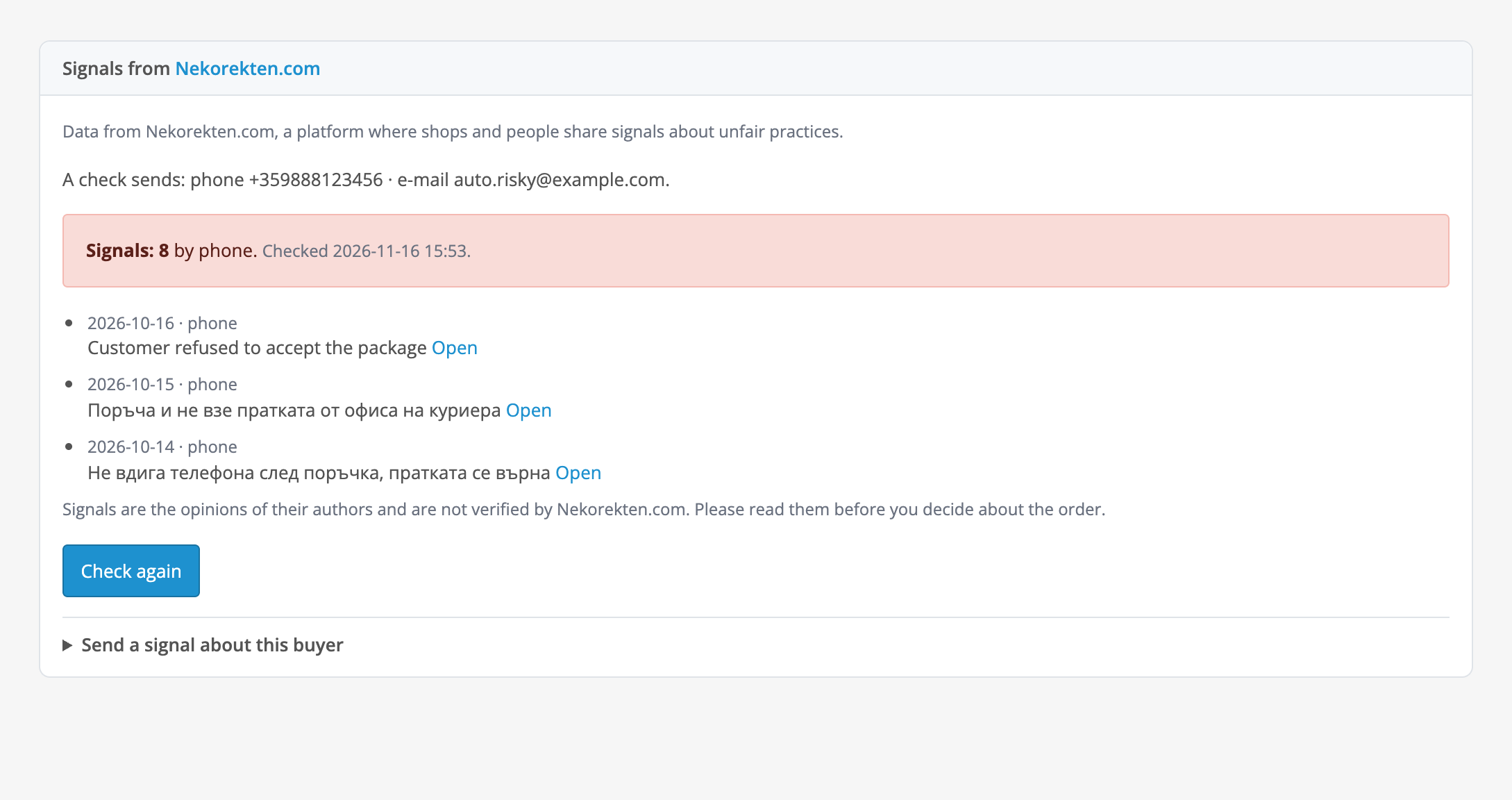
Every order gets a “Signals from Nekorekten.com” block.

Extensions → Extensions → Modules → Nekorekten Buyer Check.

The phone and e-mail of a buyer go to a third-party platform (Nekorekten.com), so the shop needs a legal basis and a mention in its privacy policy: the Nekorekten.com API terms ask you to name the platform, and a sample text is in the module settings.

A fresh install is the free version, nothing switches on by itself. The “Try Pro for 7 days” button → e-mail → the key right in the window and by e-mail.

Moving the site? Unlink the licence on the old domain and activate it on the new one yourself. A staging copy (staging., dev.) works with the same key and does not take a site slot. For studios — keys for 5 or 25 sites, or unlimited.
 OpenCart 4.0.2.0–4.1.x, 3.0.x or 2.3.0.2; PHP 7.0+ for 2.3 (OpenCart 4 itself needs PHP 7.4+), the cURL and OpenSSL extensions.You need an account at nekorekten.com and an API key. The key is tied to IP addresses: on a host with a changing outgoing address Nekorekten.com answers with error 403, and the module shows it in plain words. Behind a proxy or a load balancer the outgoing address can differ from the one PHP sees: your hosting provider knows it.The free plan of Nekorekten.com has 30 searches a day and 5 requests a minute; on a live shop the automatic check and the checkout rule use them up quickly, so the answer cache (Pro) and a higher plan make sense. After a “too many requests” (429) answer the automatic check pauses for 15 minutes and buyers go through.The checkout rules work on the standard OpenCart checkout steps (choosing the payment method, the confirmation, the payment button). A third-party checkout that replaces those steps with its own can bypass them: check it with the rule switched on.The checkout does not wait long for the service: the list of payment methods waits at most 6 seconds, the whole checkout at most 9 seconds, and after a failure the service is not asked at every step.The automatic check (Pro) runs in the background after the buyer gets the page, through PHP-FPM or LiteSpeed; it is also started by pages of the shop and the admin and by the OpenCart 4 scheduler (Extensions → Cron jobs). For a steady pace call the cron address from the “Data” tab every few minutes.The interface of the module is in English and Bulgarian.
For OpenCart 4.x, 3.x and 2.3: a check of the phone and e-mail of an order on Nekorekten.com from the order page (number of signals, what matched, excerpts with links), English and Bulgarian.


Nekorekten Buyer Check for OpenCart 4.x, 3.x and 2.3 checks the phone and e-mail of an order against the signals on Nekorekten.com, the Bulgarian platform where shops share cases of unpaid and refused orders. From the order page in the admin you see in one click how many signals there are on the buyer, what matched (phone or e-mail), and excerpts with the date and a link to the signal itself.
Every order gets a “Signals from Nekorekten.com” block. The “Check” button makes one request: the module shows the number of signals on a red, yellow or green background, what matched, up to three of the latest excerpts (date, what matched, text up to 280 characters, an “Open” link) and the time of the check. The last result is kept in the order, so you do not have to ask the service again; “Check again” asks anew. If the order has neither a phone nor an e-mail, no request is sent and the block says so.
With Pro the check runs by itself. When a new order gets its first status, the module asks Nekorekten.com in the background, after the buyer has already got the page, and if there are at least the threshold of signals (2 by default) it writes a line to the order history without e-mailing the buyer. The answer for the same phone and e-mail is kept in a cache for the number of hours you set (24 by default), so one buyer does not use up the searches of your plan twice.
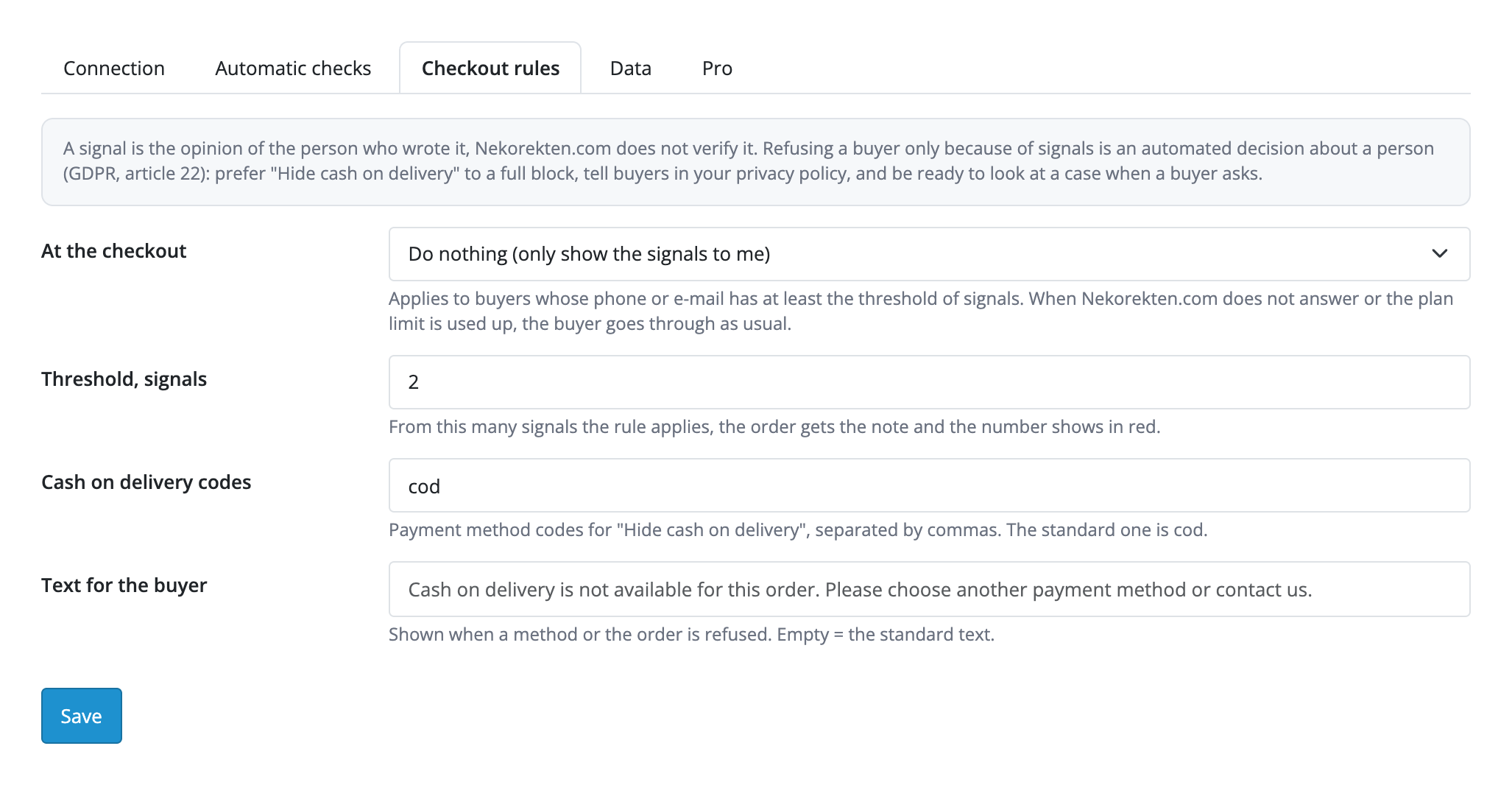
The checkout rule (Pro) applies to buyers whose phone or e-mail has at least the threshold of signals. Choices: “Do nothing (only show the signals to me)” (only show it to you), “Hide cash on delivery” (the payment method codes are configurable, cod by default) or “Do not take the order online” (no payment methods, the buyer sees your text). The rule is not only a filter on the list of methods: the server also refuses a hidden method chosen by hand, the order confirmation and the payment button. When Nekorekten.com does not answer, the plan limit is used up or any other error happens, the buyer goes through as usual.
Extensions → Extensions → Modules → Nekorekten Buyer Check. Five tabs: “Connection” (switch on, API key, the “Save and check the connection” button, choice of phone and e-mail, a sample text for your privacy policy), “Automatic checks”, “Checkout rules”, “Data” (how many days to keep checks, the address for a server cron) and “Pro” (licence and trial). The API key is stored encrypted and never returned to the form; “Save and check the connection” shows your plan and limits and does not use up a search.
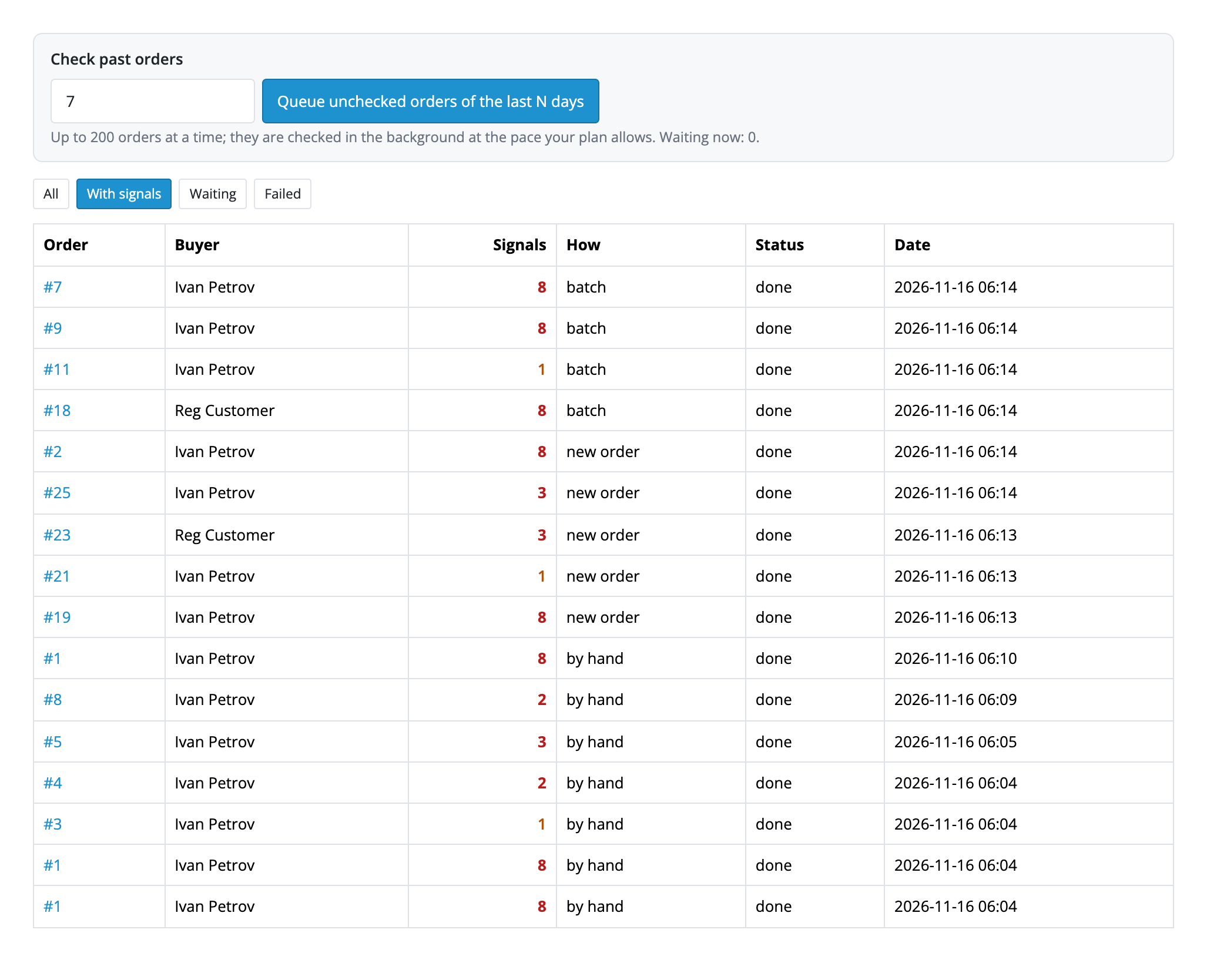
The journal of all checks (Pro) is in the menu Customers → Nekorekten checks: filters “All”, “With signals”, “Waiting”, “Failed”, links to orders, the number of signals, how the check ran (by hand, new order, batch), the status and the date. The “Check past orders” form is there too: enter a number of days, and the orders without a check (up to 200 at a time) are queued and checked in the background at the pace your plan allows.
The phone and e-mail of a buyer go to a third-party platform (Nekorekten.com), so the shop needs a legal basis and a mention in its privacy policy: the Nekorekten.com API terms ask you to name the platform, and a sample text is in the module settings. Signals are the opinions of their authors and the platform does not verify them; the order block says so. Refusing a buyer only because of signals is an automated decision about a person (GDPR, article 22), so the checkout rule does nothing by default, and the settings advise “hide cash on delivery” instead of a full refusal. Sending a signal (Pro) publishes the buyer’s data on a public platform in the name of the shop: send only real cases and keep the proof.
Didn't find the answer? Message us on Telegram and we'll reply within a business day.
 @catcode_support
Setup, compatibility, activation
No, it is an independent integration through the public Nekorekten.com API. The name and materials of Nekorekten.com belong to their owners.
An account and an API key with the IP addresses of your server listed. The free plan gives API access with a limit of 30 searches a day.
Only the phone and/or e-mail of the order, depending on your ticks. The name, address and contents of the order are never sent.
Only in Pro and only if you switch it on: by default the checkout rule does nothing. A service error, a missing key or a used-up limit never blocks the buyer.
No, the note an automatic check writes to the order history is not sent to the buyer. The buyer sees a message only when the checkout rule hid a payment method or refused the order: that is your own text from the settings.
Yes: connecting the key, the "Check" button in the order with the number of signals, what matched and the excerpts, the choice of phone and e-mail, a sample text for the privacy policy.
OpenCart 4.0.2.0–4.1.x, 3.0.x and 2.3.0.2: three separate archives in one product.
Yes, for OpenCart it is one payment and a lifetime licence, for two sites.
Pro switches off and the free part keeps working; checks that were waiting in the queue stop with a reason in the journal and in the order.
No reviews yet. Be the first.
No questions yet. Ask one — we answer within 24 hours.
We build custom modules for WordPress, WooCommerce, OpenCart and Shopify. Tell us about the task and we'll prepare an estimate.
Order a custom module
—
Charged in UAH; your bank converts it to your currency. EUR price is approximate.

CatCode assistant
Just now


CatCode assistant
Online

I’ll help with your website task
Describe your website task — I’ll find a ready-made module or pass it to a developer for an estimate. Modules, custom features, layout, integrations, speed, migration, technical SEO.