
















OpenCart
1 290 UAH839 UAH≈ €17
Black November: −35% on all modules until 30 November Black November: −35% until 30 November Choose a module
 Website auditA PDF report by email in 3 minutesCheck a website
Everyday tasks
Image compressorSize, quality and WebP in bulkQR generatorLink, Wi-Fi, payment to IBANVAT calculator20, 14, 7% and amount in wordsTransliterationOfficial Ukrainian standardWebsite checks
PHP and pluginsPHP version, WordPress, pluginsGoogle Merchant feedFields, prices, GTIN, imagesDomain emailSPF, DKIM, DMARC, blacklistsAI search readinessllms.txt, bots, markupAll 9 toolsEnter at least 2 characters

monday.com CRM Sync for OpenCart 4.x, 3.x, 2.3 (US): orders as monday.com board items with an update; Pro adds automation by status, columns, two-way status, a customers board, a journal. Licence for life.
The free version works with no time limit. Pro adds the rest of the features in the table.


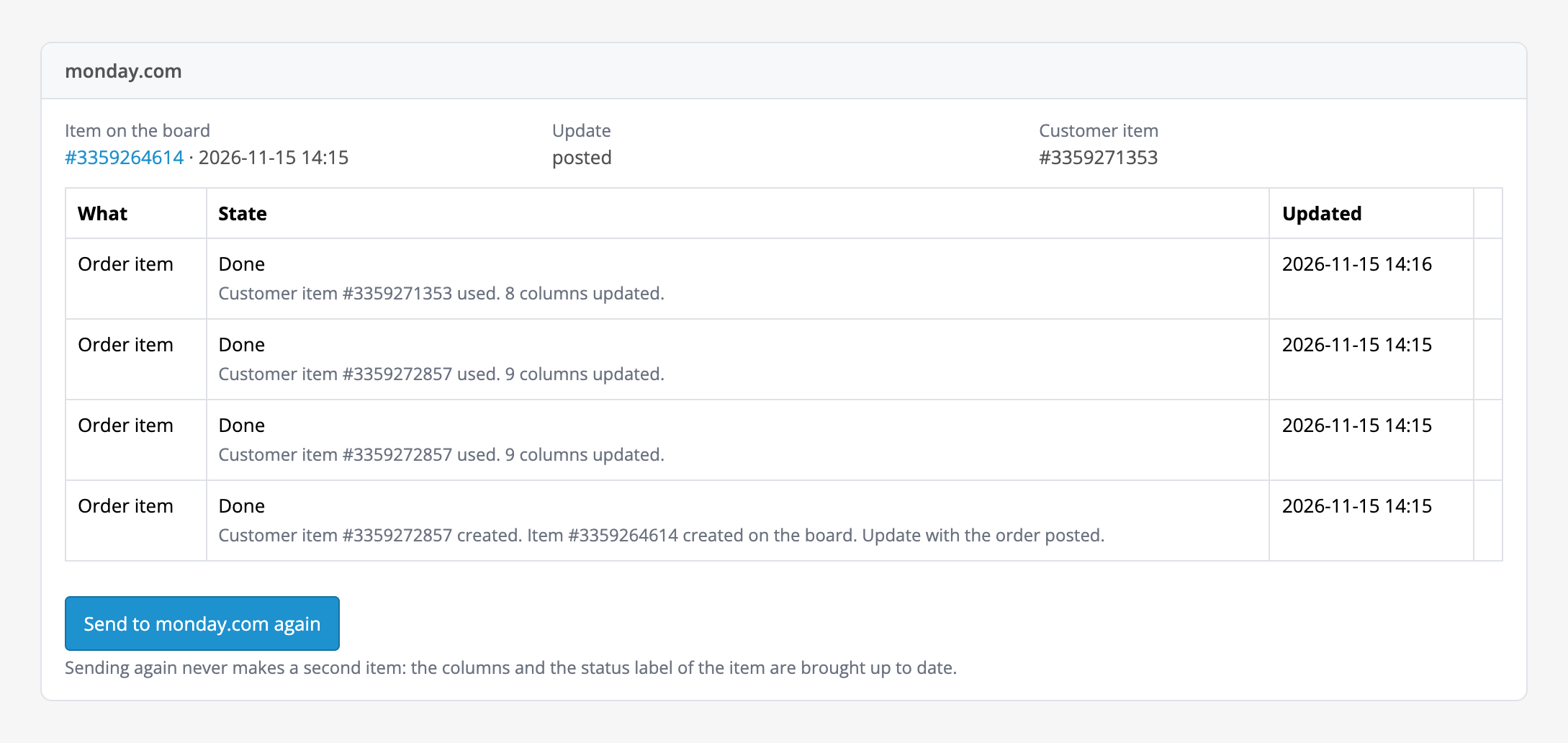
The order page gets a “monday.com” box: the item on the board (a link and the time), the state of the update, the customer item (Pro), a table of the jobs of this order with state and time, the “Send to monday.com” button and “Retry” for a stopped job.

Extensions → Extensions → Modules → monday.com CRM Sync. Tabs: “Connection”, “Board”, “Automation and columns”, “Two-way status”, “Customers board”, “Past orders”, “Licence”.

A fresh install is the free version, nothing switches on by itself. The “Try Pro for 7 days” button → e-mail → the key right in the window and by e-mail.

Moving the site? Unlink the licence on the old domain and activate it on the new one yourself. A staging copy (staging., dev.) works with the same key and does not take a site slot. For studios — keys for 5 or 25 sites, or unlimited.
 OpenCart 4.0.2.0–4.1.x, 3.0.x or 2.3.0.2; the cURL extension.A monday.com account and a personal API token; the token user has write access to the board.The API call limit is set by your monday.com plan: the free plan allows 200 calls a day. One order takes 2 calls in Free and up to 4–5 in Pro (customer lookup or creation, item, update), and every status change takes 1 more. When the limit is used up the module pauses until midnight UTC and goes on by itself; the settings say so. Busy shops on a free or basic plan can hit the daily limit.Two-way status needs a storefront reachable from the internet over https: behind a password or in maintenance mode the webhook cannot be connected, and the module says so in words. A status change from the board runs the same shop logic as an ordinary one (stock, e-mails of other extensions), so matching labels to statuses is your responsibility.Boards are read 50 at a time, up to 200 boards in an account; if there are more, the rest are not listed (a board already saved stays selected).The order date goes to the date column in UTC using the PHP time zone; if the OpenCart database time zone differs, the time may shift.Automatic sending relies on the standard OpenCart order status events: third-party one-page checkouts that bypass them will not start it (the “Send to monday.com” button still works).The module interface is in English.
For OpenCart 4.x, 3.x and 2.3: orders as monday.com board items with an update, a box on the order page, resending without duplicates.


monday.com CRM Sync for OpenCart 4.x, 3.x and 2.3 turns the orders of your shop into items on a monday.com board: from the order page one click makes an item “Order #N — customer name” and an update with everything your team needs to know about the order: status, total, payment, customer, items, address, shipping and comment. Sending again never makes a second item.
The order page gets a “monday.com” box: the item on the board (a link and the time), the state of the update, the customer item (Pro), a table of the jobs of this order with state and time, the “Send to monday.com” button and “Retry” for a stopped job. The item is named “Order #N — customer name”, and the update lists the status, total, payment, customer, items, address, shipping and the customer’s comment.
Pressing the button again does not make a second item: the order keeps its own. If the item was deleted on the board, the module makes a new one on the next try instead of showing a link to the deleted one. monday.com errors are shown in words (token not accepted, no access to the board, API call limit used up), without raw JSON; after server and network errors the module retries by itself, and on the call limit it waits and goes on.
Pro sends the order to the board by itself when it reaches the statuses you choose, and updates the item on every status change: columns filled from the order (text, long text, numbers, e-mail, phone with the country code, order date and time, link) and a status column with a label for each order status. A value that does not fit its column is left out, so the item still goes.
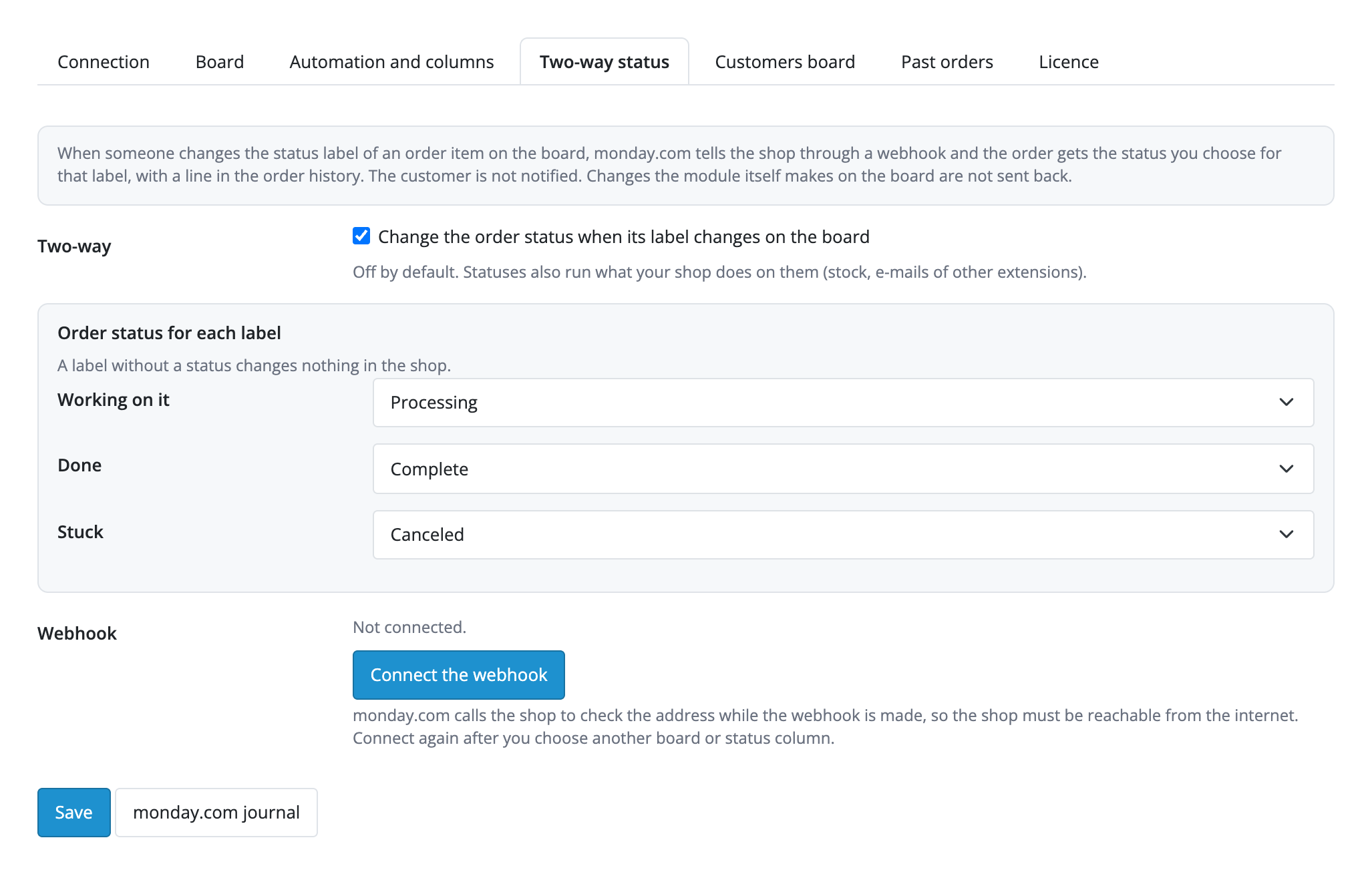
Two-way status (Pro) is off by default. When you switch it on, a status label changed on the board changes the order status in the shop: monday.com tells the shop through a webhook (the “Connect the webhook” button), the order gets the status you chose for that label and a line in the order history; the customer is not notified. Repeated and older events are ignored, and changes the module itself makes on the board are not sent back.
Customers board (Pro): a buyer is found by the e-mail column, an existing item is used instead of a second one, a new one is made with columns filled from the order and linked to the order item through a Connect boards column. Past orders from the date you choose go in the background in portions of 25, keeping to the limits of your plan; orders already sent are skipped.
Extensions → Extensions → Modules → monday.com CRM Sync. Tabs: “Connection”, “Board”, “Automation and columns”, “Two-way status”, “Customers board”, “Past orders”, “Licence”. On “Connection” paste the API token: in monday.com click your avatar, choose Developers and API token. The token is stored encrypted and never shown again; the “Check connection” button shows the account and the user. The module works as that user and sees the boards that user sees.
On “Board” choose the orders board (any board of the account: a CRM Deals board, a work management board or a board made for orders) and the group for new items. The journal of all orders opens from the menu Marketing → monday.com journal (Pro): with filters by state and a “Retry” button. The free version shows the jobs of each order on its own page.
Didn't find the answer? Message us on Telegram and we'll reply within a business day.
 @catcode_support
Setup, compatibility, activation
No, it is an independent integration through the public API. monday.com is a trademark of its owner.
Any board of the account: a CRM Deals board, a work management board or a board made for orders. You choose the group for new items.
No: the order keeps its own item. If it was deleted on the board, the next send makes a new one.
In Free 2 calls per order, in Pro up to 4–5 (customer, item, update) and 1 more per status change. The free monday.com plan allows 200 calls a day; when the limit is used up the module waits until midnight UTC and goes on.
In Pro a status label changed on the board changes the order status in the shop through a webhook, with a line in the order history and no e-mail to the customer. It is off by default, and you set which label matches which status.
A storefront reachable from the internet over https, with no password and no maintenance mode. If monday.com cannot reach the shop, the module gives the reason in words.
Yes: the connection, reading boards, choosing the board and group, the "Send to monday.com" button, the update with the order and the box on the order page work for free. Automation, columns, the status column, two-way status, the customers board, past orders and the journal are Pro.
OpenCart 4.0.2.0–4.1.x, 3.0.x and 2.3.0.2: three separate archives in one product.
Yes, for OpenCart it is one payment and a licence for life, for two sites.
Pro switches off, automatic jobs in the queue stop with a reason, and the free part keeps working.
No reviews yet. Be the first.
No questions yet. Ask one — we answer within 24 hours.
We build custom modules for WordPress, WooCommerce, OpenCart and Shopify. Tell us about the task and we'll prepare an estimate.
Order a custom module
—
Charged in UAH; your bank converts it to your currency. EUR price is approximate.

CatCode assistant
Just now


CatCode assistant
Online

I’ll help with your website task
Describe your website task — I’ll find a ready-made module or pass it to a developer for an estimate. Modules, custom features, layout, integrations, speed, migration, technical SEO.