
















OpenCart
1 290 UAH839 UAH≈ €17
Black November: −35% on all modules until 30 November Black November: −35% until 30 November Choose a module
 Website auditA PDF report by email in 3 minutesCheck a website
Everyday tasks
Image compressorSize, quality and WebP in bulkQR generatorLink, Wi-Fi, payment to IBANVAT calculator20, 14, 7% and amount in wordsTransliterationOfficial Ukrainian standardWebsite checks
PHP and pluginsPHP version, WordPress, pluginsGoogle Merchant feedFields, prices, GTIN, imagesDomain emailSPF, DKIM, DMARC, blacklistsAI search readinessllms.txt, bots, markupAll 9 toolsEnter at least 2 characters

EZ Texting SMS for OpenCart 4.x, 3.x, 2.3 (US, Canada): texts from the order page and a consent box at checkout; Pro adds automatic texts, MMS, replies and STOP, cart reminders, a log. Licence for life.
The free version works with no time limit. Pro adds the rest of the features in the table.


The order page gets an “EZ Texting SMS” panel: the messages of this order with their states, a “Send the status” button with the text of the current status, and a field for your own message with a character and SMS part counter.

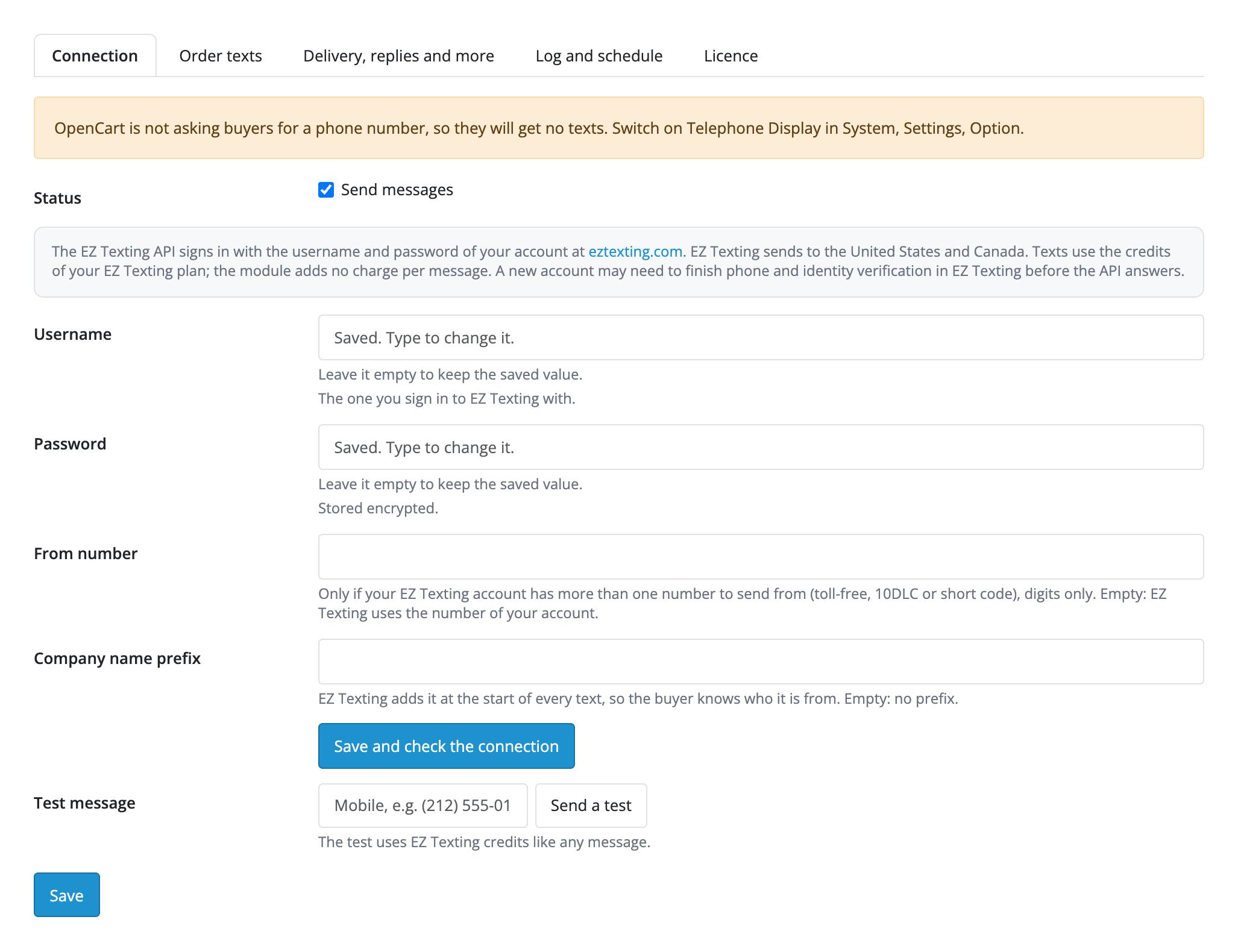
Extensions → Extensions → Modules → EZ Texting SMS Notifications. Tabs: “Connection”, “Order texts”, “Delivery, replies and more”, “Log and schedule”, “Licence”.

A fresh install is the free version, nothing switches on by itself. The “Try Pro for 7 days” button → e-mail → the key right in the window and by e-mail.

Moving the site? Unlink the licence on the old domain and activate it on the new one yourself. A staging copy (staging., dev.) works with the same key and does not take a site slot. For studios — keys for 5 or 25 sites, or unlimited.
 OpenCart 4.0.2.0–4.1.x, 3.0.x or 2.3.0.2; PHP 7.0+ for 2.3, the cURL extension.An EZ Texting account. A new account may need to finish phone and identity verification in EZ Texting before the API answers: the module shows that as a message of its own.EZ Texting sends to the United States and Canada only; numbers of other countries are not sent. Registering a sender number (10DLC or toll-free) and the consent wording required by US law stay with the seller.OpenCart must ask for a phone number (System → Settings → Option → Telephone Display), or buyers do not type one and no texts go out.Replies by webhook need the shop on https.Cart reminders reach only signed-in customers who agreed to the newsletter and have a phone number; a guest cart has no number.OpenCart 3.0 and 2.3 store text without emoji, so the module asks you to remove emoji from messages; on OpenCart 4 they are fine.MMS with a product photo: the photo must be reachable from the internet (JPG, PNG or GIF, up to 5 MB); an MMS uses more credits than an SMS and depends on your EZ Texting plan.
For OpenCart 4.x, 3.x and 2.3: texts through EZ Texting from the order page, the consent box at checkout, US and Canadian numbers, the credit balance and a test message.


EZ Texting SMS Notifications for OpenCart 4.x, 3.x and 2.3 sends buyers order texts through your EZ Texting account: one click on the order page sends the status, the checkout gets an SMS consent box of its own, and the credit balance and a test message are in the settings. US and Canadian numbers are turned into the form EZ Texting accepts, whatever way the buyer typed them.
The order page gets an “EZ Texting SMS” panel: the messages of this order with their states, a “Send the status” button with the text of the current status, and a field for your own message with a character and SMS part counter. A failed message can be retried with one button. Templates are written with {order_id}, {firstname}, {lastname}, {total}, {status}, {store}, {store_url} and {comment}; the comment of a status change goes out only if “Notify customer” is ticked.
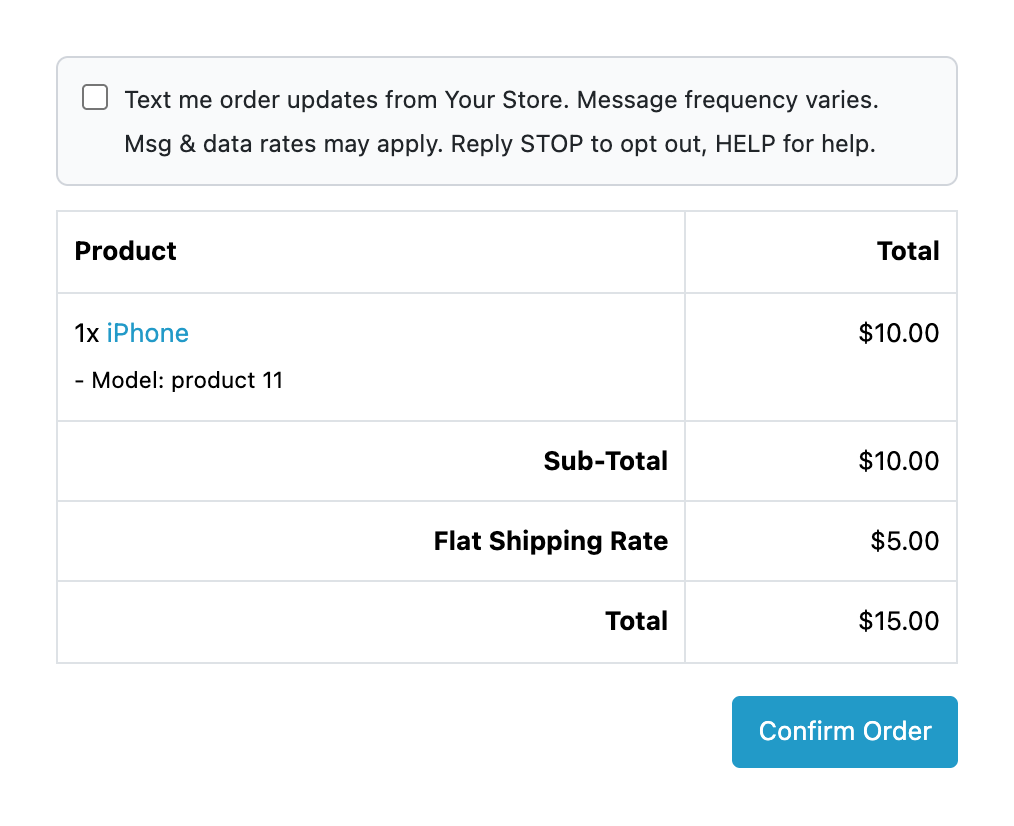
The consent box is off by default. When you switch it on, the checkout shows a box with your text above the confirm button (STOP and HELP in the default text), unticked, and only the buyers who tick it get texts. The answer is kept with the order and shown on its page; orders made in the admin and buyers who did not tick it get no texts while the option is on. The box anchors to the standard OpenCart checkout markup: a third-party checkout may not show it, and then with the option on nobody gets texts, as the help text says.
The buyer’s phone number is accepted in any form and turned into 1XXXXXXXXXX; numbers outside the US and Canada are refused with a plain message instead of being sent. If EZ Texting answers with an error, the seller sees the reason in words (wrong username or password, the account waiting for phone verification, no credits, a number that opted out), and the buyer’s checkout is never held up: messages go out after the page has answered.
Extensions → Extensions → Modules → EZ Texting SMS Notifications. Tabs: “Connection”, “Order texts”, “Delivery, replies and more”, “Log and schedule”, “Licence”. On the “Connection” tab enter the username and password you sign in to EZ Texting with: the password is stored encrypted and is never sent back to the form. Click “Save and check the connection” and the module shows the credit balance. If needed, set the from number (when the account has several) and a company name prefix that EZ Texting puts at the start of every text.
The log and the report, and the settings, are in the Sales → EZ Texting SMS menu. The free version shows the messages of each order on its page; the full log with filters, the report (sent, delivered, failed, SMS parts, replies) and the CSV export are part of Pro.
Didn't find the answer? Message us on Telegram and we'll reply within a business day.
 @catcode_support
Setup, compatibility, activation
No, it is an independent integration through the public API. EZ Texting is a trademark of its owner.
The United States and Canada. A number in any form is turned into 1XXXXXXXXXX; other countries are refused with an explanation.
They use the credits of your EZ Texting plan. The module adds no charge per message; the balance is shown on the "Connection" tab.
It stays off until you switch it on. With the option on, texts go only to buyers who ticked it, and the answer is kept with the order. The consent wording that US law requires stays with you.
In Pro the "Connect replies in EZ Texting" button subscribes the shop to incoming texts. A reply lands in the log and next to the order, and STOP stops any further text to that number.
No: messages go out after the page has answered, and after a server or network error the module retries by itself.
Yes: the connection, the test SMS, the status button and your own text on the order page, the retry of a failed message and the consent box work in the free version. Automatic texts, replies, delivery status, contacts, cart reminders, quiet hours and the full log are Pro.
OpenCart 4.0.2.0–4.1.x, 3.0.x and 2.3.0.2: three separate archives in one product.
Yes, for OpenCart it is one payment and a licence for life, for two sites.
Pro switches off, automatic messages in the queue stop with a reason, and the free part keeps working.
No reviews yet. Be the first.
No questions yet. Ask one — we answer within 24 hours.
We build custom modules for WordPress, WooCommerce, OpenCart and Shopify. Tell us about the task and we'll prepare an estimate.
Order a custom module
—
Charged in UAH; your bank converts it to your currency. EUR price is approximate.

CatCode assistant
Just now


CatCode assistant
Online

I’ll help with your website task
Describe your website task — I’ll find a ready-made module or pass it to a developer for an estimate. Modules, custom features, layout, integrations, speed, migration, technical SEO.