
















WordPress
990 UAH644 UAH/year≈ €14
Black November: −35% on all modules until 30 November Black November: −35% until 30 November Choose a module
 Website auditA PDF report by email in 3 minutesCheck a website
Everyday tasks
Image compressorSize, quality and WebP in bulkQR generatorLink, Wi-Fi, payment to IBANVAT calculator20, 14, 7% and amount in wordsTransliterationOfficial Ukrainian standardWebsite checks
PHP and pluginsPHP version, WordPress, pluginsGoogle Merchant feedFields, prices, GTIN, imagesDomain emailSPF, DKIM, DMARC, blacklistsAI search readinessllms.txt, bots, markupAll 9 toolsEnter at least 2 characters

Apifon in WooCommerce (Greece): the order status to the buyer from the order screen; Pro adds automatic messages, Viber with an SMS failover, a phone code and a journal.
The free version works with no time limit. Pro adds the rest of the features in the table.


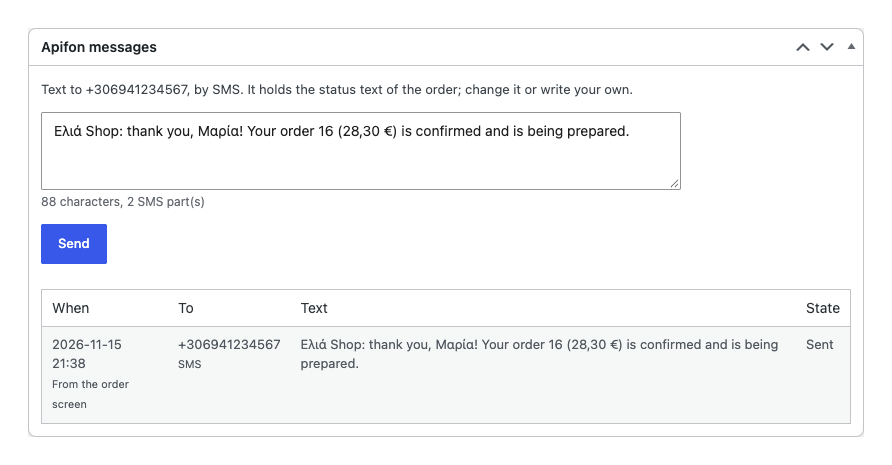
The buyer receives a short message on the phone of the order’s billing address: “Ελιά Shop: thank you, Μαρία!

WooCommerce → Apifon.

A fresh install is the free version, nothing switches on by itself. The “Try Pro for 7 days” button → e-mail → the key right in the window and by e-mail.

Moving the site? Unlink the licence on the old domain and activate it on the new one yourself. A staging copy (staging., dev.) works with the same key and does not take a site slot. For studios — keys for 5 or 25 sites, or unlimited.
 WordPress 6.2+, WooCommerce 7.0+ (HPOS and block checkout supported), PHP 7.4+.An Apifon (Mookee) account with an HMAC token with the SMS scope, a topped up balance and an approved SMS sender.For Viber: a Viber sender on the Apifon account and the Viber scope on the token.For delivery status: a shop on https with a valid certificate (Apifon requires it for the callback address); on http the setting explains this and no address is sent.If the token lists allowed IP addresses instead of *, add the address of the shop server to it.Shop and buyer numbers are mobile: the plugin does not accept landlines.Interface languages: English, Ελληνικά.
Connecting Apifon by token and key, the balance, texts per status, sending a status or your own text from the order screen, sending again, a test message, Greek Unicode or capitals, Greek…


Order SMS with Apifon for WooCommerce connects your Apifon (Mookee) account through its REST API with an HMAC signature: from the order screen you send the buyer an SMS with the current status in one click, and in Pro the messages go by themselves, over Viber with an SMS failover when Viber does not get through. Greek texts go as typed, in Unicode, or in capitals without accents when you want a cheaper SMS.
What you need. An Apifon account (mookee.apifon.com) with an HMAC API token that has the SMS scope and an approved sender; for Viber, a Viber sender on the account and the Viber scope on the token. Apifon charges the messages to your account balance; the plugin adds no fee per message. SMS goes to mobile numbers; landlines are refused before sending.
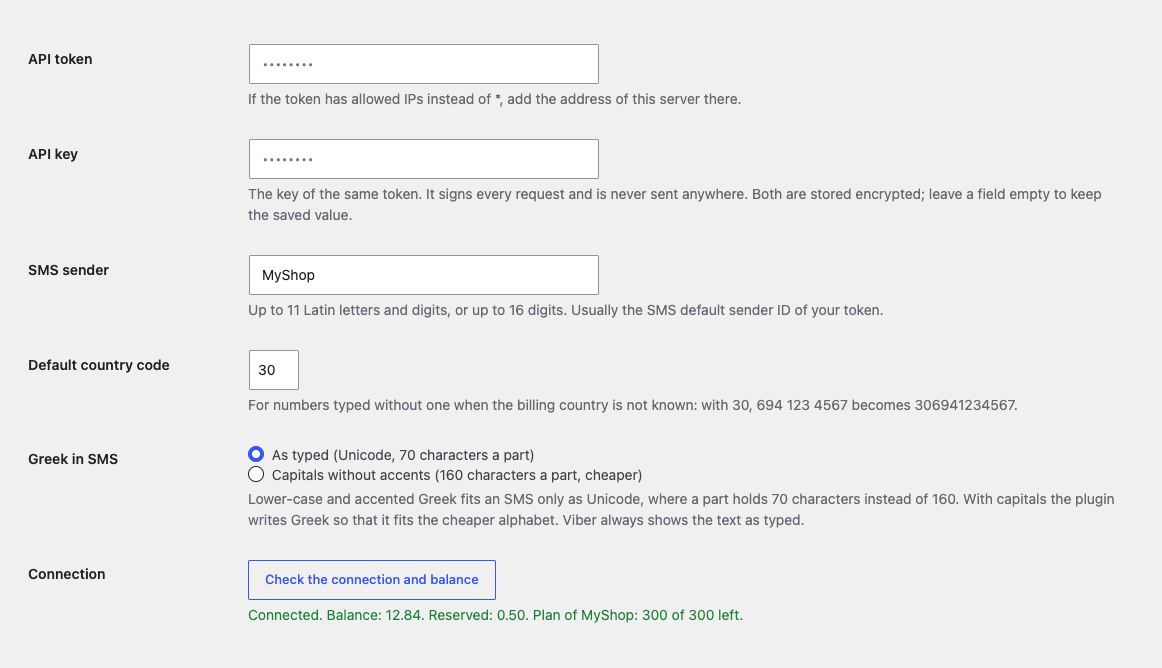
The buyer receives a short message on the phone of the order’s billing address: “Ελιά Shop: thank you, Μαρία! Your order 20 (28,30 €) is confirmed and is being prepared”. You write the text; the placeholders {shop_name}, {order_number}, {order_total}, {first_name}, {last_name}, {status}, {order_url}, {pay_url}, {shipping} and {payment} work in it. A number typed without a country code gets the code of the billing country or your default (30 for Greece): 694 123 4567 becomes 306941234567.
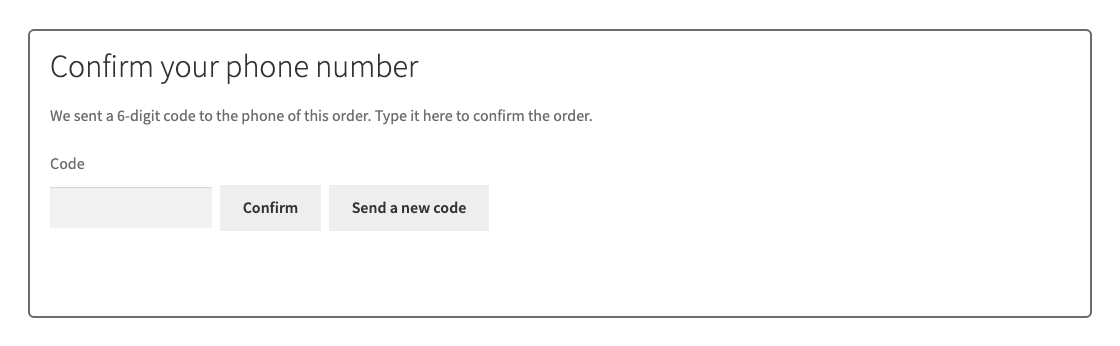
In Pro, for cash on delivery orders you can ask the buyer to confirm the phone with a code: after checkout Apifon sends a one-time 6-digit code, and the order received page (classic and block) shows a field for it. Checkout is not held up: an order without confirmation is placed as usual and its page says it is not confirmed. After the confirmation the order can move to the status you choose. Made-up numbers stop costing you parcels.
WooCommerce → Apifon. Paste the API token and API key from Mookee (account name → Developers → Add, type HMAC, scope SMS and, if needed, Viber), enter the sender (up to 11 Latin letters and digits, or up to 16 digits) and press “Check the connection and balance”: the plugin shows the balance, the reserved amount and the message plans of the account. The token and key are stored encrypted and never shown again; the key signs every request and is never sent anywhere.
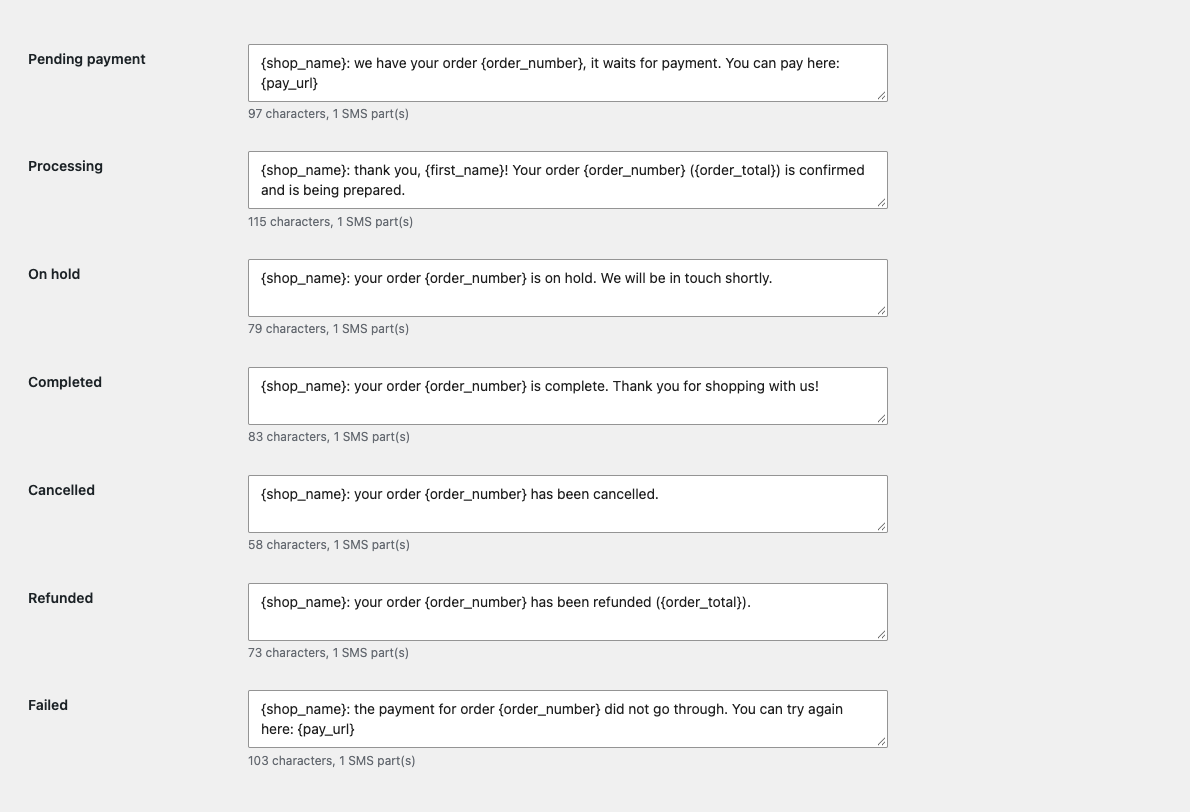
Below is a separate text for every order status: pending payment, processing, on hold, completed, cancelled, refunded, failed. Under each field a counter shows characters and SMS parts: Greek Unicode holds 70 characters a part, capitals without accents 160, so they cost less. You choose the mode in the connection settings.
The order screen gets an “Apifon messages” box: the text of the current status filled in with the order data, a “Send” button and all the messages of the order with their state (“Sent”, “Delivered”, “Not sent”) and the reason of a refusal in plain words. A failed message is sent again with one button; everything is also written to the order notes.
Didn't find the answer? Message us on Telegram and we'll reply within a business day.
 @catcode_support
Setup, compatibility, activation
No, it is an independent integration through the public API. Apifon and Mookee are trademarks of their owners.
Log in to mookee.apifon.com, open your account name, the Developers section, press Add, choose HMAC and switch on SMS (and Viber for Pro). Copy the API Token, then after Reveal copy the API Key.
Yes, Apifon charges the cost to your account balance at the service tariff. The plugin adds no fee of its own per message.
Lower-case and accented Greek fits an SMS only as Unicode, 70 characters a part. Choose "Capitals without accents" in the settings and a part holds 160 characters.
A Viber sender on the Apifon account and the Viber scope on the token. If Viber is unavailable to the buyer or the sender is not approved, the same text goes by SMS.
Yes, every code is a separate message from your balance, up to 3 sends per order. It is a Pro feature and off by default.
Yes: the connection, the balance, a test message, sending a status or your own text from the order screen and sending again work without a licence. Automatic messages, Viber, the phone code, delivery status and the journal are Pro.
Pro switches off, queued Pro messages leave a note on the order with the reason, and the free part keeps working.
One key works on two sites: the shop and its development copy.
No reviews yet. Be the first.
No questions yet. Ask one — we answer within 24 hours.
We build custom modules for WordPress, WooCommerce, OpenCart and Shopify. Tell us about the task and we'll prepare an estimate.
Order a custom module
—
Charged in UAH; your bank converts it to your currency. EUR price is approximate.

CatCode assistant
Just now


CatCode assistant
Online

I’ll help with your website task
Describe your website task — I’ll find a ready-made module or pass it to a developer for an estimate. Modules, custom features, layout, integrations, speed, migration, technical SEO.