WordPress
BAS Exchange for WooCommerce — products, prices, stock and orders in sync with BAS
Free + Pro
1 490 UAH/year
v1.0.0
Enter at least 2 characters
WooCommerce exchange with BAS over the CommerceML 2 protocol: categories, products, properties, pictures, prices and stock come from BAS, orders go to BAS. The exchange address, user and password are in the admin, BAS starts every exchange itself. The base version is free; Pro adds orders, variations, warehouses and sale prices.
The free version works with no time limit. Pro adds the rest of the features in the table.


Customers see on the site what is in BAS — and never see the exchange itself:

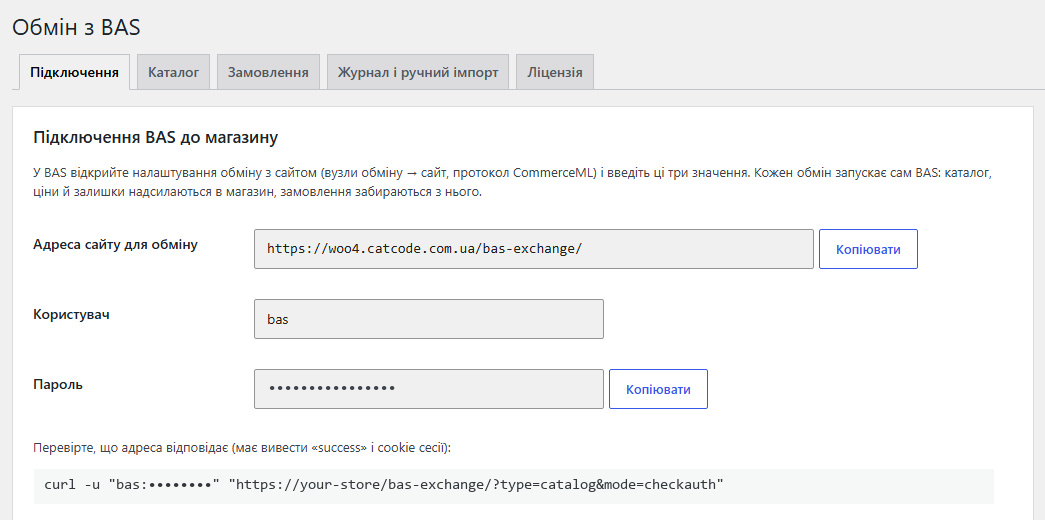
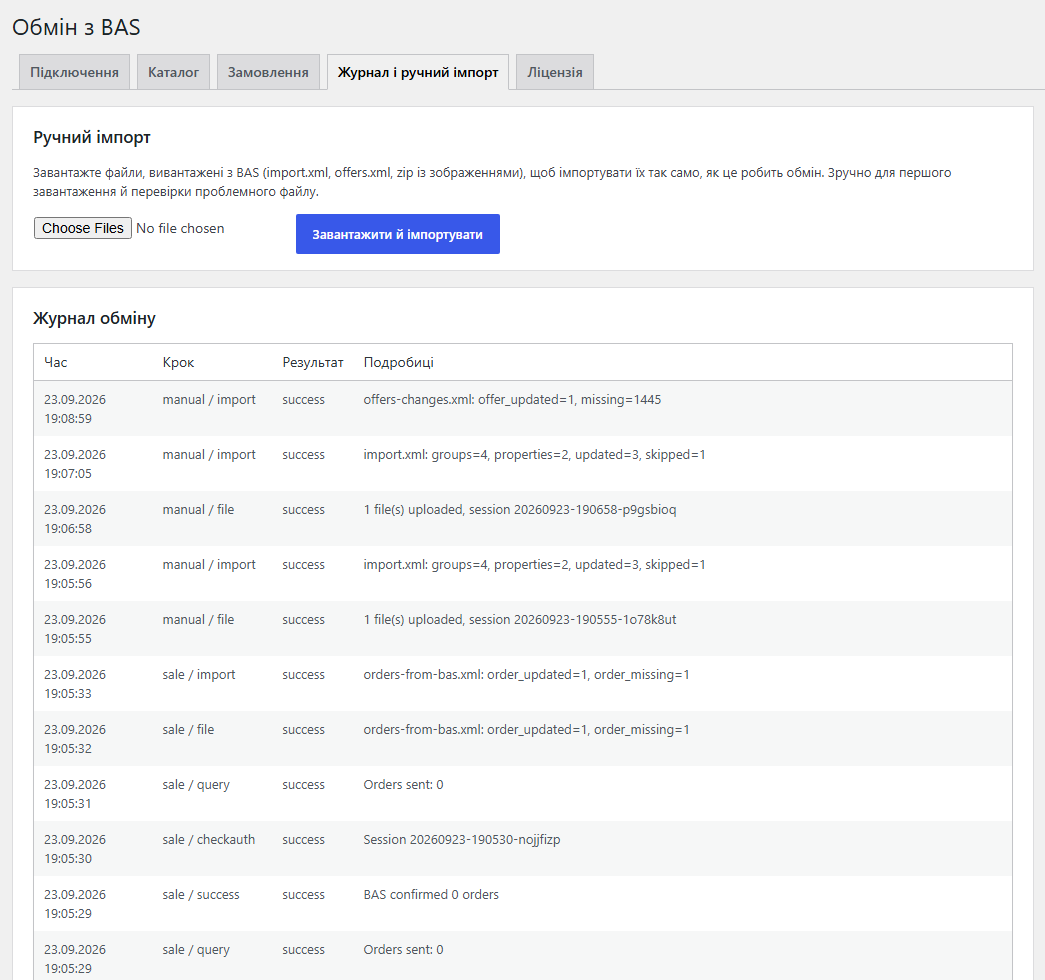
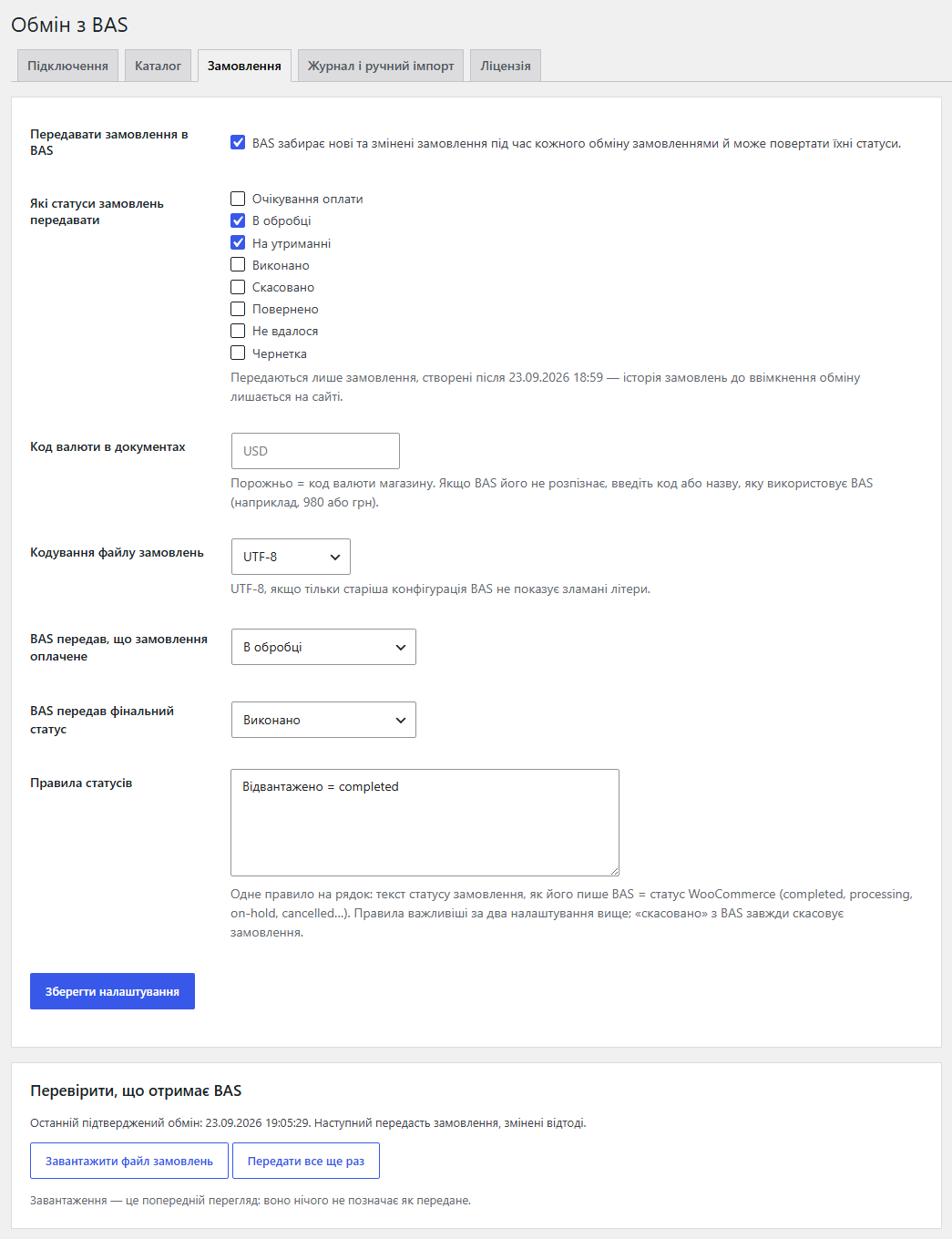
The WooCommerce → BAS Exchange page with the Connection, Catalog, Orders (Pro), Log and manual import, and Licence tabs.

A fresh install is the free version, nothing switches on by itself. The “Try Pro for 7 days” button → e-mail → the key right in the window and by e-mail.

Moving the store? Unbind the licence on the old domain and activate it on the new one yourself. If our server is unreachable, Pro keeps working for 14 more days. For studios — keys for 5 or 25 sites, or unlimited.
 BAS with website exchange over the CommerceML 2 protocol.WooCommerce 7.0+, HPOS compatible, classic and block checkout.WordPress 6.2+ · PHP 7.4+ with the XMLReader extension. The Zip extension is needed for archives; without it the module asks BAS to send files unpacked.BAS must be able to reach the site over HTTP(S) at the exchange address. If the site is behind a firewall or a password, that address has to be let through.The server’s request timeout must be longer than “Seconds per import step” (20 s by default).Tested on WordPress 7.1 with WooCommerce 11.1, PHP 8.3 and 7.4, MySQL, with and without HPOS.
CommerceML 2 exchange point (authorisation, files in parts and zip, step-by-step import), groups → categories, products with pictures, properties → attributes, price from a price type,…
4 modules in one order — 40% cheaper than separately



BAS Exchange for WooCommerce connects a WooCommerce store with BAS over the CommerceML 2 protocol. Products, prices and stock are kept in BAS and the site receives them by itself: no CSV exports, no retyping prices by hand, and no “in stock” on the site for goods that are already gone from the warehouse. In the other direction (Pro), BAS collects orders from the site and sends their statuses back.
BAS starts every exchange: in its website exchange settings you enter the address, user and password from the Connection tab, and BAS then sends the catalog and offers and collects orders on schedule or on demand. The store answers exactly the way the protocol expects.
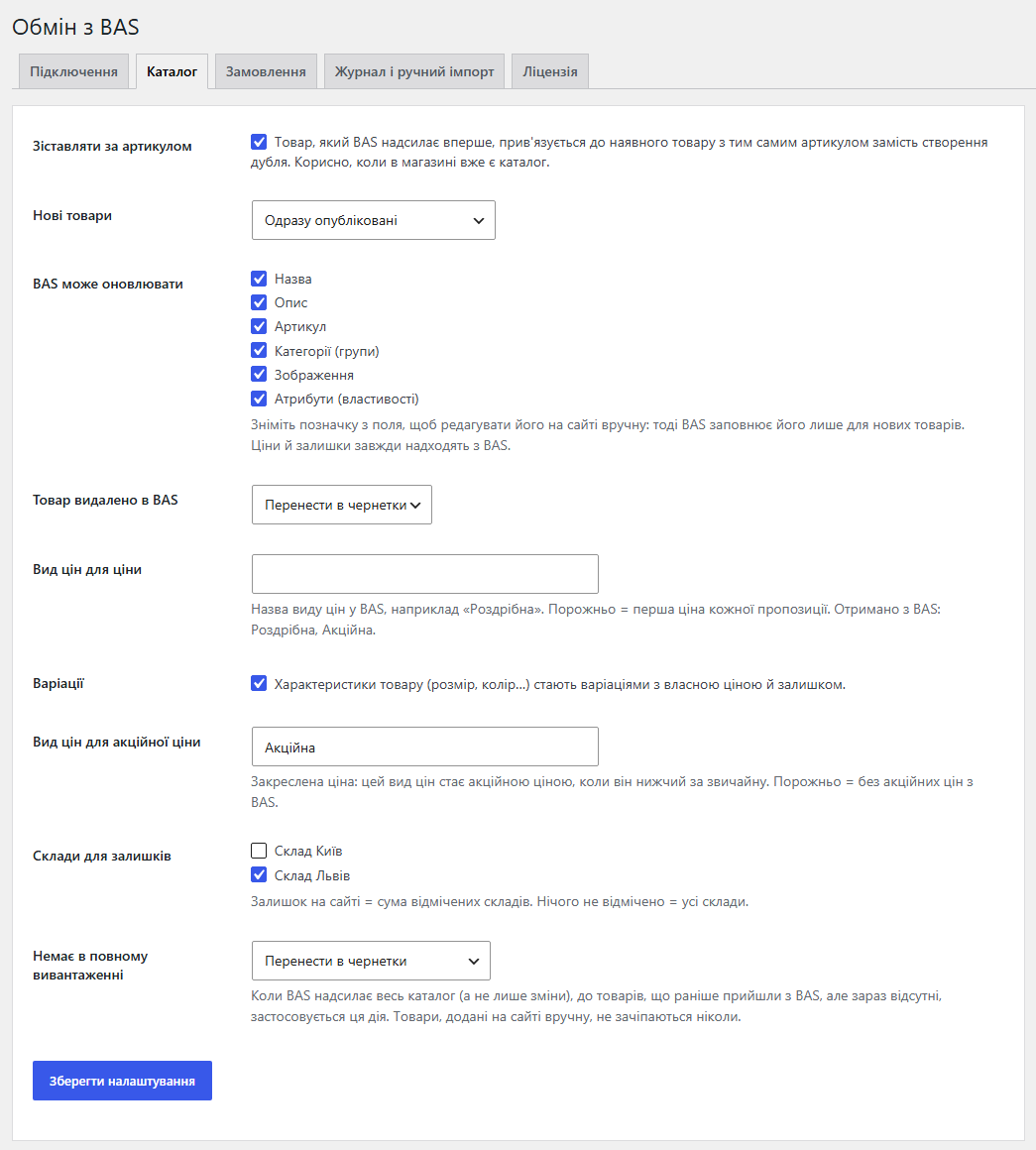
Customers see on the site what is in BAS — and never see the exchange itself:
The WooCommerce → BAS Exchange page with the Connection, Catalog, Orders (Pro), Log and manual import, and Licence tabs. The screenshots show the admin in Ukrainian; the module interface is also in English and Russian.
catcode-bas-exchange-for-woocommerce-free-1.0.0.zip (free version) or catcode-bas-exchange-for-woocommerce-1.0.0.zip (Pro) and activate it. WooCommerce must be active.Didn't find the answer? Message us on Telegram and we'll reply within a business day.
 @catcode_support
Setup, compatibility, activation
@catcode_support
Setup, compatibility, activation
WooCommerce → BAS Exchange → Connection. It shows the exchange address, user and password with Copy buttons, plus a curl command to check it: the answer must start with "success". BAS adds the protocol parameters to the address by itself.
No. The exchange was tested with a CommerceML 2 protocol simulator playing the part of BAS: the same requests, files in parts and as an archive, large catalogs, orders and statuses. Run your first exchange with your BAS during the 7-day trial; if something goes wrong, the log shows at which step, and we fix it quickly.
Only the fields ticked in Catalog → "BAS may update". Untick "Description" and BAS fills it only for new products. Prices and stock always come from BAS.
No, with "Match by SKU" on: a product BAS sends for the first time is linked to the existing product with the same SKU. After that the link is kept by the BAS id, so renaming an item in BAS updates the same product.
Lower "Seconds per import step" on the Connection tab below your server's request timeout (20 seconds by default). The store answers "progress" and BAS repeats the request until the whole file is imported.
No. Only orders with the chosen statuses created after the order exchange was switched on are sent. If BAS missed something, "Send everything again" sends those orders once more.
The "paid" flag is set only when the money has actually arrived: for card payments after the payment is confirmed, for cash on delivery only in the Completed status. Processing is not treated as paid for cash on delivery.
Yes. Export import.xml and offers.xml from BAS (or any CommerceML 2 files) and upload them on the "Log and manual import" tab — they are imported exactly like an exchange.
Yes. The Connection tab then shows an address like /index.php/bas-exchange/ — that is the one to paste into BAS.
No reviews yet. Be the first.
No questions yet. Ask one — we answer within 24 hours.
We build custom modules for WordPress, WooCommerce, OpenCart and Shopify. Tell us about the task and we'll prepare an estimate.
Order a custom module
—

CatCode assistant
Just now


CatCode assistant
Online

I’ll help with your website task
Describe your website task — I’ll find a ready-made module or pass it to a developer for an estimate. Modules, custom features, layout, integrations, speed, migration, technical SEO.
