WordPress
e-Factura ANAF for WooCommerce — RO e-Factura invoices to ANAF (SPV) straight from orders
Free + Pro
990 UAH/year
v1.0.1
Enter at least 2 characters

Romanian RO e-Factura invoices from WooCommerce orders: UBL 2.1 under CIUS-RO 1.0.1, sent directly to the ANAF API (SPV) through your own OAuth application, no accounting SaaS. Upload index, ANAF status and the signed answer ZIP on the order, CUI field at checkout, retry queue, TEST and PRODUCTION. Pro — B2C reporting, credit notes from refunds, foreign buyers, the ANAF PDF for customers, SPV messages.
The free version works with no time limit. Pro adds the rest of the features in the table.



A fresh install is the free version, nothing switches on by itself. The “Try Pro for 7 days” button → e-mail → the key right in the window and by e-mail.

Moving the store? Unbind the licence on the old domain and activate it on the new one yourself. If our server is unreachable, Pro keeps working for 14 more days. For studios — keys for 5 or 25 sites, or unlimited.
 WooCommerce 8.0+ with the classic or block checkout, HPOS compatibleWordPress 6.2+ · PHP 7.4+ with OpenSSL and ZipArchiveA qualified certificate of a person with SPV rights for the seller’s CUI (legal representative, designated representative or authorised person)An ANAF application for the “E-Factura” service with the site’s callback URL. We recommend pretty permalinks (/wp-json/…): whether ANAF accepts a callback with “?rest_route=” has not been verified. Security plugins that switch off the REST API break the callback — tokens can then be pasted manually.Currency — RON only; orders in other currencies are skipped with a noteWooCommerce taxes with the Romanian rates — the rates go into the invoice from the taxes of each orderPlugin languages: English and Romanian.
ANAF answers (signed ZIPs, error lists, SPV messages, PDFs) are kept in the site database instead of the uploads folder, which nginx served by direct URL; existing files are moved on update…
UBL 2.1 / CIUS-RO 1.0.1, ANAF OAuth, upload, stareMesaj, descarcare, retry queue, CUI fields on the classic and block checkout, RO address checks, TEST and PRODUCTION; English and Romanian.
4 modules in one order — 40% cheaper than separately



e-Factura ANAF for WooCommerce is a plugin for shops in Romania that sell on WooCommerce and have to report their invoices to the national RO e-Factura system (SPV) of the ANAF tax authority. It turns an order into an electronic invoice in UBL 2.1 under the Romanian specification CIUS-RO 1.0.1 and sends it to the ANAF API itself, through your own OAuth application — the way accounting programs do it, but without a SaaS in between and without a monthly subscription. The upload index, the ANAF status and the answer ZIP with the Ministry of Finance seal are kept with the order.
What you need. A company registered in SPV; a qualified digital certificate of a person with SPV rights for the company’s CUI; your own ANAF application for the “E-Factura” service, registered in the developer profile on anaf.ro with the callback URL the plugin shows. Invoices are in RON only.
How it was tested, honestly. The plugin was tested on a local WooCommerce store with ANAF answers simulated from the official API documentation (upload, stareMesaj, descarcare, uploadb2c) and the examples of Romania’s Ministry of Finance. Every XML from the test orders — B2B, B2C, a seller not registered for VAT, credit notes — passed the official ANAF validator (UBL 2.1 XSD + CIUS-RO 1.0.9 schematron). We have not run it against the live ANAF, test or production, yet: that needs the certificate of a Romanian company. Start in the TEST environment with your company during the 7-day Pro trial — if ANAF answers differently from its documentation, we fix it promptly.
Responsibility for the content of the invoice stays with the shop. The plugin builds the invoice from the WooCommerce order data and from the VAT settings you choose: categories for lines without VAT, the non-VAT-payer mode, “TVA la încasare”, B2C reporting, foreign buyers. These are your accountant’s decisions — show them the settings before switching to PRODUCTION.
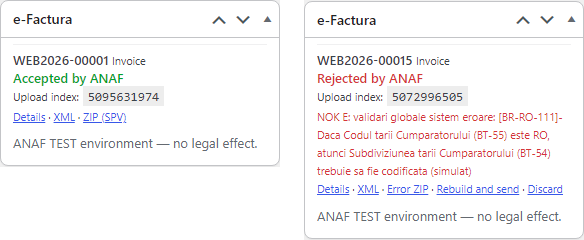
Every order has an “e-Factura” box: invoice number, status (“Accepted by ANAF”, “Rejected by ANAF”, queued), upload index and links to the XML and ZIP. An order without an invoice gets a “Send to e-Factura” button. The order notes record each step: invoice created, uploaded with its index, accepted or rejected with the reason.
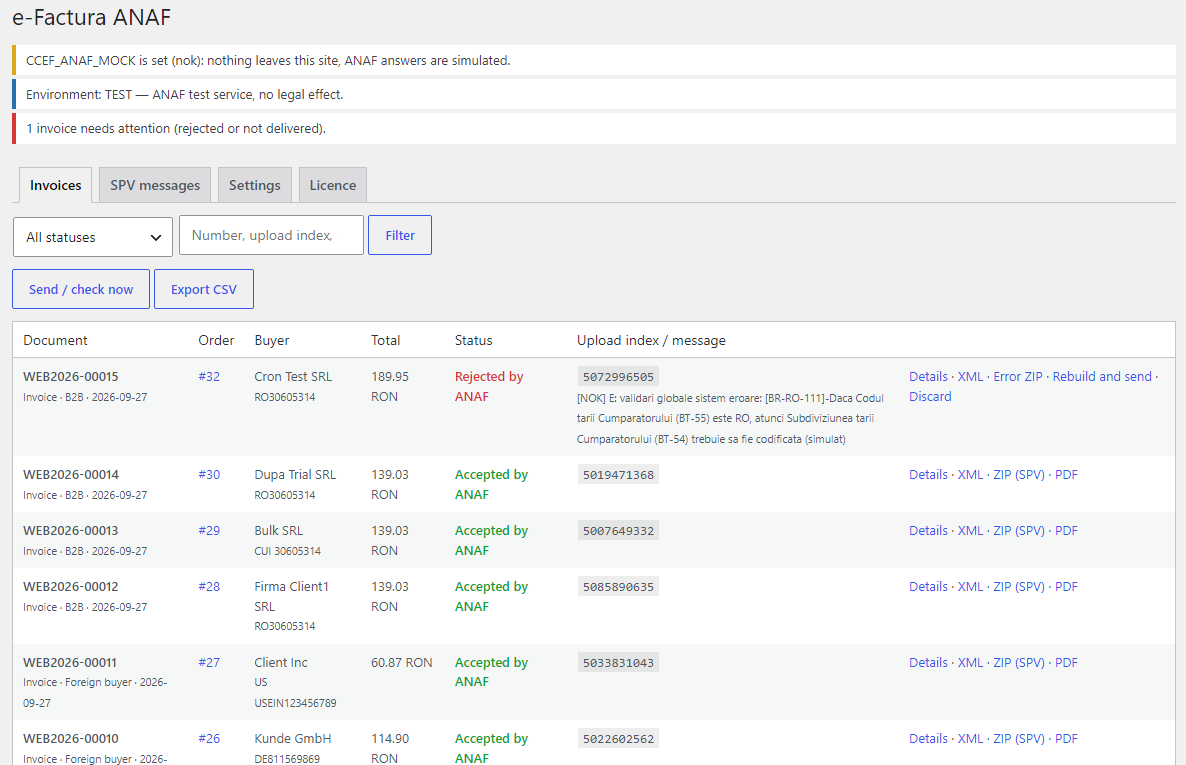
A rejected invoice is visible at once: in the register, on the order and in a notice at the top of the admin, next to the error text from the ANAF answer ZIP (for example BR-RO-111 about the county code). Once the order is fixed, “Rebuild and send” rebuilds the invoice with the same number, which never reached the buyer; one you do not need is closed with “Discard”.
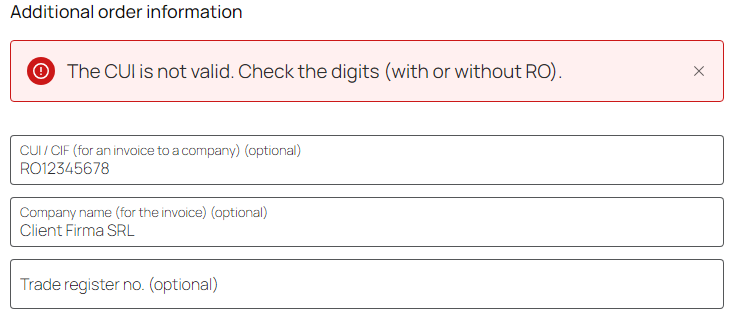
The checkout gets the “CUI / CIF (for an invoice to a company)” and “Trade register no.” fields and, while WooCommerce hides its own Company field, “Company name (for the invoice)”. Without a CUI the order is an ordinary one. With a CUI the plugin checks the check digit (with or without the RO prefix), and a CNP typed into the CUI field is refused with a hint. A CUI without a company name does not pass. Works on the classic and the block checkout.
ANAF requires the sector (SECTOR1–SECTOR6) for an address in Bucharest. A Bucharest buyer without a sector in the City field is asked to add it, for example “Sector 3” — otherwise ANAF itself would reject the invoice.
Pro. A WooCommerce refund — by items or by amount — produces a 381 credit note referencing the invoice, sent to ANAF the same way. Orders without a CUI are reported through uploadb2c with the CNP (if the buyer gave it) or 13 zeros. EU buyers with a VAT number get category K, buyers outside the EU get G, both with extern=DA.
CCEF_ANAF_MOCK constant in wp-config.php simulates ANAF answers in the TEST environment — to check the shop without a certificate.CCEF_DELETE_DATA constant removes everything.efactura-anaf-for-woocommerce-1.0.1.zip and activate.Didn't find the answer? Message us on Telegram and we'll reply within a business day.
 @catcode_support
Setup, compatibility, activation
@catcode_support
Setup, compatibility, activation
A company registered in SPV, a qualified digital certificate of a person with SPV rights for its CUI, and your own application for the "E-Factura" service registered in the ANAF developer profile with the callback URL the plugin shows. ANAF gives you a Client ID and a Client Secret — paste them into the settings and sign in with the certificate.
On a local WooCommerce store with ANAF answers simulated from the official API documentation and the examples of Romania's Ministry of Finance. Every XML from the test orders passed the official ANAF validator (CIUS-RO 1.0.9 schematron). It has not yet run against the live ANAF, test or production: that needs the certificate of a Romanian company. Try it with your company in the TEST environment during the 7-day Pro trial.
No. This version sends invoices in RON only; orders in other currencies are skipped with a note on the order.
The access token is valid for 90 days and renewed automatically, the refresh token for 365 days. Once a year you sign in with the certificate again; the plugin reminds you in advance.
The shop. The plugin builds the invoice from the order data and from the VAT settings you choose. VAT categories, "TVA la încasare", B2C reporting are your accountant's decisions; show them the settings before switching to PRODUCTION.
In the site database, not in a web-accessible folder: the ZIP can be downloaded only in the admin, the PDF only by the customer who placed the order.
No reviews yet. Be the first.
No questions yet. Ask one — we answer within 24 hours.
We build custom modules for WordPress, WooCommerce, OpenCart and Shopify. Tell us about the task and we'll prepare an estimate.
Order a custom module
—

CatCode assistant
Just now


CatCode assistant
Online

I’ll help with your website task
Describe your website task — I’ll find a ready-made module or pass it to a developer for an estimate. Modules, custom features, layout, integrations, speed, migration, technical SEO.
