Get in touch
  • WordPress
  • Sales and conversion
  • v1.0.0

Returns & Exchanges Manager for WooCommerce — online returns and exchanges

Return and exchange requests from the customer account and a guest form: item and quantity picker, return window, statuses, return waybill and e-mails. Pro — refund, replacement or coupon in one click.

Download Free
Pro · one-year licence The more sites, the less each one costs
Compatibility
WooCommerce 7.0+ · WordPress 6.2+ · PHP 7.4+ · HPOS · block and classic themes
Licence
one site, annual
Trial
7 days, no card, one per site
Updated
September 2026
Or all 115 Pro modules with All Access — 4 990 ₴ / year

What Free has,
and what Pro adds

The free version works with no time limit. Pro adds the rest of the features in the table.

Feature Free Pro
A "Return / exchange" button on the order and a "Returns" tab in the customer account ✔ ✔
Guest form: find the order by its number and e-mail or phone, the page is created in one click ✔ ✔
Item and quantity picker, reason from a list, refund or exchange, comment ✔ ✔
Return window (14 days by default) and allowed order statuses ✔ ✔
Protection against a second request for the same items ✔ ✔
Request statuses, message to the customer, private note, history ✔ ✔
Return waybill with a Nova Poshta / Ukrposhta tracking link ✔ ✔
E-mails to the customer and the store, a note on the WooCommerce order ✔ ✔
Photos with the request: up to 5 JPG / PNG / WebP images — ✔
One-click refund through a gateway that supports refunds (cash on delivery is recorded manually) — ✔
Zero-value replacement order with the chosen product or variation — ✔
Store-credit coupon for the refund amount, locked to the customer's e-mail — ✔
Non-returnable categories and a custom period per category — ✔
"Item received" status set automatically from Nova Poshta tracking — ✔
Telegram alerts and CSV export of requests — ✔

What it looks like

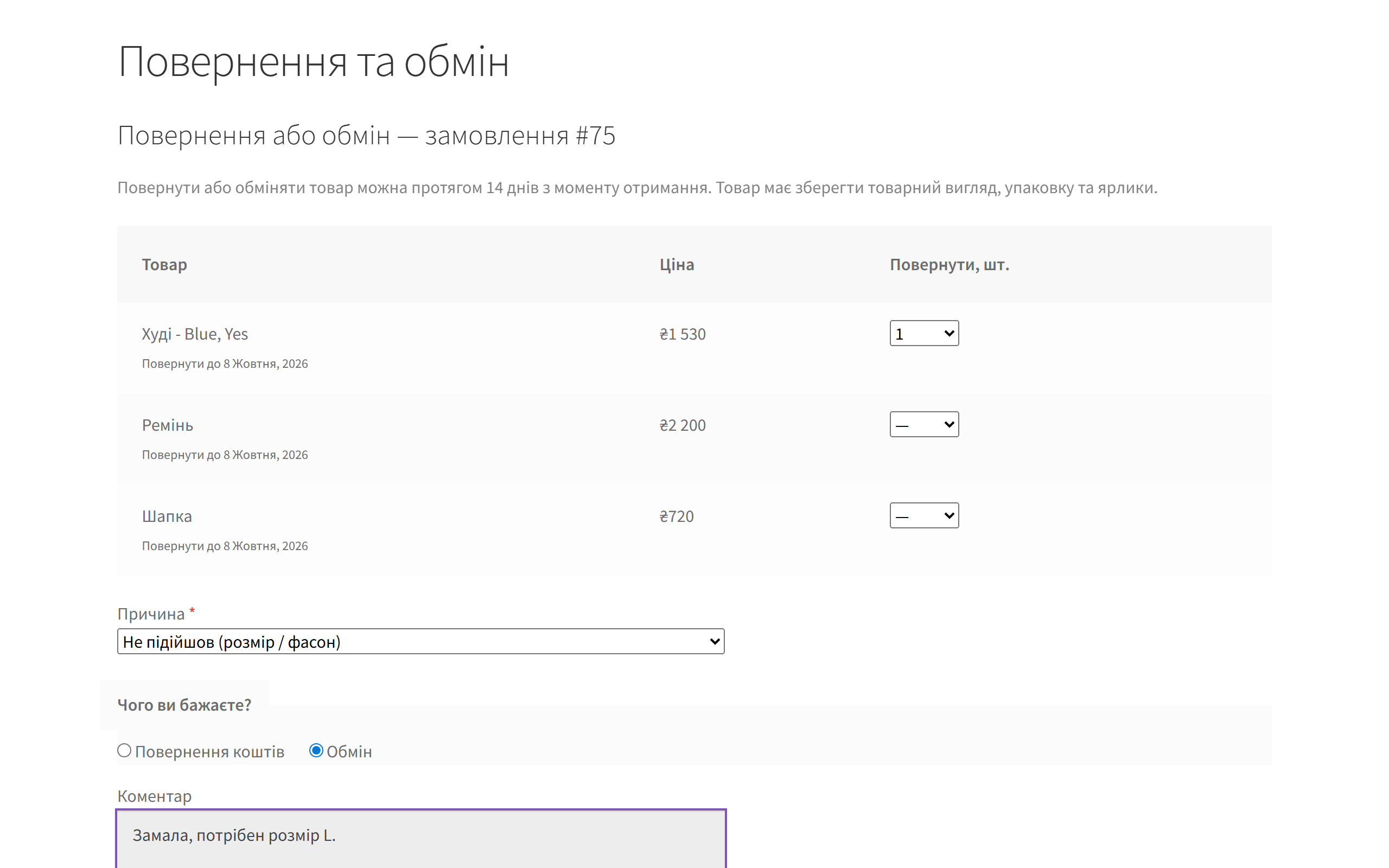
Return or exchange form on a WooCommerce store
The request form: order items with the last day to return them, a reason, "Refund", "Exchange" or coupon, a comment and photos (Pro). The store is in Ukrainian.
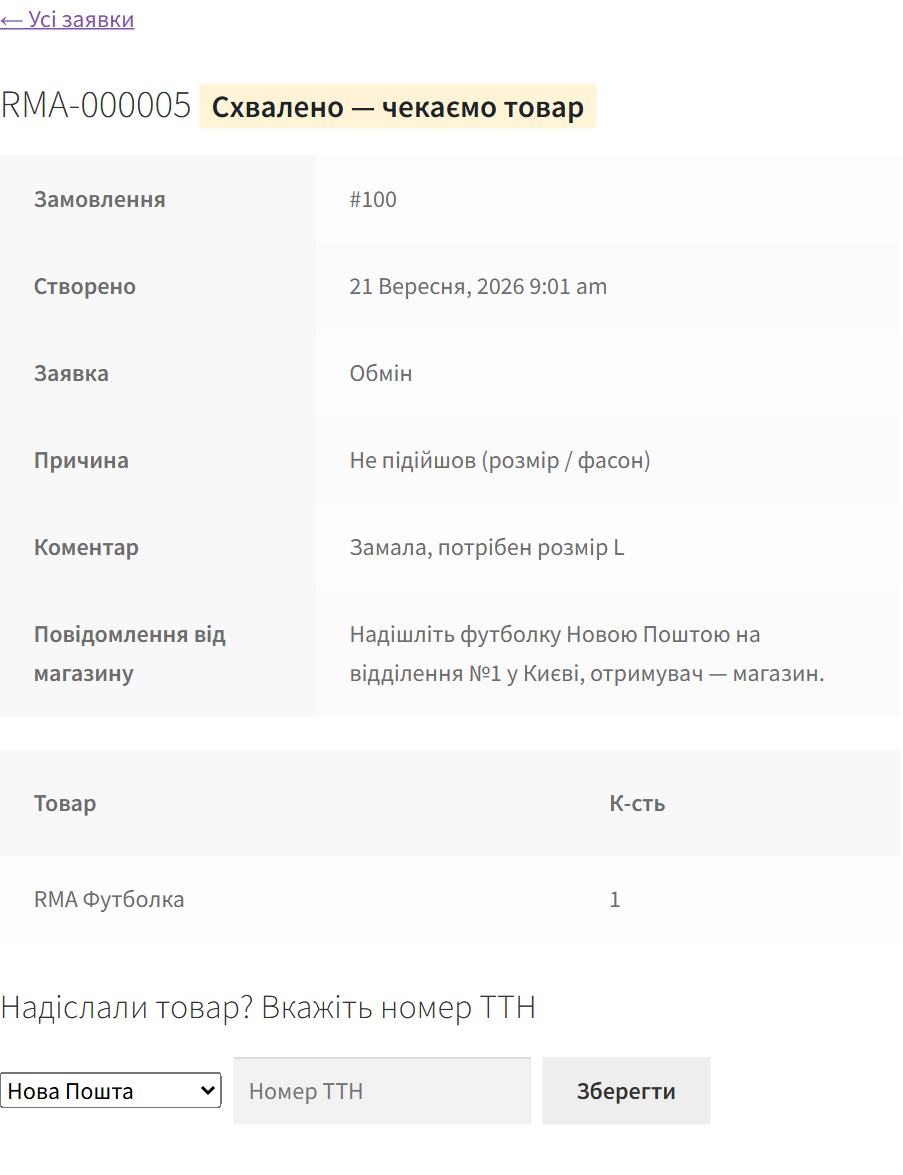
RMA request page for the customer
The request as the customer sees it: status, message from the store, items and a field for the return waybill.
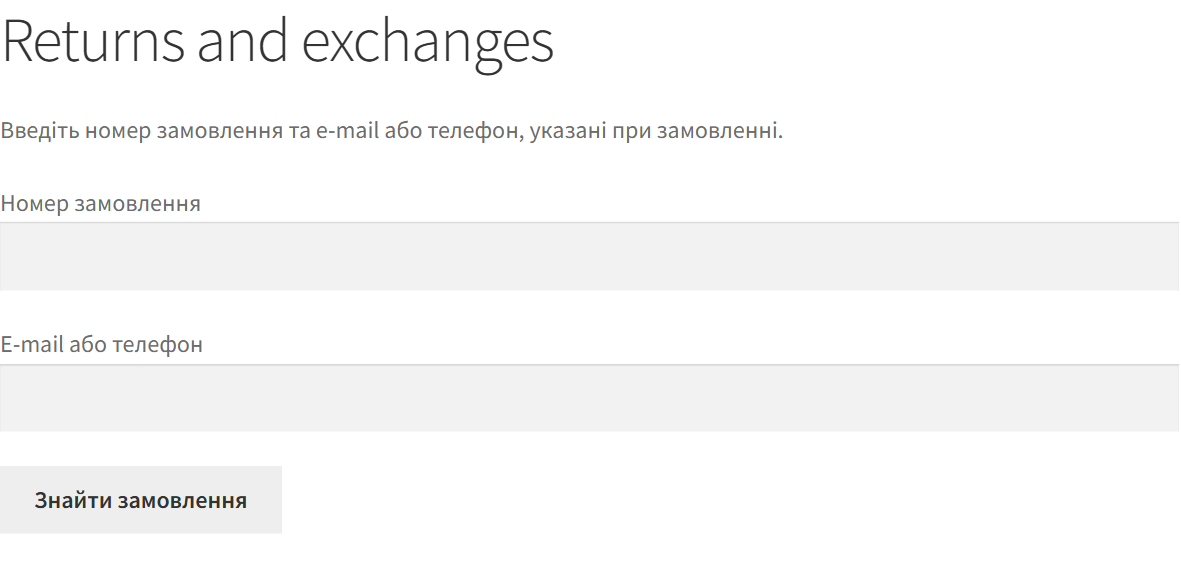
Guest order lookup page for returns
The guest page: order number plus e-mail or phone, and a customer without an account reaches the same form.

The trial starts when you ask

A fresh install is the free version, nothing switches on by itself. The “Try Pro for 7 days” button → e-mail → the key right in the window and by e-mail.

One key — one site

Moving the store? Unbind the licence on the old domain and activate it on the new one yourself. If our server is unreachable, Pro keeps working for 14 more days. For studios — keys for 5 or 25 sites, or unlimited.

Technical requirements

  • WooCommerce 7.0+ (tested on 11.1), HPOS compatible
  • WordPress 6.2+ · PHP 7.4+
  • Themes: block (Twenty Twenty-Five) and classic (Storefront)
  • Languages: Ukrainian, Russian, English; e-mails in the order’s language

Version history

v1.0.0 Current September 2026

Return and exchange requests from the account and a guest form, return window, statuses, waybill with tracking, e-mails and notes.

Frequently bought with Returns & Exchanges Manager for WooCommerce

4 modules in one order — 40% cheaper than separately

“Store starter” bundle Returns & Exchanges Manager Nova Poshta Premium LiqPay Telegram notifications and Viber/SMS for customers Need more — all 115 modules in All Access for 4 990 ₴.
3 590 ₴ / year instead of 5 960 UAH bought separately
Buy the bundle →

Full module description

Returns & Exchanges Manager for WooCommerce turns returns and exchanges from chats and e-mail threads into a proper process. The customer opens their order, picks the items and quantities, gives a reason and says what they want — money back or an exchange. The store sees every request in one list, changes statuses, answers the customer and tracks the parcel coming back.

What the customer sees

  • In the account: a “Return / exchange” button next to a completed order and a “Returns” tab with every request and its status.
  • The request form: the order’s items with the quantity to return and the last day to do it, a reason from a list, “Refund” or “Exchange”, a comment. Photos in Pro.
  • Without an account: the “Returns and exchanges” page — order number plus e-mail or phone, then the same form. A link to the request arrives by e-mail.
  • After sending the parcel: the customer enters the Nova Poshta or Ukrposhta waybill and gets a tracking link, plus an e-mail on every status change.

What the admin gets

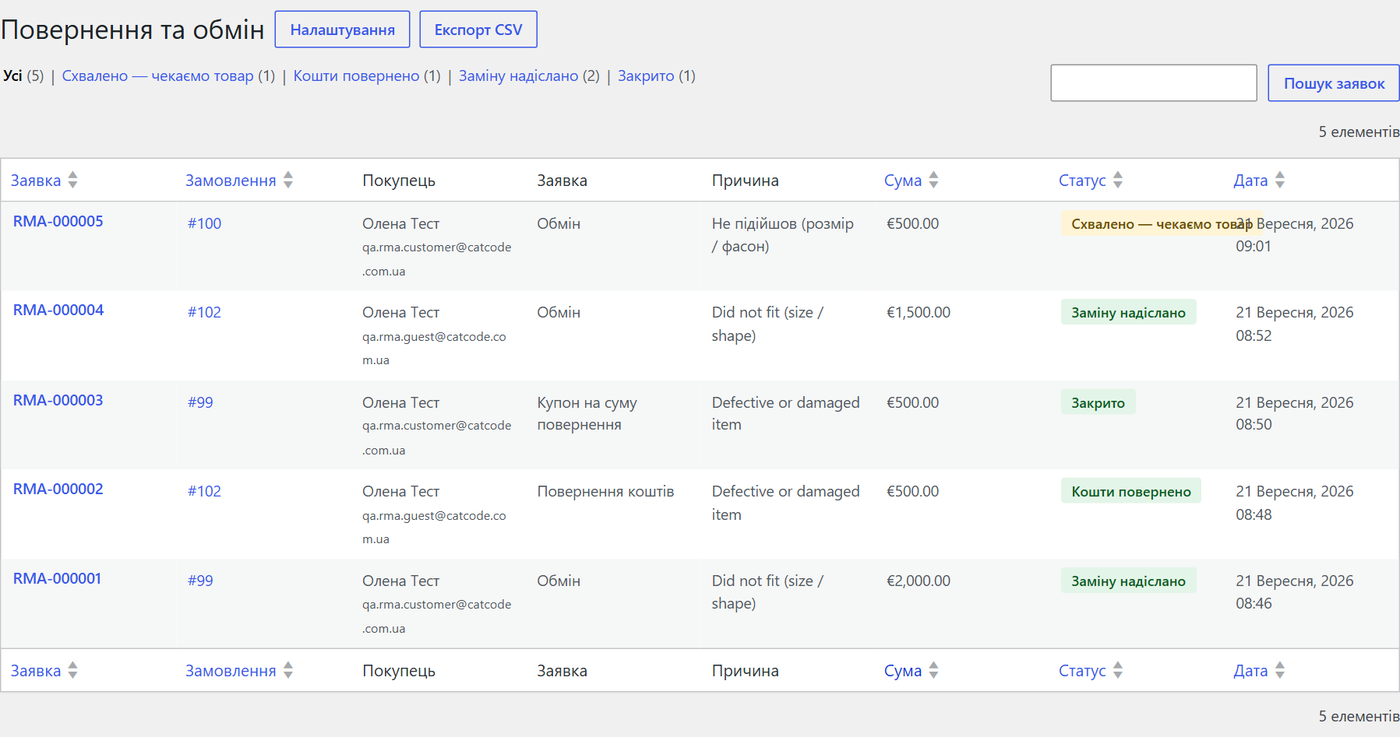
  • Request list under WooCommerce → Returns: status filter, search by number, order, e-mail, phone or waybill, amount per request.
  • Request card: order, customer, items, reason, comment, photos, history. Status with a message to the customer, waybill, a private note the customer never sees.
  • A “Returns” box on the order screen — on both the HPOS and the legacy screen.
  • Pro: “Refund” (with restocking), “Create replacement order” with another variation and “Issue coupon” right on the card. Once one is used, the others hide so the customer is never compensated twice.

How it works — step by step

  1. The order becomes “Completed” — the return period (14 days by default) starts on that date.
  2. The customer sends a request from the account or the guest page. The store and the customer get e-mails, and a note appears on the order.
  3. Requested quantities are reserved: the same items cannot be claimed twice. If a request is rejected, the quantity becomes available again.
  4. The manager approves the request and says where to send the goods. The customer adds the waybill, you see the tracking link.
  5. The goods arrive — you refund, ship a replacement or issue a coupon. In Pro that is one button, and “Item received” can be set automatically from Nova Poshta tracking.

How much it costs

UAH 990 — a one-year licence. A year of updates, technical support and all Pro features.

You can take a longer term right away — the longer, the cheaper per year:

  • 1 year — UAH 990
  • 2 years — UAH 1,880 (−5%, UAH 940 a year)
  • 3 years — UAH 2,610 (−12%, UAH 870 a year)
  • 4 years — UAH 3,250 (−18%, UAH 813 a year)
  • 5 years — UAH 3,710 (−25%, UAH 742 a year)

No automatic charges. A purchased key does not switch Pro off when the term ends — only updates and support stop. One key — one domain.

Trial first, payment later. A free 7-day Pro trial starts with a button in the plugin settings using your e-mail, no card needed. It never starts by itself: a fresh install is the plain Free version.

Under the hood

  • Own tables for requests and items — WooCommerce orders are not changed except for the notes and refunds you make.
  • Guest access only with the order number and its e-mail or phone; the request link is signed with a key. Lookups are limited to 10 attempts per 15 minutes per IP.
  • Photos are checked by file content, not by extension, and stored under a random name.
  • E-mails use the WooCommerce template and the order’s language (Polylang, WPML).
  • Licence: “Save settings” never touches the key, and a licence-server outage never switches off a purchased Pro.
  • Uninstall removes the tables, settings, photos and scheduled tasks — no customer personal data is left behind.

How to install

  1. Plugins → Add New → Upload Plugin: choose the archive and activate it.
  2. WooCommerce → Returns settings: check the period and statuses, click “Create the page” for guests.
  3. Done — the “Return / exchange” button is already in your customers’ accounts.
  4. For Pro: paste the key from the purchase e-mail or start the 7-day trial.

Questions
about the module

Didn't find the answer? Message us on Telegram and we'll reply within a business day.

@catcode_support Setup, compatibility, activation
Why is this better than handling returns by e-mail?

The customer picks the items and quantities from their own order, and you see every request in one list with statuses, waybills and history. Nothing gets lost in inboxes and messengers.

Can a customer without an account send a request?

Yes. On the "Returns and exchanges" page they enter the order number and the e-mail or phone used in that order. The phone is recognised in any format: +380…, 067…, with spaces or dashes.

When does the return period start?

On the date the order became "Completed". The period is configurable, 0 means no limit. In Pro you can set a separate period per category or make a category non-returnable.

Are refunds automatic?

In Pro — one button that runs the standard WooCommerce refund if the payment gateway supports it. For cash on delivery and bank transfers the refund is recorded on the order and you send the money yourself.

What happens when the trial ends?

The Pro features switch off; requests, statuses and e-mails keep working. Once you buy a licence, Pro comes back and the settings are kept.

Not quite what you are looking for?

We build custom modules for WordPress, WooCommerce, OpenCart and Shopify. Tell us about the task and we'll prepare an estimate.

Order a custom module