Get in touch
  • WordPress
  • Shipping
  • v1.0.0

Spain Couriers for WooCommerce — SEUR and Correos Express: delivery to the address, a pickup point or a locker

SEUR and Correos Express in one plugin for shops in Spain: delivery to the address, to SEUR Pickup shops and lockers, to Correos Express offices and PaqPunto points, a pickup point picker on the classic and block checkout, waybills, labels, tracking and cash on delivery. Pro — live SEUR tariff, automatic and bulk waybills.

Download Free
Pro · one-year licence The more sites, the less each one costs
Compatibility
WooCommerce 7.0+ · WordPress 6.2+ · PHP 7.4+ · HPOS · classic and block checkout
Licence
one site, annual
Trial
7 days, no card, one per site
Updated
September 2026
Or all 144 Pro modules with All Access — 4 990 ₴ / year

What Free has,
and what Pro adds

The free version works with no time limit. Pro adds the rest of the features in the table.

Feature Free Pro
Four delivery methods: SEUR to the address, SEUR Pickup or locker, Correos Express to the address, Correos Express office or PaqPunto — for addresses in Spain only ✔ ✔
Regions per method: mainland, Balearic Islands, Canary Islands, Ceuta and Melilla — read from the post code; mainland and Balearics by default ✔ ✔
Fixed price, free from an order amount, free-shipping coupons, weight limit per method ✔ ✔
Pickup point picker on the classic and block checkout: the list for the buyer's post code, another code, or a search by street or name that ignores accents ✔ ✔
Per courier — "all points" or one kind only: SEUR Pickup shops, SEUR lockers, Correos Express offices, PaqPunto ✔ ✔
The point panel appears only with its own method; the plugin never rewrites the buyer's address fields ✔ ✔
Orders without a point, with a point the courier never listed, or with a cart heavier than the SEUR locker limit are refused on the server ✔ ✔
The point is stored on the order (HPOS) and shown on the thank-you page, in the account and in e-mails with a tracking link ✔ ✔
Waybill from the order screen: weight, cash on delivery for the payment methods you choose, declared value, PDF label (label printer or A4), status, cancellation ✔ ✔
Waybills for orders shipped with another method too — pick the courier in the order ✔ ✔
SEUR services and Correos Express products separately for the mainland, the islands and the Canaries; Saturday delivery for Correos Express ✔ ✔
Test systems of both couriers: SEUR pre-production and the Correos Express test server ✔ ✔
Courier passwords and secrets stored encrypted (AES-256) ✔ ✔
Plugin languages: English, español ✔ ✔
Parcels per waybill 1 up to 10
Live SEUR tariff at checkout with a markup in % and a fixed one, rounding and the fixed price as a fallback — ✔
Waybill created automatically when the order reaches the status you choose — ✔
Bulk actions in the orders list: create waybills and print all labels at once — ✔
Hourly status sync with order notes and "Completed" after delivery — ✔

What it looks like

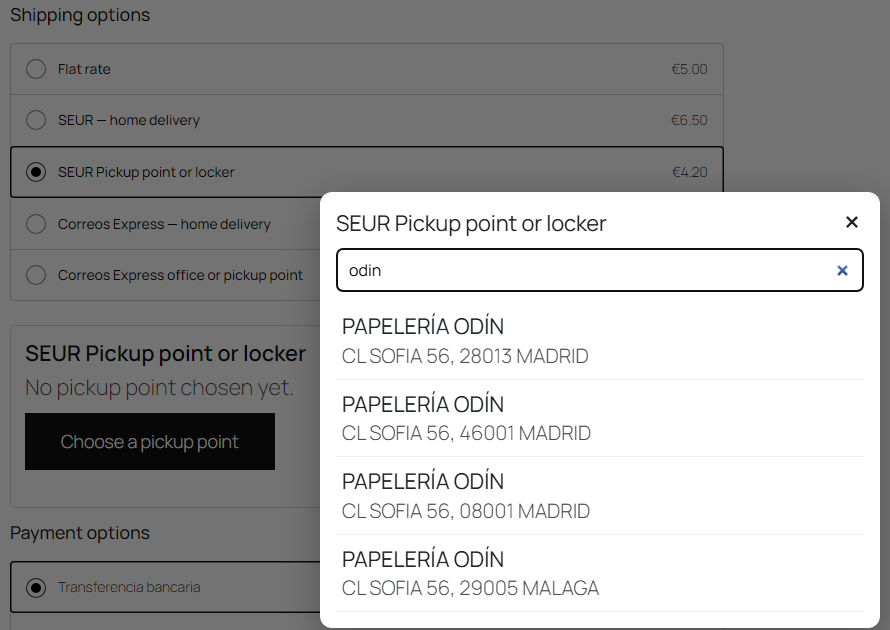
SEUR Pickup point picker on the WooCommerce block checkout: accent-insensitive search
Block checkout: SEUR and Correos Express methods with prices, the SEUR point list open. Searching “odin” finds “PAPELERÍA ODÍN” — accents do not get in the way. The points are modelled.
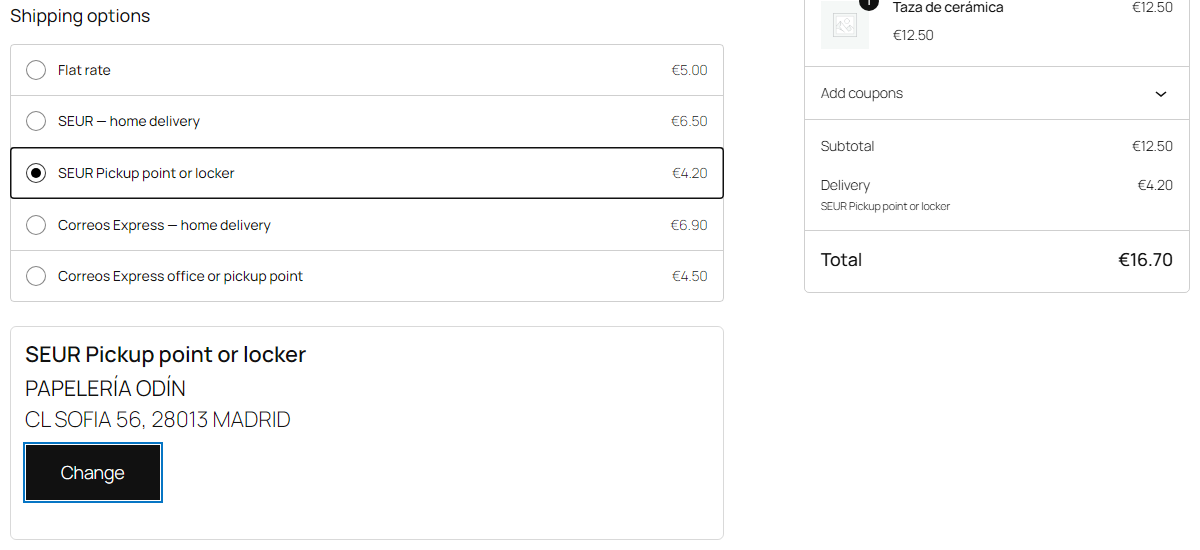
Chosen SEUR point below the shipping methods on the WooCommerce block checkout
Point chosen: below the methods a panel with the point’s name and address and a “Change” button; the order summary shows “SEUR Pickup point or locker” as delivery.
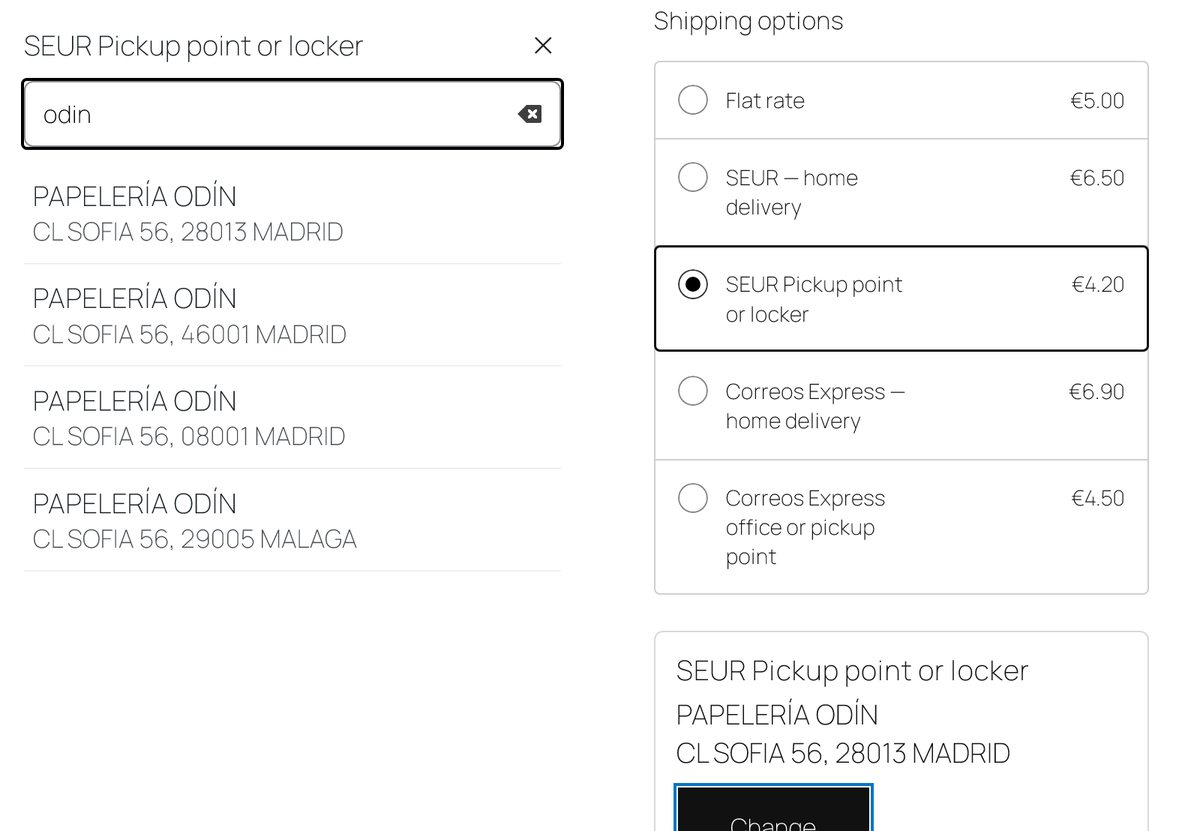
Choosing a SEUR point on a phone at the WooCommerce checkout
On a phone (390 px) the point list opens full screen, and the chosen point is shown below the shipping methods.

The trial starts when you ask

A fresh install is the free version, nothing switches on by itself. The “Try Pro for 7 days” button → e-mail → the key right in the window and by e-mail.

One key — one site

Moving the store? Unbind the licence on the old domain and activate it on the new one yourself. If our server is unreachable, Pro keeps working for 14 more days. For studios — keys for 5 or 25 sites, or unlimited.

Technical requirements

  • WooCommerce 7.0+ with the classic or block checkout, HPOS compatible
  • WordPress 6.2+ · PHP 7.4+
  • A shipping zone with Spain — the methods are shown for Spanish addresses only and only for the regions switched on in the method
  • A contract with API access: SEUR (client ID and secret, API user, CCC), Correos Express (client code, API user and password). You can switch on one courier or both.
  • Canary Islands, Ceuta and Melilla are outside the EU VAT area; they are off by default and the plugin does not produce customs documents (DUA). Switch them on only if your contract and your taxes cover them.
  • Weight and size — products without a weight use the default weight from the settings; the box size is set there too.
  • Plugin languages: English and Spanish — the plugin is made for Spanish shops.

Version history

v1.0.0 Current September 2026

SEUR (address, SEUR Pickup shop, locker) and Correos Express (address, office, PaqPunto); pickup point picker on the classic and block checkout; waybills, labels, tracking, cash on…

Frequently bought with Spain Couriers for WooCommerce

4 modules in one order — 40% cheaper than separately

“Store starter” bundle Spain Couriers Nova Poshta Premium LiqPay Telegram notifications and Viber/SMS for customers Need more — all 144 modules in All Access for 4 990 ₴.
3 490 ₴ / year instead of 5 860 UAH bought separately
Buy the bundle →

Full module description

Spain Couriers for WooCommerce is a shipping plugin for shops in Spain. Two couriers in one module: SEUR with SEUR Pickup shops and lockers (SEUR 2SHOP), and Correos Express with its offices and PaqPunto points. The buyer chooses delivery to the address or to a pickup point right at checkout, and your staff create the waybill, print the label and see the parcel status without opening the couriers’ portals.

What you need. A contract with API access with each courier you switch on: SEUR — client ID and secret, an API user with a password and your customer account (CCC); Correos Express — client code, API user and password. Without a contract the couriers do not issue keys.

An honest word on testing. Neither SEUR nor Correos Express offers public test accounts, so the plugin was tested on a local WooCommerce shop with the courier answers modelled: for SEUR on the official PIC API manual and the official SEUR plugin, for Correos Express on the API contract of the official Correos module for WooCommerce (Correos Express publishes no API documentation). The plugin has not yet worked with the live APIs of either courier. Start on the courier’s test system (SEUR pre-production or the Correos Express test server) during the 7-day Pro trial — if the courier answers differently from what is described, we fix it promptly. Courier errors are shown in the courier’s own words.

What the buyer sees

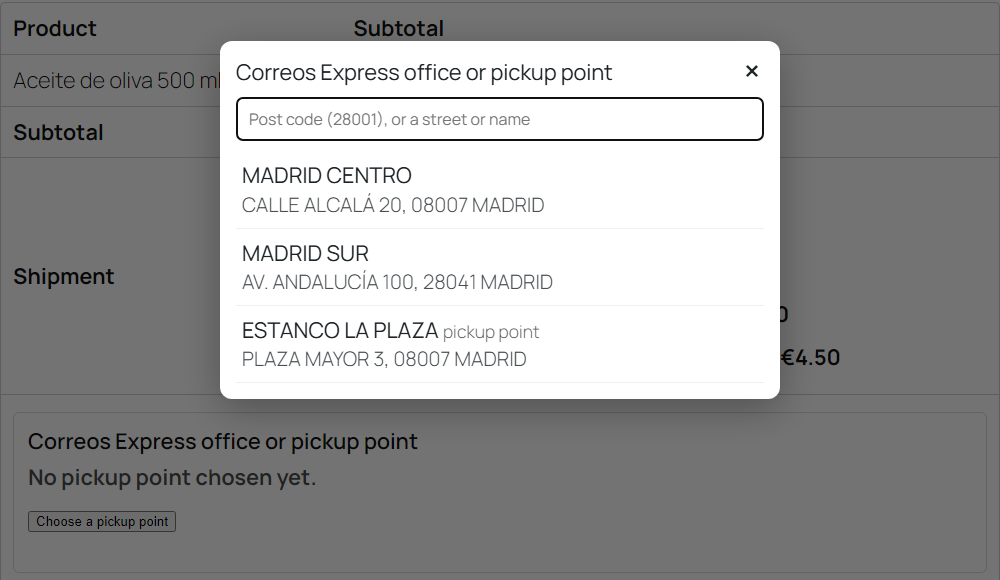
The buyer sees the methods of both couriers you added to the shipping zone, with prices. Choosing delivery to a point opens a “Choose a pickup point” panel below the methods: the list starts with the points for the post code of their address. They can type another post code (a 4-digit code missing its leading zero is completed) or search by street or name — accents are ignored, so “odin” finds “ODÍN”. SEUR lockers are marked in the list.

Switching to delivery to the address hides the panel, and the buyer’s address stays their own: the plugin never writes the point’s address into the buyer’s fields, neither on the classic nor on the block checkout. Each courier keeps its own chosen point, so switching between SEUR and Correos Express mixes nothing up. Trying to order delivery to a point without choosing one is refused on the server with an explanation. The same goes for a point the courier never listed and for a cart heavier than the locker weight limit SEUR reports.

The chosen point is shown on the thank-you page, in the buyer’s account and in e-mails together with the tracking link. Optionally the plugin writes the point into the order’s shipping address as well, so e-mails and other tools show it; the address saved in the buyer’s account stays theirs.

What the admin gets

  • Four methods for WooCommerce shipping zones: “SEUR — home delivery”, “SEUR Pickup point or locker”, “Correos Express — home delivery”, “Correos Express office or pickup point”. Shown for addresses in Spain only.
  • Regions per method — mainland, Balearic Islands, Canary Islands, Ceuta and Melilla, read from the post code. Mainland and Balearics by default.
  • Method price — fixed, free from an order amount, free-shipping coupons, weight limit (for points 30 kg at SEUR and 20 kg at Correos Express by default).
  • Pickup points per post code. Neither courier hands out a full list of points, so the plugin asks for the points of a post code when a buyer opens the list and keeps the answer for a day — the next buyer from the same code does not wait.
  • “Check the connection” and “Find pickup points” test each courier’s account and show which points it returns for a given code.
  • Passwords and secrets are stored encrypted in the database and never reach the HTML of the settings page.
  • Waybill from the order screen: weight, cash on delivery (the order total, for the payment methods you ticked), declared value if you want it.
  • PDF label — for a label printer (one per page) or an A4 sheet (three per page); status refresh and cancellation are buttons in the same box.
  • Correos Express cancellation: the Correos Express API has no cancel call, so “Cancel” marks the waybill cancelled in the shop and adds a note “call Correos Express”. SEUR waybills are cancelled at SEUR itself.
  • A new waybill after a cancellation gets a suffix on the order number (1234-2), so the courier does not reject it as a duplicate.
  • Change the point by hand if the buyer asks — by the point code.
  • A waybill for any order: even if the buyer chose “Flat rate”, you pick the courier in the order and the parcel goes to the address.
  • Tracking — the waybill number with a link to the courier’s page in e-mails, on the thank-you page and in the buyer’s account.
  • Log of every courier call in the WooCommerce logs (source spain-couriers); errors are always logged, secrets never.

How it works — step by step

  1. Settings. WooCommerce → Spain Couriers: the sender (name, NIF/CIF, phone, address), the accounts of the couriers you need, the environment (production or test), SEUR services and Correos Express products, “Check the connection”.
  2. Shipping zone. In your “Spain” zone you add the methods marked “(Spain Couriers)” and set the price, the free-shipping threshold, the weight limit and the regions.
  3. Checkout. The buyer chooses the courier and the delivery type, and for a point the point itself in the panel. With Pro the SEUR delivery price comes from your SEUR tariff for the post code and the cart weight.
  4. Server check. For a pickup point method an order without a point, with an unknown point or with a cart heavier than the point’s limit does not go through.
  5. Order. The point is stored on the order and, if you want, in the shipping address too.
  6. Waybill. Staff create it from the order screen (with Pro — automatically on the chosen status or in bulk from the list) and print the label. SEUR points ship as SEUR 2SHOP (1/48), Correos Express offices as Paq 24 Oficina Elegida, PaqPunto points as PaqPunto.
  7. Status. “Refresh status” asks the courier; with Pro statuses sync every hour, changes go to the order notes and a delivered order can become “Completed” by itself. Waybills older than 60 days are no longer polled.
  8. Cancellation. SEUR — from the order screen at the courier itself; Correos Express — a mark in the shop and a call to the courier.

Under the hood

  • The point lives on the server only. The picker’s JavaScript never writes into the buyer’s address fields. The point goes into the session separately per courier, and into the order only when the delivery method is that courier’s point method; otherwise the link is wiped.
  • Points in the plugin’s own database table: the courier’s answer for a post code is cached for a day, and the word search runs over the points the shop already knows.
  • A live tariff without surprises (Pro). If SEUR answers with zero, an error or not within a few seconds, the method shows your fixed price, not “Free”. Check whether your contract tariff includes IVA and add a markup if needed.
  • Courier protocols: SEUR — the public PIC API (OAuth2, points, valuation, shipments, labels, tracking, cancellation) with one retry on an expired token; Correos Express — its REST API (points, shipments, labels, tracking).
  • Secrets — AES-256-CBC with HMAC, no XOR.
  • A Pro gate that never bricks the shop: when the trial ends, only the Pro features stop; delivery and waybills keep working.
  • Uninstalling removes the plugin’s points table, settings, cron jobs and its methods from the shipping zones.

How to install

  1. Plugins → Add New → Upload Plugin: choose spain-couriers-for-woocommerce-1.0.0.zip and activate.
  2. WooCommerce → Spain Couriers: fill in the sender and the account of each courier you switch on, and save.
  3. Click “Check the connection” and “Find pickup points” — the courier should answer.
  4. WooCommerce → Settings → Shipping → your “Spain” zone → Add shipping method → the methods marked “(Spain Couriers)”.
  5. Place a test order to a pickup point and create the waybill from the order screen.
  6. For Pro: paste the licence key from the e-mail after payment, or start the 7-day trial.

Questions
about the module

Didn't find the answer? Message us on Telegram and we'll reply within a business day.

@catcode_support Setup, compatibility, activation
Do I need contracts with the couriers?

Yes. SEUR and Correos Express give API access only to customers with a contract: SEUR — client ID and secret, an API user and your customer account (CCC); Correos Express — client code, API user and password from your sales or technical contact. You can switch the couriers on one at a time.

What was the plugin tested on?

On a local WooCommerce shop with courier answers modelled on the official SEUR PIC manual and on the API contract of the official Correos module for WooCommerce. The plugin has not yet worked with the live SEUR and Correos Express APIs: neither courier offers public test accounts, access comes only with a contract. Courier errors are shown in the courier's own words, and the debug log records request and response without secrets.

How do I cancel a Correos Express waybill?

The Correos Express API has no cancel call. "Cancel" only marks the waybill cancelled in the shop and adds an order note; if the parcel was already handed over, call Correos Express.

Why is there no live tariff for Correos Express?

The Correos Express API has no price calculation. Correos Express methods work with a fixed price and free delivery from an order amount; the Pro live tariff is for SEUR only.

Can I deliver to the Canary Islands, Ceuta and Melilla?

Yes, if your contract allows it: regions are switched on per method. By default only the mainland and the Balearic Islands are on, because the Canaries, Ceuta and Melilla are outside the EU VAT area and the plugin does not produce customs documents (DUA).

What if I don't want to pay for Pro?

Delivery methods, the point picker, waybills, labels, tracking and cash on delivery stay free with no time limit.

Not quite what you are looking for?

We build custom modules for WordPress, WooCommerce, OpenCart and Shopify. Tell us about the task and we'll prepare an estimate.

Order a custom module