WordPress
FatturaPA SdI for WooCommerce — Italian FatturaPA e-invoices from orders, checked against the official XSD
Free + Pro
990 UAH/year
v1.0.0
Enter at least 2 characters
Italian electronic invoices in FatturaPA 1.2.3 (FPR12) built straight from WooCommerce orders, with no paid invoicing service in between. Every XML is checked against the official XSD and the offline SdI controls before it gets a number. Codice fiscale, Partita IVA, SDI code and PEC at checkout, Natura codes, stamp duty, the forfettario regime, SdI receipts on the order. Pro — sending to the SdI through your own PEC mailbox or an intermediary, TD04 credit notes, customers outside Italy.
The free version works with no time limit. Pro adds the rest of the features in the table.



A fresh install is the free version, nothing switches on by itself. The “Try Pro for 7 days” button → e-mail → the key right in the window and by e-mail.

Moving the store? Unbind the licence on the old domain and activate it on the new one yourself. If our server is unreachable, Pro keeps working for 14 more days. For studios — keys for 5 or 25 sites, or unlimited.
 WooCommerce 8.0+ with the classic or block checkout, HPOS compatibleWordPress 6.2+ · PHP 7.4+ with the DOM (libxml) and OpenSSL extensionsCurrency — EUR only; orders in other currencies are skipped with a messageWooCommerce taxes with the Italian rates — they go into the invoice from each orderFor sending in Pro: a PEC mailbox with SMTP and IMAP access (SSL/TLS or STARTTLS) or an intermediary with a webhook address. The plugin has not yet been tried with specific PEC providers (Aruba, Legalmail, Namirial and others).Not supported: invoices to public administrations (FPA12), split payment, ritenuta d’acconto, TD24, San Marino, OSS salesPlugin languages: English and Italian.
FatturaPA 1.2.3 (FPR12) from orders, checked against the official XSD and the offline SdI controls, CF / P.IVA / SDI / PEC fields on the classic and block checkout, Natura codes with legal…
4 modules in one order — 40% cheaper than separately



FatturaPA SdI for WooCommerce is a plugin for shops in Italy that sell on WooCommerce and issue electronic invoices through the Sistema di Interscambio (SdI) of the Agenzia delle Entrate. It turns an order into an invoice in the official FatturaPA 1.2.3 format for the private sector (FPR12, “fattura ordinaria”), checks it against the official XSD schema and helps you get it to the SdI — with no paid invoicing service in between and no monthly subscription. The invoice register, the XML under its SdI file name and the SdI receipts stay in your shop.
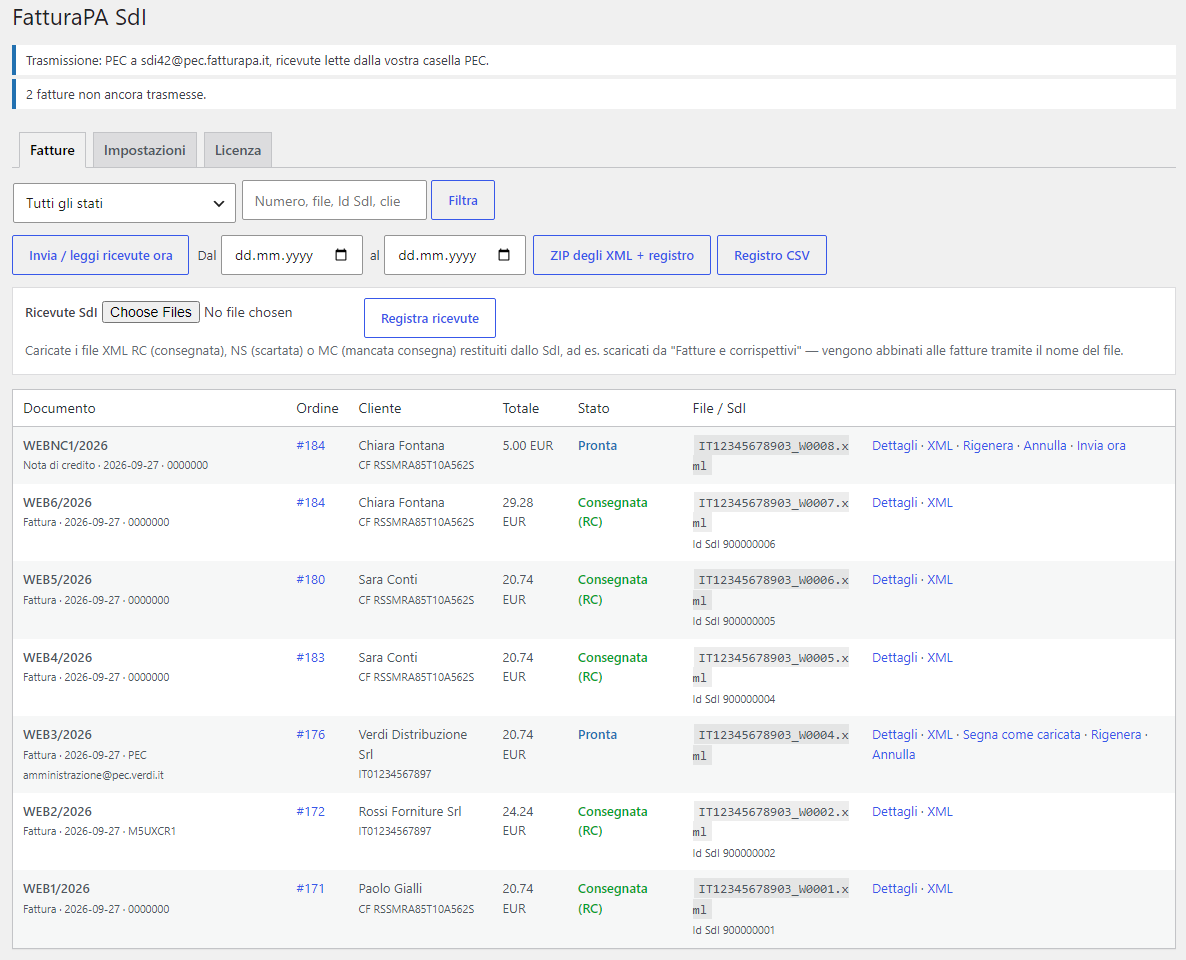
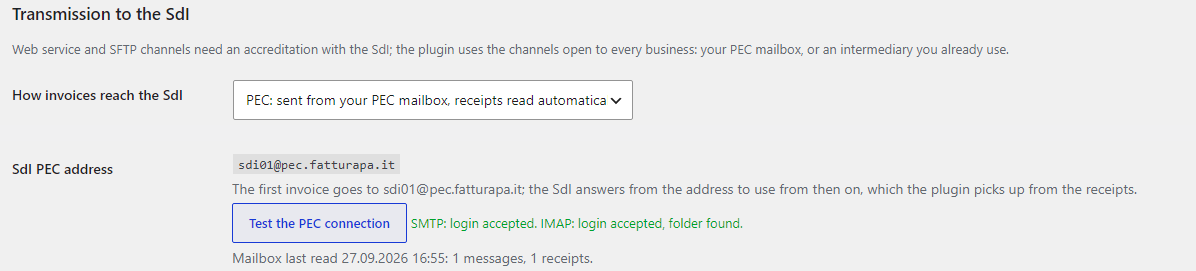
How the invoice reaches the SdI. The plugin does not use the direct SdI channels (web service or SFTP): they need a separate accreditation that a shop usually does not have. In the free version you upload the finished XML to the SdI yourself — for example in “Fatture e corrispettivi” — and then upload the XML receipt the SdI returned to the plugin. In Pro the plugin sends the invoice from your own PEC mailbox (the channel open to every business) and reads the receipts from it, or hands the XML to your intermediary through a webhook.
What you need. An Italian company or sole trader with a Partita IVA; WooCommerce taxes with the Italian rates; prices in EUR. For sending in Pro — your PEC mailbox with SMTP and IMAP access from your provider, or an intermediary that accepts the XML at a webhook address.
Honestly about testing. The plugin was tested on a local WooCommerce shop on PHP 8.3 and 7.4: 153 browser checks, classic and block checkout, the admin in English and Italian. Every XML from the test orders — companies with an SDI code, customers with a CF, PEC, forfettario with stamp duty, credit notes, foreign customers — passed the official FatturaPA 1.2.3 XSD schema with two independent validators. The PEC channel was tested on a test mail server (real SMTP and IMAP), and the SdI receipts were built on the official message schema. The plugin has not yet worked with the real SdI or with real PEC providers: that takes the PEC mailbox of an Italian business. Start with the Pro trial on your own company — if the SdI answers differently from the specification, we fix it quickly.
Responsibility for the content of the invoice stays with the seller. The plugin builds the invoice from the WooCommerce order data and from the settings you choose: Natura codes for lines without VAT, legal references, stamp duty, when invoices are issued, foreign customers. These are decisions for your commercialista — show them the settings before the first real invoice.
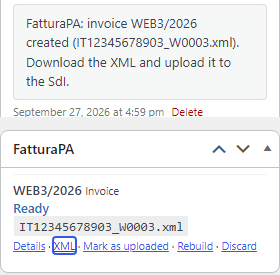
Every order has a “FatturaPA” box: invoice number, status, XML file name and the actions — “Details”, “XML”, “Mark as uploaded”, “Rebuild”, “Discard”. An order without an invoice shows a “Create FatturaPA” button or the reason no invoice was created. The order notes record every step: invoice created, transmitted, delivered or rejected with the error code.
An invoice the SdI rejected (an NS receipt) counts as not issued. The error list from the receipt is shown in the register and in the order notes. Once the order is fixed, “Rebuild and send” rebuilds the invoice with the same number and date and a new file name, as the SdI requires; an invoice you no longer need — “Discard”.
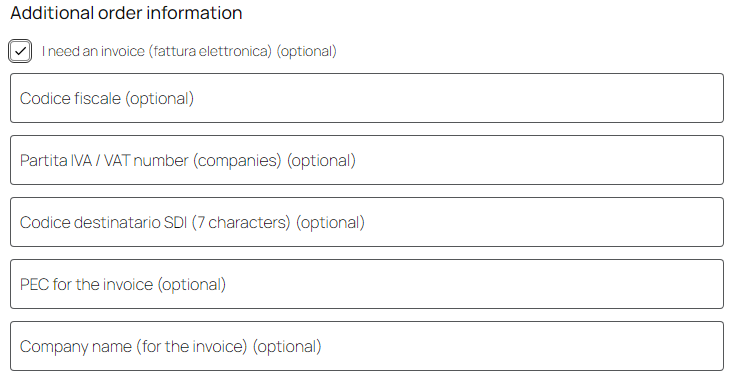
The checkout gets an “I need an invoice (fattura elettronica)” checkbox. Until it is ticked, the invoice fields stay hidden and the order goes through as usual. Once ticked — Codice fiscale, Partita IVA, Codice destinatario SDI, PEC and, while WooCommerce hides its own “Company” field, “Company name (for the invoice)”. For an address outside Italy the SDI and PEC fields are hidden.
If another plugin already collects the invoice data, the fields can be switched off: the plugin reads the known order meta fields with the CF, P.IVA, SDI code and PEC.
WEB{N}/{YYYY} with a counter that restarts at 1 every year. The SdI refuses a second invoice with the same number in the same year, so keep the year in the format.In the free version the register tells you what to do: upload each XML to the SdI, mark it “Mark as uploaded” and record the receipt. The same receipt uploaded twice changes nothing, and a late receipt for an old file does not override the status of the current one.
VAT and stamp duty. Several rates on one invoice, totals per rate and Natura code, rounding to the order total. For forfettario (RF19) and minimi (RF02) sellers every line goes without VAT with the N2.2 code and the legal reference. When the lines without VAT (N2.1, N2.2, N3.5, N3.6, N4) together exceed 77.47 EUR, a 2 EUR BolloVirtuale is added to the invoice — you pay the stamp duty itself quarterly with F24.
Pro. A WooCommerce refund — by item or by amount — produces a TD04 credit note linked to the invoice (DatiFattureCollegate). The credit note is created automatically once the invoice has an RC or MC receipt; otherwise with the “Create credit note” button on the order. Customers outside Italy get the code XXXXXXX, their foreign VAT number or the shop’s customer reference, CAP 00000 and the Natura codes you chose for sales to EU businesses, exports and services. Orders taxed at another EU country’s rate (OSS) are not invoiced, and the plugin explains why.
In My Account the customer sees the invoice sent through the SdI and downloads a courtesy copy (copia di cortesia) — only the owner of the order can. For a forfettario seller Pro can add the 2 EUR stamp duty to the cart as a separate line when the amount without VAT exceeds the threshold.
/wp-json/ccfp/v1/receipt with a token.CCFP_SDI_MOCK constant in wp-config.php simulates SdI answers (rc, ns, mc, silent, down, auth) — nothing leaves the site.CCFP_DELETE_DATA constant removes everything.fatturapa-sdi-for-woocommerce-1.0.0.zip and activate it (WooCommerce must be active).Didn't find the answer? Message us on Telegram and we'll reply within a business day.
 @catcode_support
Setup, compatibility, activation
@catcode_support
Setup, compatibility, activation
In the free version — no: you upload the XML file to the SdI yourself (for example in "Fatture e corrispettivi") and then upload the receipt to the plugin. Pro sends the invoices from your PEC mailbox or through your intermediary and reads the receipts by itself. The plugin does not use the web service or SFTP channels: they need a separate accreditation with the SdI.
On a local WooCommerce shop: every XML from the test orders passed the official FatturaPA 1.2.3 schema with two independent validators. The PEC channel was tested on a test mail server, the SdI receipts were modelled on the official message schema. The plugin has not yet worked with the real SdI or with real PEC providers.
That is your commercialista's call. The plugin offers only the codes still accepted (the generic N2, N3, N6 are refused by the SdI since 2021) and standard wording you can replace with your own for each code.
No. Invoices are created in EUR only; an order in another currency is skipped with a message on the order.
No. The plugin creates FPR12 invoices for the private sector. The FPA12 format for public administrations, split payment, ritenuta d'acconto, San Marino and OSS sales are not supported by this version.
The seller. The plugin builds the invoice from the order data and the settings you choose; show the settings to your accountant before the first real invoice.
No reviews yet. Be the first.
No questions yet. Ask one — we answer within 24 hours.
We build custom modules for WordPress, WooCommerce, OpenCart and Shopify. Tell us about the task and we'll prepare an estimate.
Order a custom module
—

CatCode assistant
Just now


CatCode assistant
Online

I’ll help with your website task
Describe your website task — I’ll find a ready-made module or pass it to a developer for an estimate. Modules, custom features, layout, integrations, speed, migration, technical SEO.
