OpenCart
e-Factura ANAF for OpenCart — RO e-Factura invoices to ANAF (SPV) straight from orders
Free + Pro
1 290 UAH
v1.0.0
Enter at least 2 characters

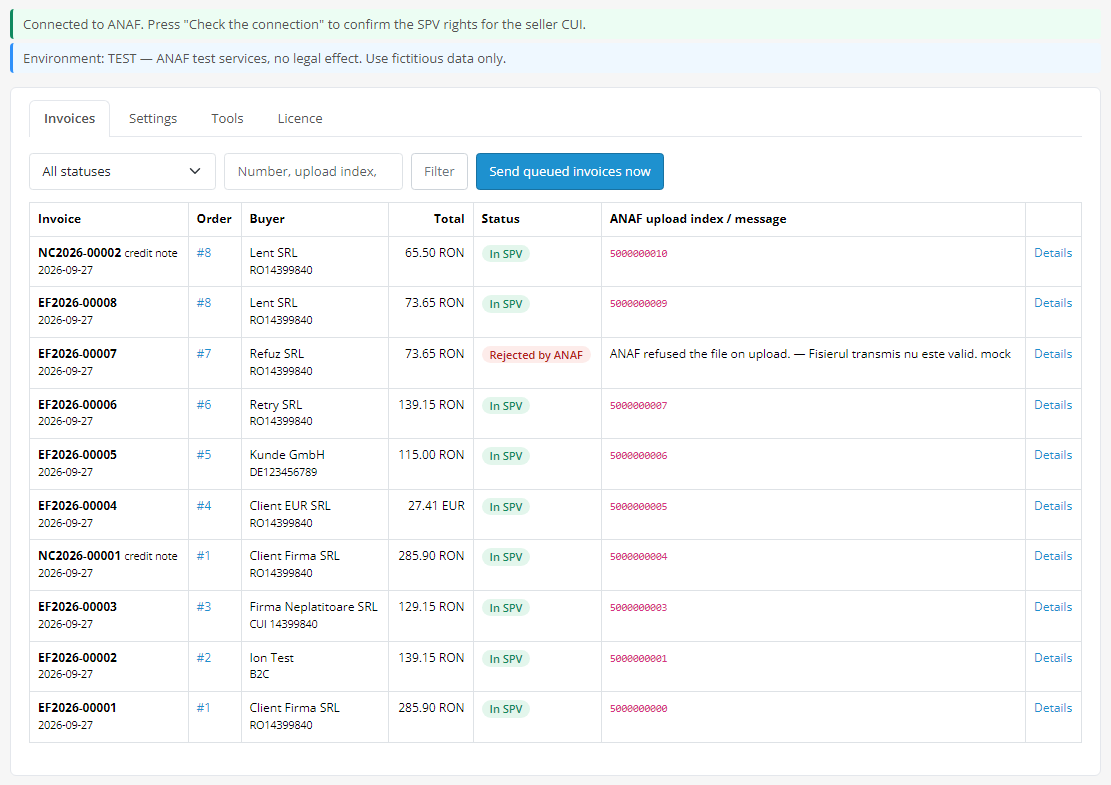
Romanian RO e-Factura invoices from OpenCart 4 orders: UBL 2.1 under CIUS-RO 1.0.1, sent directly to the ANAF API (SPV) through your own OAuth application, no accounting SaaS. Upload index, status and the signed ANAF answer on the order, a CUI field with a check at checkout, counties and Bucharest sectors, TEST and PRODUCTION. Pro — B2C, credit notes, EU and non-EU buyers, currencies with the BNR rate, a printable invoice for customers. Lifetime licence.
The free version works with no time limit. Pro adds the rest of the features in the table.



A fresh install is the free version, nothing switches on by itself. The “Try Pro for 7 days” button → e-mail → the key right in the window and by e-mail.

Moving the store? Unbind the licence on the old domain and activate it on the new one yourself. If our server is unreachable, Pro keeps working for 14 more days. For studios — keys for 5 or 25 sites, or unlimited.
 OpenCart 4.0.2.0+ or 4.1 (tested on 4.0.2.3 and 4.1.0.3, mysqli and pdo drivers). There are no builds for OpenCart 3 and 2.3.PHP 8.0+ with cURL, OpenSSL and ZipArchiveA qualified certificate of a person with SPV rights for the seller’s CUIAn ANAF application for the “E-Factura” service with the storefront callback URL (index.php?route=extension/cc_efactura/efactura.oauth). Whether ANAF accepts a callback URL with parameters has not been verified live; if not, tokens from Postman can be pasted into the settings.Currency: RON in Free; other currencies with the BNR rate in ProCheckout: the standard OpenCart checkout. Third-party checkouts and themes that redraw the order page have not been tested.Module languages: English and Romanian.
For OpenCart 4.0.2+ and 4.1: UBL 2.1 / CIUS-RO 1.0.1, ANAF OAuth, upload, stareMesaj, descarcare, the signed answer kept in the database, rejected invoices and “Regenerate and send”, CUI…
4 modules in one order — 40% cheaper than separately



e-Factura ANAF for OpenCart is a module for shops in Romania on OpenCart 4 that have to report their invoices to the national RO e-Factura system (SPV) of the ANAF tax authority. It turns an order into an electronic invoice in UBL 2.1 under the Romanian specification CIUS-RO 1.0.1 and sends it to the ANAF API itself, through your own OAuth application — without an accounting SaaS in between and without a monthly subscription. The upload index, the ANAF status and the signed answer of the Ministry of Finance are kept with the invoice.
What you need. A company registered in SPV; a qualified digital certificate of a person with SPV rights for the company’s CUI; your own ANAF application for the “E-Factura” service, registered on the ANAF portal with the callback URL the module shows. OpenCart 4.0.2+ or 4.1.
How it was tested, honestly. The module was tested on local OpenCart 4.1.0.3 and 4.0.2.3 stores (mysqli and pdo database drivers) with ANAF answers simulated from the official API documentation (upload, stareMesaj, descarcare, uploadb2c) and the examples of Romania’s Ministry of Finance: installation with the standard Installer, guest checkout, B2B and B2C invoices, credit notes, EUR with the BNR rate, an EU buyer, a rejection and a resend. The XML of the test orders passed the official ANAF validator (UBL 2.1 XSD + CIUS-RO 1.0.9 schematron); the offline validator cannot identify an EU buyer (extern=DA), that document passed the XSD and the schematron. We have not run the module against the live ANAF, test or production, yet: that needs the certificate of a Romanian company. Start in the TEST environment during the 7-day Pro trial — if ANAF answers differently from its documentation, we fix it promptly.
Responsibility for the content of the invoice stays with the shop. The module builds the invoice from the OpenCart order data and from the VAT settings you choose: categories for lines without VAT, the non-VAT-payer mode, “TVA la încasare”, B2C reporting, the BNR rate for currencies. These are your accountant’s decisions — show them the settings before switching to PRODUCTION.
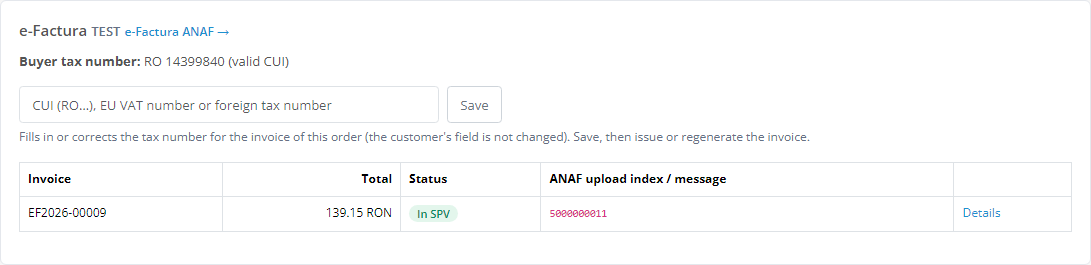
The order page in the admin gets an “e-Factura” panel: the buyer’s tax number with the check result, a field to correct the CUI for the invoice (the customer’s data is not changed) and the order’s invoices with their ANAF status. A rejected invoice shows the error list from the ANAF answer; once fixed — “Regenerate and send” with the same number.
Uncertain uploads. If ANAF does not answer after an upload has started (a timeout), the module never resends the invoice blindly — that could create a duplicate in SPV. The invoice becomes “Not delivered”, and “Send again as it is” sends the same XML after you have checked in SPV that the first one did not arrive.
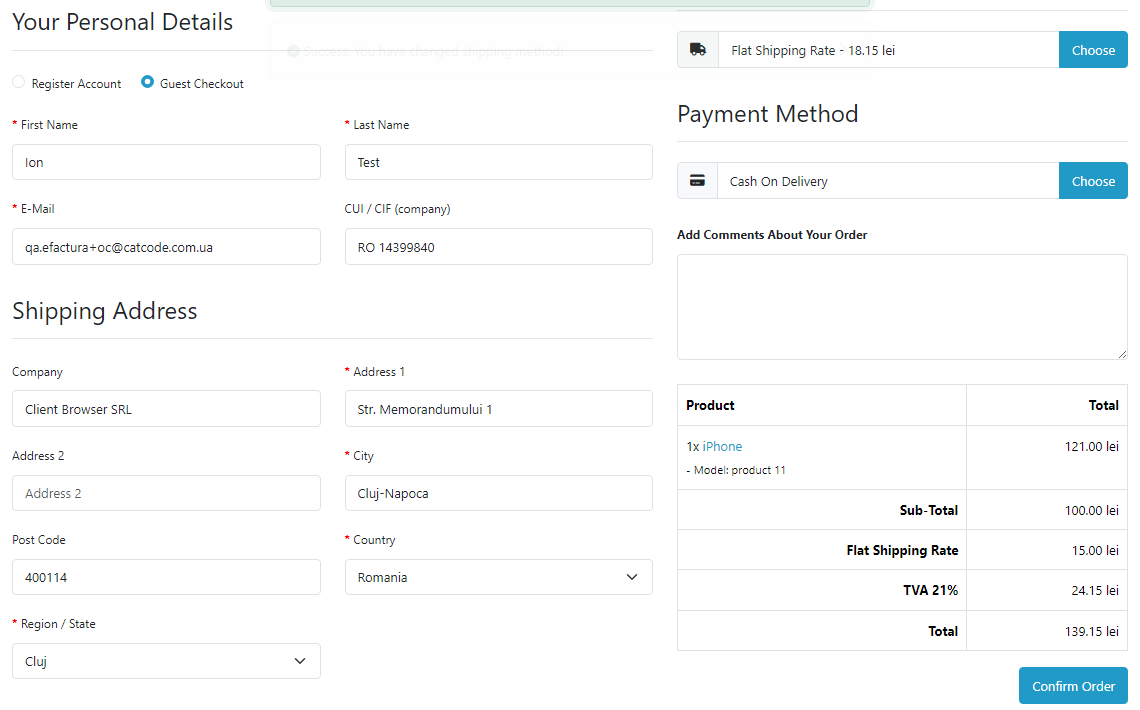
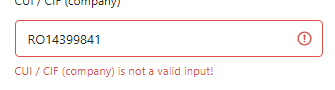
The standard OpenCart checkout gets a “CUI / CIF (company)” field — an ordinary OpenCart custom field (Customers → Custom Fields) that the module creates with a button in the settings. It is optional: without a CUI the order is an ordinary one, a company with a CUI gets an invoice in RON. “14399840”, “RO14399840” and “RO 14399840” are all accepted.
A Romanian CUI with a wrong check digit does not pass: the error appears under the field, and the order cannot be placed until the number is fixed. VAT numbers from other EU countries and foreign tax numbers are accepted.
Pro. The “Refunded” status (or one you choose) produces a full 381 credit note referencing the invoice; a partial credit note is created by hand by lines or by amount. Orders without a CUI are reported through uploadb2c with the CNP (an optional field of its own) or 13 zeros. EU buyers with a VAT number get category K, buyers outside the EU get G, both with extern=DA. Orders in EUR, USD and other currencies get an invoice with the BNR rate and the VAT total in RON.
cc_efactura.log in the shop’s log folder, viewable in the “Tools” tab.cc_efactura.ocmod.zip, then Install.Didn't find the answer? Message us on Telegram and we'll reply within a business day.
 @catcode_support
Setup, compatibility, activation
@catcode_support
Setup, compatibility, activation
A company registered in SPV, a qualified digital certificate of a person with SPV rights for its CUI and your own application for the "E-Factura" service, registered on the ANAF portal with the callback URL the module shows. The Client ID and Client Secret go into the settings, then you sign in with the certificate.
On local OpenCart 4.1.0.3 and 4.0.2.3 stores (mysqli and pdo database drivers) with ANAF answers simulated from the official API documentation. The XML of the test orders passed the official ANAF validator (CIUS-RO 1.0.9 schematron). It has not yet worked with the live ANAF: that needs the certificate of a Romanian company. Try it in the TEST environment with your company during the 7-day Pro trial.
No, OpenCart 4.0.2+ and 4.1 only.
The access token lasts 90 days and is renewed by the module, the refresh token lasts 365 days. Once a year you sign in with the certificate again; the module warns you in advance.
The shop. The module builds the invoice from the order data and from the VAT settings you choose. VAT categories, "TVA la încasare", B2C reporting, the BNR rate for currencies are your accountant's decisions; show them the settings before switching to PRODUCTION.
No. For OpenCart the licence is lifetime: one payment, no yearly fees.
No reviews yet. Be the first.
No questions yet. Ask one — we answer within 24 hours.
We build custom modules for WordPress, WooCommerce, OpenCart and Shopify. Tell us about the task and we'll prepare an estimate.
Order a custom module
—

CatCode assistant
Just now


CatCode assistant
Online

I’ll help with your website task
Describe your website task — I’ll find a ready-made module or pass it to a developer for an estimate. Modules, custom features, layout, integrations, speed, migration, technical SEO.
