
OpenCart
Crawler Shield for OpenCart — protects the catalogue from AI crawlers, meta-externalagent and filter scrapers
Free + Pro
1 290 UAH
v1.0.0
Enter at least 2 characters

A module for OpenCart 4, 3 and 2.3 that keeps bots from walking every filter and sorting combination of the catalogue and loading the database. Bots are recognised by User-Agent and grouped into families — search engines, Meta ad previews, AI crawlers, SEO tools, scrapers; each family has its own rule for filter pages and for the rest of the shop. Refusal happens before the first catalogue query. noindex for filter pages, a bot report, a request tester. The base version is free; Pro adds per-minute limits, a per-IP limit against scrapers with a browser User-Agent, IP lists, a fake-Googlebot check, a cache for bots, nginx/Apache rules and llms.txt.
The free version works with no time limit. Pro adds the rest of the features in the table.


Nothing new.

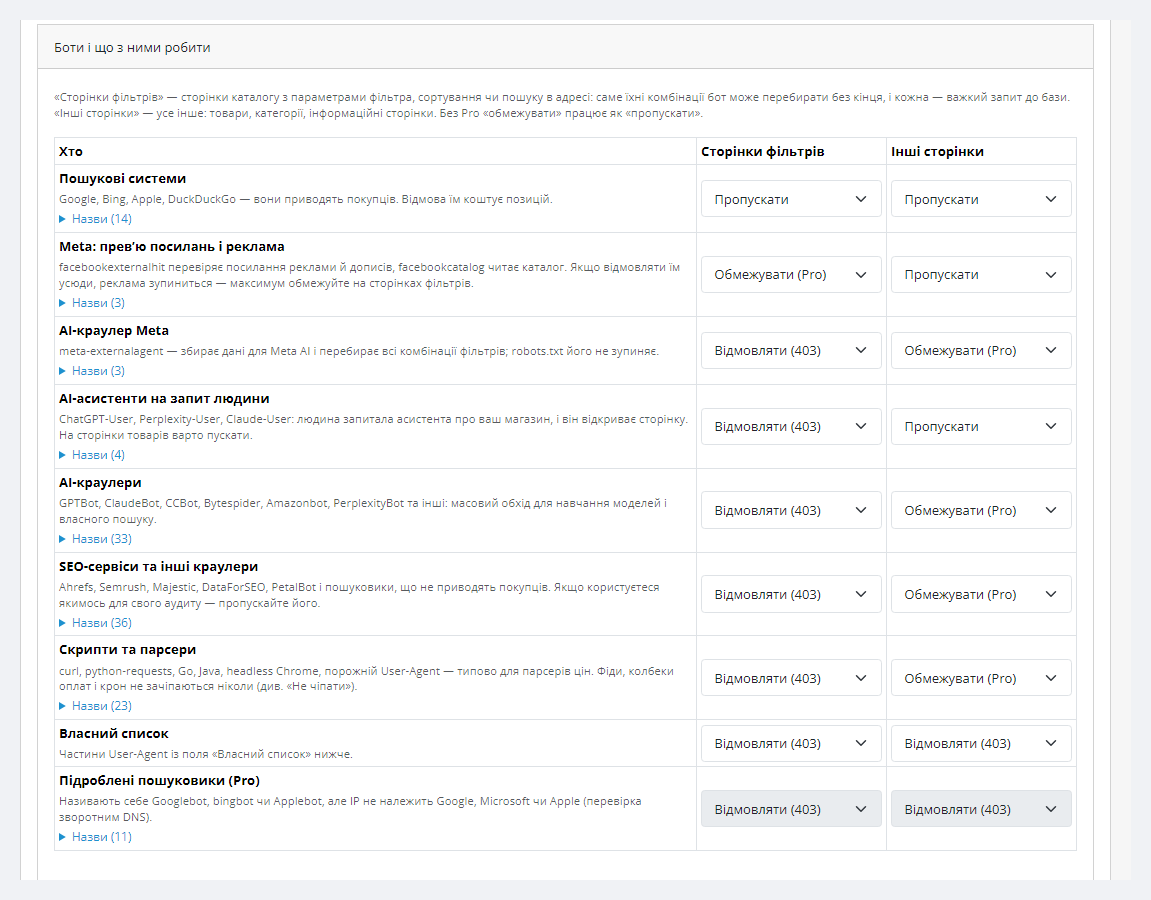
Settings are in Extensions → Extensions → Modules → Crawler Shield, four tabs: “Rules”, “Bot report”, “Check and files”, “Licence”. “Rules” has the mode, noindex, where the visitor’s IP comes from and a table of bot families with two rules each: for filter pages and for other pages.

The “Limit” rule gives a family a limit of requests a minute (20 on filter pages and 120 on other pages by default) — then 429 with Retry-After.

A fresh install is the free version, nothing switches on by itself. The “Try Pro for 7 days” button → e-mail → the key right in the window and by e-mail.

Moving the store? Unbind the licence on the old domain and activate it on the new one yourself. If our server is unreachable, Pro keeps working for 14 more days. For studios — keys for 5 or 25 sites, or unlimited.
 OpenCart 4.0.2+ and 4.1 (tested 4.0.2.3 and 4.1.0.3), 3.0.x (tested 3.0.5.0), 2.3.0.2. OpenCart 4.0.0/4.0.1 were not tested.PHP 7.0+ for 2.3 (tested 7.0.33), 8.x for 3.0 and 4.x (tested 8.3). mysqli and pdo database drivers.No core edits and no OCMOD: one event, four own tables.Server. nginx and Apache (with the stock OpenCart .htaccess), nginx in front of Apache. Behind Cloudflare or a proxy — choose the IP header in “General”.The bot cache (Pro) needs system/storage/cache to be writable.Multistore and a shop in a subfolder were not tested.
First public release for OpenCart 4.x, 3.x and 2.3.
4 modules in one order — 40% cheaper than separately



Crawler Shield for OpenCart is a module that keeps bots from taking the shop down on filter pages. Every combination of filter, sorting, items per page and page number is a URL of its own, and each one is a heavy database query. A person opens a few. AI crawlers (meta-externalagent, GPTBot, ClaudeBot, Bytespider), SEO tools and price scrapers open all of them — and a shop on ordinary hosting hits the limits of its CPU and database.
The module recognises a bot by User-Agent and refuses it before the first catalogue query: in our test a refused filter page made 0 product queries, while the same page for a shopper made 43–45. Search engines and your ad previews go through, shoppers notice nothing. There is also a WooCommerce version.
Nothing new. In the test on all four versions a shopper in a real browser went through a category, a filter, sorting, six more filter pages, a product, the cart and guest checkout — without a single refusal or JavaScript error, and the order was saved with the right total. The module never touches checkout, account, payment callbacks, feeds or cron, and does not check POST requests at all.
The only limit that can touch a person is the Pro limit of filter pages from one IP (60 a minute by default). If many shoppers share one address (a mobile carrier, an office), raise it or add the address to “Never touch these IPs / networks”.
Settings are in Extensions → Extensions → Modules → Crawler Shield, four tabs: “Rules”, “Bot report”, “Check and files”, “Licence”. “Rules” has the mode, noindex, where the visitor’s IP comes from and a table of bot families with two rules each: for filter pages and for other pages. Unsure — choose “Watch only” for a day or two and look at the report.
noindex for filter pages is on by default. If you deliberately rank filter pages with parameters in the URL, untick “Tell search engines not to index filter pages” in the “General” block. Below are the filter parameters in the URL (you can add your own), routes where every page counts (search), the page number from which a list counts as a filter page for bots, and routes the module never touches.
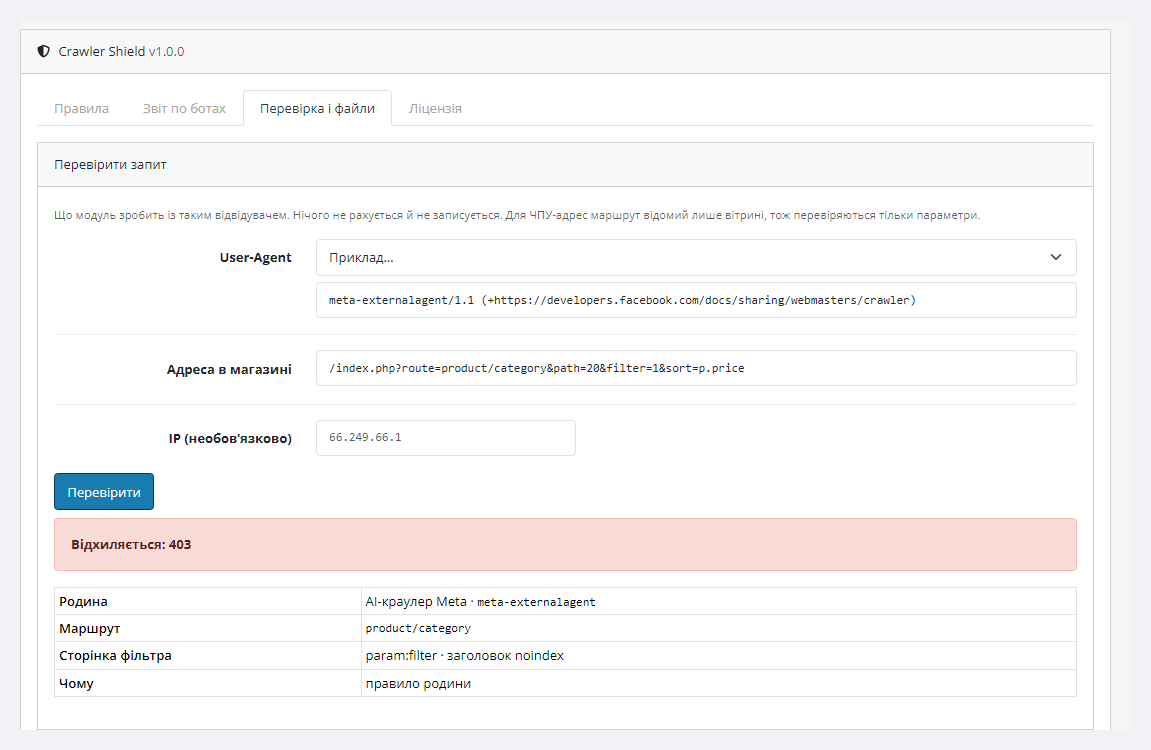
“Check and files” shows what the module does with any visitor: pick a User-Agent from the examples or paste your own, add the page URL — and you see the decision, family, route and reason. The same tab has robots.txt lines worth adding for honest bots.
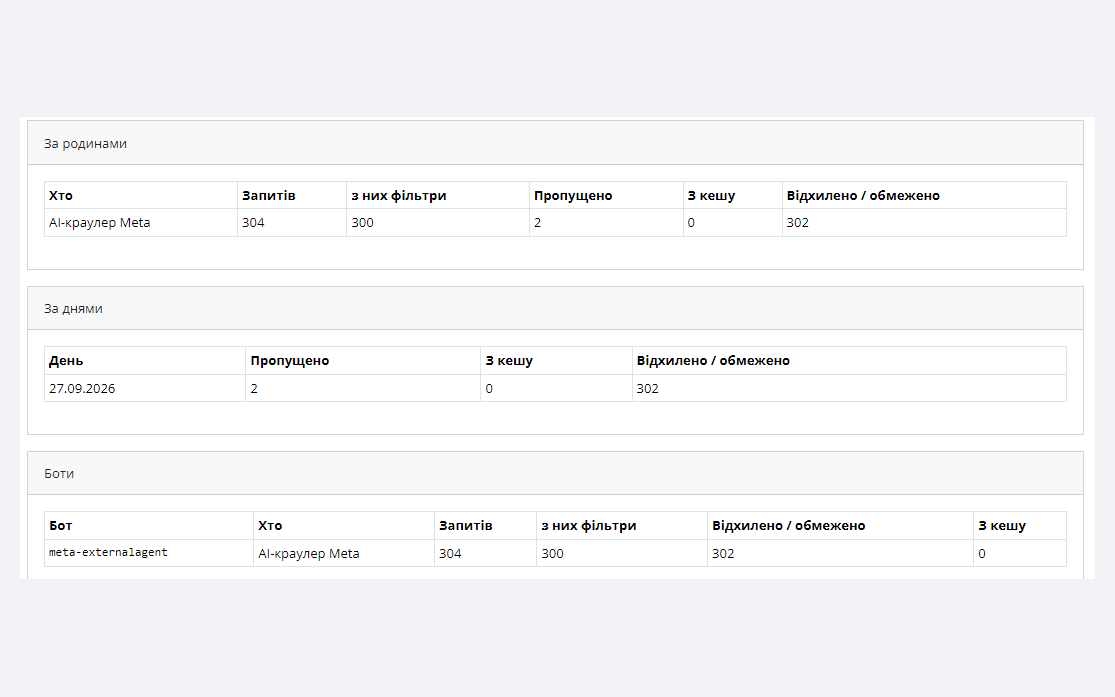
The “Bot report” shows requests by family, day and individual bot: how many in total, how many to filters, how many let through, served from the cache and refused.
The “Limit” rule gives a family a limit of requests a minute (20 on filter pages and 120 on other pages by default) — then 429 with Retry-After. The limit of filter pages from one IP and, optionally, from a /24 network catches a scraper calling itself a browser. IP and network lists — “always refuse” and “never touch”, with “Add Alibaba Cloud networks” (in September 2026 a scraper with a browser User-Agent walked the filters of our demo shop from there) and “Add my IP” buttons.
Googlebot, bingbot and Applebot are checked by reverse DNS once a day per address: a “Googlebot” from someone else’s network lands in “Fake search engines” and is refused. The filter page cache serves recognised bots a file instead of catalogue queries (a page lives 60 minutes — configurable; a bot may see a price that old), shoppers always get a live page. The journal of refusals shows top IPs, networks and pages for 24 hours with a “Block the network” button. The “Check and files” tab generates nginx and Apache rules and llms.txt.
catalog/controller/*/before, 2.3 — catalog/language/*/before. In 2.3 pages whose controller queries the database before loading its language (some AJAX endpoints of filter modules) are not checked.system/storage/cache/cc_crawler/, is filled only from 200 responses to recognised bots and is never served to shoppers.cc_crawler.ocmod.zip (keep the archive name) and click “Install”. OpenCart 3: Extensions → Installer → cc_crawler-oc3.ocmod.zip. OpenCart 2.3: upload the contents of the upload/ folder from cc_crawler-oc2.ocmod.zip to the shop root (FTP or the hosting file manager) — the 2.3 Installer does not copy files without FTP configured.Didn't find the answer? Message us on Telegram and we'll reply within a business day.
 @catcode_support
Setup, compatibility, activation
@catcode_support
Setup, compatibility, activation
Search engines are let through everywhere by default. Filter, sorting and search pages get the X-Robots-Tag: noindex, follow header — they stay open to shoppers and bots, but thousands of combinations stay out of the index. Categories and products stay open. If you deliberately rank filter pages with parameters in the URL, untick "Tell search engines not to index filter pages" in "Rules" → "General".
Yes. facebookexternalhit, with which Meta checks the ad landing page, is let through by default; in Pro it is only limited on filter pages. Do not set this family to "Refuse" everywhere — ads would stop.
In "Rules" → "General" → "Visitor's IP comes from" choose the header: CF-Connecting-IP for Cloudflare, X-Forwarded-For or X-Real-IP for your own proxy. By default the connection address is used, and behind a proxy every visitor has the same IP — the per-IP limit (Pro) would slow everyone down. The module warns when it sees a Cloudflare header. Choose a header only if a proxy really stands in front — otherwise the address can be forged.
The module recognises filter pages by query parameters. SEO-path URLs of filter modules are not seen as filters: the family's "Other pages" rule and the Pro per-IP limit apply to them. We have not checked the mfp, ocf, ocfilter and bfilter parameter names against the modules themselves — test your URL on the "Check and files" tab.
No, and it does not promise 100% protection. The module solves one problem: bots walking the endless filter combinations of the catalogue. A scraper calling itself Chrome is caught only by Pro — the per-IP and per-network limits and IP lists.
The Pro journal of refusals keeps the time, IP and URL of recent refused or limited requests — up to 5,000 rows and no longer than 14 days. For visitors caught by the per-IP limit this is personal data under GDPR — mention it in your privacy policy. The journal is switched off with one tick.
The stock OpenCart .htaccess on Apache refuses every .txt except robots.txt. The module detects it and shows the one line to change: (?<!robots)\.txt → (?<!robots)(?<!llms)\.txt.
The base version is free. Pro is 1,290 UAH, a single payment, a lifetime licence for one domain, all three builds (4.x, 3.x, 2.3).
No reviews yet. Be the first.
No questions yet. Ask one — we answer within 24 hours.
We build custom modules for WordPress, WooCommerce, OpenCart and Shopify. Tell us about the task and we'll prepare an estimate.
Order a custom module
—

CatCode assistant
Just now


CatCode assistant
Online

I’ll help with your website task
Describe your website task — I’ll find a ready-made module or pass it to a developer for an estimate. Modules, custom features, layout, integrations, speed, migration, technical SEO.
