
WordPress
Crawler Shield for WooCommerce — protects the catalogue from AI crawlers, meta-externalagent and filter crawling
Free + Pro
990 UAH/year
v1.0.0
Enter at least 2 characters

A WooCommerce plugin that keeps crawlers from walking the endless filter combinations of the catalogue and taking the shop down. Bot groups with their own rules (search engines, Meta ad previews, AI crawlers, SEO tools, scripts), limits per bot and per visitor address, refusal before WooCommerce starts building the page, robots.txt, noindex for filter pages, llms.txt and a report. The base version is free; Pro checks that Googlebot and AI bots are real, adds data-centre networks, a browser check, stored copies for bots and nginx/Apache rules.
The free version works with no time limit. Pro adds the rest of the features in the table.


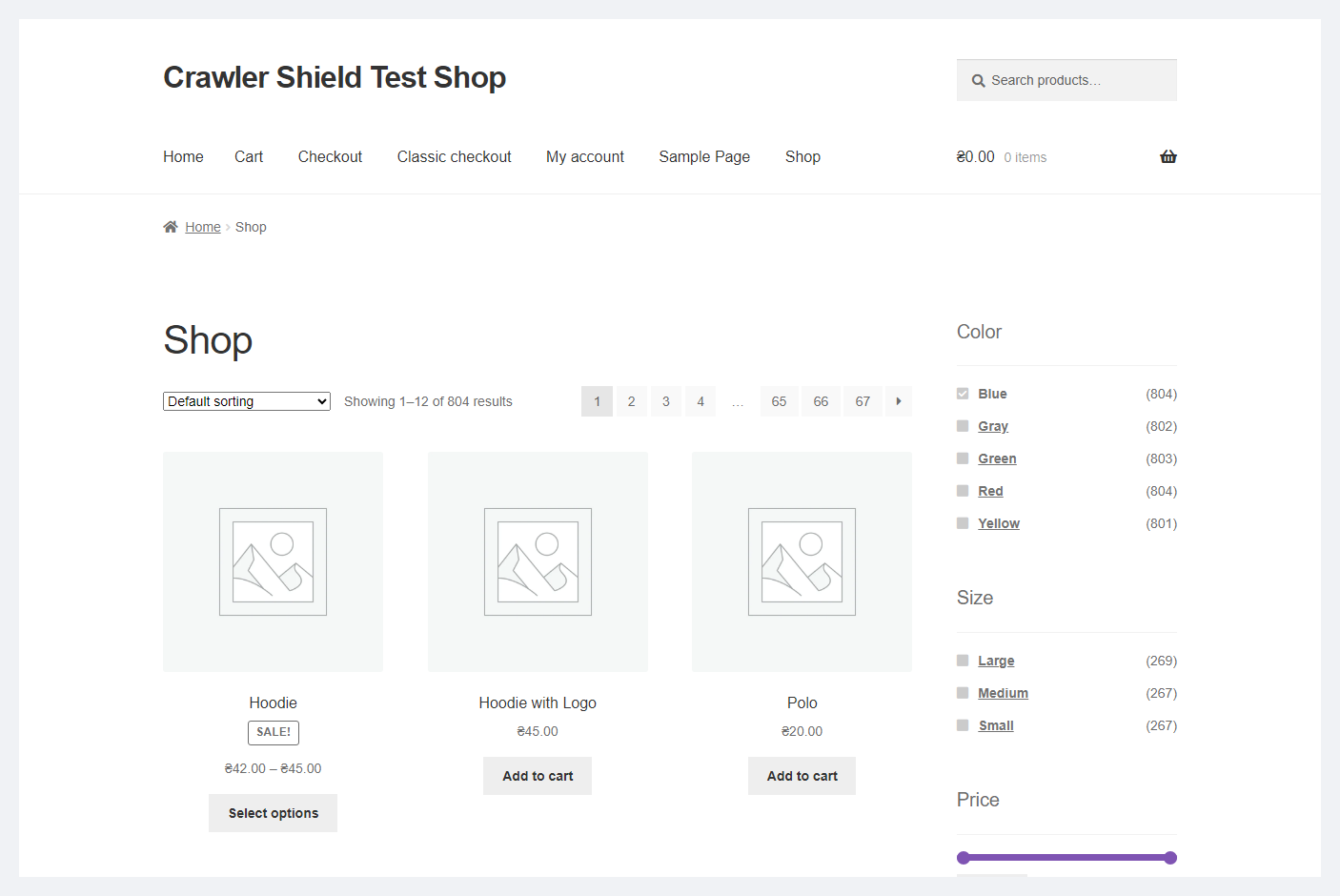
Nothing new. The shopper clicks filters, sorts, adds to the cart and checks out — in our test 25 quick filter clicks in a row, classic and block checkout went through without a single refusal and without check pages.

Settings are in WooCommerce → Crawler Shield, five tabs: “Report”, “Rules”, “robots.txt and llms.txt”, “Test a request” and “Server rules” (Pro).

Some crawlers call themselves Googlebot, some — Chrome.

A fresh install is the free version, nothing switches on by itself. The “Try Pro for 7 days” button → e-mail → the key right in the window and by e-mail.

Moving the store? Unbind the licence on the old domain and activate it on the new one yourself. If our server is unreachable, Pro keeps working for 14 more days. For studios — keys for 5 or 25 sites, or unlimited.
 WordPress 6.2+ and WooCommerce 7.0+. End-to-end run on WordPress 7.1 and WooCommerce 11.1.PHP 7.4+. End-to-end run on PHP 8.3 (nginx + PHP-FPM) and PHP 8.2 (Apache), syntax also on 7.4.Server. nginx + PHP-FPM, Apache, nginx in front of Apache (HestiaCP, VestaCP). Behind Cloudflare the address is detected automatically; behind another CDN choose the header in “Server” → “Visitor address”.Counters. Redis or Memcached as object cache, APCu or one database table — the plugin takes the fastest one available. Redis and APCu are tested, Memcached is not.robots.txt. Lines are added to the virtual robots.txt of WordPress. If there is a physical robots.txt file in the site root, copy the lines from the tab by hand.Filter plugins. Parameter names of HUSKY, YITH, BeRocket and WBW were checked against their code; we have not tested it with those plugins installed or with page caching (WP Super Cache, LiteSpeed) — start in “Monitor” mode.
First public release: bot groups with “allow / limit / pages yes, filters no / block” rules, filter URL detection for WooCommerce and popular filter plugins, per-bot and per-address limits,…
4 modules in one order — 40% cheaper than separately



Crawler Shield for WooCommerce is a plugin that keeps crawlers from taking the shop down on filter pages. A catalogue with filters has millions of URLs: every combination of colour, size, brand, price and sorting is a page of its own, and each one is a heavy database query. People open a handful of them. Crawlers — meta-externalagent, GPTBot, ClaudeBot, Bytespider, SEO tools and scrapers — open all of them, and a shop on ordinary hosting runs out of PHP workers: pages take tens of seconds, and a host may suspend the site for “abnormal load”.
The plugin decides who gets what before WooCommerce and the theme start building the page and answers a refusal with a few bytes instead of a catalogue page. Search engines and your ad previews go through, AI crawlers and SEO tools see pages but not filter combinations, scripts are rate limited. There is also an OpenCart version.
Nothing new. The shopper clicks filters, sorts, adds to the cart and checks out — in our test 25 quick filter clicks in a row, classic and block checkout went through without a single refusal and without check pages. The shield does not count ordinary pages for ordinary visitors at all and never limits logged-in shoppers.
There is only one limit for people: 40 filter URLs a minute from one address — more than a person manages to click. If many shoppers share one address (a mobile carrier, an office), raise it or add the address to “Never limit these addresses”. During a wave Pro also shows unknown visitors a browser check page for a second — a real browser passes by itself and then has its own limit.
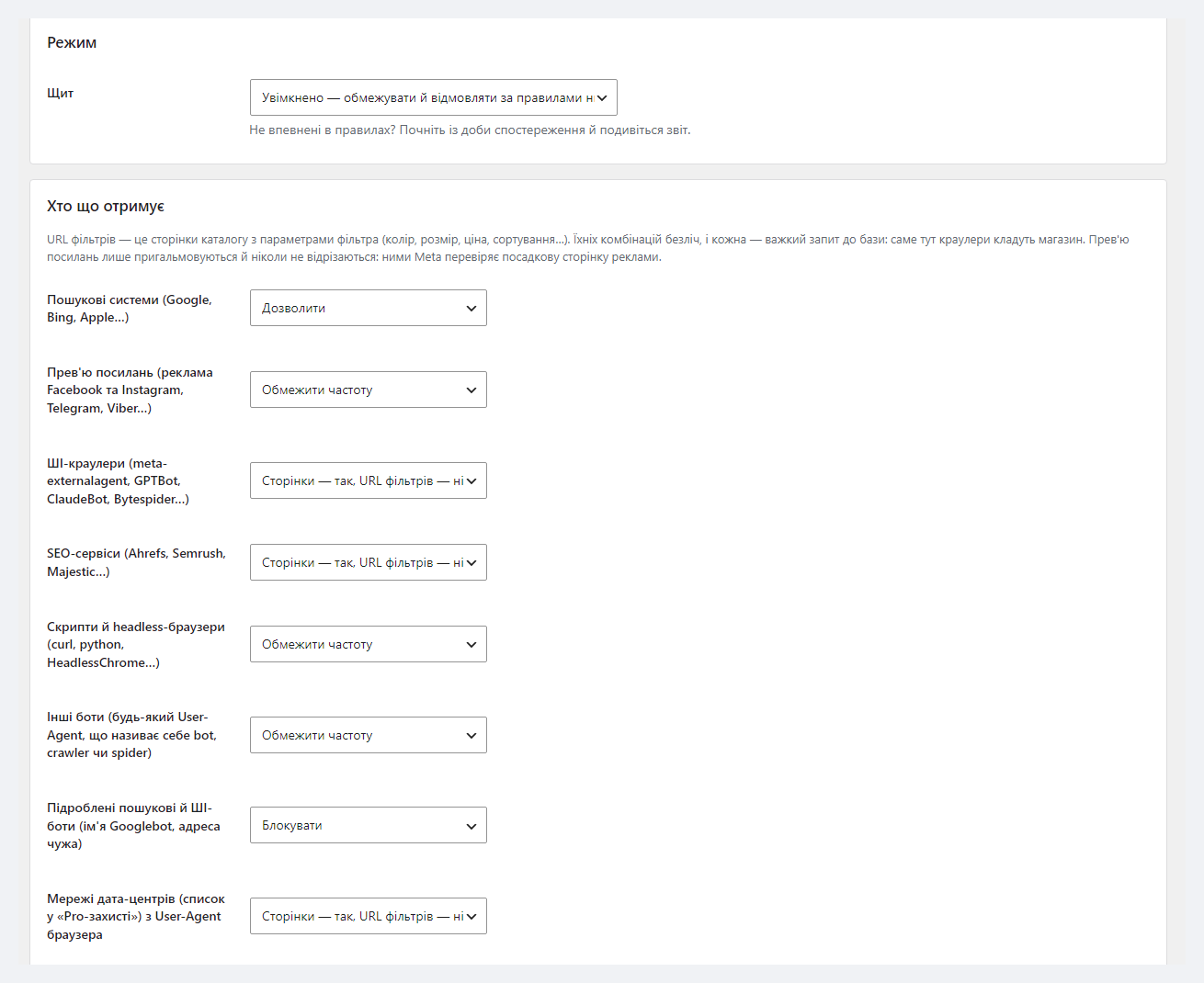
Settings are in WooCommerce → Crawler Shield, five tabs: “Report”, “Rules”, “robots.txt and llms.txt”, “Test a request” and “Server rules” (Pro). The “Rules” tab has the shield mode, a rule for each group and the limits. The defaults suit most shops; if unsure, choose “Monitor” for a day: the shield only counts what it would do and refuses nothing.
Further down the same tab are the recognised filter parameters and fields for your own: parameters (color, pa_*) and paths, if a filter builds pretty URLs like /filter/. Without them pretty-URL filters are ordinary pages to the shield. There are also “never limit” and “always refuse” lists for addresses, networks and User-Agents, and the “Server” block: where to take the visitor address from (automatically, CF-Connecting-IP, X-Forwarded-For or X-Real-IP) and where to keep the counters.
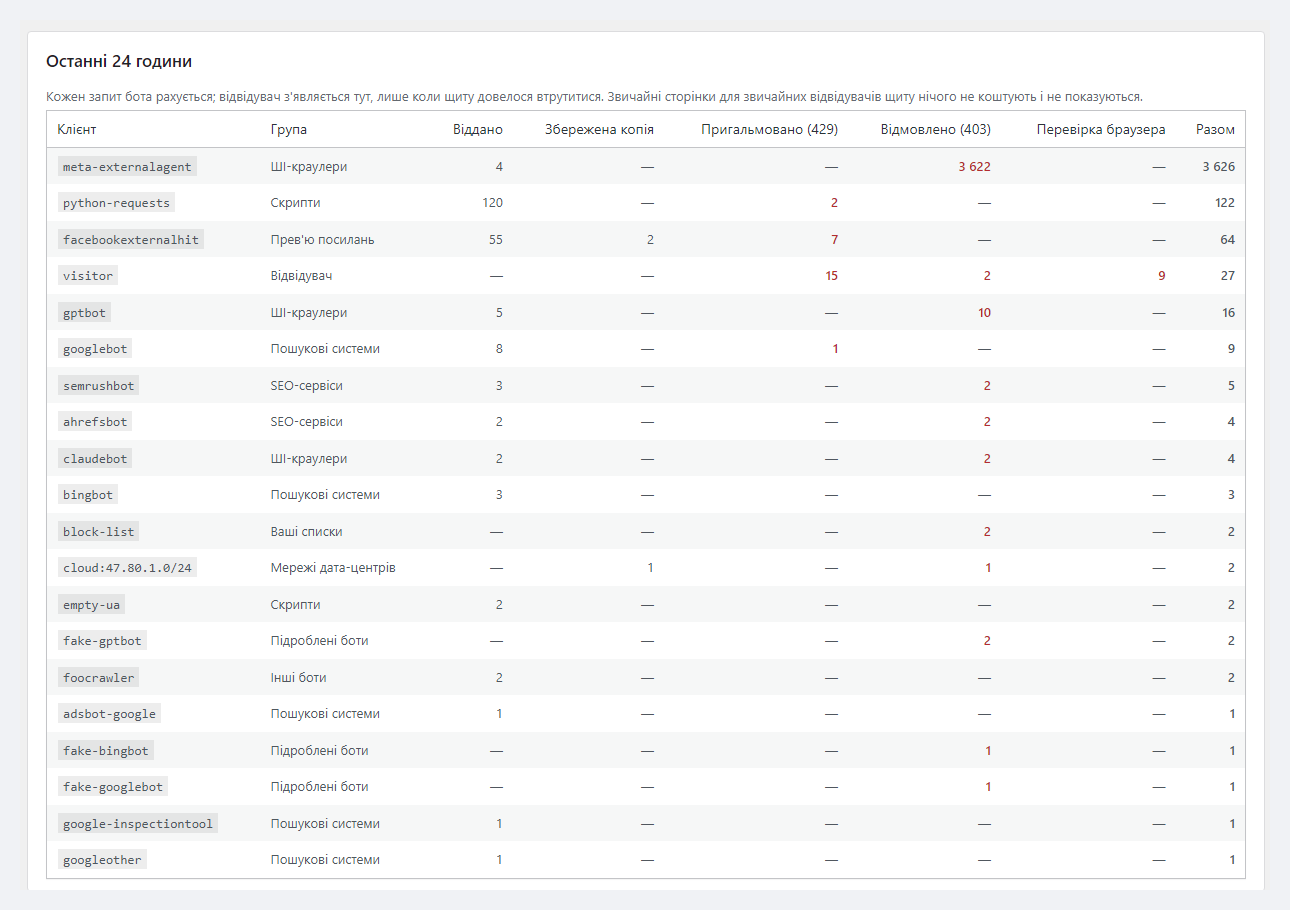
The “Report” shows every bot for 24 hours and by day: how many requests were served, slowed down (429) and refused (403). This is where you see who really loads the shop.
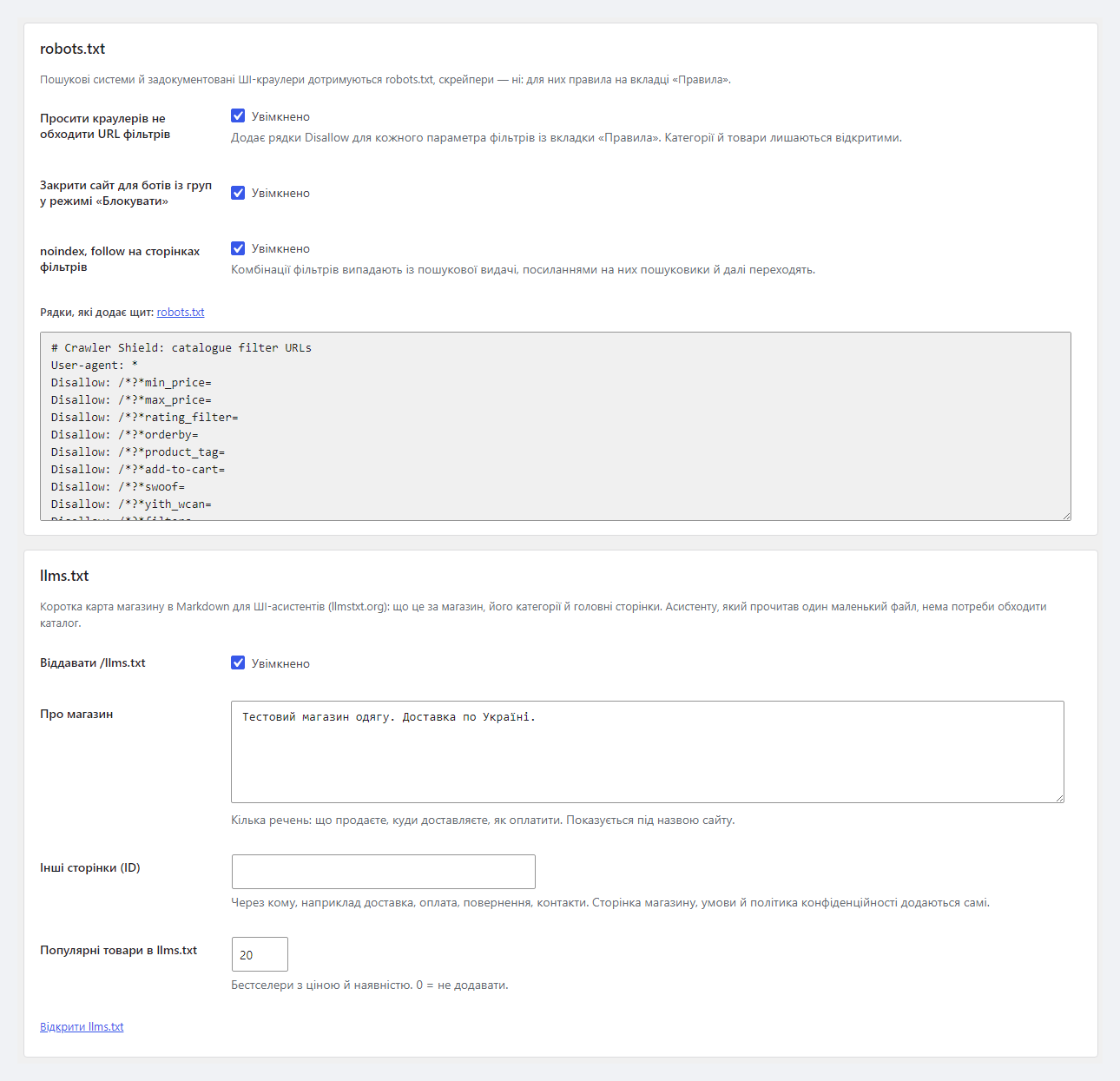
The “robots.txt and llms.txt” tab has switches for the filter Disallow lines, closing the site to “Block” groups and noindex, follow on filter pages. noindex and Disallow are on by default: if you deliberately rank filter pages with parameters in the URL, untick both here. /llms.txt is set up on the same tab: the “About the shop” text and extra pages.
“Test a request” takes a URL, a User-Agent and an address and shows what the shield would do and why, without counting anything. The same from the console: wp catcode-crsh test "/shop/?filter_color=red" --ua="meta-externalagent/1.1".
Some crawlers call themselves Googlebot, some — Chrome. Once a day Pro downloads the official address lists of Google, Bing, Apple, OpenAI, Anthropic and Perplexity: the real Googlebot from a Google network goes through, a “Googlebot” from someone else’s address lands in the “Fake bots” group and is refused. Data-centre networks (an Alibaba Cloud preset — in September 2026 scrapers with a browser User-Agent walked the filters of our demo shop from there) get “pages yes, filter URLs no”. The per-/24 limit catches a scraper spread over hundreds of addresses.
When unknown visitors together open more than 300 filter URLs a minute, Pro turns on a browser check for 10 minutes: a real browser passes in a second, a script does not. Ad previews with new fbclid and utm tags are served from stored copies instead of being built every time (a copy lives up to 6 hours — configurable; bots may see a price that old). The “Server rules” tab generates blocks for nginx and Apache so the heaviest refusals are done by the web server before PHP.
plugins_loaded at priority -10000: the WordPress core is loaded, but WooCommerce, the theme and catalogue queries are not yet. A refusal is cheap but not free; the full effect comes from the Pro server rules.INSERT … ON DUPLICATE KEY UPDATE per request. Statistics are one more small upsert.Disallow: /*?*parameter=) and is appended after the WordPress and WooCommerce rules. robots.txt always stays readable for blocked bots — so they can read Disallow.catcode-crawler-shield-for-woocommerce-free-1.0.0.zip with the button at the top of the page (or the Pro archive from your account after purchase): Plugins → Add New → Upload Plugin → Install → Activate.Didn't find the answer? Message us on Telegram and we'll reply within a business day.
 @catcode_support
Setup, compatibility, activation
@catcode_support
Setup, compatibility, activation
Search engines are allowed by default. Filter parameters are closed in robots.txt with lines like "Disallow: /*?*min_price=" — the way Google's documentation on faceted navigation recommends — and filter pages get noindex, follow. Categories and products stay open. If you deliberately rank filter pages with parameters in the URL, switch both off on the "robots.txt and llms.txt" tab.
Yes. Link previews (facebookexternalhit) are never blocked by default — only limited on filter URLs: 10 a minute, then 429 with Retry-After. The ad landing page, including with fbclid and utm, is served as usual. We have not watched Meta's ad account react to the limit live — if your ads point to filter URLs, raise the limit or switch the group to "Allow".
Nothing: the plugin recognises requests from Cloudflare networks itself and takes the address from CF-Connecting-IP. Behind another CDN or proxy it does not know, choose the header in "Rules" → "Server" → "Visitor address", otherwise every visitor gets the proxy address and they share one limit. We imitated Cloudflare rather than connecting the real one.
They can if many people share one address: a mobile carrier (CGNAT) or an office network. The limit is 40 filter URLs a minute from one address; ordinary pages and logged-in shoppers are not counted. AJAX filters (HUSKY, YITH, WBW) may make several requests per click — then raise the limit. In Pro the browser check gives every browser its own limit.
No, and it does not promise 100% protection. It solves one problem general firewalls do not: bots walking the endless filter combinations of a shop catalogue. A scraper calling itself Chrome is an ordinary visitor with a per-address limit in Free; data-centre networks, the per-/24 limit and the browser check come with Pro.
Then WordPress does not build robots.txt and the plugin cannot add its lines. The "robots.txt and llms.txt" tab shows them for copying into your file.
Free — nowhere, everything is counted on your server. Pro downloads the official address lists of Google, Bing, Apple, OpenAI, Anthropic and Perplexity once a day and checks the licence at catcode.com.ua. The Pro journal with IP addresses of refused requests is kept on your server for 7 days — under GDPR that is personal data, mention it in your privacy policy.
Yes. Pages served from a full-page cache never reach WordPress — they cost nothing anyway and the plugin does not see them. Everything that reaches WordPress goes through the shield. Pro stored copies for bots are separate from your cache. We have not tested it together with WP Super Cache or LiteSpeed Cache.
The base version is free. Pro is 990 UAH per year, and a longer term is cheaper: 2 years — 1,880 UAH, 5 years — 3,710 UAH. No automatic charges. A purchased licence keeps the Pro features for good; the term covers updates and support.
No reviews yet. Be the first.
No questions yet. Ask one — we answer within 24 hours.
We build custom modules for WordPress, WooCommerce, OpenCart and Shopify. Tell us about the task and we'll prepare an estimate.
Order a custom module
—

CatCode assistant
Just now


CatCode assistant
Online

I’ll help with your website task
Describe your website task — I’ll find a ready-made module or pass it to a developer for an estimate. Modules, custom features, layout, integrations, speed, migration, technical SEO.
