Get in touch
  • WordPress
  • CRM and integrations
  • v1.0.0

eMAG Marketplace Connector for WooCommerce — eMAG prices, stock and orders in your store

WooCommerce integration with eMAG Marketplace (Romania, Bulgaria, Hungary, Fashion Days): import and link your offers by SKU or EAN, automatic price and stock sync through the official eMAG API. Pro — eMAG orders in WooCommerce, status back to eMAG, AWBs, invoices, product publishing and a Buy button monitor.

Download Free
Pro · one-year licence The more sites, the less each one costs
Compatibility
WooCommerce 7.0+ · WordPress 6.2+ · PHP 7.4+ · HPOS · classic and block checkout
Licence
one site, annual
Trial
7 days, no card, one per site
Updated
September 2026
Or all 144 Pro modules with All Access — 4 990 ₴ / year

What Free has,
and what Pro adds

The free version works with no time limit. Pro adds the rest of the features in the table.

Feature Free Pro
Connection to eMAG Romania, Bulgaria, Hungary and Fashion Days (RO, BG) through the official Marketplace API ✔ ✔
Import of your existing eMAG offers, linked to products by SKU (part number), EAN or ID; report of unlinked offers ✔ ✔
Price and stock sync a few minutes after a sale or a change, in batches of up to 50, only what changed ✔ ✔
Price without VAT from the WooCommerce price, markup in % and fixed, currency rate, sale price with the regular one crossed out ✔ ✔
VAT rates read from your eMAG account, a rate per tax class and per product ✔ ✔
Stock reserve for your own store, a quantity for products without stock management, handling time ✔ ✔
Unpublished, draft or deleted products go inactive on eMAG ✔ ✔
Status of every offer: documentation validation, errors, price and stock on eMAG ✔ ✔
eMAG column, bulk actions in the product list and an eMAG tab in products and variations ✔ ✔
API log for 30 days; the password is stored encrypted and never logged ✔ ✔
Plugin languages: English, română, български, magyar ✔ ✔
eMAG orders in WooCommerce: instantly through the callback plus a check every 5 minutes, acknowledged on eMAG, stock reduced — ✔
A cancellation on eMAG cancels the WooCommerce order and restores stock; a cancellation in WooCommerce goes to eMAG with a reason — ✔
Status back to eMAG: prepared, finalized — ✔
AWBs through your eMAG courier accounts: lockers, cash on delivery, PDF labels A4/A5/A6, delivery status — ✔
Invoice sent to the eMAG order — ✔
Publishing: attach to an eMAG product by EAN or create a new product with category, brand, images and characteristics — ✔
Buy button monitor: your rank, number of offers, best price, an e-mail when you lose first place — ✔

What it looks like

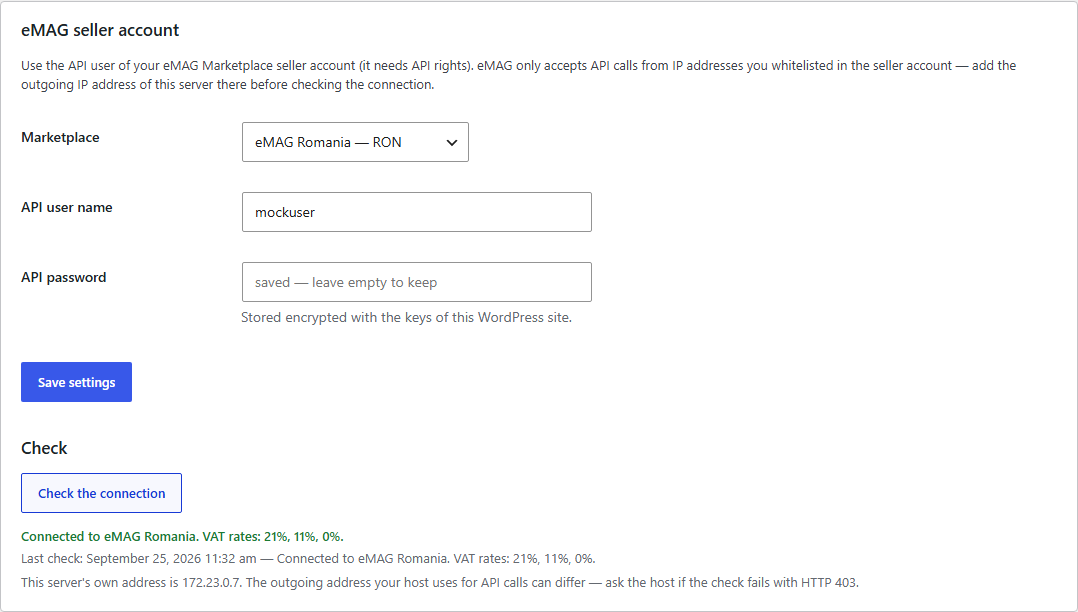
eMAG Marketplace Connector connection: marketplace, API user, connection check with VAT rates
WooCommerce → eMAG Marketplace → Connection: marketplace, API user and password (stored encrypted), “Check the connection” — connected, VAT rates loaded from eMAG.
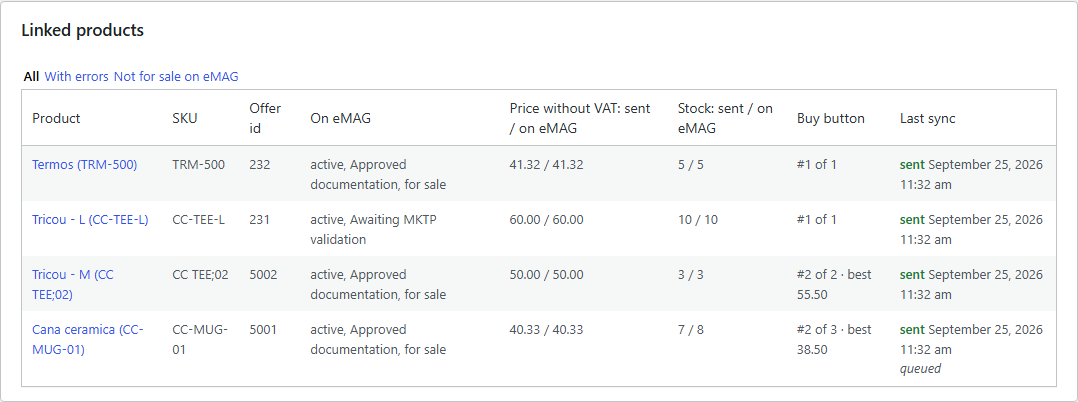
Linked WooCommerce products and eMAG offers: status, price and stock
Linked products: eMAG offer ID, documentation status, price without VAT and stock — as sent and as on eMAG, Buy button rank (Pro), time of the last sync.
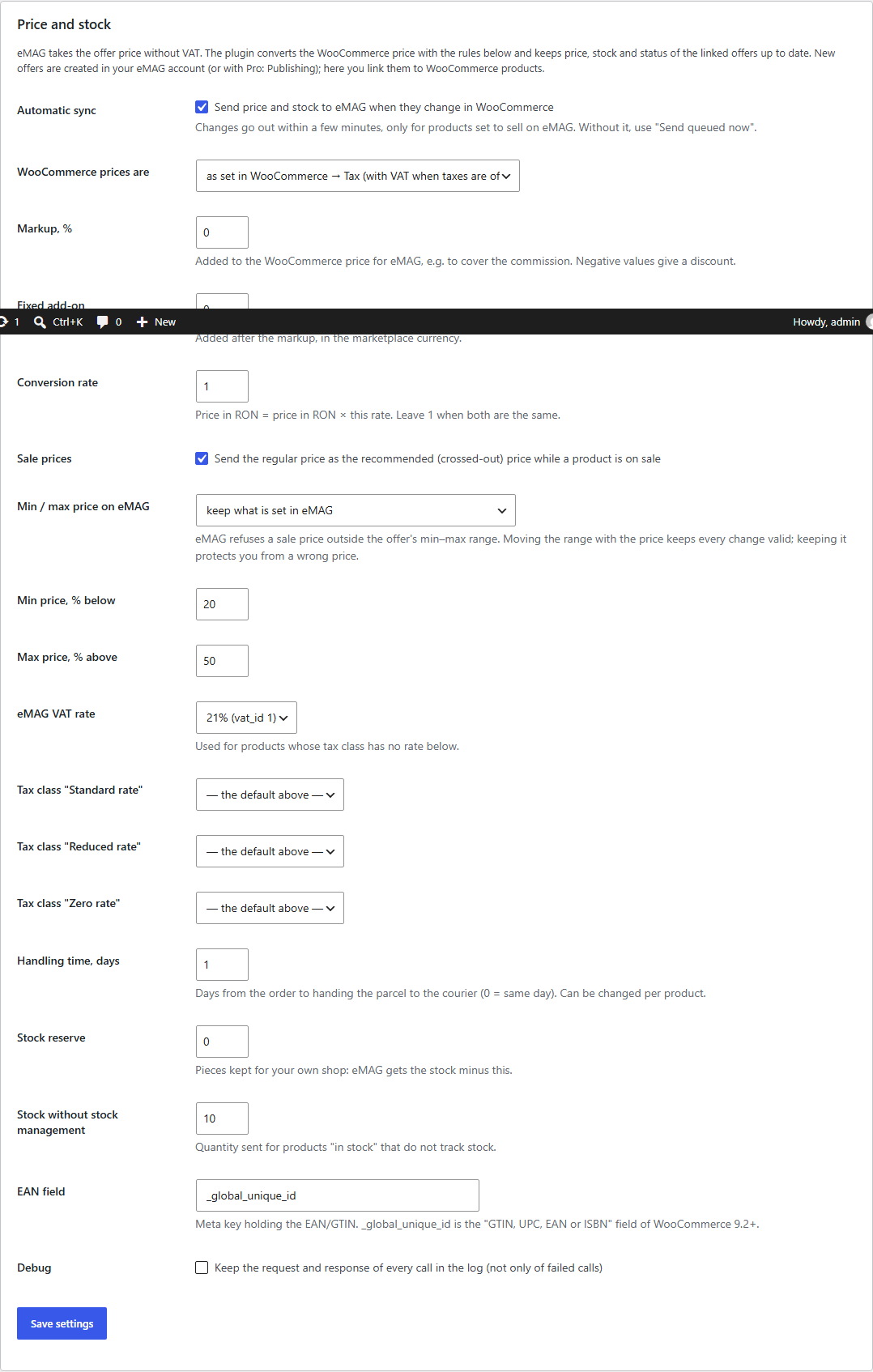
Price and stock rules for eMAG: price with or without VAT, markup, currency rate, VAT rates, reserve
Offers tab: how the WooCommerce price becomes the eMAG price without VAT, VAT rates per tax class, stock reserve and handling time.

The trial starts when you ask

A fresh install is the free version, nothing switches on by itself. The “Try Pro for 7 days” button → e-mail → the key right in the window and by e-mail.

One key — one site

Moving the store? Unbind the licence on the old domain and activate it on the new one yourself. If our server is unreachable, Pro keeps working for 14 more days. For studios — keys for 5 or 25 sites, or unlimited.

Technical requirements

  • WooCommerce 7.0+ with the classic or the block checkout, compatible with HPOS and the classic order storage
  • WordPress 6.2+ · PHP 7.4+ (tested on 7.4 and 8.3)
  • An eMAG Marketplace seller account with an API user and the server IP on the eMAG API whitelist
  • WP-Cron or a system cron — for the sync queue and the order check
  • Plugin languages: English, Romanian, Bulgarian, Hungarian.

Version history

v1.0.0 Current September 2026

EMAG RO/BG/HU and Fashion Days; offer import and linking by SKU, EAN or ID; price and stock sync with VAT, markup and currency rules; offer status; API log; English, Romanian, Bulgarian, Hungarian.

Frequently bought with eMAG Marketplace Connector for WooCommerce

4 modules in one order — 40% cheaper than separately

“Store starter” bundle eMAG Marketplace Connector Nova Poshta Premium LiqPay Telegram notifications and Viber/SMS for customers Need more — all 144 modules in All Access for 4 990 ₴.
3 590 ₴ / year instead of 5 960 UAH bought separately
Buy the bundle →

Full module description

eMAG Marketplace Connector for WooCommerce connects your store to eMAG Marketplace, the largest marketplace in Romania, Bulgaria and Hungary (together with Fashion Days). You sell both in your own store and on eMAG — the plugin keeps the eMAG price and stock in line with WooCommerce, and with Pro it brings eMAG orders into your store and ships them through eMAG’s couriers. Everything goes through the official eMAG Marketplace API: no scraping and no manual exports. Running OpenCart? See eMAG Marketplace Connector for OpenCart.

What you need. An eMAG Marketplace seller account with an API user, and your server’s IP address on the API whitelist in the eMAG account. Honestly about testing: eMAG gives no public sandbox — the API only answers whitelisted sellers. The plugin is built on the official eMAG Marketplace API reference v4.5.2 and tested end to end against a simulation of that API (offers, prices, stock, orders, cancellations, AWBs, invoices, publishing); from our server the live eMAG API answers the plugin’s request with its own error text. It has not yet run on a live seller account — try it on yours in the 7-day Pro trial. The log shows every request and eMAG’s answer, and if eMAG answers differently from its documentation, we fix it promptly.

What your store gets

  • One plugin — five marketplaces: eMAG Romania, eMAG Bulgaria, eMAG Hungary, Fashion Days Romania and Bulgaria. The same API, each with its own account and currency (RON, EUR, HUF).
  • “Check the connection” tests the API user and password, reads the VAT rates of your account and preselects the standard rate. An eMAG error (wrong password, IP not whitelisted) is explained in plain words together with eMAG’s own text.
  • The API password is stored encrypted (AES-256 with HMAC) and never reaches the log.
  • Offer import: the plugin reads all your eMAG offers and links them to WooCommerce products by SKU (part number, normalised for spaces and semicolons the way eMAG does it), by EAN or by ID. Unlinked offers and conflicts come in a separate report.
  • Sync: a sale in your store, a price change, an import — and a minute later the eMAG offer is updated. A check of the queue every 5 minutes is the safety net. Only what changed is sent, in batches of up to 50 offers; an offer eMAG refuses is found one by one without holding up the rest.
  • Linked products table: eMAG documentation validation, documentation errors, price and stock — as sent and as on eMAG.
  • Price without VAT, the way eMAG takes it: from the WooCommerce price with or without VAT — your choice.
  • Markup in % and fixed, a currency rate when the store sells in another currency, sale prices — the regular price goes to eMAG as the crossed-out (recommended) price, and the min–max range eMAG requires can move with the price.
  • VAT: a rate for each WooCommerce tax class and for a single product.
  • Stock: a reserve for your own store, a quantity for products without stock management, handling time for the store and per product.

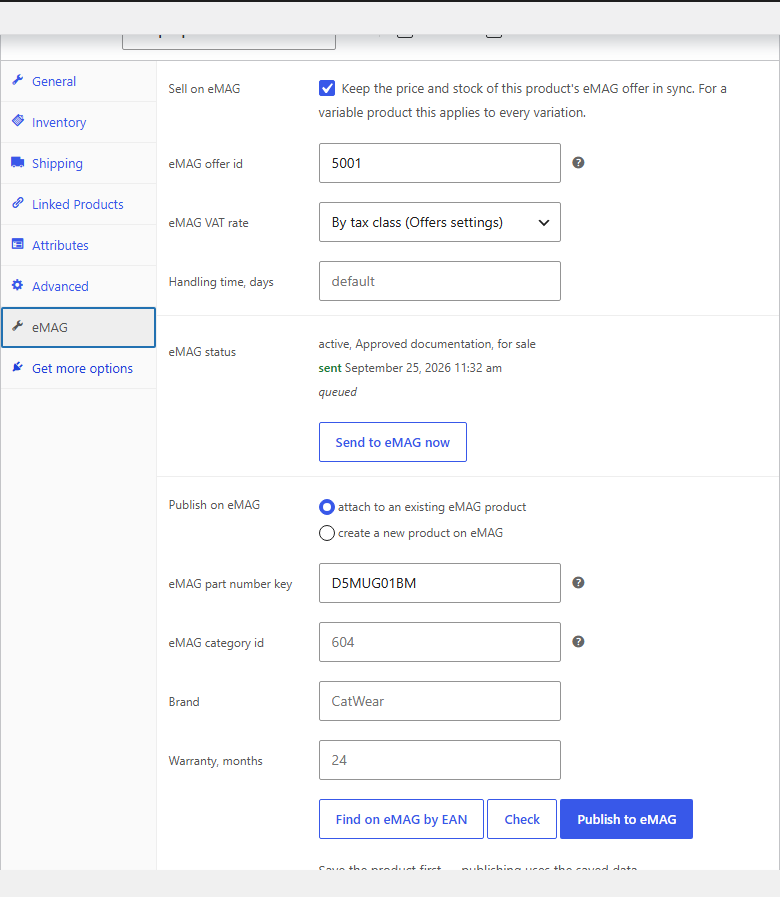
Every product and variation has an eMAG tab: sell or not, the offer ID, its own VAT rate and handling time, the state on eMAG and a “Send to eMAG now” button. The product list gets an eMAG column and the bulk actions “Sell on eMAG” / “Stop selling on eMAG”.

Pro: orders, shipping, publishing

  • eMAG orders in WooCommerce — instantly through the eMAG callback URLs, while a check every 5 minutes picks up anything missed. Buyer, address or locker, products, line VAT, vouchers, the SGR deposit and shipping — the total matches eMAG’s own calculation.
  • Acknowledged on eMAG and stock reduced — exactly once, even when eMAG sends the callback several times in parallel. The new stock goes to eMAG by itself.
  • Cancellations both ways: an order cancelled on eMAG becomes “Cancelled” in WooCommerce and the stock comes back; an order cancelled in WooCommerce goes to eMAG with the reason you chose.
  • Status back to eMAG: on the WooCommerce status you pick, the order becomes “prepared” or “finalized” on eMAG.
  • AWBs through your eMAG courier accounts right from the order screen: sender from your eMAG addresses, the buyer’s locker, cash on delivery for the order total, PDF labels A4, A5 or A6, hourly delivery status and, if you want, “Completed” on delivery.
  • Invoice: the link to the invoice PDF goes to the eMAG order with a button in the same box.
  • Publishing: find a product on eMAG by EAN and attach your offer, or create a new product — eMAG category, brand, description, images, characteristics (automatically from WooCommerce attributes or through a per-category map), EAN, warranty and families for variations.
  • eMAG categories: download, search, a WooCommerce → eMAG category map, characteristics and family types.
  • Buy button monitor: your rank, the number of offers and the best price in the table, and an e-mail when you lose first place.

How it works — step by step

  1. Connection. WooCommerce → eMAG Marketplace → Connection: marketplace, API user and password, “Check the connection”. The VAT rates load from eMAG.
  2. Price rules. Offers tab: prices with or without VAT, markup, currency rate, stock reserve.
  3. Linking. “Import and link offers” — eMAG offers are linked to products by SKU or EAN; the unlinked ones are in the report.
  4. Sync. From then on every sale and every price change goes to eMAG by itself; “Resend all linked products” sends everything at once.
  5. Orders (Pro). Switch on the import and paste the two callback URLs into the eMAG seller account — new and cancelled orders arrive in WooCommerce instantly.
  6. Shipping (Pro). Shipping tab: “Read courier accounts and addresses from eMAG”, the sender phone — and AWBs are created from the order screen.

Under the hood

  • Request format as in eMAG’s documentation: a JSON body, saves wrapped in data, reads with top-level filters; for an unusual gateway the encoding can be switched with a filter or a constant.
  • eMAG rate limits (3 requests per second, 12 for orders) are respected by the plugin itself, and a 429 is retried.
  • The sync queue lives in product meta; a network failure, 401/403 or 5xx keeps offers queued instead of losing them. An unchanged offer (hash) is not sent again.
  • No duplicate orders: a database lock and a second read of the order inside the lock — three parallel callbacks give one order and one stock reduction.
  • The callback is protected by a key; security plugins that block anonymous REST calls don’t stop the import — the check every 5 minutes remains.
  • A Pro gate that never bricks: when the trial ends, only the Pro features stop, the sync keeps working.
  • Deleting the plugin removes its settings, the eMAG fields of products, the log and the cron jobs; the eMAG data of orders stays.

Installation

  1. Plugins → Add New → Upload Plugin: choose emag-marketplace-connector-for-woocommerce-1.0.0.zip and activate it.
  2. WooCommerce → eMAG Marketplace → Connection: marketplace, API user and password, save and press “Check the connection”.
  3. Offers: check the price rules and press “Import and link offers”.
  4. For Pro: paste the licence key from the e-mail after payment or start the 7-day trial, then go through the Orders and Shipping tabs.

Questions
about the module

Didn't find the answer? Message us on Telegram and we'll reply within a business day.

@catcode_support Setup, compatibility, activation
What do I need?

An eMAG Marketplace seller account with an API user (eMAG grants API rights in the seller account) and your server's IP address on the API whitelist in the eMAG account — eMAG refuses other addresses.

Which eMAG account was the plugin tested with?

eMAG offers no public sandbox: the API only answers seller accounts from whitelisted IPs. The plugin is built on the official eMAG Marketplace API reference (v4.5.2) and tested against a simulation of that API; from our server the live eMAG API answers the plugin's request with its own error text, so it accepts the request format. It has not yet run on a live seller account — try it on yours in the 7-day Pro trial; eMAG's answer is visible in the log.

Does the plugin create new offers on eMAG?

Not in Free: eMAG's light offer API only updates offers that already exist. New offers are created in the eMAG seller account and linked here; with Pro they are published from the product editor.

The connection check fails with HTTP 403.

eMAG only accepts calls from whitelisted IP addresses. Add your server's outgoing IP in the eMAG seller account — your host can tell you which one it is.

Why do eMAG orders have no buyer e-mail?

eMAG sends a hash instead of the e-mail, so the order is imported without it and WooCommerce sends the buyer no e-mails — eMAG informs the buyer itself.

What if I don't want to pay for Pro?

Offer linking, price and stock sync, VAT rules and the log stay free with no time limit.

Not quite what you are looking for?

We build custom modules for WordPress, WooCommerce, OpenCart and Shopify. Tell us about the task and we'll prepare an estimate.

Order a custom module