Get in touch
  • WordPress
  • CRM and integrations
  • v1.0.0

BAS Exchange for WooCommerce — products, prices, stock and orders in sync with BAS

WooCommerce exchange with BAS over the CommerceML 2 protocol: categories, products, properties, pictures, prices and stock come from BAS, orders go to BAS. The exchange address, user and password are in the admin, BAS starts every exchange itself. The base version is free; Pro adds orders, variations, warehouses and sale prices.

Download Free
Pro · one-year licence The more sites, the less each one costs
Compatibility
WordPress 6.2+ · WooCommerce 7.0+ (tested on WP 7.1 / Woo 11.1) · PHP 7.4+ · HPOS · BAS with website exchange over CommerceML 2
Licence
one site, annual
Trial
7 days, no card, one per site
Or all 144 Pro modules with All Access — 4 990 ₴ / year

What Free has,
and what Pro adds

The free version works with no time limit. Pro adds the rest of the features in the table.

Feature Free Pro
One exchange address, user and password for BAS — all on the Connection tab ✔ ✔
CommerceML 2 protocol: authorisation, files in parts and as a zip, step-by-step import ✔ ✔
BAS groups → WooCommerce categories with the tree and renames ✔ ✔
Products: name, SKU, description (text or HTML), weight, main picture and gallery ✔ ✔
BAS properties → global WooCommerce attributes for filters ✔ ✔
Price from the price type you choose (for example "Retail") ✔ ✔
Total stock and the in stock / out of stock status ✔ ✔
Items marked as deleted in BAS → draft or trash ✔ ✔
Matching existing products by SKU, no duplicates ✔ ✔
Choice of the fields BAS may overwrite ✔ ✔
Large catalogs in steps: no request runs into the server timeout ✔ ✔
Manual import of import.xml, offers.xml and zip in the admin ✔ ✔
Exchange log in the admin and in WooCommerce → Status → Logs ✔ ✔
Exchange files kept outside the public folder, deleted right after import ✔ ✔
Order exchange: BAS collects new and changed orders — ✔
Order statuses back from BAS: cancelled, paid, final, your own rules — ✔
Variations from product characteristics (size, colour) with their own price and stock — ✔
Sale price from a second price type — ✔
Stock from the warehouses you pick only — ✔
Products missing from a full upload → draft or out of stock — ✔

What it looks like

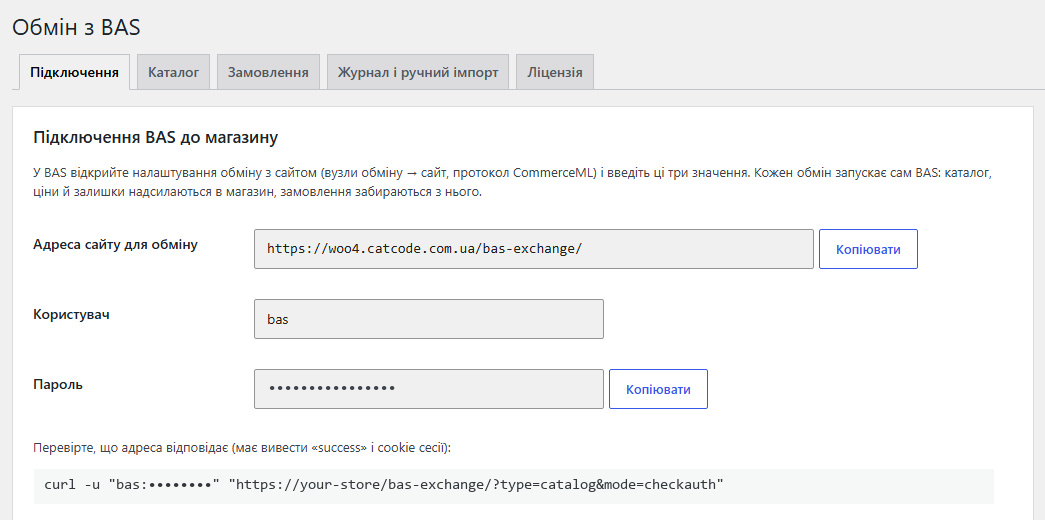
Connection tab: exchange address, user and password for BAS
Connection tab (admin in Ukrainian): the exchange address, user and password (hidden here) with Copy buttons, and the curl command that checks the address before BAS is set up.
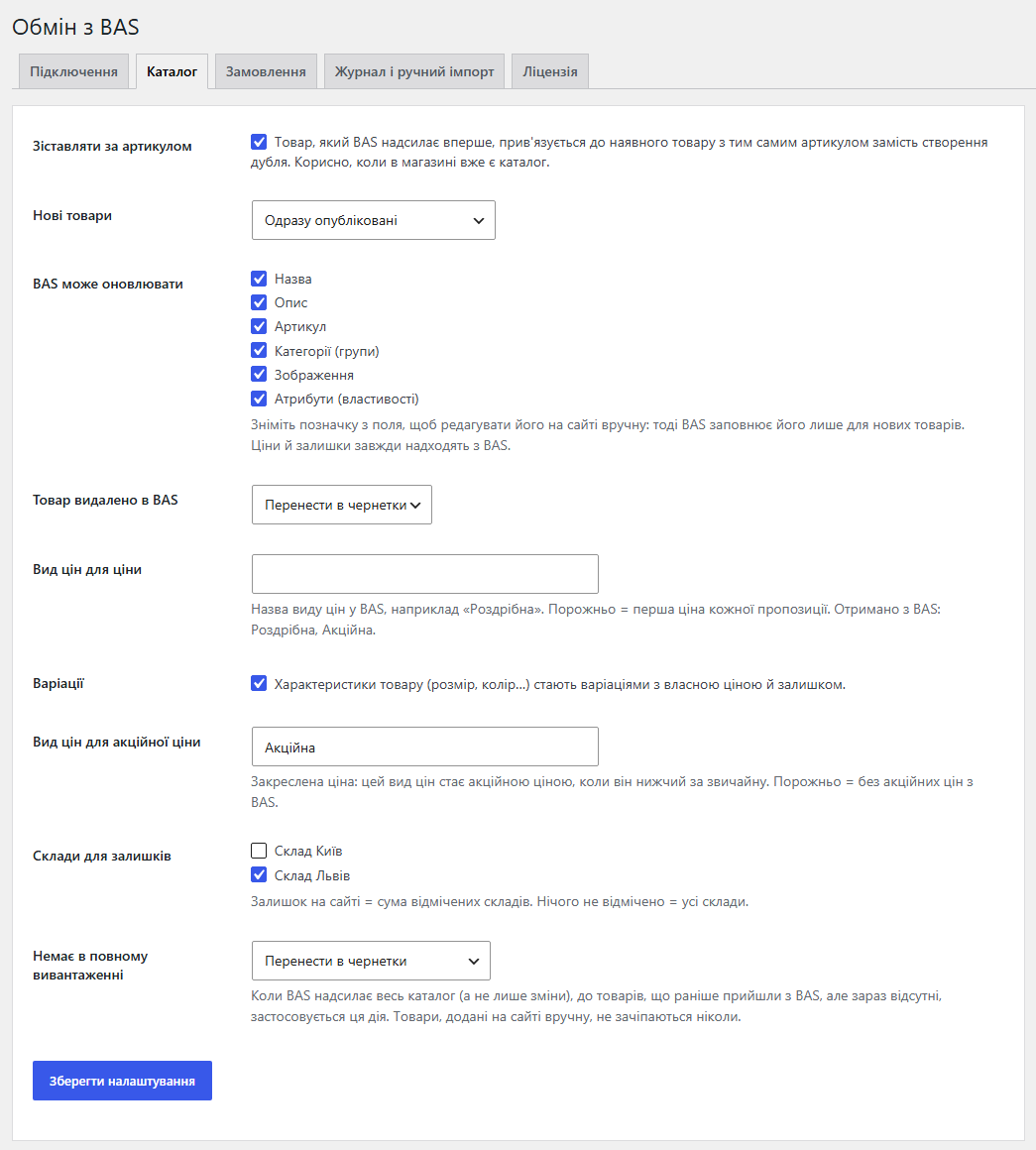
Catalog settings: SKU matching, fields, price types, variations, warehouses
Catalog tab: matching by SKU, status of new products, fields BAS may update, the price type for the price and the sale price, variations and warehouses. Price types and warehouses are taken from the very first exchange.
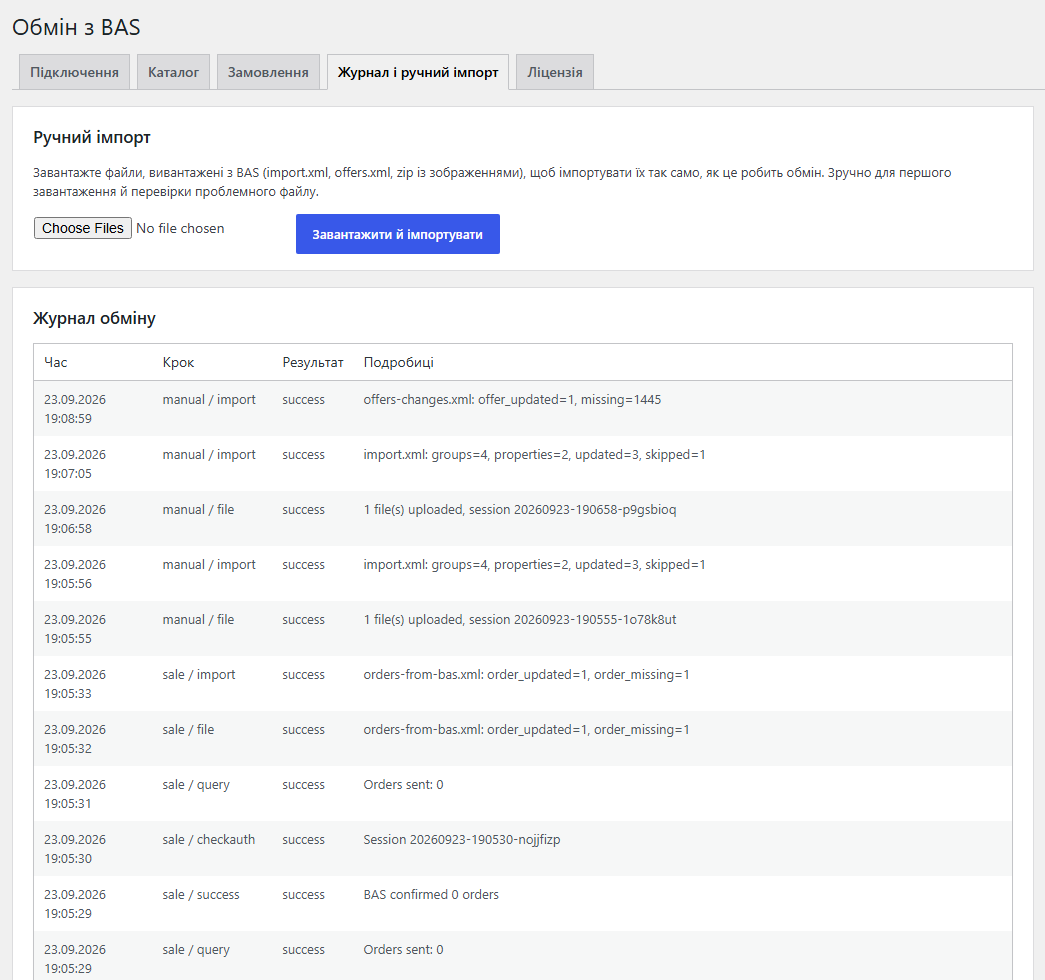
Exchange log and manual file import
Log and manual import tab: every exchange step with its result and details (how many categories, products and offers were processed, how many orders were sent) and a form for uploading BAS files by hand.

Key points

What the customer sees

Customers see on the site what is in BAS — and never see the exchange itself:

What the store admin gets

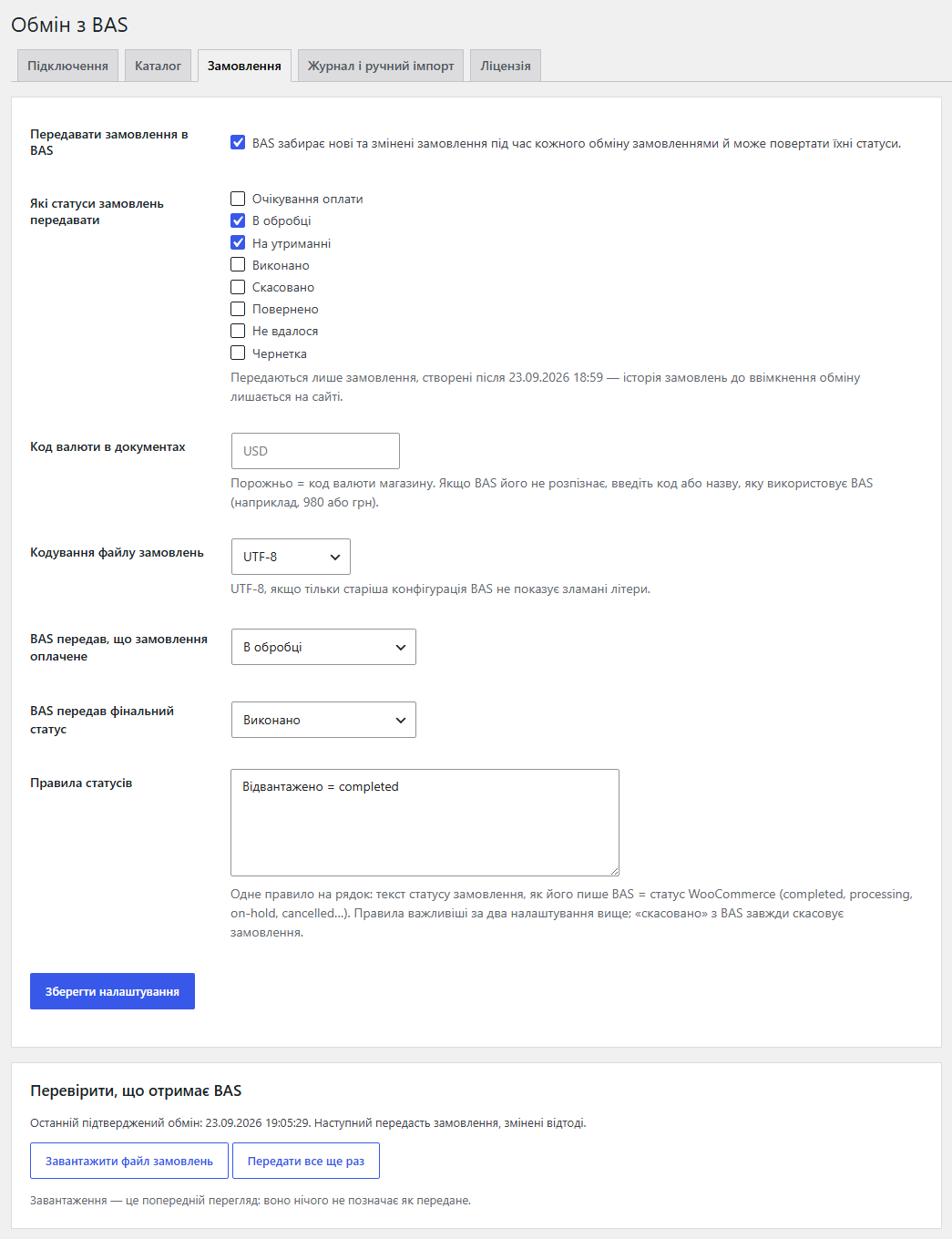
The WooCommerce → BAS Exchange page with the Connection, Catalog, Orders (Pro), Log and manual import, and Licence tabs.

The trial starts when you ask

A fresh install is the free version, nothing switches on by itself. The “Try Pro for 7 days” button → e-mail → the key right in the window and by e-mail.

One key — one site

Moving the store? Unbind the licence on the old domain and activate it on the new one yourself. If our server is unreachable, Pro keeps working for 14 more days. For studios — keys for 5 or 25 sites, or unlimited.

Technical requirements

  • BAS with website exchange over the CommerceML 2 protocol.
  • WooCommerce 7.0+, HPOS compatible, classic and block checkout.
  • WordPress 6.2+ · PHP 7.4+ with the XMLReader extension. The Zip extension is needed for archives; without it the module asks BAS to send files unpacked.
  • BAS must be able to reach the site over HTTP(S) at the exchange address. If the site is behind a firewall or a password, that address has to be let through.
  • The server’s request timeout must be longer than “Seconds per import step” (20 s by default).
  • Tested on WordPress 7.1 with WooCommerce 11.1, PHP 8.3 and 7.4, MySQL, with and without HPOS.

Version history

v1.0.0 Current

CommerceML 2 exchange point (authorisation, files in parts and zip, step-by-step import), groups → categories, products with pictures, properties → attributes, price from a price type,…

Frequently bought with BAS Exchange for WooCommerce

4 modules in one order — 40% cheaper than separately

“Store starter” bundle BAS Exchange Nova Poshta Premium LiqPay Telegram notifications and Viber/SMS for customers Need more — all 144 modules in All Access for 4 990 ₴.
3 890 ₴ / year instead of 6 460 UAH bought separately
Buy the bundle →

Full module description

BAS Exchange for WooCommerce connects a WooCommerce store with BAS over the CommerceML 2 protocol. Products, prices and stock are kept in BAS and the site receives them by itself: no CSV exports, no retyping prices by hand, and no “in stock” on the site for goods that are already gone from the warehouse. In the other direction (Pro), BAS collects orders from the site and sends their statuses back.

BAS starts every exchange: in its website exchange settings you enter the address, user and password from the Connection tab, and BAS then sends the catalog and offers and collects orders on schedule or on demand. The store answers exactly the way the protocol expects.

What the customer sees

Customers see on the site what is in BAS — and never see the exchange itself:

  • Up-to-date prices and availability. The price from the chosen price type, the stock and the in stock / out of stock status refresh with every exchange.
  • The catalog as in your accounting. BAS groups become categories with the same nesting, properties become attributes that filters work with.
  • Pictures and descriptions come with the product; a repeated exchange does not pile up copies in the media library.
  • Sizes and colours (Pro) — variations with their own price and stock, the sale price shown crossed out.
  • An item marked as deleted in BAS leaves the storefront (to drafts or trash, as you choose).

What the store admin gets

The WooCommerce → BAS Exchange page with the Connection, Catalog, Orders (Pro), Log and manual import, and Licence tabs. The screenshots show the admin in Ukrainian; the module interface is also in English and Russian.

  • Connected in a minute. The module creates the address, user and password itself — you only copy them into BAS. The user and password are separate; they are not a WordPress account.
  • Control over fields. Name, description, SKU, categories, pictures, attributes — each field can be left to BAS or kept editable on the site.
  • Price types and warehouses are read from the BAS files and listed in the settings — no guessing names.
  • The log records every exchange step with its result: what came in, how much was created and updated, what was skipped and why. The same log is in WooCommerce → Status → Logs.
  • Manual import — upload import.xml, offers.xml or a zip with pictures right in the admin and watch the step-by-step import. Handy for the first load and for checking a problem file.

Pro: orders, variations, warehouses, sale prices

  • Orders to BAS. During the order exchange BAS collects new and changed orders with the chosen statuses: customer, address, phone and e-mail, product lines with BAS ids, shipping and fees as services, payment method.
  • Statuses from BAS. Cancelled, paid, the final status and your own rules like “Shipped = completed”. Every change is written as an order note.
  • An honest “paid” flag. For cash on delivery only in the Completed status, for cards after the payment is confirmed.
  • Variations from product characteristics: size, colour and so on become variations with their own price and stock.
  • Sale price from a second price type (for example “Sale”) — when it is lower than the regular one.
  • Warehouses: the stock on the site is the sum of the ticked warehouses only.
  • Full upload: products that came from BAS earlier but are missing from a full upload go to drafts or out of stock. When they return in BAS, they are back on the site.

How it works, step by step

  1. BAS calls the exchange address with the user and password and gets a session.
  2. The store tells BAS whether it accepts zip archives and how large file parts may be — within what your server accepts.
  3. BAS sends the files: import.xml (groups, properties, products), offers.xml (prices and stock) and pictures — in parts or as one archive.
  4. The store imports a file in steps: when a step’s time is up, it answers “progress” and BAS repeats the request until the import is finished.
  5. Every product and category gets its BAS id, so the next exchanges update them instead of creating new ones.
  6. Exchange files are deleted right after import; the log keeps the result of every step.
  7. Pro: during the order exchange BAS gets a file with orders, confirms it, and next time gets only new and changed ones. Statuses from BAS come back in a separate file.

Under the hood

  • Streaming XML reading. Files are read one element at a time, not loaded whole into memory, so a large catalog does not hit memory_limit. Files in windows-1251 are read too.
  • Resumes where it stopped. The import state of every file is kept between steps; a repeated request from BAS continues instead of starting over.
  • Linked by BAS id in products, variations, categories and pictures: no duplicates on repeated exchanges or after renames.
  • Security. A separate user and password for BAS compared in constant time; file names are checked (no “../” and no executable extensions), zip archives are unpacked with protection against escaping the folder.
  • Files outside the public folder. The module picks a folder outside the site root for exchange files and deletes the XML right after import — order files included, as they hold personal data. The admin shows where the files are kept.
  • Sites on plain permalinks get an address like /index.php/bas-exchange/ that reaches WordPress without rewrite rules.
  • Cleans up after itself. With “Delete data on uninstall” ticked, deleting the module removes its settings, log, exchange folder and BAS ids; the products and categories themselves stay.

Installation

  1. Plugins → Add New → Upload Plugin, choose catcode-bas-exchange-for-woocommerce-free-1.0.0.zip (free version) or catcode-bas-exchange-for-woocommerce-1.0.0.zip (Pro) and activate it. WooCommerce must be active.
  2. WooCommerce → BAS Exchange → Connection: copy the exchange address, user and password. The curl command on the same tab checks that the address answers “success”.
  3. In BAS open the website exchange settings (CommerceML protocol) and paste the three values.
  4. On the Catalog tab choose which fields BAS may update, and keep “Match by SKU” on if the site already has products.
  5. Run the exchange in BAS. The result of every step is in the Log. After the first exchange pick the price type (and for Pro, the sale price type and warehouses).
  6. For Pro: paste the licence key from the e-mail you get after payment, or start the 7-day trial on the Licence tab, then switch the order exchange on.

Questions
about the module

Didn't find the answer? Message us on Telegram and we'll reply within a business day.

@catcode_support Setup, compatibility, activation
Where do I find the address for BAS?

WooCommerce → BAS Exchange → Connection. It shows the exchange address, user and password with Copy buttons, plus a curl command to check it: the answer must start with "success". BAS adds the protocol parameters to the address by itself.

Has the module been tested with a live BAS?

No. The exchange was tested with a CommerceML 2 protocol simulator playing the part of BAS: the same requests, files in parts and as an archive, large catalogs, orders and statuses. Run your first exchange with your BAS during the 7-day trial; if something goes wrong, the log shows at which step, and we fix it quickly.

Will the exchange overwrite descriptions I wrote on the site?

Only the fields ticked in Catalog → "BAS may update". Untick "Description" and BAS fills it only for new products. Prices and stock always come from BAS.

The store already has products. Will there be duplicates?

No, with "Match by SKU" on: a product BAS sends for the first time is linked to the existing product with the same SKU. After that the link is kept by the BAS id, so renaming an item in BAS updates the same product.

A large catalog breaks off during import.

Lower "Seconds per import step" on the Connection tab below your server's request timeout (20 seconds by default). The store answers "progress" and BAS repeats the request until the whole file is imported.

Will my whole order history go to BAS?

No. Only orders with the chosen statuses created after the order exchange was switched on are sent. If BAS missed something, "Send everything again" sends those orders once more.

How does BAS know an order is paid?

The "paid" flag is set only when the money has actually arrived: for card payments after the payment is confirmed, for cash on delivery only in the Completed status. Processing is not treated as paid for cash on delivery.

Can I try it without BAS?

Yes. Export import.xml and offers.xml from BAS (or any CommerceML 2 files) and upload them on the "Log and manual import" tab — they are imported exactly like an exchange.

My site uses plain permalinks. Does it work?

Yes. The Connection tab then shows an address like /index.php/bas-exchange/ — that is the one to paste into BAS.

Not quite what you are looking for?

We build custom modules for WordPress, WooCommerce, OpenCart and Shopify. Tell us about the task and we'll prepare an estimate.

Order a custom module