WordPress
NAV Online Számla for WooCommerce — Hungarian invoices from orders reported straight to NAV (API 3.0)
Free + Pro
990 UAH/year
v1.0.0
Enter at least 2 characters

Hungarian invoices from WooCommerce orders, reported straight to NAV Online Számla through API 3.0 with your own technical user — no paid invoicing service in between. Number, NAV status and warnings in the order, adószám field at checkout, a printable invoice for the customer once NAV has processed it, a retry queue, TEST and PRODUCTION. Pro adds modifying and cancelling invoices from refunds and cancellations, foreign buyers and currencies, adószám check at NAV, bulk sending, CSV and e-mail alerts.
The free version works with no time limit. Pro adds the rest of the features in the table.



A fresh install is the free version, nothing switches on by itself. The “Try Pro for 7 days” button → e-mail → the key right in the window and by e-mail.

Moving the store? Unbind the licence on the old domain and activate it on the new one yourself. If our server is unreachable, Pro keeps working for 14 more days. For studios — keys for 5 or 25 sites, or unlimited.
 WooCommerce 8.0+ with the classic or block checkout, HPOS compatibleWordPress 6.2+ · PHP 7.4+ with hash (SHA3-512), OpenSSL and DOMRegistration in Online Számla and a technical user with a signature key and an exchange key; separate ones for the NAV test systemCurrency — HUF in the free version; other currencies with the HUF exchange rate in ProWooCommerce taxes with Hungarian rates (27/18/5/0%), or prices including VAT at one rate from the settingsNot supported: OSS sales to private persons in other EU countries (orders with a non-Hungarian VAT rate are stopped with an explanation)Plugin languages: English and Hungarian.
NAV Online Számla API 3.0 (tokenExchange, manageInvoice, queryTransactionStatus, queryTransactionList), checks against the official XSD and the NAV blocking rules, retry queue with…
4 modules in one order — 40% cheaper than separately



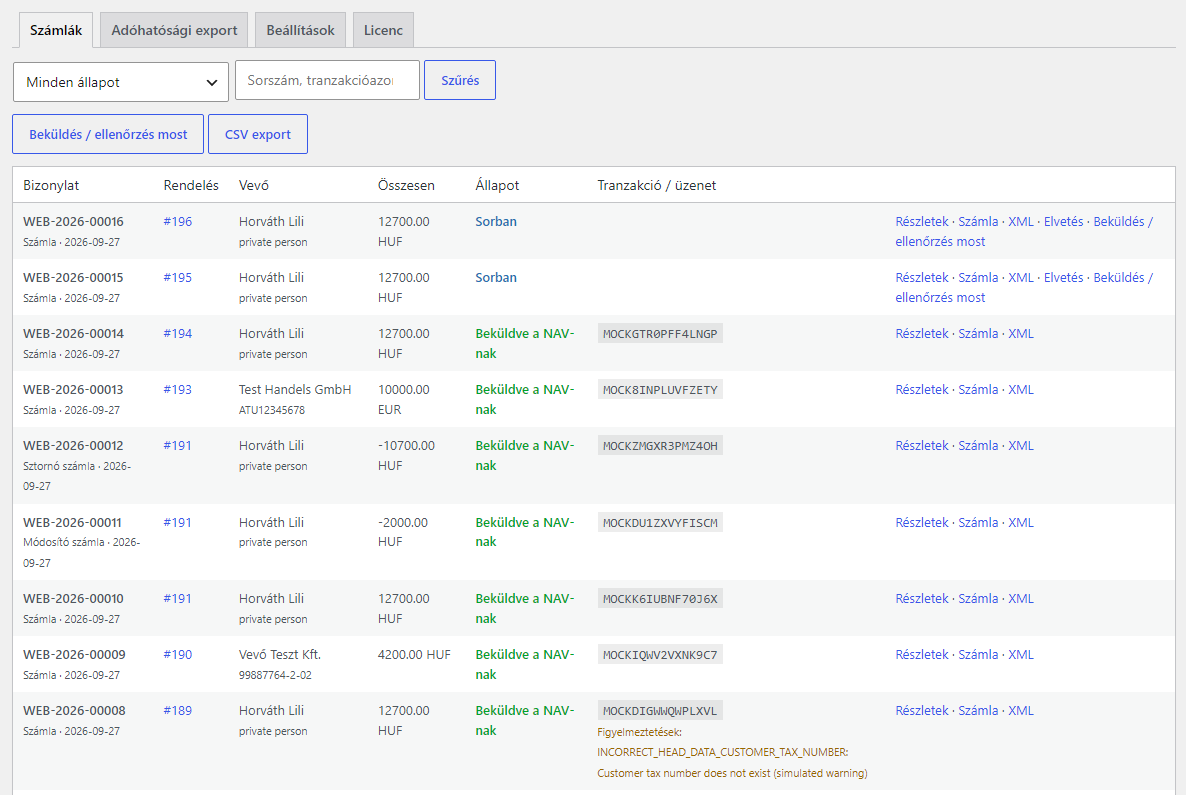
NAV Online Számla for WooCommerce is a plugin for shops in Hungary that sell on WooCommerce and have to report every invoice they issue to the Online Számla system of the Hungarian tax authority NAV. The plugin issues an invoice from the order and reports its data to the NAV Online Számla API 3.0 on behalf of your own technical user — the way invoicing programs do it, but without a paid service in between and without a monthly subscription. The invoice number, the transaction ID, the processing status and the NAV warnings are kept with the order.
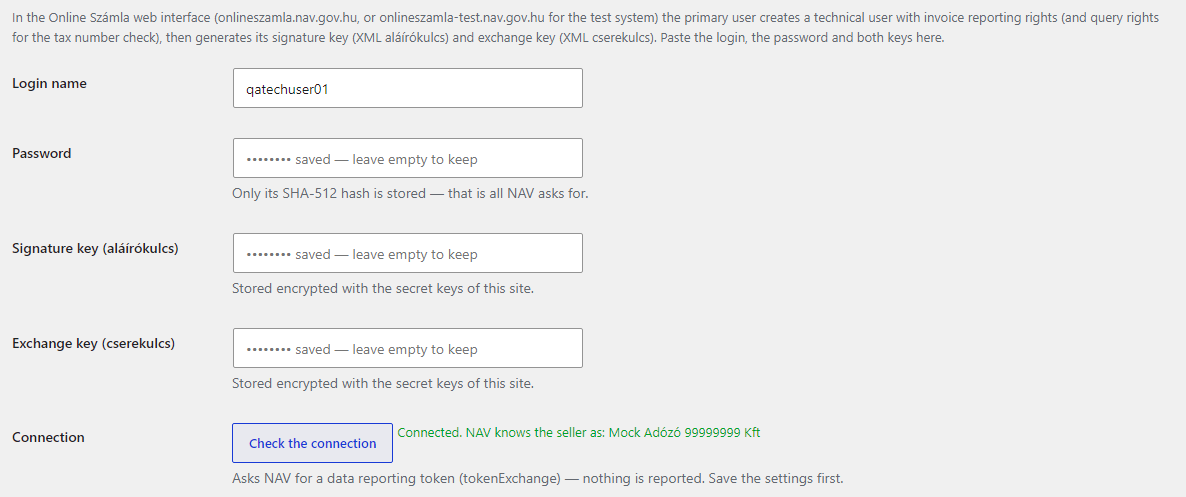
What you need. A company registered in Online Számla; a technical user, created by the primary user in the Online Számla web interface, with the right to report invoices; and its two keys — the signature key (XML aláírókulcs) and the exchange key (XML cserekulcs). The NAV test system (onlineszamla-test.nav.gov.hu) needs a separate registration and a separate technical user. Without them the plugin reports nothing: invoices wait in the queue and a reminder stays at the top of the admin.
Honestly about testing. The plugin has been tested on a local WooCommerce shop with the built-in NAV simulator, which reproduces the answers described in the official API 3.0 specification: DONE with warnings, ABORTED with errors, maintenance, NAV unreachable, a lost answer, a duplicate number. The request signatures, the password hash and the token decryption match the test examples of the NAV specification, and every generated document — invoices to private persons and companies, modifying and cancelling invoices, EU buyers — passed the official NAV XSD. We have not yet run it against the live NAV, test or production: that takes a registered Hungarian company. Start with the NAV test system for your company during the 7-day Pro trial — if NAV answers differently from the specification, we fix it promptly.
Responsibility for the content of the invoice and the report stays with the shop. The plugin builds the invoice from the WooCommerce order data and from the VAT settings you choose: the cases for lines without VAT (TAM, ATK, AAM), foreign buyers (KBAET, EUFAD37, EAM, HO), paper or electronic invoice. An online shop that issues its own invoices effectively becomes an invoicing program, and Decree 23/2014 NGM sets rules for such programs — notifying NAV about the program, keeping documentation, providing an export for audits. Of these the plugin covers only the document export; check the rest with your accountant before switching to PRODUCTION.
Every order has a “NAV Online Számla” box: the invoice number, the buyer type (“Private person”, “Hungarian company”, “Other / foreign”), the status (“Queued”, “Processing at NAV”, “Reported to NAV”, “Rejected by NAV”) and the transaction. An order without an invoice gets an “Issue and report” button, and if an invoice cannot be built, the box says what is missing. The order notes record every step.
A rejected invoice shows up right away: in the register, in the order and in the notice at the top of the admin, next to the NAV error codes and texts. Once the order is fixed, “Rebuild and send” rebuilds the invoice with the same number: the customer only sees an invoice after NAV has processed it, so the rejected document never reached them. A document you don’t need — “Discard”. If NAV answered INVOICE_NUMBER_NOT_UNIQUE because it already has this invoice — “Mark as reported”.
The checkout gets a “Tax number (for a company invoice)” field (“Adószám (céges számlához)” in Hungarian) and, while WooCommerce hides its own “Company” field, “Company name (for the invoice)”. Without a number the order is placed as a private person. When a number is entered, the plugin checks the check digit and the format (8 or 11 digits, spaces removed) and does not accept a number without a company name. The field can be made required for a B2B shop, hidden, or read from the order meta of another plugin. It works on the classic and the block checkout.
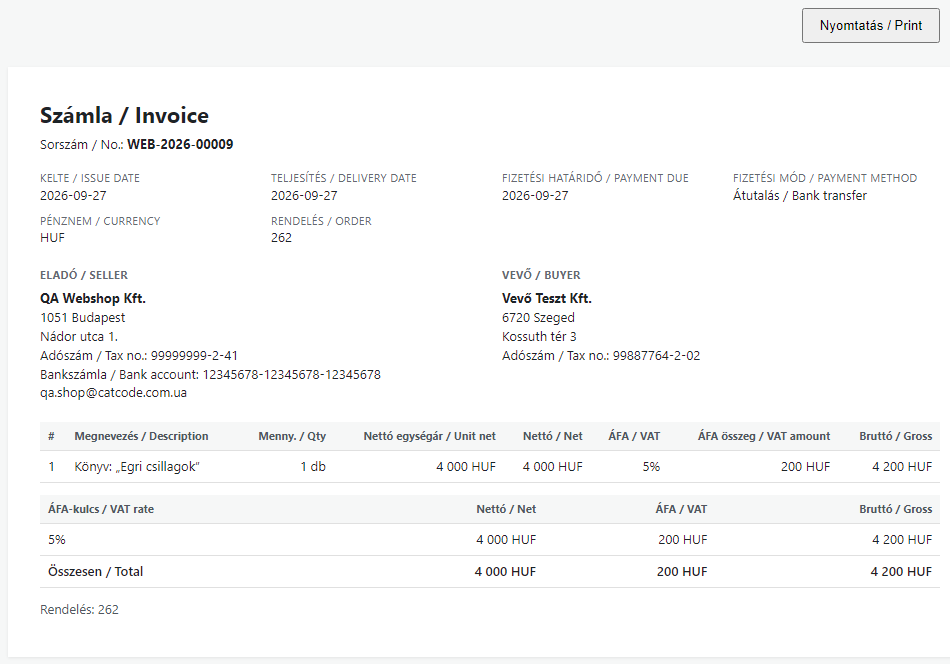
Once NAV has processed the invoice, the customer gets an e-mail in the standard WooCommerce template with a link to it, and an “Invoice” block appears in My Account and on the order page. The printable page carries Hungarian and English labels: Számla, Eladó / Seller, Vevő / Buyer, adószám, delivery date, payment method, ÁFA by rate and totals. A guest opens the invoice with the order key; another user cannot.
VAT comes from the WooCommerce taxes of each order: 27%, 18%, 5% and 0%, several rates on one invoice. For domestic lines without VAT you choose the case once — TAM (exempt activity), ATK (outside the scope of VAT) or the 0% rate; until you do, such invoices are not created. A seller under alanyi adómentes reports every line as AAM, and pénzforgalmi elszámolás has its own switch.
Tax audit export (Decree 23/2014 NGM § 11/A): the “Tax authority export” tab gives a ZIP with every document of a date or number range — each as the InvoiceData XML NAV received — plus index.csv.
Pro. A WooCommerce refund — by item or by amount — gives a modifying invoice (MODIFY), cancelling an invoiced order gives a cancelling invoice (STORNO). A document of the chain is built when it is sent, after NAV has processed the original and the earlier changes: with the right modification index and continued line numbering. EU companies with a VAT number get their lines without VAT as KBAET or EUFAD37, buyers outside the EU as EAM or HO; orders in EUR and other currencies use the HUF exchange rate from the settings. The bulk action “Report to NAV (invoice)” in the orders list issues invoices for past orders.
CCNAV_LOGIN, CCNAV_PASSWORD, CCNAV_SIGN_KEY, CCNAV_EXCHANGE_KEY in wp-config.php.CCNAV_NAV_MOCK constant in wp-config.php simulates NAV answers in the test environment only — to try the shop without a registration.CCNAV_DELETE_DATA constant removes everything.nav-online-szamla-for-woocommerce-1.0.0.zip and activate it.Didn't find the answer? Message us on Telegram and we'll reply within a business day.
 @catcode_support
Setup, compatibility, activation
@catcode_support
Setup, compatibility, activation
Your company registered in the Online Számla system and a technical user created by the primary user, with its signature key (XML aláírókulcs) and exchange key (XML cserekulcs). The login, the password and both keys go into the plugin settings. The NAV test system (onlineszamla-test) needs a separate registration and a separate technical user.
On a local WooCommerce shop with the built-in NAV simulator, which reproduces the answers described in the official API 3.0 specification. The request signatures match the test examples of the NAV specification, and every generated XML passed the official NAV XSD. It has not yet run against the live NAV — neither the test nor the production system: that takes a registered Hungarian company. Try it with your company in the NAV test system during the 7-day Pro trial.
The free version issues invoices in HUF only. Pro adds EUR and other currencies with the HUF exchange rate from the settings or from the ccnav_exchange_rate filter; there is no automatic rate download.
No. An order with a non-Hungarian VAT rate is stopped before reporting, with an explanation; the OSS scenario is not implemented in this version.
The shop. The plugin builds the invoice from the order data and the VAT settings you choose. The cases without VAT (AAM, TAM, ATK, KBAET, EAM…), how the invoice reaches the customer and the rules for invoicing programs (Decree 23/2014 NGM) are questions for your accountant; show them the settings before switching to PRODUCTION.
The password only as its SHA-512 hash (that is all NAV needs). The signature key and the exchange key are stored encrypted with the secret keys of your site, or defined as constants in wp-config.php.
No reviews yet. Be the first.
No questions yet. Ask one — we answer within 24 hours.
We build custom modules for WordPress, WooCommerce, OpenCart and Shopify. Tell us about the task and we'll prepare an estimate.
Order a custom module
—

CatCode assistant
Just now


CatCode assistant
Online

I’ll help with your website task
Describe your website task — I’ll find a ready-made module or pass it to a developer for an estimate. Modules, custom features, layout, integrations, speed, migration, technical SEO.
