WordPress
BFSG Accessibility for WooCommerce — accessibility information (Informationen zur Barrierefreiheit) and a WCAG check of the checkout
Free + Pro
990 UAH/year
v1.0.0
Enter at least 2 characters
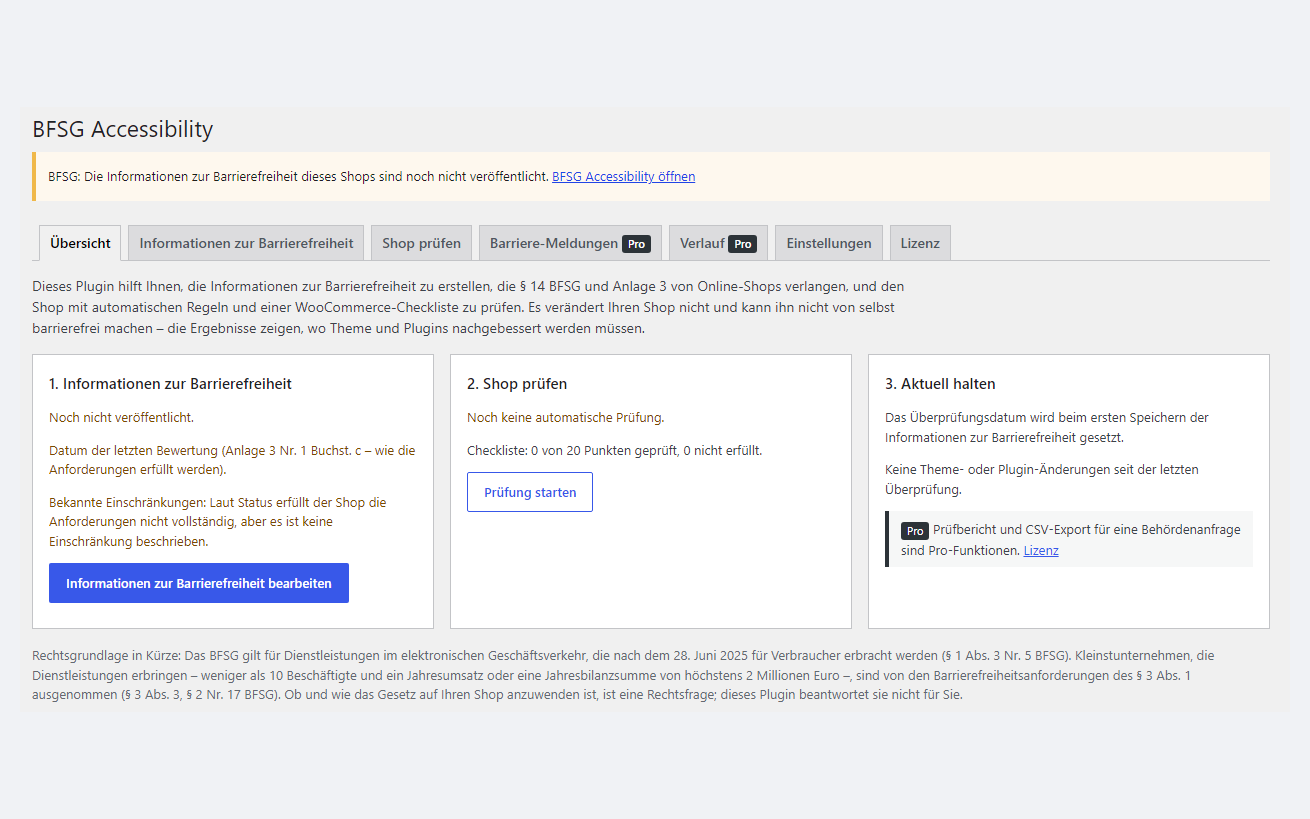
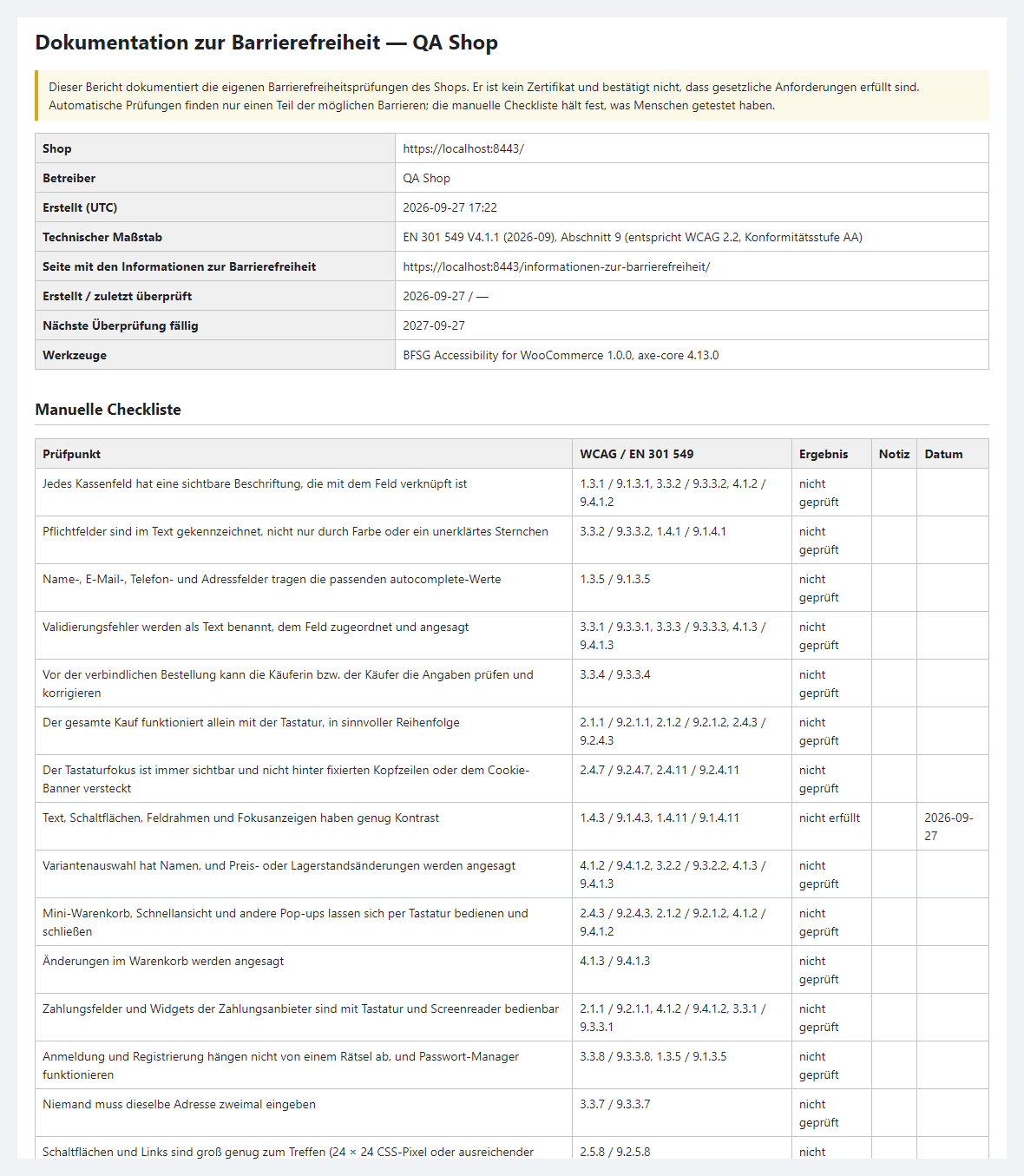
A plugin for German WooCommerce shops: it helps you write and publish the "Informationen zur Barrierefreiheit" required by § 14 BFSG and Annex 3, and checks the cart, the checkout and a product page against WCAG 2.1/2.2 (axe-core plus rules written for WooCommerce) with a 23-item checklist. Nothing changes on the storefront — no overlays, no toolbars. The base version is free; Pro adds the information in German and English at once, a check of the whole Annex 1 page sample, run history, a printable report and a barrier report form.
The free version works with no time limit. Pro adds the rest of the features in the table.


For the shopper nothing changes: no panels, no plugin scripts, no pop-ups. The only new thing is the “Informationen zur Barrierefreiheit” page, easy to find through a footer link or your own menu.

The menu WooCommerce → BFSG Accessibility, seven tabs: “Overview”, “Accessibility information”, “Check the shop”, “Barrier reports” (Pro), “History” (Pro), “Settings”, “Licence” — in English or German, depending on the admin language.

Pro checks the whole page sample described in BFSG Annex 1 in one click: home, shop, category, search, “Mein Konto” as a guest sees it, contact, AGB, Datenschutz, the barrier report form and the information page — and the admin stays logged in after the run. “History” keeps every run and shows what is new and what was fixed.

A fresh install is the free version, nothing switches on by itself. The “Try Pro for 7 days” button → e-mail → the key right in the window and by e-mail.

Moving the store? Unbind the licence on the old domain and activate it on the new one yourself. If our server is unreachable, Pro keeps working for 14 more days. For studios — keys for 5 or 25 sites, or unlimited.
 WordPress 6.2+ and WooCommerce 7.0+. End-to-end run on WordPress 7.1 and WooCommerce 11.1.PHP 7.4+. End-to-end run on PHP 8.3; on 7.4 the syntax and the offline tests.Checkout — classic and block; both tested.Languages. Interface in English and German, the information in German or English.Frames. If the server or a security plugin forbids showing the site in a frame (X-Frame-Options, CSP frame-ancestors), use “Run in a new tab”.Admin browser. The check runs in the administrator’s browser. The scanner was tested end to end in Chromium; the visitor pages also in WebKit (Safari) at 390 px.
First public release: the “Informationen zur Barrierefreiheit” wizard under § 14 BFSG and Annex 3 with data from WooCommerce and the MLBF authority, a page with a shortcode and a footer…
4 modules in one order — 40% cheaper than separately



BFSG Accessibility for WooCommerce is a plugin for shops covered by the German Barrierefreiheitsstärkungsgesetz (BFSG). Since 28 June 2025 the law applies to e-commerce services provided to consumers, and a shop has to publish “Informationen zur Barrierefreiheit”: how the service meets the accessibility requirements (§ 14 (1) no. 2 BFSG together with Annex 3). The plugin does two things: it helps you write and publish this information, and it checks the pages that matter most — cart, checkout, product page — against WCAG.
What it does not do: it adds no overlays, toolbars or “accessibility buttons” to the storefront, and it does not make a shop accessible by itself. It shows where your theme and plugins have barriers; the fixes belong there. The evaluation in the information is your own statement, and the plugin’s report is marked plainly as “kein Zertifikat”. Micro-enterprises — fewer than 10 employees and a turnover or balance sheet total of up to EUR 2 million — are exempt from the accessibility requirements for services (§ 3 (3) BFSG). The plugin is for the shops the law does cover, and for agencies that look after several of them.
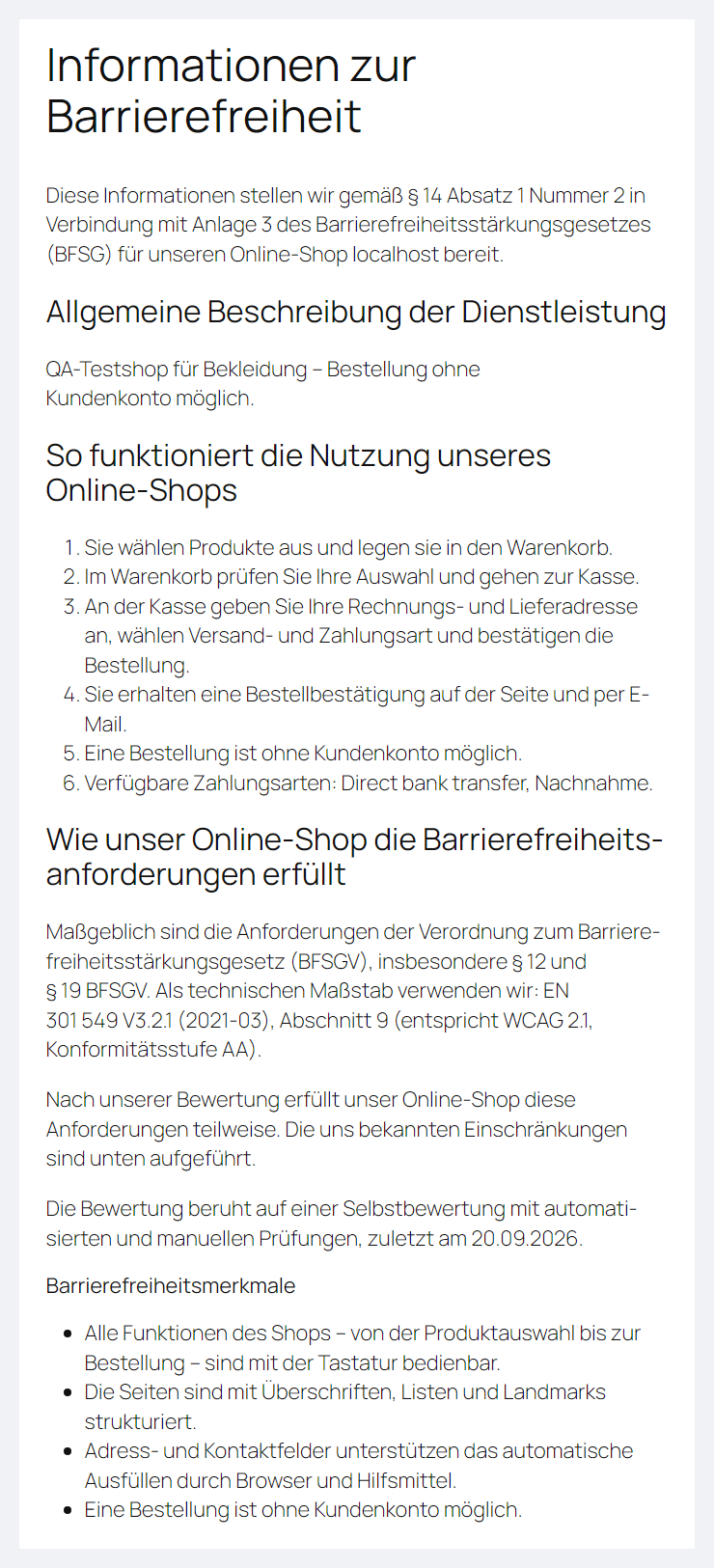
For the shopper nothing changes: no panels, no plugin scripts, no pop-ups. The only new thing is the “Informationen zur Barrierefreiheit” page, easy to find through a footer link or your own menu. It is built from headings and lists and passes the check itself: axe in the browser on the information page — 0 violations; at 390 and 320 px long German words such as “Marktüberwachungsbehörde” wrap without horizontal scrolling.
With Pro, visitors see the information in their language (German or English) with a switch to the other one, and the “Barrieren melden” form lets them report a barrier: errors appear as a summary with links to the fields, and there is no CAPTCHA — a hidden field, a signed timestamp and a rate limit keep bots out.
The menu WooCommerce → BFSG Accessibility, seven tabs: “Overview”, “Accessibility information”, “Check the shop”, “Barrier reports” (Pro), “History” (Pro), “Settings”, “Licence” — in English or German, depending on the admin language. Until the information is published, the admin shows a notice with a “Remind me in 14 days” button.
The information. The form follows Annex 3 no. 1 a–d: a general description of the service; how a purchase works — the plugin fills in from WooCommerce whether guests can order and which payment methods are active; how the requirements are met — the benchmark (EN 301 549 V3.2.1 = WCAG 2.1 AA or V4.1.1 = WCAG 2.2 AA), the result of your evaluation (met in full, in part or not), method and date, accessibility features, known limitations, alternative ways to get in touch. Then the contact for accessibility questions and the market surveillance authority: prefilled with the joint authority of the German federal states, MLBF (Carl-Miller-Straße 6, 39112 Magdeburg, e-mail), from its official website. The phone number is left empty on purpose — the MLBF website announced a number change; check the authority details before you publish. Optionally, a sentence on the consumer’s right to apply to the authority (§ 32 BFSG). The “Create the page” button creates the page with the shortcode, and a switch in the settings adds a link to it in the footer.
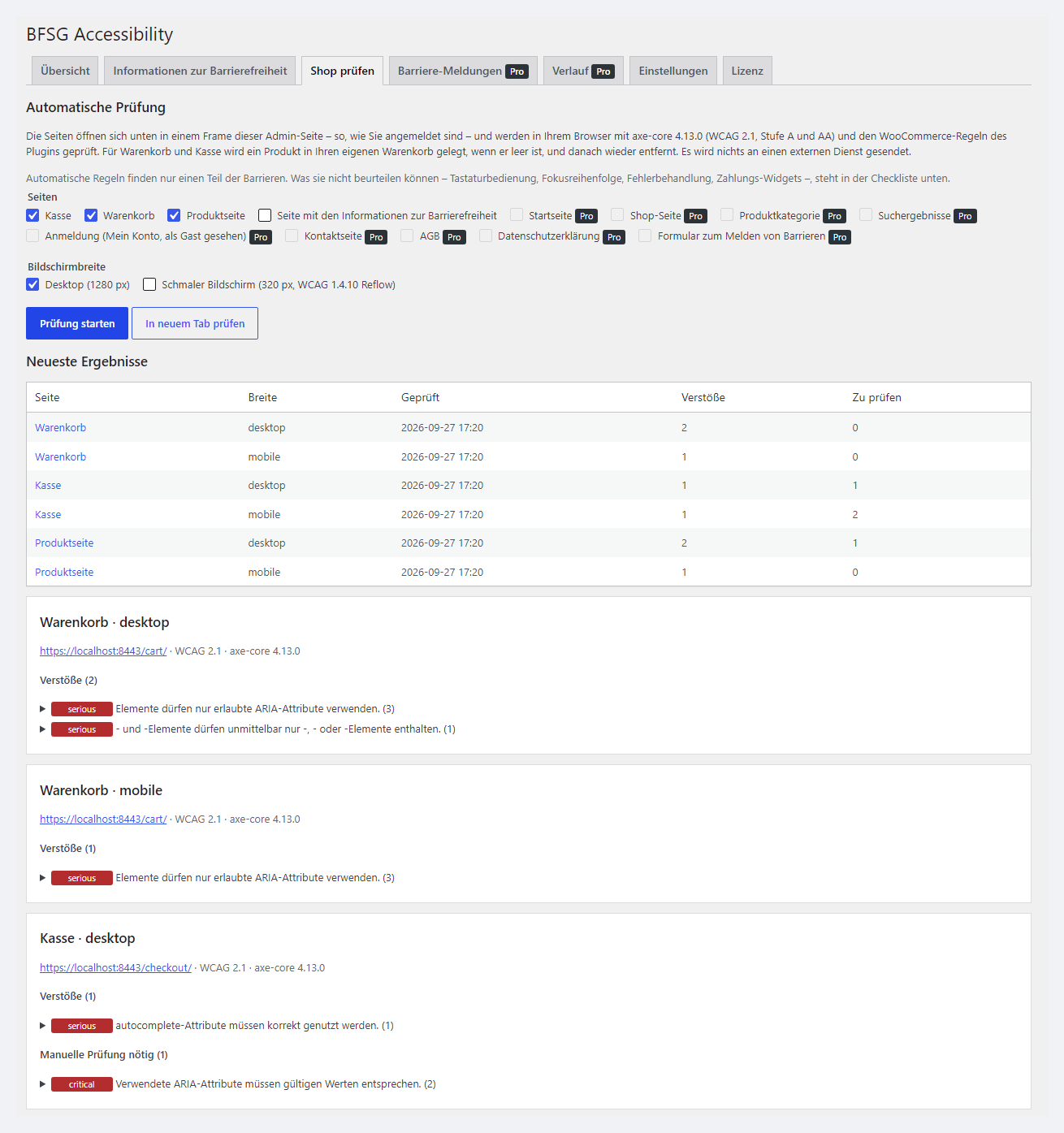
Checking the shop. On the “Check the shop” tab pick the pages and screen widths and click “Run the check”. The pages open in a frame of the admin page — as you see them while logged in — and are checked in your browser with axe-core 4.13.0 against WCAG 2.1 or 2.2, Levels A and AA, plus the rules written for WooCommerce. For cart and checkout the plugin puts one product in your own cart and removes it after the run. Every finding carries a severity, a WCAG criterion and an EN 301 549 clause.
WooCommerce checklist. 23 items (20 for WCAG 2.1) on what automation cannot see: can a purchase be made with the keyboard alone, is the focus visible, are errors and cart changes announced, do payment widgets work with a screen reader, does anyone have to type the same address twice. Every item has “how to check”. A failing item with a public explanation goes straight into “Bekannte Einschränkungen” (known limitations) of the information. If you choose “erfüllt” (meets the requirements) while the checklist or the scanner show failures, the plugin warns you in red.
Keeping it current. The law requires changes to the service to be taken into account (§ 14 (3) BFSG). The plugin records theme switches and theme, plugin and WordPress updates since the last review and reminds you to review the information at an interval you set (12 months by default).
Pro checks the whole page sample described in BFSG Annex 1 in one click: home, shop, category, search, “Mein Konto” as a guest sees it, contact, AGB, Datenschutz, the barrier report form and the information page — and the admin stays logged in after the run. “History” keeps every run and shows what is new and what was fixed. The printable or PDF “Audit report” and the CSV bring together the benchmark, the dates, the manual checklist and the latest automated runs — for when the authority asks for information (§ 14 (5)). For agencies there is export and import of settings, information and checklist as JSON, and reminders and change digests can go to several recipients.
Pro is 990 UAH, a one-year licence. A year of updates, technical support and all Pro features. You can take a longer term straight away — the longer, the cheaper per year:
No automatic charges: you renew by hand, and reminders come by e-mail. A purchased licence keeps the Pro features for good — when the term ends, the shop only stops getting new versions and support. One key, one domain.
Trial first, then pay. The 7-day Pro trial starts with the “Try Pro free for 7 days” button on the “Licence” tab; the key comes by e-mail, no card needed. When the trial ends only the Pro features switch off; the information and the base check keep working.
vendor/axe-core/. The 580 KB file loads only in scan mode for an admin with a nonce and the manage_woocommerce capability; visitors never get it.define( 'CCBF_DELETE_DATA', true ); in wp-config.php the tables and options are removed. The information page stays as ordinary site content.catcode-bfsg-accessibility-for-woocommerce-1.0.0.zip with the button at the top of this page: Plugins → Add New → Upload Plugin → Install → Activate. It is the same archive as for Pro: Pro switches on with a key or the trial.Didn't find the answer? Message us on Telegram and we'll reply within a business day.
 @catcode_support
Setup, compatibility, activation
@catcode_support
Setup, compatibility, activation
No, and no plugin can. It helps you write the accessibility information you have to publish and shows where your theme and plugins have barriers. The fixes belong in the theme and plugins, and the evaluation in the information is your own statement. The report says plainly: "kein Zertifikat".
Since 28 June 2025 the law applies to e-commerce services provided to consumers (§ 1 (3) no. 5 BFSG). Micro-enterprises providing services — fewer than 10 employees and an annual turnover or balance sheet total of up to EUR 2 million — are exempt from the accessibility requirements (§ 3 (3), § 2 no. 17 BFSG). Whether the law covers your shop is a legal question; the plugin does not answer it, so ask a lawyer if in doubt.
Because an overlay does not make a site accessible: checkout fields, focus and messages stay the way the theme built them. The plugin adds nothing to the storefront — no scripts, no panels. Visitors only see the information page (and, with Pro, the barrier report form).
No. Automated rules catch only part of the barriers. Keyboard use, focus order, error handling, payment widgets and screen reader use need a person — that is what the checklist with instructions for every item is for.
No. The check runs in the administrator's browser; the page and the result never leave the site. The only external request is the licence check against catcode.com.ua when you enter a key or start the trial.
A security plugin or the server forbids showing the shop in a frame (X-Frame-Options, Content-Security-Policy frame-ancestors). Click "Run in a new tab" — the page is checked in a new tab with the same result.
The plugin is built for the German market: the admin is in English and German, the information is published in German or English (both at once with Pro).
The base version is free. Pro is 990 UAH per year, and a longer term is cheaper: 2 years — 1,880 UAH, 5 years — 3,710 UAH. No automatic charges. A purchased licence keeps the Pro features for good; the term covers updates and support.
No reviews yet. Be the first.
No questions yet. Ask one — we answer within 24 hours.
We build custom modules for WordPress, WooCommerce, OpenCart and Shopify. Tell us about the task and we'll prepare an estimate.
Order a custom module
—

CatCode assistant
Just now


CatCode assistant
Online

I’ll help with your website task
Describe your website task — I’ll find a ready-made module or pass it to a developer for an estimate. Modules, custom features, layout, integrations, speed, migration, technical SEO.
