WordPress
Age Verification 18+ for WooCommerce — customer age check per product and category, checkout blocking, verification log for DE/AT/CH
Free + Pro
990 UAH/year
v1.0.1
Enter at least 2 characters
A WooCommerce plugin for shops selling alcohol, tobacco, vapes, knives, fireworks or chemicals into Germany, Austria and Switzerland. The minimum age is set on a category, product or variation; the customer gives a date of birth only when such a product is actually in the cart, and an order without confirmation goes through neither the classic nor the block checkout. The answer is written into the order and into a verification log. The base version is free; Pro adds a minimum age per delivery country with DE/AT/CH presets, limited shipping and payment methods, a delivery note and CSV export of the log.
The free version works with no time limit. Pro adds the rest of the features in the table.


The customer opens a product with a minimum age — an 18+ badge sits next to the name.

The settings live under WooCommerce → Age verification in four tabs: “Log”, “Settings”, “Rules” and “Licence”.

Age limits differ between countries, so Pro lets you set a minimum age per delivery country — for everything restricted or for a specific category.

A fresh install is the free version, nothing switches on by itself. The “Try Pro for 7 days” button → e-mail → the key right in the window and by e-mail.

Moving the store? Unbind the licence on the old domain and activate it on the new one yourself. If our server is unreachable, Pro keeps working for 14 more days. For studios — keys for 5 or 25 sites, or unlimited.
 WordPress 6.2+ and WooCommerce 7.0+. End-to-end run on WordPress 7.1 and WooCommerce 11.1.PHP 7.4+. The full shop run was on PHP 8.3; on 7.4 the syntax and the plugin’s own tests were checked.Checkout. Classic (shortcode) and block — both tested. Orders — HPOS and legacy storage.Themes. Tested with Twenty Twenty-Five and Storefront; the gate uses the theme font.Page cache. The gate asks the server whether to open, so a cached page neither shows it again to someone who has answered nor hides it from a new guest. Tested live with WP Super Cache; other caches were not. Pages without age-restricted products make no extra request.Languages. Interface and gate in English and German (de_DE). No Ukrainian or Russian: the plugin is made for the DACH market.
First public release as Age Verification 18+ for WooCommerce.
4 modules in one order — 40% cheaper than separately



Age Verification 18+ for WooCommerce is a plugin for shops that sell age-restricted goods into Germany, Austria and Switzerland: alcohol, tobacco and vapes, knives, fireworks, hazardous chemicals. Most age-check plugins put a single splash screen in front of the whole website. For a mixed shop that is awkward: someone buying shampoo gets asked their age, and nothing ends up in the order.
Here the age belongs to the goods. You give a category (or a single product or variation) its minimum age, and the shop asks only when such a product is actually in the cart: on the product page, on adding to cart and before checkout. An order without confirmation goes through neither the classic nor the block checkout — the check sits on the server, not only in the dialog. The answer is written into the order and into a log the shop can show when asked whether it checked the age.
What the plugin does not do. A date of birth typed into a browser is a statement by the customer, not an identity check. The plugin does not replace identification and does not make a shop “legally compliant” by itself: whether such a process is enough for your goods is for your legal adviser to decide. It documents that the shop asked, stops orders that fail the rule and, in Pro, lets you close the gap where it can really be closed — on delivery, with a carrier that checks the ID at hand-over.
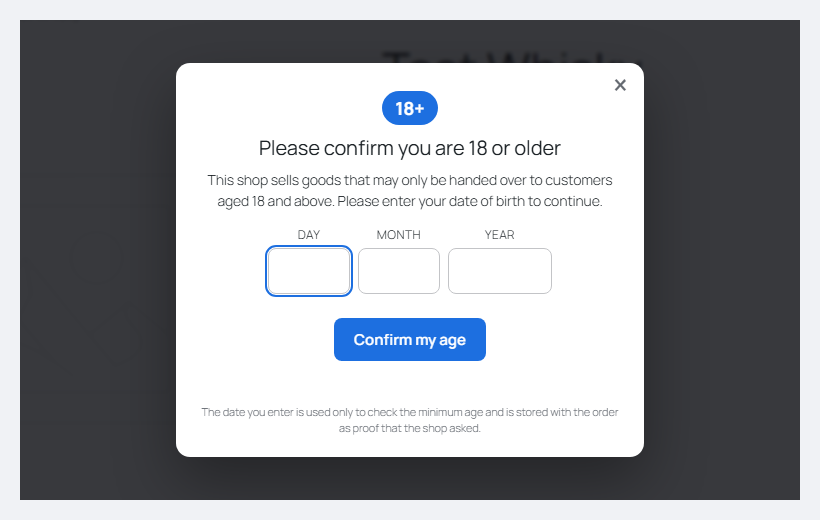
The customer opens a product with a minimum age — an 18+ badge sits next to the name. If the product-page question is on, the gate opens straight away; if not, it appears when the customer clicks “Add to cart” or goes to checkout. The gate has three fields: day, month and year of birth. The cursor is already in the first field and moves on by itself once a number is entered. Instead of a date you can switch on one-click confirmation — a lighter variant that proves less.
An adult date closes the gate, the answer is remembered for the chosen period (30 days by default) and the product goes into the cart. A date that makes the customer younger than required is refused; after three such attempts (the number is configurable) the gate locks, and the customer can be sent to a page of yours, for example one explaining the age limits. Ordinary products without an age are bought as usual, with no questions.
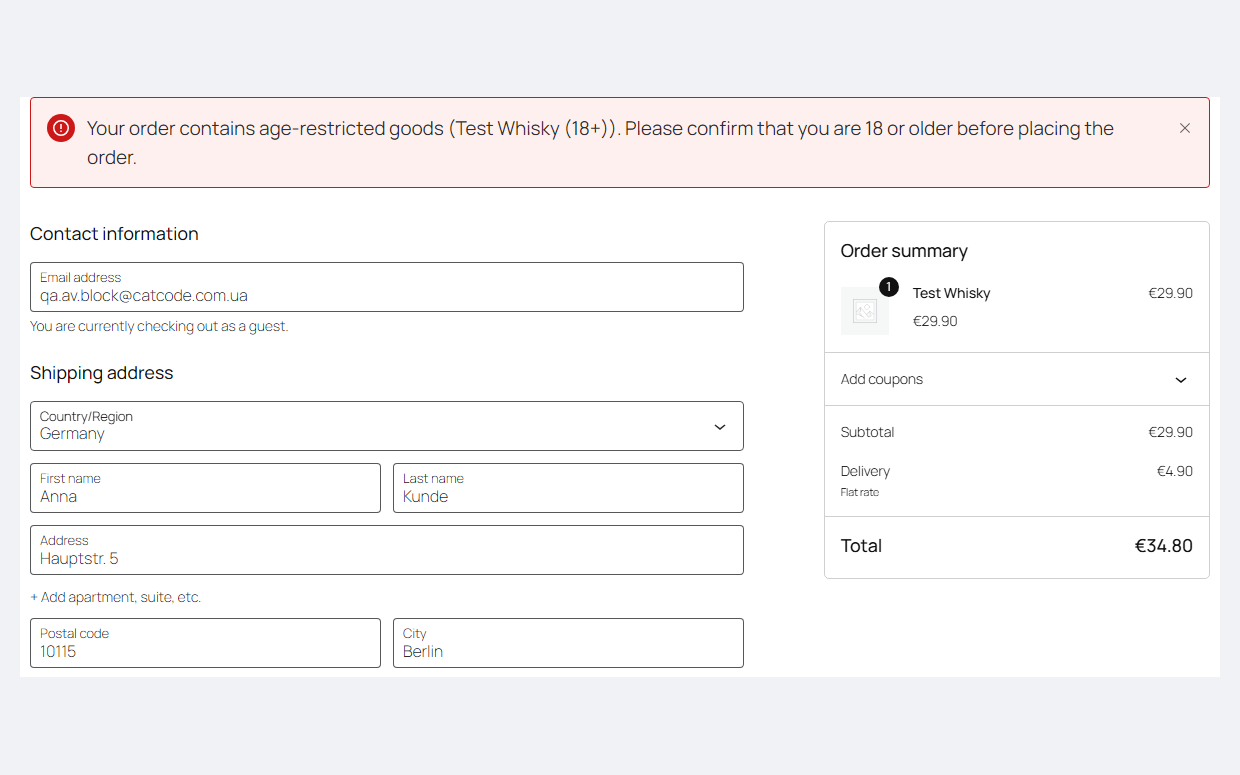
Closing the gate and ordering around it does not work. On the block checkout, “Place order” without confirmation shows a banner with the product name and the required age, and no order is created. On the classic checkout WooCommerce shows its standard notice about a problem with items in the cart, and the cart itself shows which age the product requires; the checkout form does not appear until the customer answers. With JavaScript switched off, ordering is impossible too.
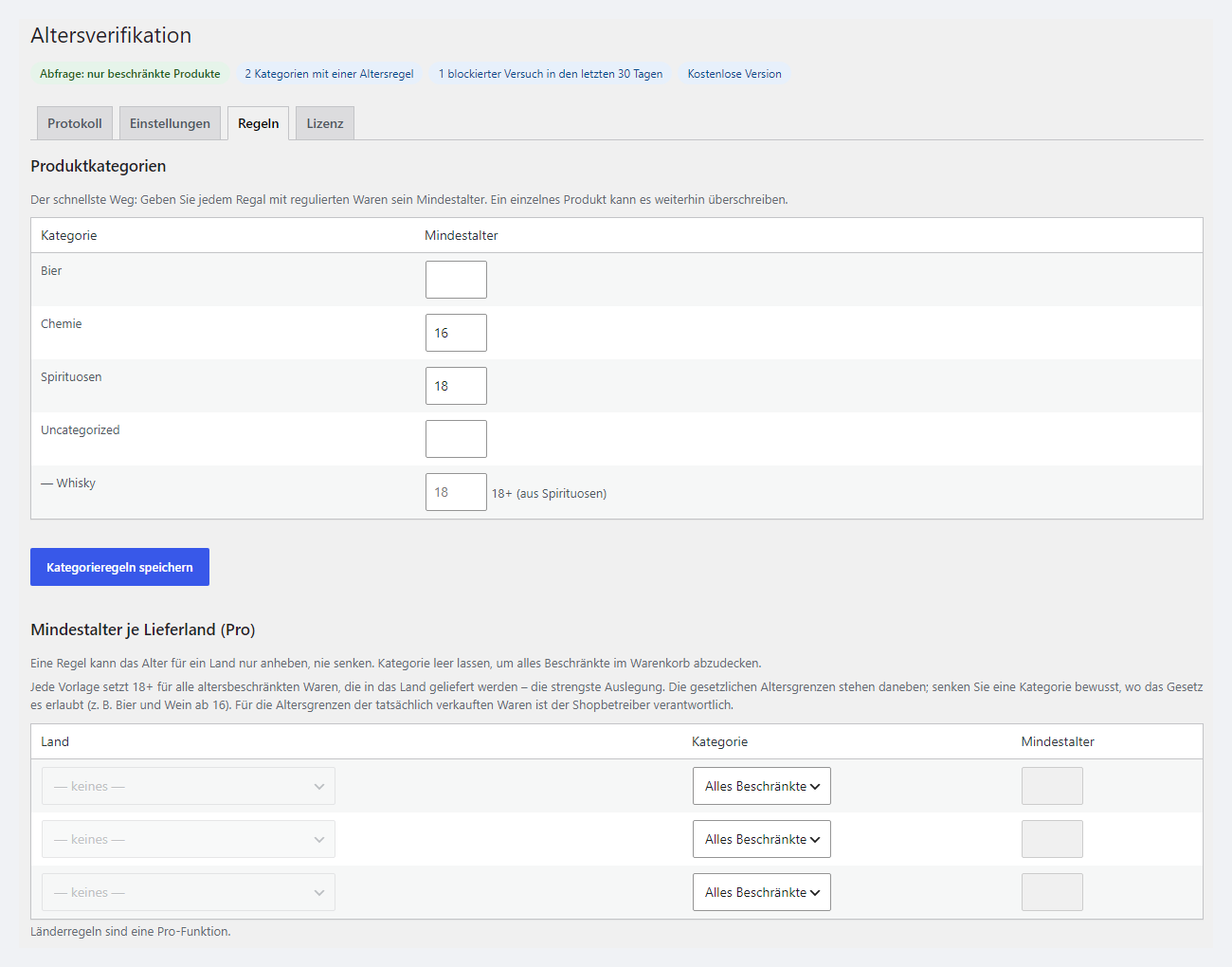
The settings live under WooCommerce → Age verification in four tabs: “Log”, “Settings”, “Rules” and “Licence”. Above the tabs is a short status line: what exactly is protected, how many categories have a rule, how many attempts were blocked in the last 30 days, and whether it is the free or the Pro version. In German the admin is called “Altersverifikation”.
On the “Rules” tab every category can get a minimum age as a single number. Subcategories inherit it, and you can see that at once: next to “Whisky” it says “18+ (from Spirituosen)”, and the same appears in the “Age” column of the category and product lists. A single product or variation can be raised higher or exempted from the category rule by entering 0.
The “Settings” tab holds the gate switch (off after installation), what to protect (only products with an age, or the whole shop), the default age, the answer method, how long the answer is remembered, the number of attempts, the address for locked-out visitors, the question on adding to cart and on the product page, product badges, writing into the order, your own gate texts with the {age} placeholder, and the log: whether to keep it and how to store the IP.
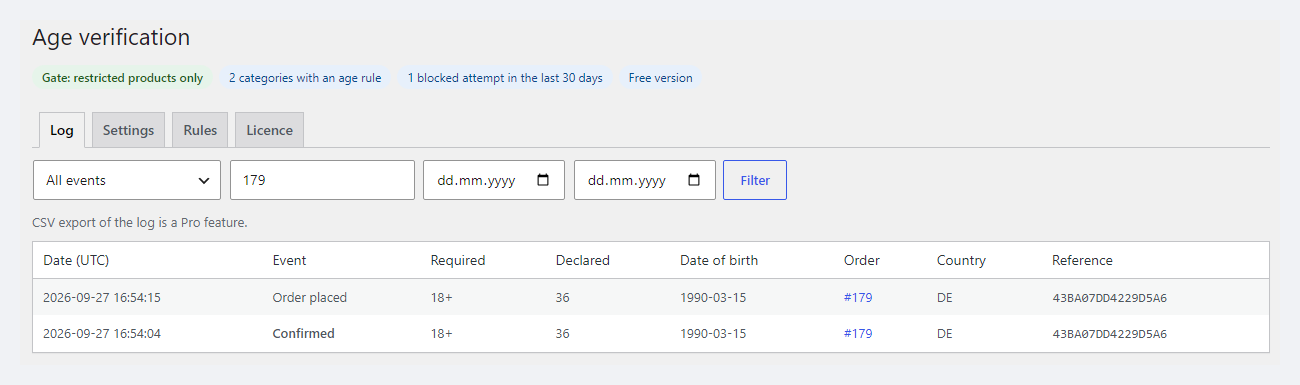
Every order with an age-restricted product gets a note such as “Age verification: 18+ required, customer confirmed 36 (date of birth: 1990-03-15)”, and the order screen shows an “Age verification” panel: the age confirmed for, the declared age, the date of birth, the log reference and a plain reminder that this is the customer’s statement, not an identity check. The panel works with both HPOS and the legacy order screen.
The “Log” tab is the record of every check: “Confirmed”, “Too young”, “Blocked”, “Order placed”. Each row has the date, the required and declared age, the date of birth, the order, the country and a reference that ties the confirmation to the order. The log can be filtered by event, order and dates. Rows are only ever added, never edited.
Age limits differ between countries, so Pro lets you set a minimum age per delivery country — for everything restricted or for a specific category. A country rule can only raise the age, never lower it. There are starting presets for Germany, Austria and Switzerland, and they are deliberately strict: 18+ on everything restricted that ships to the country. Where the law allows less (beer and wine from 16, for example), lower the category on purpose. In our test a 17-year-old customer confirmed for 16+ placed an order with a German address, while with a Swiss address the order was refused with the exact requirement. On the block checkout the country rule applies on “Place order”: switching the country does not show the banner immediately, but the order is refused.
The second part of Pro is the delivery. For orders with age-restricted goods you can leave only selected shipping methods — a carrier that checks the ID at hand-over, or pickup — and hide payment methods such as cash on delivery. An ordinary cart still sees every method. A note “hand over only against an ID showing an age of 18 or more” (the text can be changed) is added to the order and to the customer e-mail. Pro also brings CSV export of the log for a date range, automatic deletion of old rows, and your logo and colour in the gate.
Austria and tobacco. § 2a TNRSG prohibits mail-order sales of tobacco and related products in Austria altogether. No age check changes that, so for tobacco and vapes into Austria the plugin is not the answer — such goods are not shipped there at all.
Pro — 990 UAH, a one-year licence. A year of updates, technical support and all Pro features. You can take a longer term straight away — the longer, the cheaper per year:
No automatic charges: renewal is manual, and reminders come by e-mail. A purchased licence keeps the Pro features for good — when the term ends, the shop only stops receiving new versions and support. One key — one domain.
Trial first, payment later. The 7-day Pro trial starts only with the “Try Pro free for 7 days” button on the “Licence” tab; the key comes by e-mail, no card needed. When the trial ends only the Pro features switch off; the age check and the log keep working.
woocommerce_add_to_cart_validation, woocommerce_check_cart_items, woocommerce_checkout_process; block checkout — Store API cart errors and a refusal while the order is being built. One decision in one place.wp_woocommerce_session_*) — without it the attempt limit would not work.ccav_product_required_age — the final word on a product’s age, ccav_order_verified — an order has just been marked as verified.define( 'CCAV_DELETE_DATA', true ); to wp-config.php before deleting.catcode-age-verification-for-woocommerce-1.0.1.zip archive with the button at the top of the page: Plugins → Add New → Upload Plugin → Install → Activate.Didn't find the answer? Message us on Telegram and we'll reply within a business day.
 @catcode_support
Setup, compatibility, activation
@catcode_support
Setup, compatibility, activation
No plugin can guarantee that, and we do not promise it. A date of birth typed into a browser is a statement by the customer, not an identity check. The plugin records that the shop asked, what was answered and when, and it stops an order that fails the rule. Whether that is enough for your goods is for your legal adviser to decide. Where real identification is required, it happens at hand-over — that is what the Pro shipping restrictions are for.
That depends on the goods and the delivery country, and it stays the shop owner’s responsibility. For orientation, from the official texts (09/2026): in Germany beer, wine and sparkling wine from 16, other alcohol from 18 (§ 9 JuSchG), tobacco, nicotine products and e-cigarettes from 18, including mail order (§ 10 JuSchG). In Switzerland alcoholic drinks from 16, spirits from 18. The Pro presets are deliberately strict: 18+ on everything restricted, so beer and wine at 16+ have to be lowered on the category by hand.
No, and the plugin does not change that: § 2a TNRSG prohibits mail-order sales of tobacco and related products in Austria altogether. An age check does not help here — such goods must simply not be shipped to Austria.
No. The dialog is just the convenient way to answer. The check sits on the server: a closed dialog, a blocked script or a direct Store API request all end in the same refusal. We tested this on the classic checkout with JavaScript switched off and on the block checkout.
Then the gate asks again and the failed-attempt limit starts from zero — that is how any browser-side check works. An order without confirmation still does not go through. That is exactly why Pro can limit delivery to carriers that check the ID for goods that need a real check.
Yes. It is stored in the order and in the log because that is the point of the record. The IP is hashed by default (or not stored at all), and Pro can delete old log rows automatically. For a guest who answered the gate, WooCommerce starts its session cookie — it is needed for the attempt limit; list it in your cookie policy as technically necessary.
Yes. The rule is enforced through the Store API as well: the cart and checkout blocks show the error and the order is refused before it is created. The dialog is plain HTML in the footer and appears the same way on both checkouts.
English and German. The plugin is made for the German, Austrian and Swiss market; the interface and the customer dialog follow the site language. There is no Ukrainian or Russian translation.
The base version is free. Pro is 990 UAH per year, and a longer term is cheaper: 2 years — 1,880 UAH, 5 years — 3,710 UAH. No automatic charges. A purchased licence keeps the Pro features for good; the term covers updates and support.
No reviews yet. Be the first.
No questions yet. Ask one — we answer within 24 hours.
We build custom modules for WordPress, WooCommerce, OpenCart and Shopify. Tell us about the task and we'll prepare an estimate.
Order a custom module
—

CatCode assistant
Just now


CatCode assistant
Online

I’ll help with your website task
Describe your website task — I’ll find a ready-made module or pass it to a developer for an estimate. Modules, custom features, layout, integrations, speed, migration, technical SEO.
