
WordPress
Email Preview for WooCommerce — preview any store email on a real order and send a test copy
Free + Pro
990 UAH/year
v1.0.0
Enter at least 2 characters

A WooCommerce plugin that shows any store email on a real order before a customer sees it: WooCommerce emails, custom order statuses and emails from other plugins, HTML and plain text, phone width, subject, recipients, Cc and Bcc. A test copy goes only to the addresses you type — the order is not touched. The base version is free; Pro adds a log of every email with resend, preview in any language, every email of an order in one click and a staging mode.
The free version works with no time limit. Pro adds the rest of the features in the table.


Nothing — and that is the point. The plugin works only in the admin: no script appears on the storefront, and the customer receives exactly the same emails as before.

The plugin adds WooCommerce → “Email Preview” with the tabs “Preview”, “Email log” (Pro) and “Settings”.

Email log. Pro records every WooCommerce email the store sends: when, which email, order, recipient, subject and status.

A fresh install is the free version, nothing switches on by itself. The “Try Pro for 7 days” button → e-mail → the key right in the window and by e-mail.

Moving the store? Unbind the licence on the old domain and activate it on the new one yourself. If our server is unreachable, Pro keeps working for 14 more days. For studios — keys for 5 or 25 sites, or unlimited.
 WordPress 6.2+ and WooCommerce 8.0+. The end-to-end run was on WordPress 7.1 and WooCommerce 11.1.PHP 7.4+. The run was on PHP 8.3, the syntax was also checked on 7.4.Order storage. HPOS and classic storage — the order-screen box was checked in both.WooCommerce block email editor — the preview and the test copy show the edited template.Mail. Test copies go through wp_mail(), so SMTP plugins work as for regular emails. Checked through an SMTP trap; particular SMTP plugins were not tested separately.Large stores. The list shows the latest 25 orders; any other opens by number. There is no search by customer.Fulfillment emails appear only when this WooCommerce feature is switched on; we have not checked them on such a store.
First public release: preview of every order email on real orders and the WooCommerce sample, HTML and plain text, phone width, separate tab, subject and all recipients, a test copy to 5…
4 modules in one order — 40% cheaper than separately



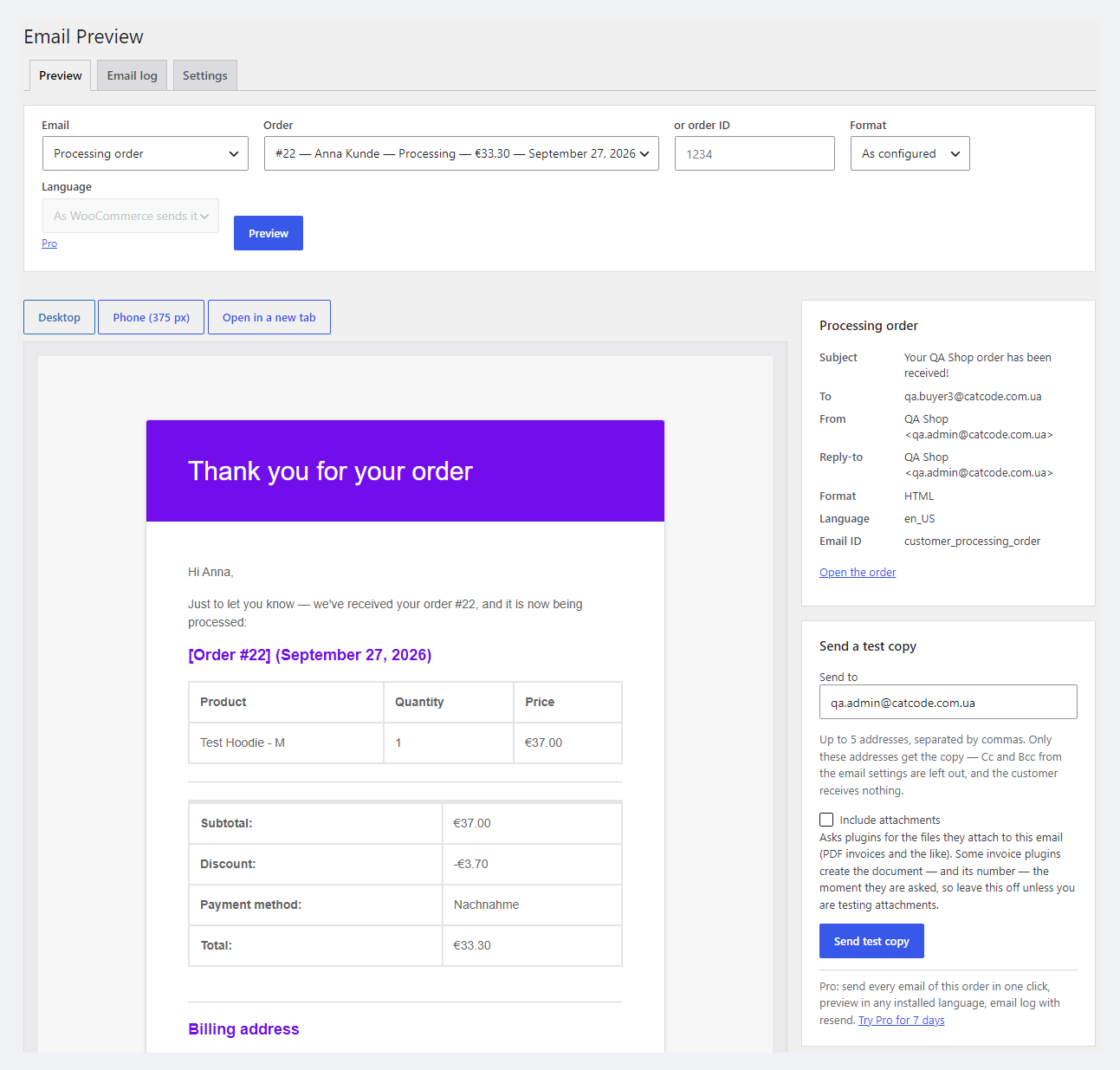
Email Preview for WooCommerce is a plugin that shows any store email on a real order before a customer sees it. Pick an email and an order — and you see it exactly the way WooCommerce builds it for that order: the real products, prices, discounts, addresses, notes and refunds, the subject and heading with their placeholders filled in, the recipient, Cc, Bcc, From and Reply-to.
Without a plugin there is only one way to check an email — place a test order and wait for the mail, or change the status of a real order and hope the customer does not get anything extra. Email Preview sends nothing while you look: the preview does not change the order — it adds no notes, sets no “email already sent” flag and does not write to the customer. When you need to check delivery itself, a test copy goes only to the addresses you typed.
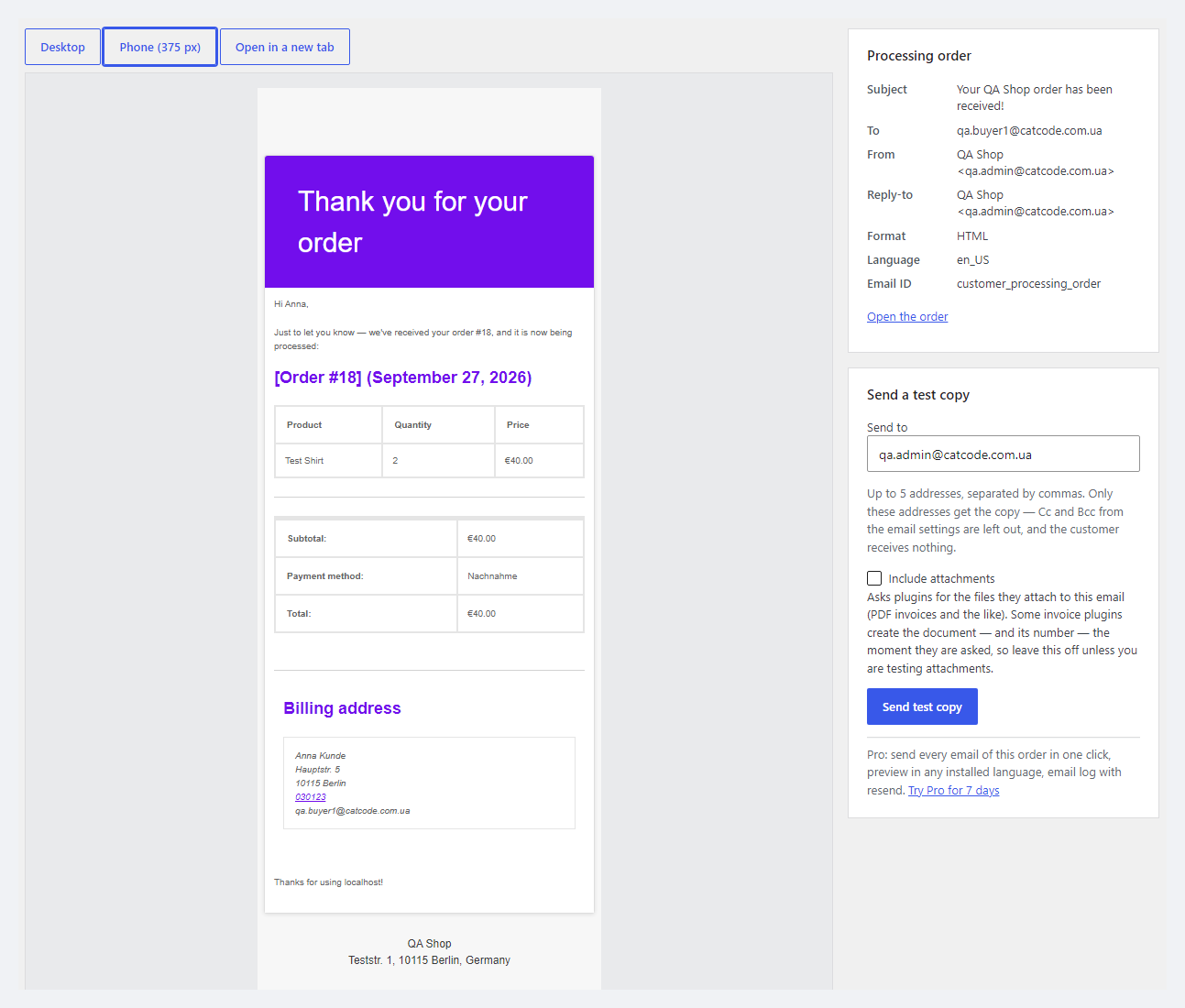
Nothing — and that is the point. The plugin works only in the admin: no script appears on the storefront, and the customer receives exactly the same emails as before. The difference is that now you see those emails in advance: what “Processing order” looks like with a coupon, what “Partially refunded” says, whether the subject of a custom-status email is empty, whether the product table reads well on a phone.
Before the preview, the plugin shows the email’s subject, who it goes to, the Cc and Bcc from the email settings, From and Reply-to. If the email is switched off in WooCommerce → Settings → Emails, you get a warning: customers do not receive it. If the order has no e-mail, the panel says plainly that WooCommerce will skip this email.
The plugin adds WooCommerce → “Email Preview” with the tabs “Preview”, “Email log” (Pro) and “Settings”. The first visit shows the latest order and the email its customer got for the current status straight away — no setup at all.
On the right is the “Send a test copy” form: up to 5 addresses separated by commas. Only they get the copy, with [Test] in the subject (the prefix is changed in the settings); the Cc and Bcc from the email settings are not added, the customer receives nothing, and no note appears in the order. The “Include attachments” box asks invoice plugins for their PDFs — it is off by default, because some invoice plugins create a real invoice with a number at that moment (PDF Invoices & Packing Slips does — we checked).
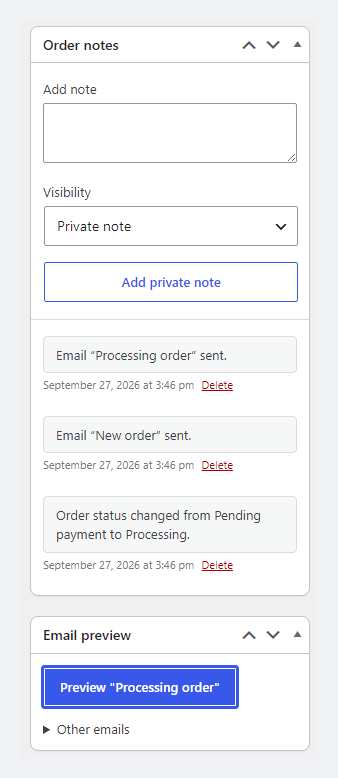
On the order screen itself an “Email preview” box appears: its button opens the email for the current status, and “Other emails” — any other email of this order. The box works with both HPOS and classic order storage.
The “Settings” tab holds the default address for test copies (empty = your account e-mail), the test copy subject prefix, “Delete all plugin data when the plugin is deleted”, and for Pro — the licence, the log and staging mode. The plugin’s interface is translated into Ukrainian and Russian; the email in the preview is in the site language, the way WooCommerce sends it.
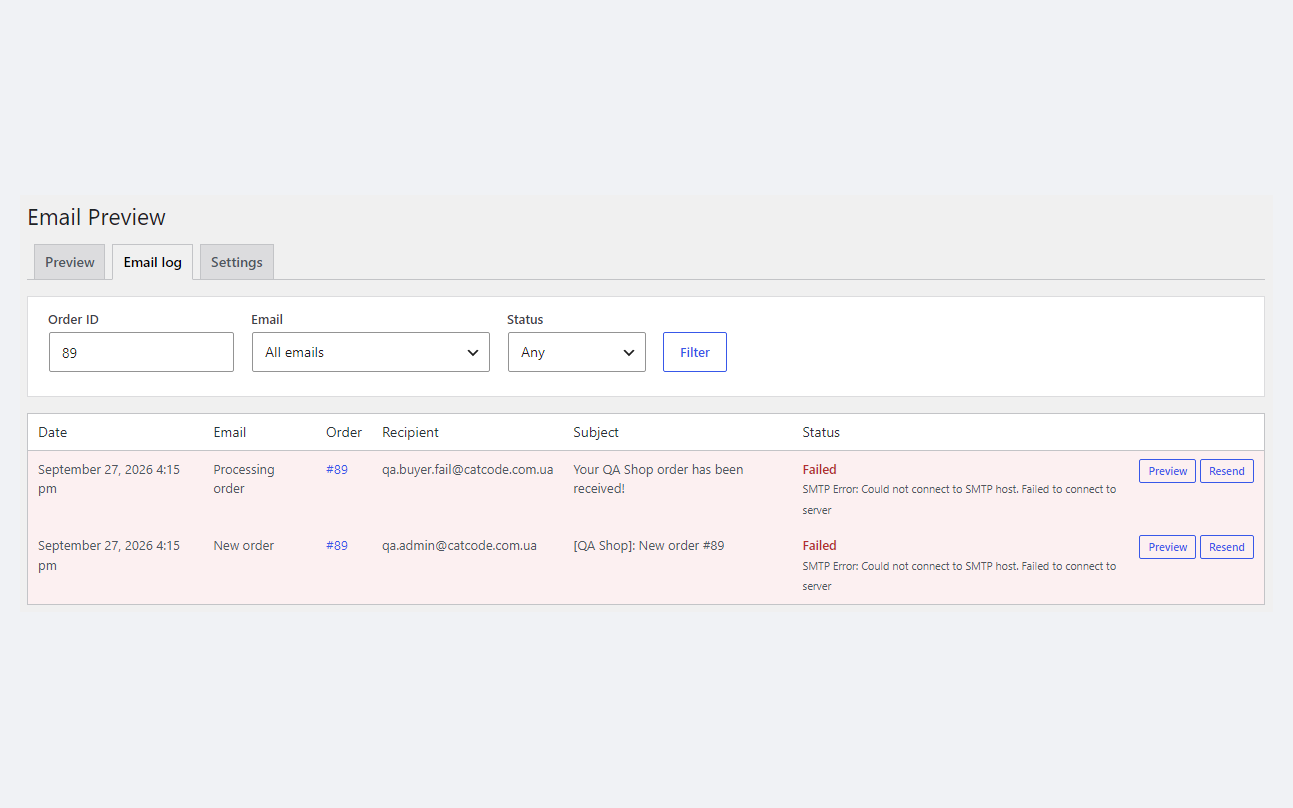
Email log. Pro records every WooCommerce email the store sends: when, which email, order, recipient, subject and status. If the mail did not go out, the row is marked “Failed” together with the error text — for example, “SMTP Error: Could not connect to SMTP host”. Filters by order number, email type and status. Every row can be previewed or sent again. The log is kept for 30 days (configurable).
“Resend” is the real email, not a test copy: WooCommerce sends it, so the copies from the settings get it too, and WooCommerce 10.9+ writes its own “email sent” note to the order. That is intended — it is a repeat of the real email.
Any language. Pro shows the email and sends a test copy in any language installed on the site — for example, a Ukrainian email with an English admin. The plugin does not pick up the order language from WPML or Polylang automatically — you choose it by hand.
Every email of an order in one click. The “Send every email of this order” button sends one test copy of each order email (switched-off ones included) to the addresses you typed — a full check in one inbox. In the test that was 13 copies and not a single note in the order.
Staging mode. For a copy of a live store or a test run of the checkout: every WooCommerce email goes to one address, with the original recipient in the subject. While the mode is on, a warning sits on every admin screen so you do not forget to switch it off. The mode redirects only WooCommerce emails — WordPress emails and those of other plugins go out as usual.
[Test] prefix.Pro is 990 UAH, a one-year licence. A year of updates, technical support and all Pro features. You can take a longer term right away — the longer, the cheaper per year:
No automatic charges: renewal is manual, reminders come by e-mail. A purchased licence keeps the Pro features for good — when the term ends, the shop only stops getting new versions and support. One key — one domain.
Trial first, payment later. The 7-day Pro trial is started with the “Try Pro for 7 days” button in the plugin settings, the key comes by e-mail, no card is needed, and the trial never starts by itself. After the trial only the Pro features switch off; preview and test copies keep working.
script-src 'none'. The page is available only to users who can manage WooCommerce.catcode_emp_prepare_email hook lets developers fill the fields their email fills only in its own send.wp plugin uninstall, not by wp plugin delete.catcode-email-preview-for-woocommerce-1.0.0.zip archive with the button at the top of the page: Plugins → Add New → Upload Plugin → Install → Activate. Pro is switched on in the same plugin with a key or a trial.Didn't find the answer? Message us on Telegram and we'll reply within a business day.
 @catcode_support
Setup, compatibility, activation
@catcode_support
Setup, compatibility, activation
No. The preview only builds the email; it sends nothing and does not change the order: no notes, no "email already sent" flags. A test copy goes only to the addresses you typed in "Send to" — the Cc and Bcc from the email settings are not added to it.
Email Preview is not a template builder. It shows the email the way your WooCommerce builds it for a particular order, with your templates, theme and plugins. People run it next to any designer or without one — to check what the customer actually receives.
Some plugins fill their own fields only at the moment of a real send. The email still opens, but those fields stay empty. A developer can fill them for the preview with the catcode_emp_prepare_email hook, which receives the email object and the order.
With it, the plugin asks invoice plugins for their files, as a real send does. We checked it with PDF Invoices & Packing Slips: at that moment the plugin creates a real invoice with a number for the order. That is why the box is off by default and carries a warning — tick it only when you are testing attachments.
When the WooCommerce block email editor is on, the store sends every email as HTML, and a plain-text version simply does not exist. The preview says so.
No, it is the real email: WooCommerce sends it, so the Cc and Bcc from the settings get it too, and WooCommerce 10.9+ adds its own "email sent" note to the order. To check without the customer, use the test copy or "Send every email of this order".
Only WooCommerce emails. WordPress emails (password reset, registration) and emails of other plugins that go straight through wp_mail() are left alone.
The base version is free. Pro is 990 UAH per year, and a longer term is cheaper: 2 years — 1,880 UAH, 5 years — 3,710 UAH. No automatic charges. A purchased licence keeps the Pro features for good; the term covers updates and support.
No reviews yet. Be the first.
No questions yet. Ask one — we answer within 24 hours.
We build custom modules for WordPress, WooCommerce, OpenCart and Shopify. Tell us about the task and we'll prepare an estimate.
Order a custom module
—

CatCode assistant
Just now


CatCode assistant
Online

I’ll help with your website task
Describe your website task — I’ll find a ready-made module or pass it to a developer for an estimate. Modules, custom features, layout, integrations, speed, migration, technical SEO.
