
WordPress
Shared Stock for WooCommerce — one stock for several product cards, no overselling
Free + Pro
990 UAH/year
v1.0.0
Enter at least 2 characters

A WooCommerce plugin that groups the cards of one physical item into a pool with one shared stock: the same shirt on its own and in a gift box, a fabric roll sold under several colour names, a product in two catalogues. A sale of any card takes from the pool, every card shows what is left, and simultaneous checkouts cannot sell the last unit twice. The base version is free; Pro adds units per sale (a 6-pack, 0.5 kg), pool history with CSV, low-stock and out-of-stock e-mails, and bulk adding.
The free version works with no time limit. Pro adds the rest of the features in the table.


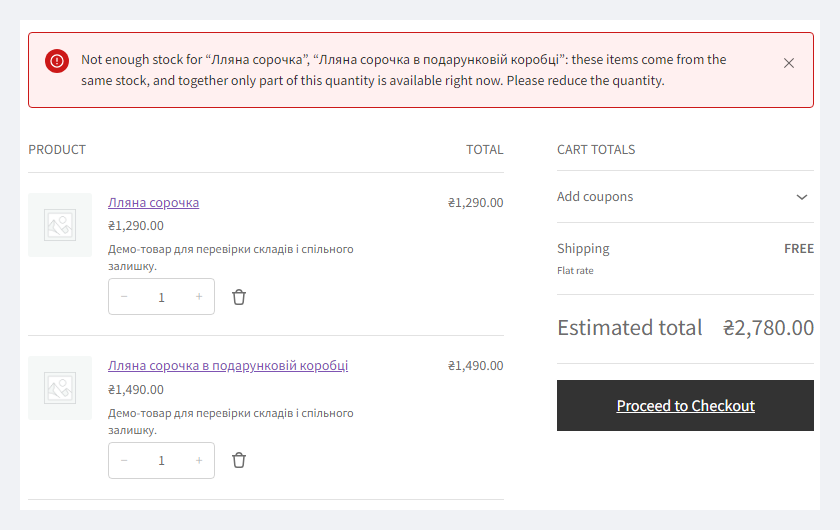
Every card of a pool shows the same stock — what the pool can still cover.

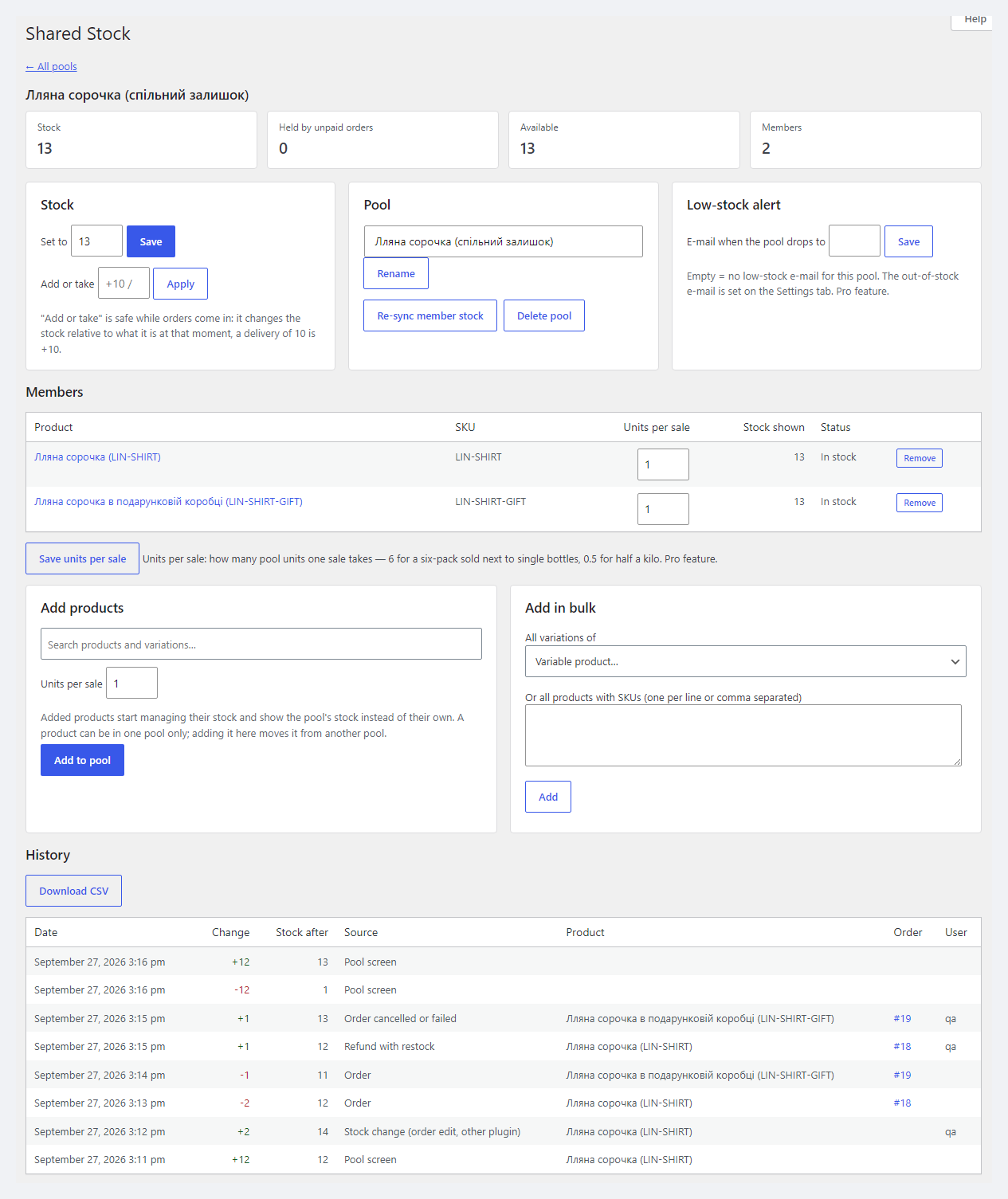
WooCommerce → Shared Stock → Stock pools lists the pools with their stock, what unpaid orders hold and what is available.

Units per sale. A 6-bottle pack takes 6 from the pool, a single bottle takes 1; selling by half a kilo takes 0.5 kg.

A fresh install is the free version, nothing switches on by itself. The “Try Pro for 7 days” button → e-mail → the key right in the window and by e-mail.

Moving the store? Unbind the licence on the old domain and activate it on the new one yourself. If our server is unreachable, Pro keeps working for 14 more days. For studios — keys for 5 or 25 sites, or unlimited.
 WordPress 6.2+ and WooCommerce 8.0+. The end-to-end run used WordPress 7.1 and WooCommerce 11.1.PHP 7.4+. Runs on PHP 8.3 and 7.4 without warnings from the plugin.“Hold stock (minutes)” above 0 in WooCommerce → Settings → Products → Inventory — without it there is no overselling protection at checkout.Database. MySQL or MariaDB with InnoDB, like WooCommerce. The lock between checkouts is a MySQL named lock (GET_LOCK); on a database without named locks the plugin works, without the extra lock. Tested on MariaDB 10.11.Pool size. Every sale updates all cards of the pool synchronously — on a pool with hundreds of cards, payment gets slower.Interface languages: English, German (du and Sie). No Ukrainian or Russian.
First public release: shared stock pools for products and variations, pool reservation at checkout under a lock, cart checks across the pool, “Add or take”, daily repair, WP-CLI, HPOS and…
4 modules in one order — 40% cheaper than separately



Shared Stock for WooCommerce is a plugin for a shop that sells one physical item under several product cards. The same shirt on its own and in a gift box, a fabric roll under several colour names, a product in two catalogues, an item sold alone and as part of a set. WooCommerce counts the stock of every card separately, so the shop owner corrects numbers by hand — and still sells the last unit twice.
Shared Stock puts such cards into a pool — one stock figure they all sell from. A sale of any card takes from the pool, and every card shows what the pool can still cover. Two shoppers checking out different cards of one pool in the same second cannot both take “the last unit”. Goods spread over several warehouses? The companion plugin Multi Warehouse splits stock between warehouses — the two work together.
Every card of a pool shows the same stock — what the pool can still cover. A shopper puts the shirt into the cart, then the shirt in a box: if together that is more than there is, they learn about it right away — on add to cart, on the cart page or in the block checkout, not after paying.
When a pool runs out, all its cards become “Out of stock” together, and “In stock” again after a delivery.
WooCommerce → Shared Stock → Stock pools lists the pools with their stock, what unpaid orders hold and what is available. A new pool with zero takes the stock of the first product added.
The pool screen has “Set to” (set the stock) and “Add or take” (add or remove relative to the current figure: a delivery of 10 booked while orders come in is never lost), rename, re-sync the cards, the list of cards and adding products by search. In Pro the same screen has units per sale, the “low stock” e-mail threshold, bulk adding of all variations or a list of SKUs, and a history of every change with its source (order, cancellation, refund, product edit, REST API, WP-CLI), the order number and the user, with CSV export.
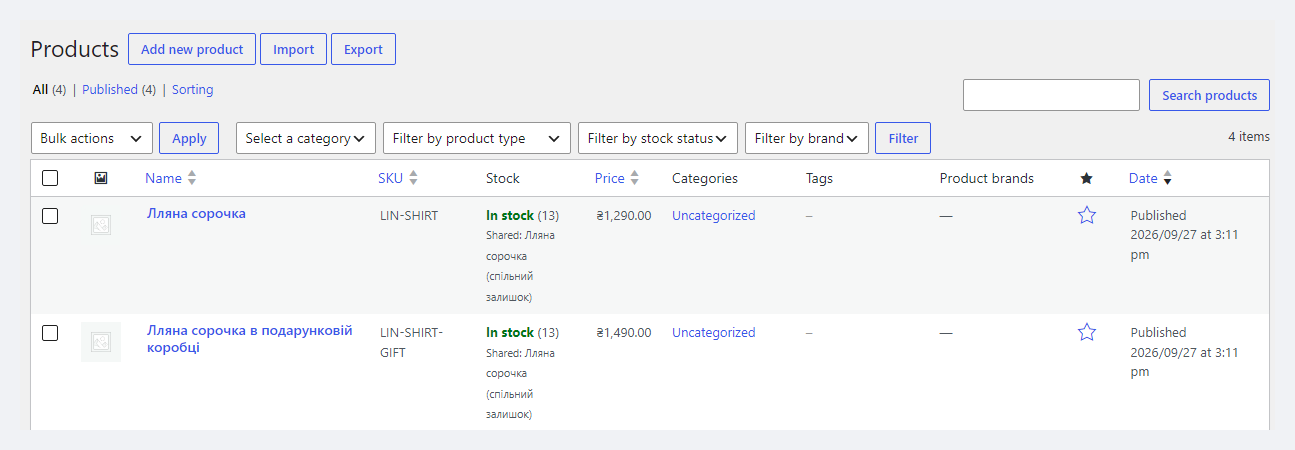
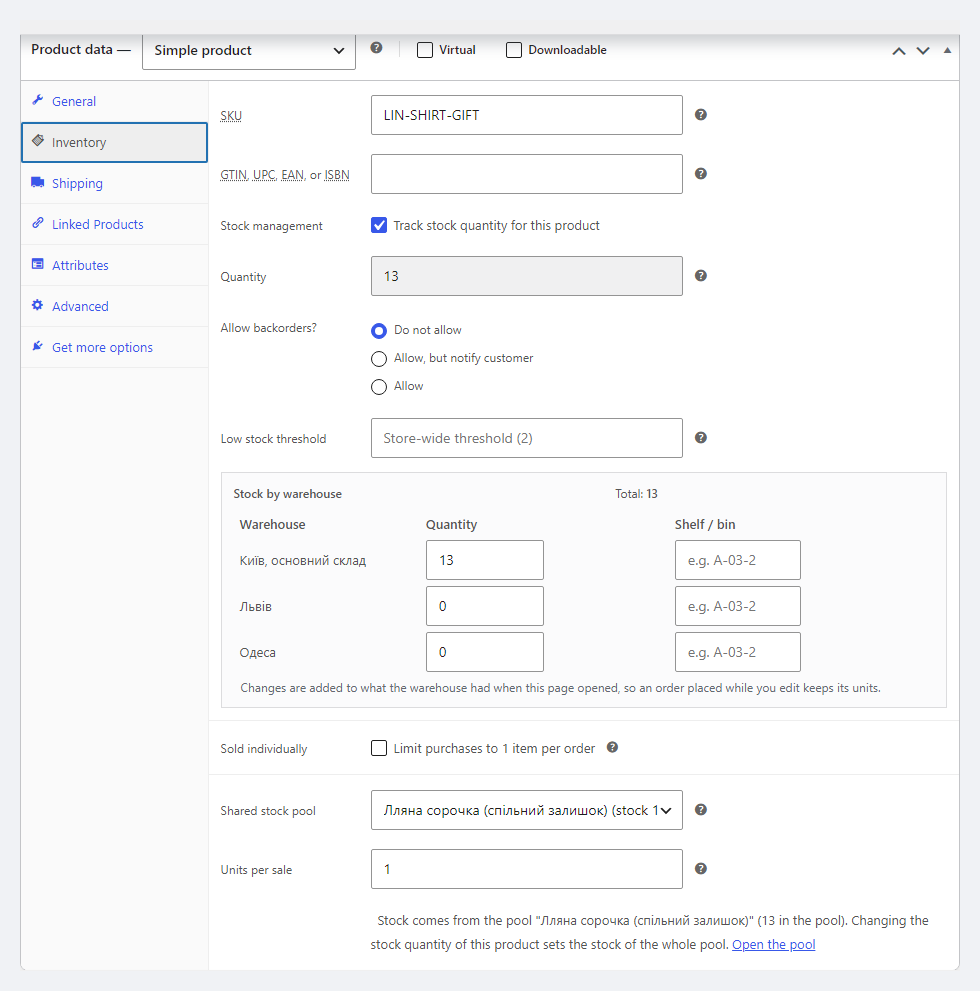
A product can also join a pool from the product or variation editor: the Inventory tab gets a “Shared stock pool” field. A figure typed into any card of the pool — in the editor, quick or bulk edit, the REST API or an import — becomes the stock of the whole pool. In the products list, pool cards carry a “Shared: …” mark.
Units per sale. A 6-bottle pack takes 6 from the pool, a single bottle takes 1; selling by half a kilo takes 0.5 kg. Each card shows how many whole sales the pool can still cover: with 13 bottles — 13 singles or 2 packs. History records every change of the pool with its source, order, user and the stock after it, with CSV export. E-mails: “low stock” with a threshold per pool, and “out of stock”. Bulk adding: all variations of a variable product or a list of SKUs in one go.
If the goods sit in several warehouses, Multi Warehouse for WooCommerce splits each card’s stock between warehouses, while Shared Stock keeps the figure of all pool cards equal. We tested them together: 42 compatibility checks per run (HPOS on and off, PHP 7.4 and 8.3), simultaneous checkouts by eight shoppers, refunds and cancellations — warehouses, cards and pool matched after every step.
One limitation: Multi Warehouse does not know that the cards of a pool are one item, so each card has its own warehouse split. Keep the warehouse split on one card of the pool; the other cards effectively hold their stock in the main warehouse — when one card sells, the others lose the units from the main warehouse, then from the other warehouses by priority, never below zero. Multi Warehouse pickup for the other cards offers warehouses by their own split.
Pro is 990 UAH for a one-year licence. A year of updates, technical support and all Pro features. You can take a longer term right away — the longer, the cheaper per year:
No automatic charges: renewal is manual, reminders come by e-mail. A purchased licence keeps the Pro features forever — when the term ends, the shop only stops getting new versions and support. One key — one domain; moving the shop — unbind the licence on the old site and activate the key on the new one.
Trial first, then payment. The 7-day Pro trial starts with the “Try Pro for 7 days” button, the key arrives by e-mail, no card needed. After the trial only the Pro features switch off; saved units per sale keep being counted (so the stock does not break) but can no longer be edited.
The plugin was tested end to end on a local stack: nginx + PHP-FPM with five workers (real concurrency), PHP 8.3 and 7.4, MariaDB 10.11, HPOS on and off — 71 checks per run plus a race of eight shoppers on a pool of three units: in each of 10 rounds exactly 3 orders went through, never a sale beyond the pool. Not tested: MySQL 8, Redis or Memcached as an object cache, WooCommerce CSV import, the REST API and quick edit through the real forms (the product form in a browser — yes). The live licence server and the trial were not part of the test. The German translations have not been proofread by a native speaker.
catcode-shared-stock-for-woocommerce-free-1.0.0.zip with the button at the top of the page (or the Pro archive from your account after payment): Plugins → Add New → Upload Plugin → Install → Activate.Didn't find the answer? Message us on Telegram and we'll reply within a business day.
 @catcode_support
Setup, compatibility, activation
@catcode_support
Setup, compatibility, activation
Yes, as far as WooCommerce's stock hold goes: the pool is reserved when the order is placed, under a database lock, counting the stock held by unpaid orders of all cards in the pool. One condition: "Hold stock (minutes)" in WooCommerce → Settings → Products → Inventory must be above 0. With the hold switched off WooCommerce reserves nothing at checkout — and neither can the plugin.
They change the pool when WooCommerce reduces stock for them (usually when the status becomes Processing, Completed or On hold). There is no checkout reservation for them — the same as in WooCommerce itself.
The product starts managing stock (if it did not) and shows the pool's stock. An empty new pool takes the stock of the first product added, so the first card does not wipe the count. When a product leaves the pool, or the pool is deleted, the product keeps the figure it showed at that moment.
Such a product is not held back by the pool — the same way WooCommerce treats a product with backorders. Its sales still take from the pool, and the pool may go below zero; the other cards then show "Out of stock".
Yes, we tested them together. Each card of a pool has its own warehouse split, so keep the split on one card of the pool — the other cards effectively hold their stock in the main warehouse.
Shared Stock works inside one WooCommerce shop. If you run several separate sites from one warehouse, that is the Multi-Store Stock Sync plugin.
The plugin was made for the German and EU market: English and German (both du and Sie). There is no Ukrainian or Russian translation of the plugin.
The base version is free. Pro is 990 UAH per year, and longer terms are cheaper: 2 years — 1,880 UAH, 5 years — 3,710 UAH. No automatic charges. A purchased licence keeps the Pro features forever; the term covers updates and support.
No reviews yet. Be the first.
No questions yet. Ask one — we answer within 24 hours.
We build custom modules for WordPress, WooCommerce, OpenCart and Shopify. Tell us about the task and we'll prepare an estimate.
Order a custom module
—

CatCode assistant
Just now


CatCode assistant
Online

I’ll help with your website task
Describe your website task — I’ll find a ready-made module or pass it to a developer for an estimate. Modules, custom features, layout, integrations, speed, migration, technical SEO.
