WordPress
Multi Warehouse for WooCommerce — stock by warehouse, order allocation and picking lists
Free + Pro
990 UAH/year
v1.0.0
Enter at least 2 characters
A WooCommerce plugin that keeps the stock of every product and variation per warehouse: main warehouse, another city, shop floor, reserve. Orders are taken from warehouses by priority, a line that one warehouse cannot cover is split, and cancellations and refunds put units back where they came from. Picking lists sorted by shelf, availability by warehouse on the product page. The base version is free; Pro adds pickup from a warehouse, "one warehouse that has everything" and regions, batch picking, a barcode scanner, shipping in parts and CSV.
The free version works with no time limit. Pro adds the rest of the features in the table.


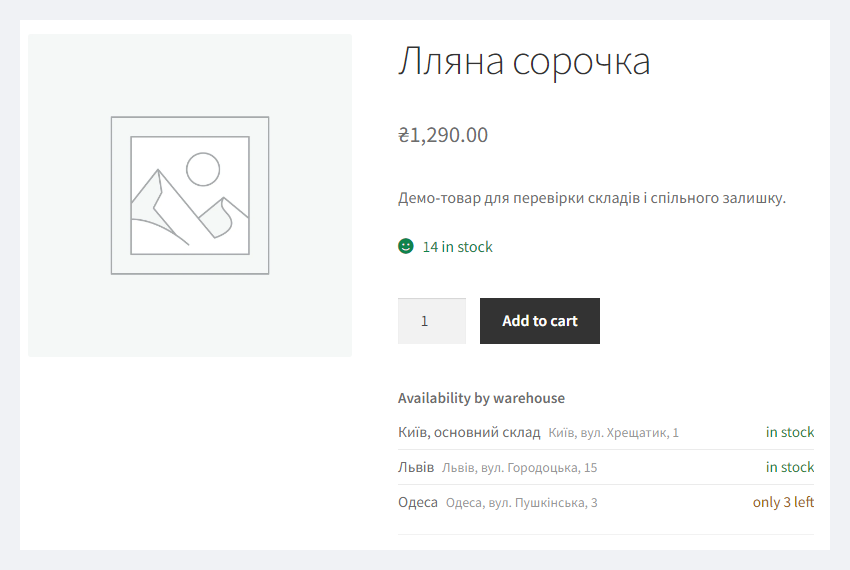
Under the Add to cart button there is an “Availability by warehouse” block: “in stock”, “only N left” or “out of stock” per warehouse (or exact quantities — a switch in the settings).

Everything is under WooCommerce → Warehouses.

The “Orders to pick” tab shows orders by status and warehouse and how many units of each are already picked.

A fresh install is the free version, nothing switches on by itself. The “Try Pro for 7 days” button → e-mail → the key right in the window and by e-mail.

Moving the store? Unbind the licence on the old domain and activate it on the new one yourself. If our server is unreachable, Pro keeps working for 14 more days. For studios — keys for 5 or 25 sites, or unlimited.
 WordPress 6.2+ and WooCommerce 8.0+ with stock management on. The end-to-end run used WordPress 7.1 and WooCommerce 11.1.PHP 7.4+. Runs on PHP 8.3 and 7.4 without a single warning from the plugin.Database. MySQL or MariaDB (InnoDB), like WooCommerce. Tested on MariaDB 10.11; MySQL 8, Galera and Redis as an object cache were not tested separately.Orders. HPOS and classic storage, block and classic checkout.Scanner (Pro). The phone camera works only on a site with HTTPS; a browser with built-in barcode detection (BarcodeDetector) uses it, others use the ZXing decoder bundled with the plugin. We have not tested the camera on real phones — try it in the trial.Interface languages: Ukrainian, Russian, English.
First public release: warehouses, stock and shelves per warehouse, allocation by priority with split lines, units put back on cancellation, refund and edits, the “Warehouses” box on orders,…
4 modules in one order — 40% cheaper than separately



Multi Warehouse for WooCommerce is a plugin for a shop whose goods sit in several places: a main warehouse, a warehouse in another city, a shop floor, a reserve. WooCommerce knows one number per product — how many you have in total. The plugin adds the split: how many units are in which warehouse and on which shelf, which warehouse picks each order, and what exactly the picker has to walk to.
The total stays with WooCommerce: product stock = the sum of its warehouses. Reports, feeds, the storefront and other plugins work as before; the plugin only splits that number between warehouses and keeps the sum equal after every change. Selling one item under several product cards (on its own and in a gift box, in two categories)? There is a companion plugin, Shared Stock — the two work together.
Under the Add to cart button there is an “Availability by warehouse” block: “in stock”, “only N left” or “out of stock” per warehouse (or exact quantities — a switch in the settings). For a variable product the list switches with the chosen size or colour, including the new “Add to Cart with Options” block of block themes. The block can also go anywhere else with the [catcode_mwh_availability] shortcode; a warehouse you do not want to show is hidden with one checkbox.
The checkout does not change for the shopper: they choose shipping and payment as usual. With Pro there is a “Pickup from warehouse” shipping method: only warehouses holding the whole cart are offered, with address, opening hours and phone; the chosen warehouse is recorded on the order.
Everything is under WooCommerce → Warehouses. The first tab lists the warehouses: code, address, priority (a lower number goes first), the “Ships online orders” mark (untick it for a shop floor or a reserve) and whether it is shown on the storefront. The main warehouse exists right after activation and holds all your current stock. A deleted warehouse hands its stock to the main one; product totals do not change.
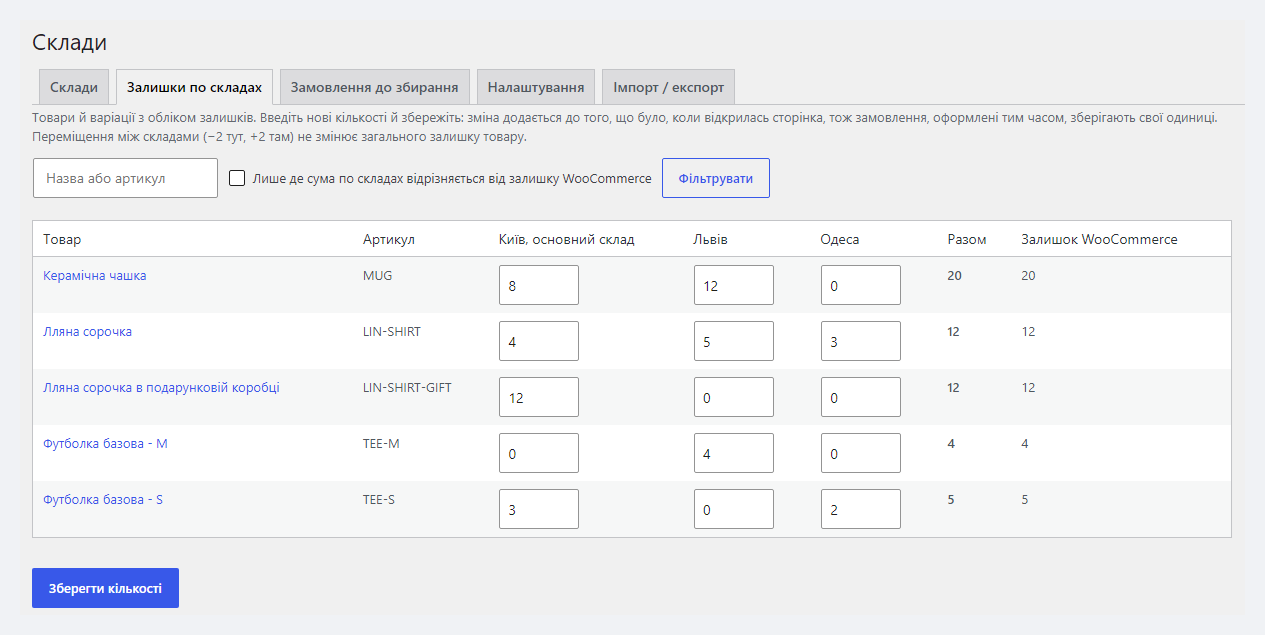
Stock is distributed in the product editor — the Inventory tab gets a table of warehouses with shelves under the quantity field, and every variation has its own — or for all products at once on the “Stock by warehouse” tab. A change is saved as a difference against what the page showed when you opened it, so an order placed while you edit keeps its units. Moving units between warehouses (−2 here, +2 there) does not change the total.
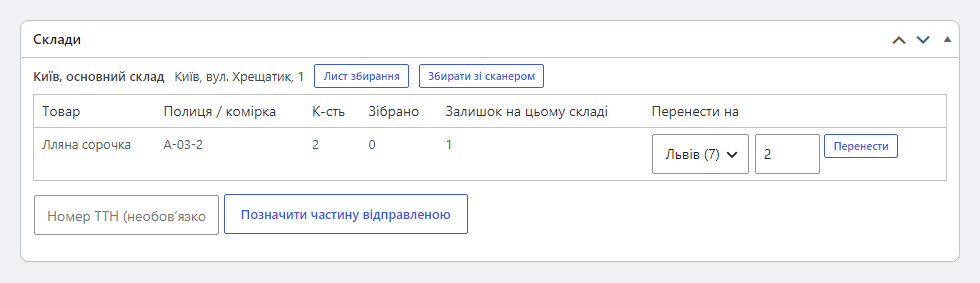
Every order gets a “Warehouses” box: which warehouse and shelf each line ships from, shortages (if sold on backorder), moving a line to another warehouse. The orders list gets a “Warehouse” column. A cancellation, a refund with restock, a quantity change or a line deleted by a manager puts the units back into the warehouse they were taken from.
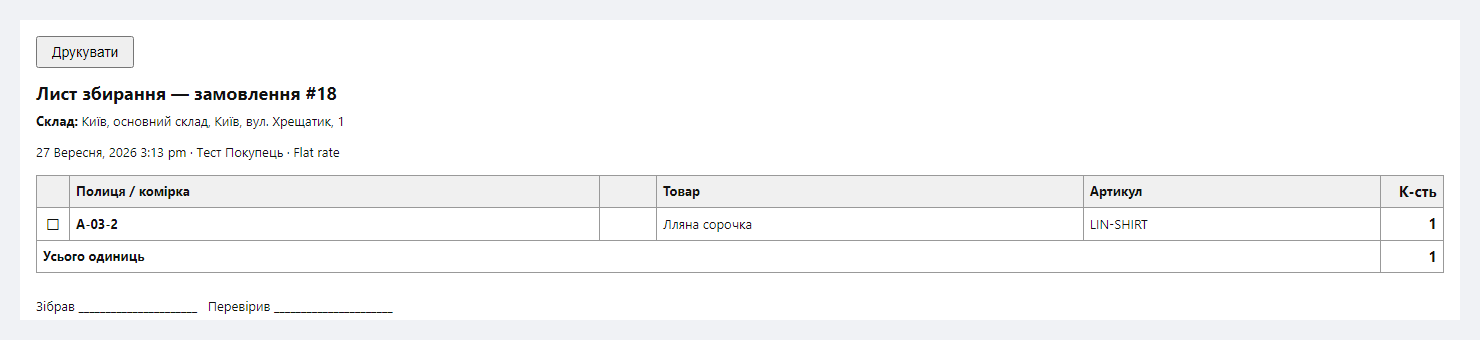
The “Orders to pick” tab shows orders by status and warehouse and how many units of each are already picked. From there, or from the order itself, you print a picking list: one per warehouse, lines sorted by shelf (A-2 before A-10), with SKU and GTIN — the picker walks the warehouse in order instead of searching for goods.
In Pro you tick several orders and get a batch list: the total per product for one walk through the warehouse, followed by one page per order for packing. Picking can use a scanner: a phone camera (over HTTPS), a USB or Bluetooth scanner, matching SKU, GTIN / EAN / UPC or your own barcode field; after “Finish picking” the order gets a note and the status set in the settings. An order from two warehouses can ship in parts: each part is marked shipped with its tracking number, the customer gets a note, and after the last part the order becomes Completed.
If one physical item is sold under several product cards, their common stock is kept by Shared Stock for WooCommerce, and Multi Warehouse splits each card’s stock between warehouses. We tested them together: 42 compatibility checks per run (HPOS on and off, PHP 7.4 and 8.3) and simultaneous checkouts by eight shoppers — warehouses, cards and pool matched after every round.
One limitation to know: Multi Warehouse does not know that the cards of a pool are one item, so each card has its own warehouse split. Keep the warehouse split on one card of the pool; the other cards effectively hold their stock in the main warehouse — when one card sells, the others lose the units from the main warehouse, then from the other warehouses by priority, never below zero. Pickup for the other cards offers warehouses by their own split.
Pro is 990 UAH for a one-year licence. A year of updates, technical support and all Pro features. You can take a longer term right away — the longer, the cheaper per year:
No automatic charges: renewal is manual, reminders come by e-mail. A purchased licence keeps the Pro features forever — when the term ends, the shop only stops getting new versions and support. One key — one domain; moving the shop — unbind the licence on the old site and activate the key on the new one.
Trial first, then payment. The 7-day Pro trial starts with the “Try Pro for 7 days” button, the key arrives by e-mail, no card needed. After the trial only the Pro features switch off; warehouses and stock keep working.
The plugin was tested end to end on a local stack: nginx + PHP-FPM, PHP 8.3 and 7.4, MariaDB 10.11, HPOS on and off, the Twenty Twenty-Five block theme and the classic Storefront — 105 checks per run plus a simultaneous-orders test. Not tested: MySQL 8, Redis as an object cache, catalogues of 10,000+ products. We did not open the scanner page with a phone camera in a browser — the server side was tested (every scan is counted on the server, you cannot pick more than the order holds). The live licence server and the trial were not part of the test.
_reduced_stock).catcode-multi-warehouse-for-woocommerce-free-1.0.0.zip with the button at the top of the page (or the Pro archive from your account after payment): Plugins → Add New → Upload Plugin → Install → Activate.Didn't find the answer? Message us on Telegram and we'll reply within a business day.
 @catcode_support
Setup, compatibility, activation
@catcode_support
Setup, compatibility, activation
Nothing changes in WooCommerce. After activation the whole stock of every product sits in the main warehouse until you distribute it to other warehouses — in the product editor or in the table on the "Stock by warehouse" tab.
From the warehouses marked "Ships online orders", lowest priority number first. A line one warehouse cannot cover is split between warehouses. Any line can be moved to another warehouse by hand in the order's "Warehouses" box. Pro adds a "one warehouse that has everything" mode and warehouse priority by the customer's region.
WooCommerce stock is updated as before. The plugin sees the change and distributes it: an increase goes to the main warehouse, a decrease is taken from the main warehouse while it has units, then from the other warehouses by priority. If your accounting software keeps stock per warehouse, this logic is not for you — load the per-warehouse split with the Pro CSV import instead of a single figure.
From changes that bypass WooCommerce: a plugin or script writing stock straight into the database, or stock changed while the plugin was deactivated. The plugin cannot see such writes. The mismatch shows on the "Stock by warehouse" tab (filter "Only where the warehouse total differs") and is fixed with one button — it is not repaired automatically.
Yes, in the block and the classic checkout. The "Pickup from warehouse" shipping method offers only warehouses holding the whole cart and re-checks the warehouse when the order is placed. In the block checkout it shows as a regular shipping option, not through the built-in Local Pickup toggle. If two shoppers take the last unit of one warehouse at the same instant, that warehouse goes below zero and the order shows a shortage — a pickup order is deliberately not moved to another warehouse.
Yes, when you sell on backorder, or in the pickup case above. The shortage shows on the order and in the stock table.
Free — nowhere: warehouses, quantities and allocations live in three tables in your database. Pro checks its licence key against catcode.com.ua once a day (the key and the site address are sent).
The base version is free. Pro is 990 UAH per year, and longer terms are cheaper: 2 years — 1,880 UAH, 5 years — 3,710 UAH. No automatic charges. A purchased licence keeps the Pro features forever; the term covers updates and support.
No reviews yet. Be the first.
No questions yet. Ask one — we answer within 24 hours.
We build custom modules for WordPress, WooCommerce, OpenCart and Shopify. Tell us about the task and we'll prepare an estimate.
Order a custom module
—

CatCode assistant
Just now


CatCode assistant
Online

I’ll help with your website task
Describe your website task — I’ll find a ready-made module or pass it to a developer for an estimate. Modules, custom features, layout, integrations, speed, migration, technical SEO.
