Trendyol Connector for WooCommerce — Trendyol prices, stock and orders in your store
WooCommerce integration with Trendyol, the largest marketplace in Türkiye: import and link your Trendyol products by barcode, automatic price and stock sync through the official Trendyol API. Pro — Trendyol orders in WooCommerce through a webhook, package status back to Trendyol, e-Arşiv / e-Fatura links, labels, product publishing and a Buybox monitor.
- Compatibility
- WooCommerce 7.0+ · WordPress 6.2+ · PHP 7.4+ · HPOS · classic and block checkout
- Licence
- one site, annual
- Trial
- 7 days, no card, one per site
- Updated
- September 2026
What Free has,
and what Pro adds
The free version works with no time limit. Pro adds the rest of the features in the table.
What it looks like

The trial starts when you ask
A fresh install is the free version, nothing switches on by itself. The “Try Pro for 7 days” button → e-mail → the key right in the window and by e-mail.

One key — one site
Moving the store? Unbind the licence on the old domain and activate it on the new one yourself. If our server is unreachable, Pro keeps working for 14 more days. For studios — keys for 5 or 25 sites, or unlimited.
Technical requirements
WooCommerce 7.0+ with the classic or block checkout, compatible with HPOS and the legacy order storage
WordPress 6.2+ · PHP 7.4+ (tested on 7.4 and 8.3)
A Trendyol seller account with access to Entegrasyon Bilgileri (Seller ID, API key, API secret)
WP-Cron or a system cron — for the sync queue, the order check and Buybox
For the webhook — a site reachable from the internet over HTTPS, on a domain without the word «trendyol» (otherwise orders arrive through the check every 5 minutes)
Plugin languages: English and Turkish — the plugin is made for stores that sell on Trendyol.
Version history
Connection to the Trendyol Marketplace API; import and linking of approved products by barcode or stock code; price and stock sync with a result for every barcode; KDV, markup, currency and…
Frequently bought with Trendyol Connector for WooCommerce
4 modules in one order — 40% cheaper than separately


Nova Poshta Premium — a Nova Poshta module for OpenCart 2.3, 3.x and 4.x

LiqPay — Card Payments for OpenCart 2.3, 3.x and 4.x

Telegram notifications and Viber/SMS for customers for OpenCart
Full module description
Trendyol Connector for WooCommerce integrates your store with Trendyol, the largest marketplace in Türkiye. You sell both in your own shop and on Trendyol — the plugin keeps the price and stock on Trendyol in line with WooCommerce, and with Pro it brings Trendyol orders into your store and sends package status back to Trendyol. All through the official Trendyol Marketplace API, with no scraping and no manual exports. Running OpenCart? See Trendyol Connector for OpenCart.
What you need. A Trendyol seller account and the API keys from the seller panel (Hesap Bilgilerim → Entegrasyon Bilgileri). Honestly about testing: Trendyol offers no public sandbox — the test environment opens only to a seller after their IP is whitelisted through Trendyol support. The plugin is built on the official documentation at developers.trendyol.com and tested end to end against a simulation of that API (product linking, prices and stock with batch results, orders through the webhook and polling, cancellations, status, invoices, labels, publishing, Buybox) on PHP 7.4 and 8.3, with and without HPOS. It has not yet run on a live seller account — check it on yours in the 7-day Pro trial. The log shows every Trendyol request and response, and if Trendyol answers differently from the documentation, we fix it promptly.
What your store gets
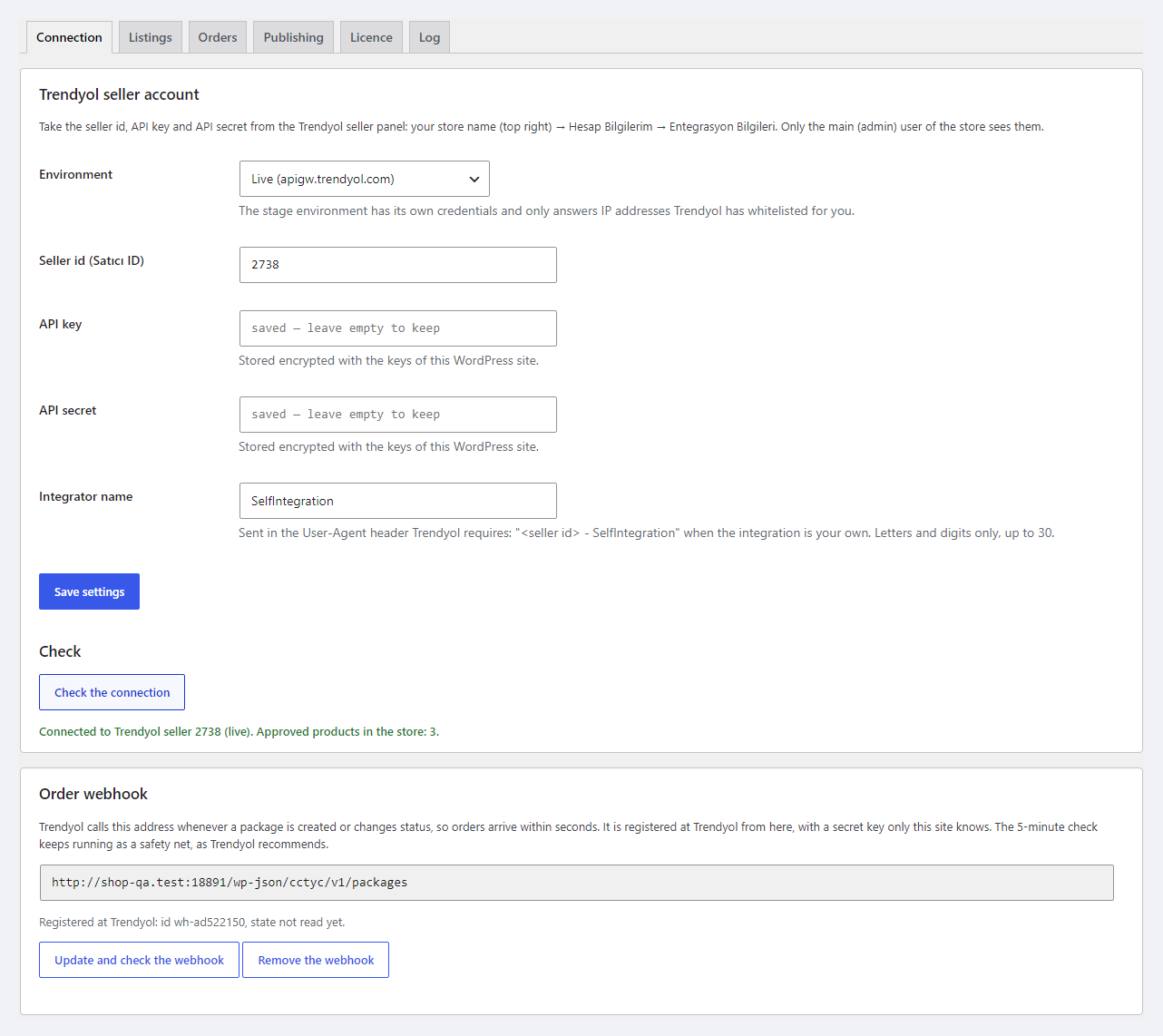
- Connection in three fields: Seller ID, API key and API secret from the seller panel, live or test environment. The User-Agent header «<Seller ID> – SelfIntegration» that Trendyol requires is set by the plugin itself.
- «Check the connection» shows how many approved products your Trendyol store has. A Trendyol error (wrong key, no access) is shown in plain words together with Trendyol’s own text.
- API keys are stored in the database encrypted (AES-256 with HMAC), never shown on the page and never written to the log.
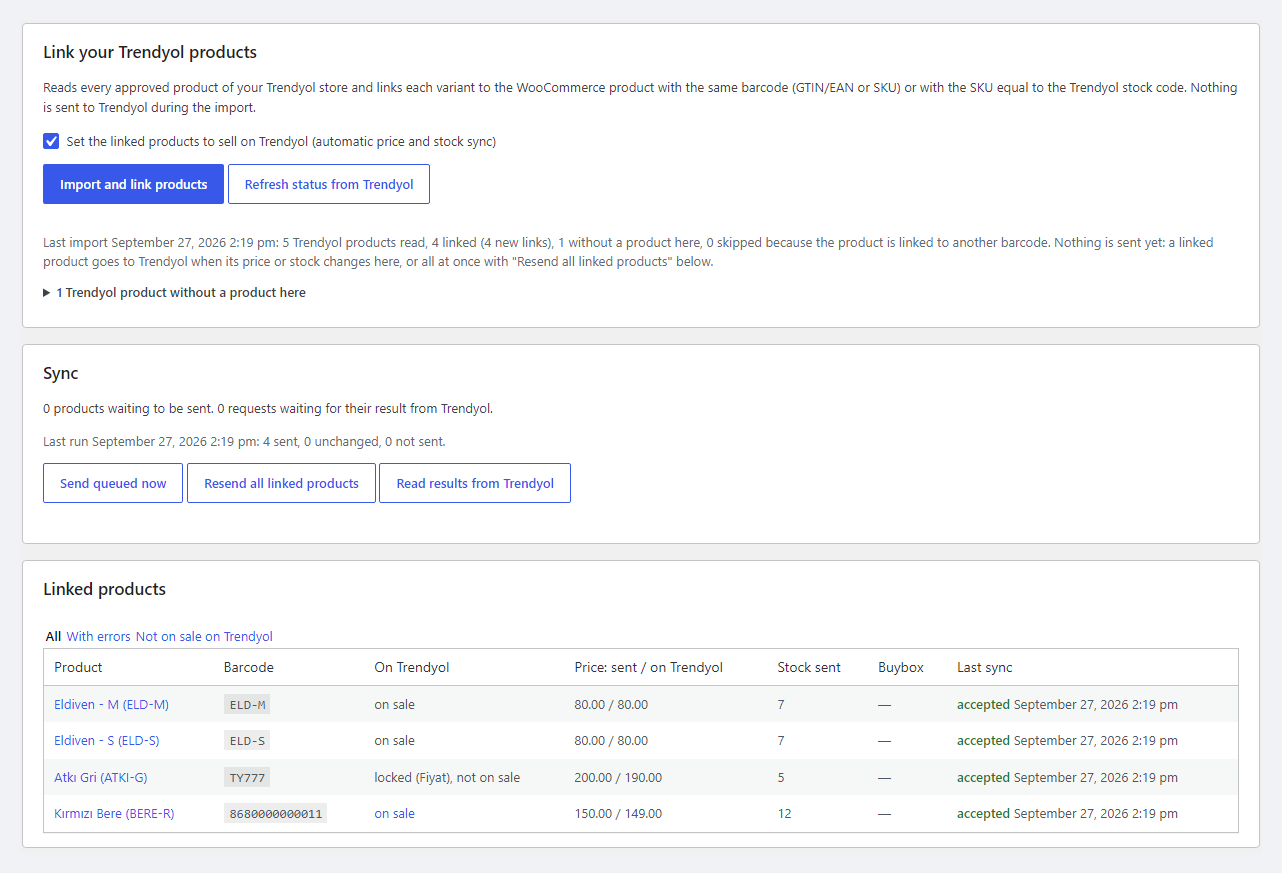
- Import and linking: the plugin reads all approved products of your Trendyol store and links each variant to a WooCommerce product or variation by barcode (the GTIN/EAN field or SKU) or by an SKU equal to the Trendyol stock code. Spaces in barcodes are removed the same way Trendyol does it. Trendyol products without a match in the shop are listed in a separate report. The import itself sends nothing to Trendyol.
- Sync: a sale in the shop or a price change — and a few minutes later the new price and stock go to Trendyol. Only what changed is sent; Trendyol does not allow repeating the same request for 15 minutes, and the plugin follows that rule itself.
- A result for every barcode: Trendyol processes updates as a batch, and the plugin reads the answer — «accepted» or Trendyol’s rejection text right in the product and the table. A network failure or an overloaded Trendyol leaves the product in the queue instead of losing it.
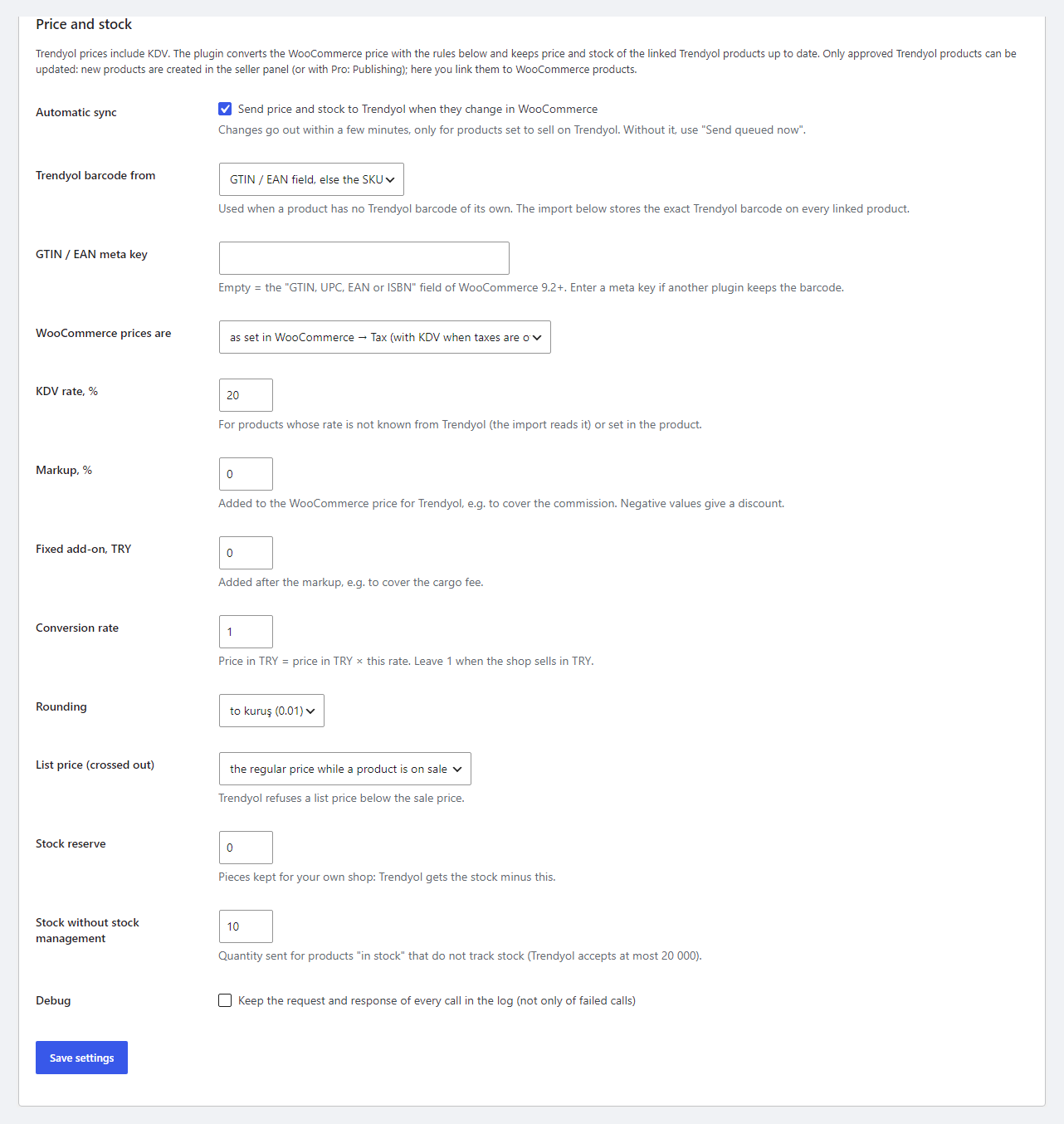
- Trendyol prices include KDV: if WooCommerce prices are without tax, the plugin adds the product’s KDV (from the Trendyol import or the default rate).
- Markup in % and a fixed add-on in TRY — for example, to cover the commission and shipping; a rate if the shop sells in another currency; rounding to the kuruş, ,90, ,99 or a whole lira.
- Crossed-out price: during a sale the regular WooCommerce price goes to Trendyol as listPrice — Trendyol does not accept it below the sale price.
- Stock: a reserve for your own shop, a quantity for products without stock management; an unpublished, switched-off or deleted product gets zero on Trendyol.
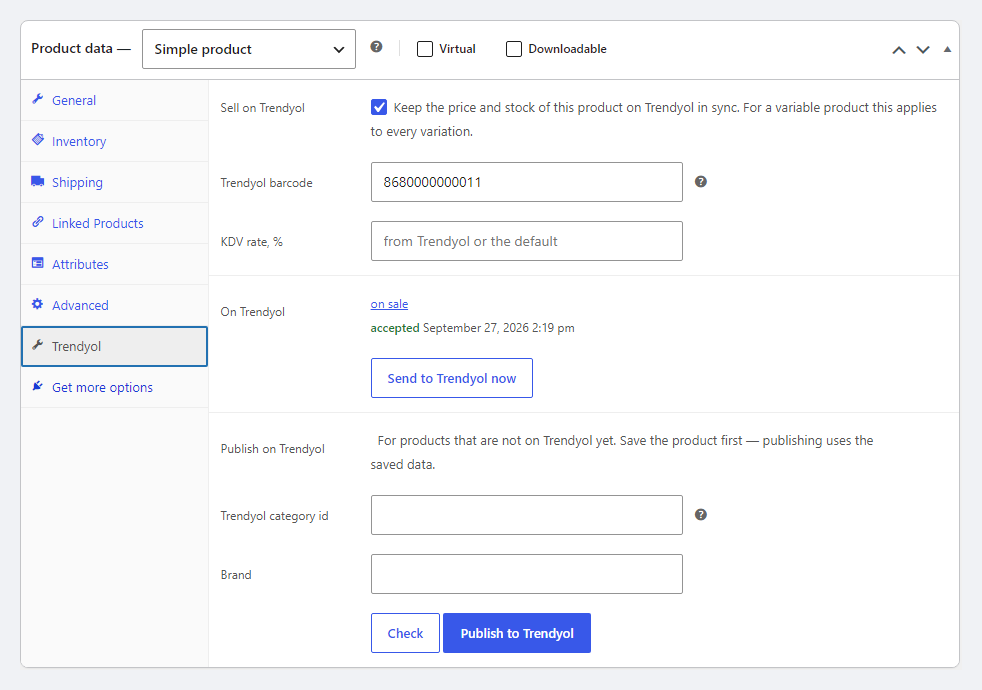
Every product and variation has a Trendyol tab: sell or not, Trendyol barcode, its own KDV rate, the state on Trendyol with the result of the last sync and a «Send to Trendyol now» button. The product list has bulk actions to sell / stop selling on Trendyol.
Pro: orders, invoices, labels, publishing
- Trendyol orders in WooCommerce — within seconds through a webhook the plugin registers at Trendyol with a button and a secret key, while a check every 5 minutes picks up anything missed, as Trendyol itself recommends. One Trendyol package — one WooCommerce order.
- Order data: the buyer, delivery and invoice address (province, district, mahalle), corporate data (name, VKN, tax office, e-Fatura), TCKN, products with line KDV, seller and Trendyol discounts — the total matches the Trendyol package total. The carrier is in the shipping name, the stock is reduced.
- No duplicates: a repeated webhook or an older copy of the package does not create a second order and does not reduce stock twice. WooCommerce e-mails to the buyer are off by default — Trendyol informs the buyer.
- Status from Trendyol: a cancelled package cancels the order and restores the stock; a split package closes the old order with a note, and the new packages arrive as new orders; «Delivered» can optionally set «Completed».
- Status back to Trendyol: the WooCommerce status you choose becomes «Picking» or «Invoiced» with the invoice number — or use the buttons in the Trendyol box of the order.
- Cancellation — with a warning: a cancellation in WooCommerce goes to Trendyol as «tedarik edememe» with a reason 500–506, and that lowers your store’s rating on Trendyol. So the order screen warns you about it and asks for confirmation before saving the Cancelled status; passing cancellations can be switched off.
- Invoice: an e-Arşiv or e-Fatura link goes to Trendyol with a button, and the plugin checks the invoice number against Trendyol’s format.
- Label: the Trendyol common label in ZPL for TEX and Aras Kargo shipments paid by Trendyol; for other carriers — an A6 slip with the tracking number barcode.
- Product publishing from the WooCommerce editor: Trendyol category (leaf categories only), category attributes — automatically by WooCommerce attribute name, by a map or as a fixed value, a brand from the Trendyol list, variations as variants of one listing, up to 8 images, desi from the dimensions, shipping and return addresses from your seller panel. Trendyol’s review result is shown in the product.
- Buybox monitor: every 6 hours your place, the Buybox price and whether other sellers offer the product — in the product table, and an e-mail when you lose first place.
The plugin interface is in English and Turkish: if the site or your profile language is Türkçe, all tabs, the order box and the warnings look like this.
How it works — step by step
- Connection. WooCommerce → Trendyol → Connection: Seller ID, API key, API secret, «Check the connection».
- Price rules. Listings tab: prices with or without KDV, markup, rate, rounding, stock reserve.
- Linking. «Import and link products» — Trendyol products are linked to your products by barcode; unlinked ones are shown in the report.
- First upload. «Resend all linked products» sends the current prices and stock, «Read results from Trendyol» shows the answer for every product. From then on every sale and every change goes to Trendyol by itself.
- Orders (Pro). Connection tab → Order webhook: one button registers the webhook at Trendyol; the Orders tab holds status, cancellation and e-mail settings.
- Publishing (Pro). Publishing tab: download the Trendyol categories, map them to your shop categories — and publish new products from the editor.
Under the hood
- Current Trendyol methods: approved products v2 with nextPageToken for large catalogues, the package stream and /v2/orders, which Trendyol makes mandatory from 15.10.2026, createProducts v2.
- Trendyol limits are handled by the plugin itself: batches of up to 200 products, no more than 20,000 pieces per line, a pause between stream pages, a retry after 429 and 5xx without losing the queue.
- The sync queue lives in product meta with a hash: an unchanged product is not sent again, and a batch Trendyol rejects as a whole is split item by item to find the bad product.
- Orders without duplicates: a database lock per package — a parallel webhook and poll give one order and one stock reduction.
- The webhook is protected with a key (x-api-key), a foreign request gets 401. If Trendyol switches the webhook off after a series of failed deliveries, the check every 5 minutes keeps picking up orders.
- A Pro gate without bricking: when the trial is over, only the Pro features stop, sync keeps working.
- Deleting the plugin removes the settings, Trendyol fields in products, the log and the cron jobs; Trendyol data in orders stays as history.
Installation
- Plugins → Add New → Upload Plugin: choose
trendyol-connector-for-woocommerce-1.0.0.zipand activate. - WooCommerce → Trendyol → Connection: Seller ID, API key and API secret, save and click «Check the connection».
- Listings: check the price rules, click «Import and link products», then «Resend all linked products».
- For Pro: paste the licence key from the e-mail after payment or start the 7-day trial in the Licence tab, then the webhook in Connection and the Orders and Publishing tabs.
Questions
about the module
Didn't find the answer? Message us on Telegram and we'll reply within a business day.
What do I need?
A Trendyol seller account (Trendyol Marketplace, Türkiye) and the API keys from the seller panel: store name → Hesap Bilgilerim → Entegrasyon Bilgileri — that is where the Seller ID, API key and API secret are. Only the main user of the store sees them.
Which Trendyol account was the plugin tested with?
Trendyol offers no public sandbox: the test environment opens only to a seller after their IP is whitelisted through Trendyol support. The plugin is built on the official documentation at developers.trendyol.com and tested end to end against a simulation of that API; it has not yet run on a live seller account. Check it on your store in the 7-day Pro trial — the log shows every Trendyol request and response, and if Trendyol answers differently from the documentation, we fix it promptly.
What happens when I cancel an order in WooCommerce?
With Pro, cancelling a Trendyol order in WooCommerce goes to Trendyol as «tedarik edememe» (could not supply), and that lowers your store's rating on Trendyol. So the order screen warns you about it and asks for confirmation before saving the Cancelled status, and passing cancellations to Trendyol can be switched off in the settings.
My site is on a domain with the word «trendyol». Will orders arrive?
Trendyol does not accept a webhook address that contains the word «trendyol», so the plugin tells you so plainly. Orders then arrive through the check every 5 minutes — a little slower, but nothing is missed. For all other sites the plugin's webhook address does not contain the word «trendyol».
Does the plugin create new products on Trendyol?
In Free — no: it links and updates the products Trendyol has already approved. With Pro a new product is published from the WooCommerce editor, and Trendyol reviews it before it goes on sale, like any new product.
What if I don't want to pay for Pro?
Product linking, price and stock sync, price rules and the log stay free with no time limit.
No reviews yet. Be the first.
No questions yet. Ask one — we answer within 24 hours.
Not quite what you are looking for?
We build custom modules for WordPress, WooCommerce, OpenCart and Shopify. Tell us about the task and we'll prepare an estimate.
Order a custom module

Buying the module
—