WordPress
Klaviyo Connector for WooCommerce — store events, profiles and subscriptions in Klaviyo
Free + Pro
990 UAH/year
v1.0.0
Enter at least 2 characters
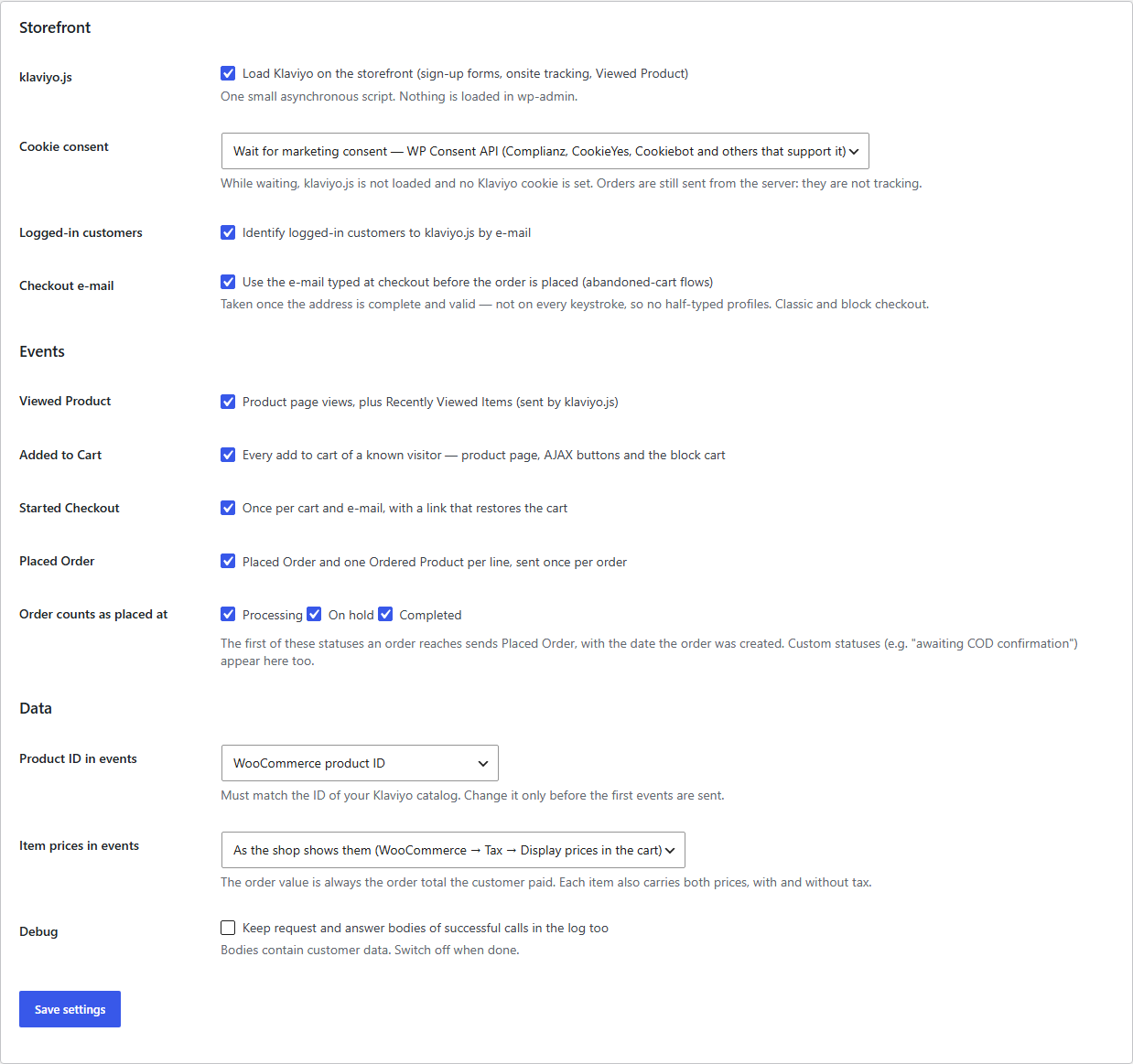
WooCommerce integration with Klaviyo through the official API: product views, cart, Started Checkout with a link that restores the cart, Placed Order and Ordered Product sent from the server without duplicates, newsletter sign-up with explicit consent in the classic and block checkout. Pro — Fulfilled, Canceled and Refunded Order, product catalog, order history, SMS consent.
The free version works with no time limit. Pro adds the rest of the features in the table.


Nothing changes for the shopper except one discreet checkbox. They browse, add to the cart and go to the checkout.

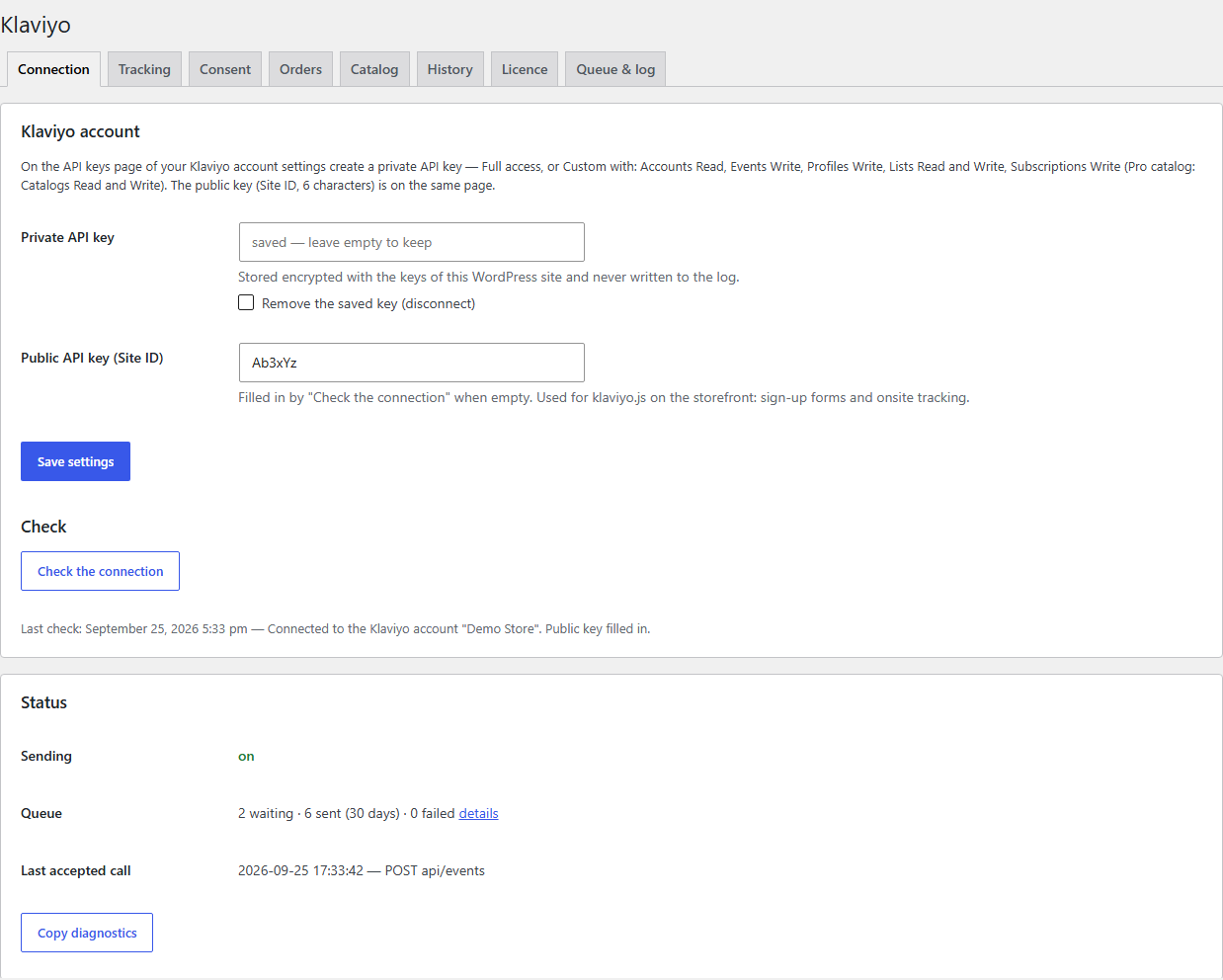
Settings live in WooCommerce → Klaviyo. On the “Connection” tab you paste the private key and press “Check the connection”: the plugin reads the account, fills in the public key and loads your lists.

Pro adds Fulfilled Order (at the status you choose, with tracking numbers), Canceled Order and Refunded Order — every refund, partial ones too.

A fresh install is the free version, nothing switches on by itself. The “Try Pro for 7 days” button → e-mail → the key right in the window and by e-mail.

Moving the store? Unbind the licence on the old domain and activate it on the new one yourself. If our server is unreachable, Pro keeps working for 14 more days. For studios — keys for 5 or 25 sites, or unlimited.
 WordPress 6.2+, WooCommerce 7.9+ (tested on 11.1), PHP 7.4–8.3.HPOS and the classic order storage, classic and block checkout.A Klaviyo account and a private API key with the scopes from the FAQ.Action Scheduler (ships with WooCommerce) runs the background queue.Tested together with our Multi-Currency, Polylang Multilingual Shop, Product Bundles and Gift and with the Complianz banner.
Viewed Product, Added to Cart, Started Checkout with cart restore, Placed Order and Ordered Product, profiles, newsletter checkbox in the classic and block checkout, queue with retries,…
4 modules in one order — 40% cheaper than separately



Klaviyo Connector for WooCommerce connects your store to Klaviyo through the official API. Klaviyo flows — abandoned cart, browse abandonment, thank-you, win-back — are only as good as the events they receive. This plugin sends them from WooCommerce itself, in the background, without duplicates and with one private key: the checkout never waits for Klaviyo. Running OpenCart? See Klaviyo Connector for OpenCart.
Before you install: if the official Klaviyo for WooCommerce plugin is active in your store, deactivate it. Two plugins send the same orders with different ids, and Klaviyo counts them twice.
How it was tested — honestly. Klaviyo offers no sandbox. The plugin is built on the official documentation (Klaviyo OpenAPI, revision 2026-07-15) and tested end to end in a test store against a simulation of the API written from that documentation: block and classic checkout, HPOS, PHP 7.4 and 8.3, multi-currency, Polylang, the Complianz consent banner. We also ran the format of our events through the live Klaviyo API’s own validation and compared its answers to a wrong key with what the plugin expects. The first real Klaviyo account it runs on is our client’s; you can try it on yours with the 7-day Pro trial. The log shows every request and Klaviyo’s answer, and if Klaviyo answers differently from its documentation, we fix it quickly.
Nothing changes for the shopper except one discreet checkbox. They browse, add to the cart and go to the checkout. As soon as they finish typing a valid e-mail, the store records Started Checkout — not on every keystroke, so no half-typed profiles appear in Klaviyo. If they leave, the abandoned-cart e-mail carries a link that brings back exactly their cart: products, variations, quantities and coupon, in any browser on any device.
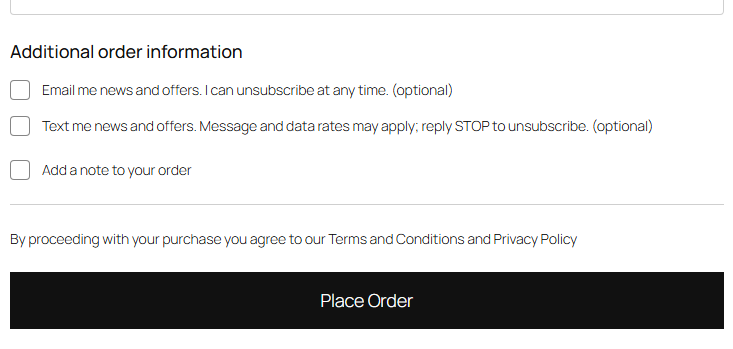
The “Email me news and offers” checkbox is never pre-ticked, and you write its text. Whoever ticks it joins the Klaviyo list you chose with marketing consent (on a double opt-in list Klaviyo first sends a confirmation e-mail). Whoever does not gets the usual order e-mails and nothing promotional.
Settings live in WooCommerce → Klaviyo. On the “Connection” tab you paste the private key and press “Check the connection”: the plugin reads the account, fills in the public key and loads your lists. The “Tracking” tab switches events on, sets which statuses count as placed and the cookie consent mode. “Consent” holds the list and wording of the checkbox and its place in the classic checkout.
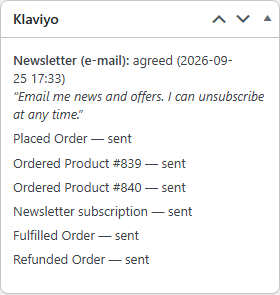
Every order has a Klaviyo box: what the customer answered and what this order has already sent to Klaviyo. From there you can also send Placed Order by hand for an order created before the plugin was installed.
The “Queue & log” tab shows the queue and every API call of the last 30 days: response code, time, Klaviyo’s error text. “Send now” and “Retry failed” buttons, and “Copy diagnostics” collects what our support needs — without the key.
Pro adds Fulfilled Order (at the status you choose, with tracking numbers), Canceled Order and Refunded Order — every refund, partial ones too. Metric names are Klaviyo’s own, and Canceled and the first refund carry the same unique_id as Placed Order, which is how Klaviyo subtracts them from customer lifetime value (CLV).
The product catalog sends products and variations with price, stock, images and categories — for product blocks in e-mails, recommendations and back-in-stock flows. A product or stock change reaches Klaviyo a minute later; nothing unchanged is sent again. Past orders of 3–60 months go with their original dates and start no flows: nobody gets a “thanks for your order” for last year’s purchase.
Didn't find the answer? Message us on Telegram and we'll reply within a business day.
 @catcode_support
Setup, compatibility, activation
@catcode_support
Setup, compatibility, activation
No. Both plugins send the same events with different ids, and Klaviyo would show duplicate orders and carts. Deactivate the official Klaviyo for WooCommerce plugin before connecting, and switch off the WooCommerce integration in Klaviyo's integrations if it is there.
Klaviyo offers no sandbox. The plugin is built on Klaviyo's official documentation (OpenAPI, revision 2026-07-15) and tested end to end in a test store against a simulation of the API written from that documentation. The live Klaviyo API accepts the format of our events (checked with its own validation) and answers key errors the way the plugin handles them. The first real account it runs on is our client's — try it on yours with the 7-day Pro trial: every request and Klaviyo's answer is in the log.
A private Klaviyo API key (starts with pk_): Full access, or Custom with Accounts Read, Events Write, Profiles Write, Lists Read and Write, Subscriptions Write; for the Pro catalog also Catalogs Read and Write.
Klaviyo processes events asynchronously, up to a few minutes. Also, Klaviyo silently drops addresses at example.com and test.com — test with a real mailbox.
No. Only a tick at checkout (or in My Account with Pro) subscribes. Everyone else gets a Klaviyo profile and order events without marketing consent — for transactional e-mails.
View, cart, checkout and order events, the cart restore link, the newsletter checkbox, the queue and the log stay free with no time limit.
No reviews yet. Be the first.
No questions yet. Ask one — we answer within 24 hours.
We build custom modules for WordPress, WooCommerce, OpenCart and Shopify. Tell us about the task and we'll prepare an estimate.
Order a custom module
—

CatCode assistant
Just now


CatCode assistant
Online

I’ll help with your website task
Describe your website task — I’ll find a ready-made module or pass it to a developer for an estimate. Modules, custom features, layout, integrations, speed, migration, technical SEO.
